Spending forty minutes refining prompts in Midjourney produces a visually striking dashboard render that becomes useless the moment it hits a production canvas. Flat PNG pixels can't be edited, inspected, or converted into Figma components, forcing teams to manually re-draw AI renders from scratch. Recommending generic AI image generators for UI design is a common failure in modern product methodology - generating flat bitmaps instead of structured, vector-based interface flows introduces technical debt before a single line of frontend code is written.
You already understand atomic design structures, design tokens, auto-layout constraints, and standard prompting frameworks. This isn't a primer on what a text prompt is. It's the technical split between two categories most listicles conflate - asset generators and UI flow generators and exactly which tool belongs in which slot of a real production pipeline.
The Core Distinction, Visually
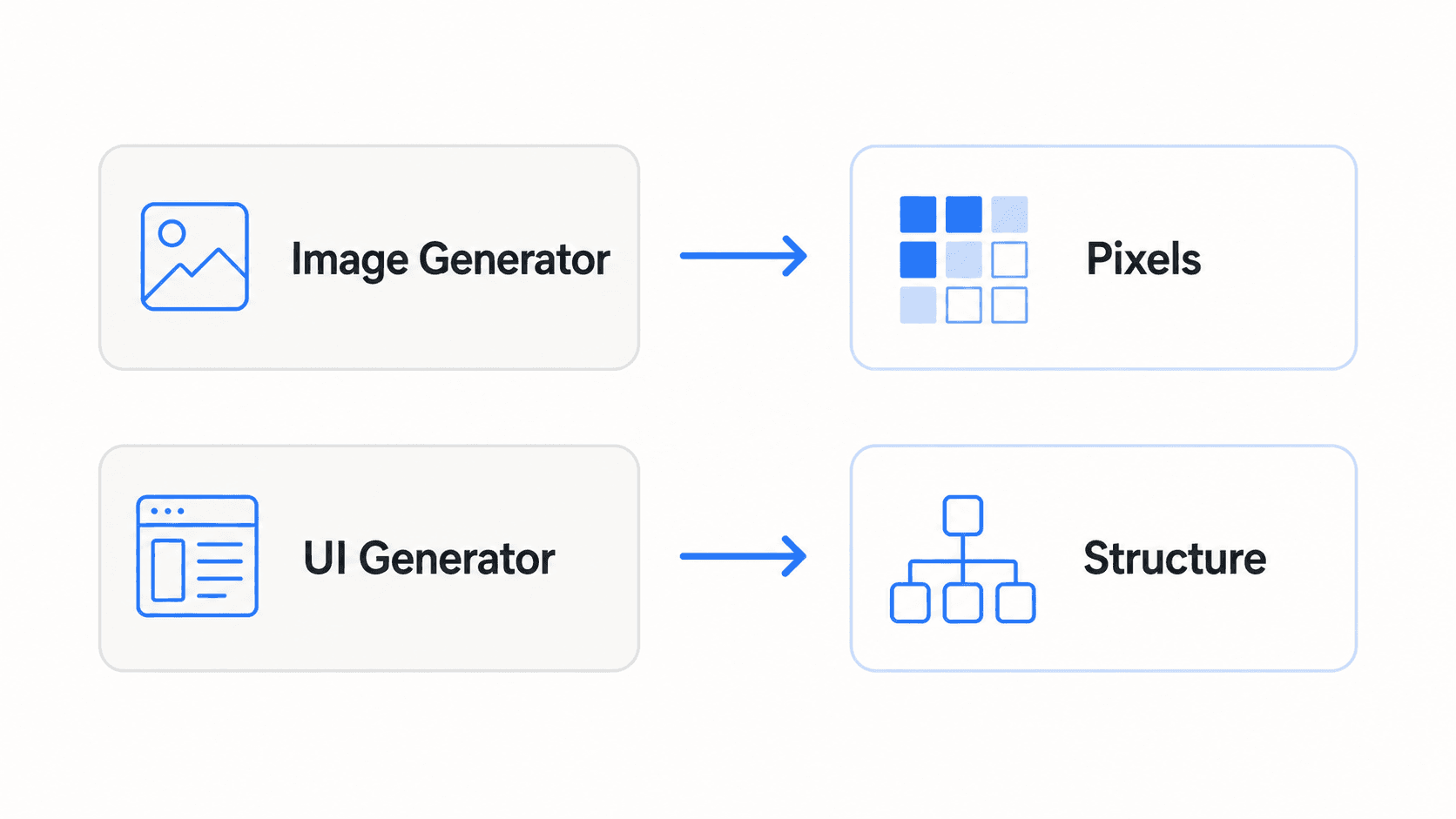
Everything in this guide traces back to that one line. A pixel is a color value at a coordinate - it doesn't know it's a button, doesn't have padding, can't be resized without degrading. Structure is a real component: a button node with a fill token, a padding value, editable text, a defined state. Evaluating a tool for UI work means asking which side of that line its output actually lands on, not how good it looks in a demo.
The Truth About AI Image Generators in UI Workflows
Explicit Query vs. Implicit Need
Searching "AI image generator for UI mockups" reveals a real gap between what people type and what they actually need. The explicit query is about image generation; the implicit goal is production-ready interface flows, editable Figma components, scalable vectors, and code an engineer can actually inspect. Non-technical founders search for "image generators" specifically because they often lack the vocabulary to distinguish raster art tools from vector-native interface platforms and most top-ranking content doesn't help them make that distinction either.
Two Categories Most Listicles Conflate
Everything in this space splits cleanly into two operational categories that require completely different evaluation criteria:
- Generative asset tools - evaluated for visual assets: hero illustrations, spot graphics, custom icons, background photography.
- Dedicated UI flow generators - evaluated for structured interface design: auto-layout components, multi-screen user journeys, Figma layer export.
Most competitor content - aggregators and general design blogs alike - groups artistic image models alongside interface tools without evaluating whether the output can actually be edited in Figma, converted into auto-layout containers, or handed off to developers. That's the gap this guide is built to close.
Why Midjourney and Flat PNG Renders Fail at Interface Design
The Raster PNG Trap
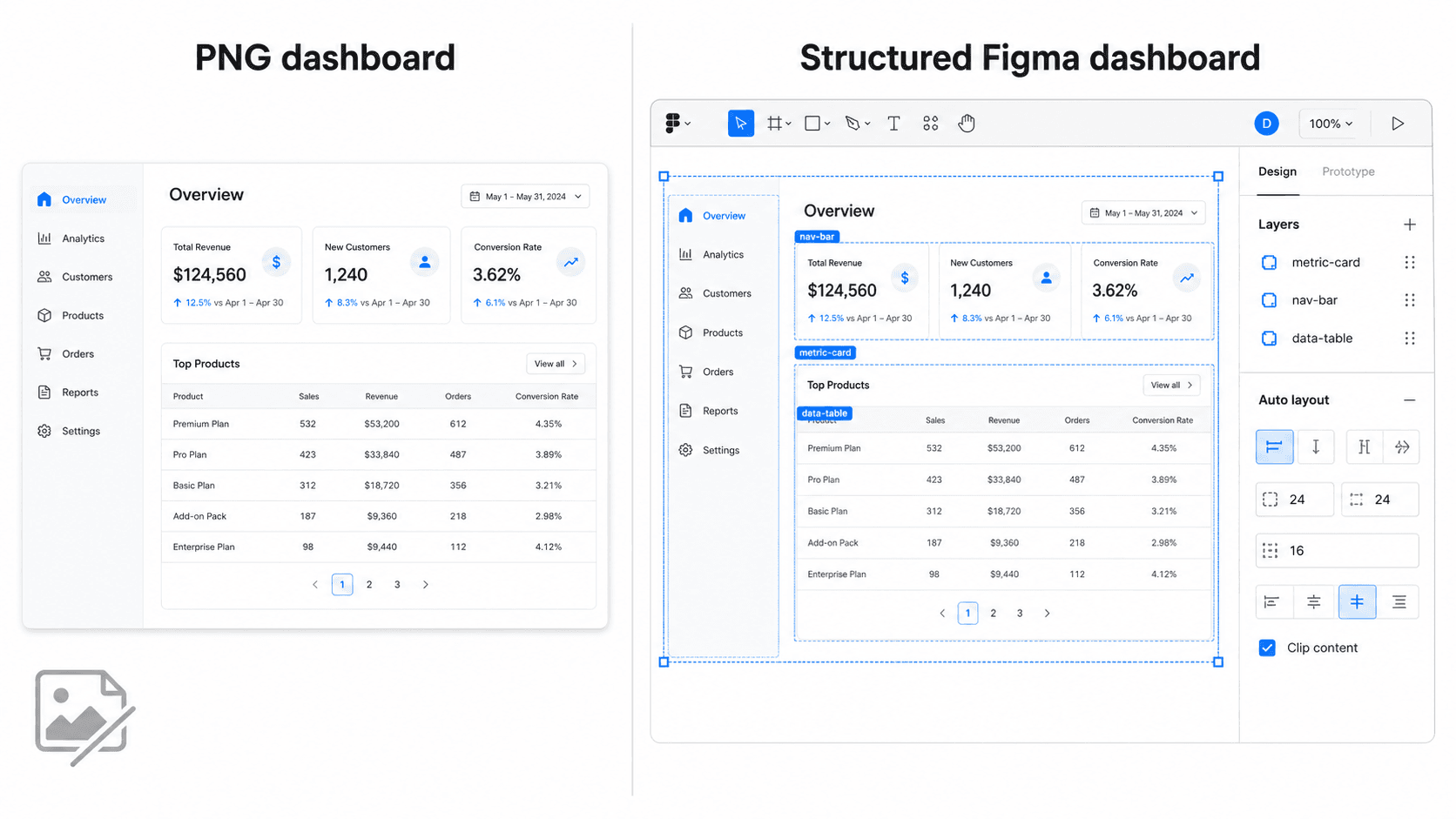
Generative models like Midjourney or Google's Gemini image tools produce visual concepts rendered as flat PNG files. Design teams can't select individual buttons, adjust spatial padding, extract CSS color tokens, or reframe responsive cards - every one of those requires manual re-creation from scratch inside Figma, which defeats the entire point of generating something fast.
Typography Hallucination and Multi-Screen Drift
Standard image generators render text as baked-in raster pixels rather than live, editable typography nodes. Even engines optimized for legible text rendering still output flattened text strings that can't be updated or translated within a design file.
Attempting to generate a sequential user flow - an onboarding sequence, a checkout journey - across multiple separate image generations compounds the problem. Raster models generally lack state persistence and design system awareness, so button styles, navigation patterns, stroke weights, and typography hierarchies tend to shift unpredictably from screen to screen, because nothing is holding them consistent between generations.
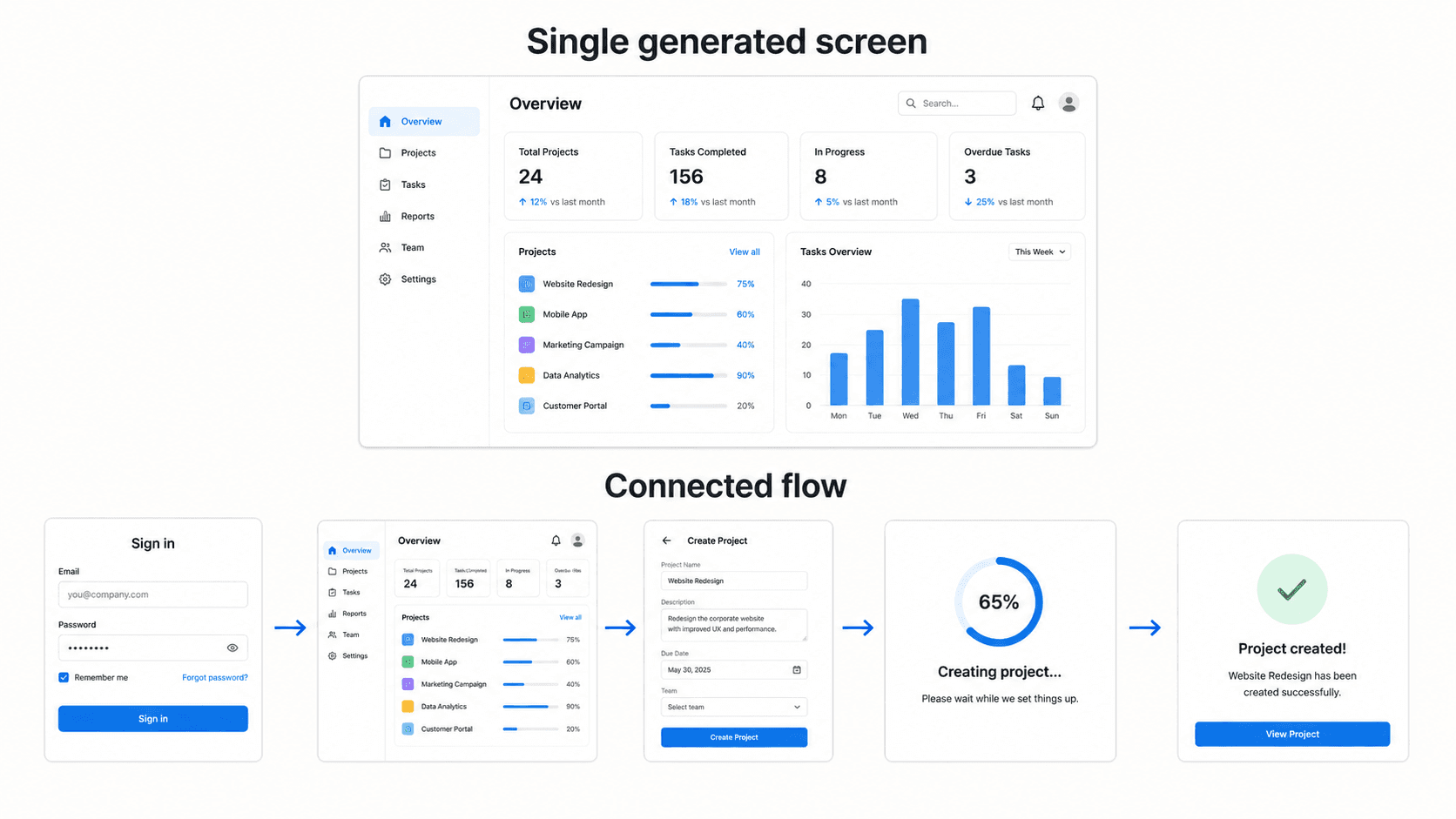
Vector Artifacts and the Developer Handoff Impasse
Generating icons or brand marks with generic raster tools tends to produce assets that pixelate on high-DPI displays. Running that raster output through a vectorizer often creates bloated geometry with many dirty nodes - files that are technically vectors but practically unusable in a real software application.
More broadly, engineers generally can't build functional software directly from static bitmap images - there's no inspectable CSS, no DOM structure, no flexbox arrangements, no structural tokens to work from. Worth being precise here rather than absolute: some image generators do offer limited SVG or vector-adjacent export in specific modes, so the real distinction isn't "raster tools can never produce anything vector" - it's that raster output, by default, doesn't provide native editable UI structure the way a purpose-built UI generator does.
Tool Comparison
| Tool | Best For | Output Format | Editable in Figma? | Multi-Screen Support | Best Workflow Stage |
|---|---|---|---|---|---|
| Midjourney | Art direction, moodboarding | Raster (PNG) | No, requires manual rebuild | No | Early visual direction only |
| Adobe Firefly | Commercial-safe stock imagery | Raster (PNG); limited vector in some modes | No, requires manual rebuild | No | Marketing asset creation |
| Ideogram / Gemini Nano Banana Pro | Typography exploration, legible text-in-image | Raster (PNG) | No | No | Early copy/visual exploration |
| Recraft AI | Native SVG icons and illustrations | Native SVG | Yes, as vector assets | N/A (asset-level, not screen-level) | Asset creation |
| v0 by Vercel | Code-first component generation | React code | No (code, not Figma-native) | Limited | Developer prototyping |
| Figma AI / Google Stitch | In-canvas component iteration | Figma-native | Yes | Limited | Iterating on existing components |
| UXMagic | Full multi-screen UI flows | Figma-native, auto-layout | Yes | Yes, native | UI flow generation |
Which Tool Should I Use?
- Need photos → Adobe Firefly, for commercially safe stock-style imagery
- Need SVG assets → Recraft AI, for native vector icons and illustrations
- Need UI flows → UXMagic, for structured, multi-screen Figma output
- Need code → v0, for a fast, code-first single component
- Need existing Figma exploration → Figma AI or Google Stitch, for iterating in-canvas on something that already exists
Evaluating the Best AI Asset Generators for Designers
This category exists for genuinely visual work - moodboards, hero imagery, custom icon sets - not interface structure. Evaluating each tool honestly means looking past photorealism and prompting flexibility to the actual file format that comes out the other end.
Recraft AI: Native SVG Vector Generation for Custom Icons and Graphics
Generating raster PNG icons and then manually tracing them into vectors is an outdated, unnecessary step for most icon work. Recraft's own product documentation confirms native SVG output as a core capability - clean, scalable vectors directly from a text prompt, with consistent stroke weights and custom color schemes, genuinely usable in a real icon system without a manual cleanup pass.
Adobe Firefly: Commercial-Safe Marketing Imagery and Photo Assets
Firefly's real strength is commercially safe stock-style imagery - hero photography, background media, marketing visuals where licensing clarity matters as much as visual quality, backed by Adobe's IP indemnification. It's the right tool for a media container, not a UI layout.
Ideogram and Gemini Nano Banana Pro: Visual Microcopy and Typography Exploration
These models have genuinely improved text legibility within generated images, which is worth acknowledging directly - independent benchmarks put leading models in this category well above older generators on text rendering accuracy. That improvement doesn't translate to UI usability, though - legible text baked into a JPEG still isn't live, editable, or tied to a scalable design token. It's useful for early visual exploration of a typographic mood, not for anything that ends up in a shipped interface.
Dedicated AI UI Generators for Editable Interface Flows
This is the category most competitor content skips entirely, or evaluates using the wrong criteria borrowed from image-generation reviews.
UXMagic: Converting Prompts, Sketches, and Screenshots into Editable Figma UI
UXMagic converts text prompts, rough wireframe sketches, or competitive screenshots directly into structured, auto-layout-ready Figma UI frames with editable layers - a direct fix for the raster PNG trap covered above. UXMagic's Flow Mode generates complete, multi-screen user journeys that maintain consistent component hierarchies, spacing rules, and brand aesthetics across every screen, addressing the multi-screen drift problem raster tools structurally aren't built to solve.
Google Stitch and Figma AI: Canvas-Native Exploration and Component Iteration
These native and near-native Figma tools are genuinely useful for quick, in-canvas exploration and component-level iteration on something that already exists. They tend to be weaker at generating a full, connected multi-screen flow from a blank starting point - a different job than iterating on an existing component.
v0 by Vercel: Code-First Frontend Interface Generation
v0 sits closer to a code generator than a design tool, producing real React components with a live preview. Strong for a developer who wants one component fast; not built around the auto-layout Figma handoff a design-first workflow depends on.
Building an End-to-End AI Design Pipeline
Phase 1 - Graphic asset generation. Generate spot illustrations, custom icon sets, or marketing hero imagery using specialized asset models - Recraft AI for native SVG vectors, Firefly for commercially safe stock imagery.
Phase 2 - Interface flow generation. Input text requirements, sketch drawings, or existing screenshots into UXMagic and run Flow Mode to output linked, multi-screen user journeys directly onto the Figma canvas.
Phase 3 - Assembly, refinement, and handoff. Place generated SVG assets into UXMagic's auto-layout Figma containers, adjust spacing tokens, refine live typography, and verify component constraints before delivering a structured file to engineering with inspectable layout properties.
Here's what this two-tool pipeline looks like on three real projects. A product manager needs to present a redesigned analytics dashboard to executive stakeholders within two hours. The legacy image approach outputs a glossy PNG with inaccurate chart data, invalid sidebar icons, and an accent color that violates brand guidelines - fixing any of it means re-drawing components in Figma from scratch, and the deadline slips. Submitting the same prompt with a screenshot of the legacy dashboard into UXMagic instead generates an editable layout with auto-layout metric cards and structured data tables, letting the manager update live text values and apply exact brand hex codes on a canvas that was already usable.
A UX designer building a four-step mobile onboarding flow for a fintech app hits the multi-screen drift problem directly: Midjourney's four separate images use dark mode with 8px corners on screen one, light mode with 16px pill buttons on screen two, and a completely different font hierarchy by screen three - a set that's structurally unusable together. UXMagic's Flow Mode generates all four steps simultaneously instead, holding uniform button components, shared typography tokens, and matching color palettes across the entire sequence.
A design system lead needing twenty cohesive vector icons for a navigation menu hits a related but distinct problem: standard raster generators output PNGs with white background boxes, and auto-tracing them tends to produce irregular paths that pixelate on resize. Generating the same icon set natively in Recraft AI and embedding those clean SVGs into UXMagic's auto-layout component sets avoids the vectorization step entirely.
What AI UI Generation Still Needs Human Review
Even a structured, auto-layout-native UI generator doesn't remove the need for human judgment on several fronts:
- Accessibility - generated color contrast, focus states, and ARIA structure still need a real accessibility pass, not just visual inspection.
- Interaction logic - a generated flow shows structure, but edge cases, error handling, and conditional logic generally need a human product decision behind them.
- Content accuracy - placeholder copy and sample data need real review before anything ships; a generator won't know your actual pricing tiers or legal disclaimers.
- Production constraints - real API response times, actual data volume, and existing technical debt in a codebase are contexts a generation tool doesn't have visibility into.
None of this undercuts the core argument of this guide - structured output is still categorically more useful than flat pixels but "generates a usable starting point" and "ships without human review" are different claims, and worth keeping distinct.
Generate Editable UI Flows
Turn prompts, sketches, or reference screenshots into editable, multi-screen Figma flows with structured UI instead of flat pixels.