Output Comparison: Side-by-Side Design Quality
Design a landing page for a new AI-powered note-taking app. Include a hero section with headline, call-to-action, a feature grid with 4 cards, and a simple footer. Use a clean, minimal style.
UXMagic

Clear CTA hierarchy effectively guides user action with distinct primary and secondary buttons.
Excellent use of white space creates a clean, uncluttered, and highly readable layout.
Feature cards are visually weak, with generic icons and faint outlines that lack impact.
The overly minimal design lacks a distinct or memorable brand personality.
Banani
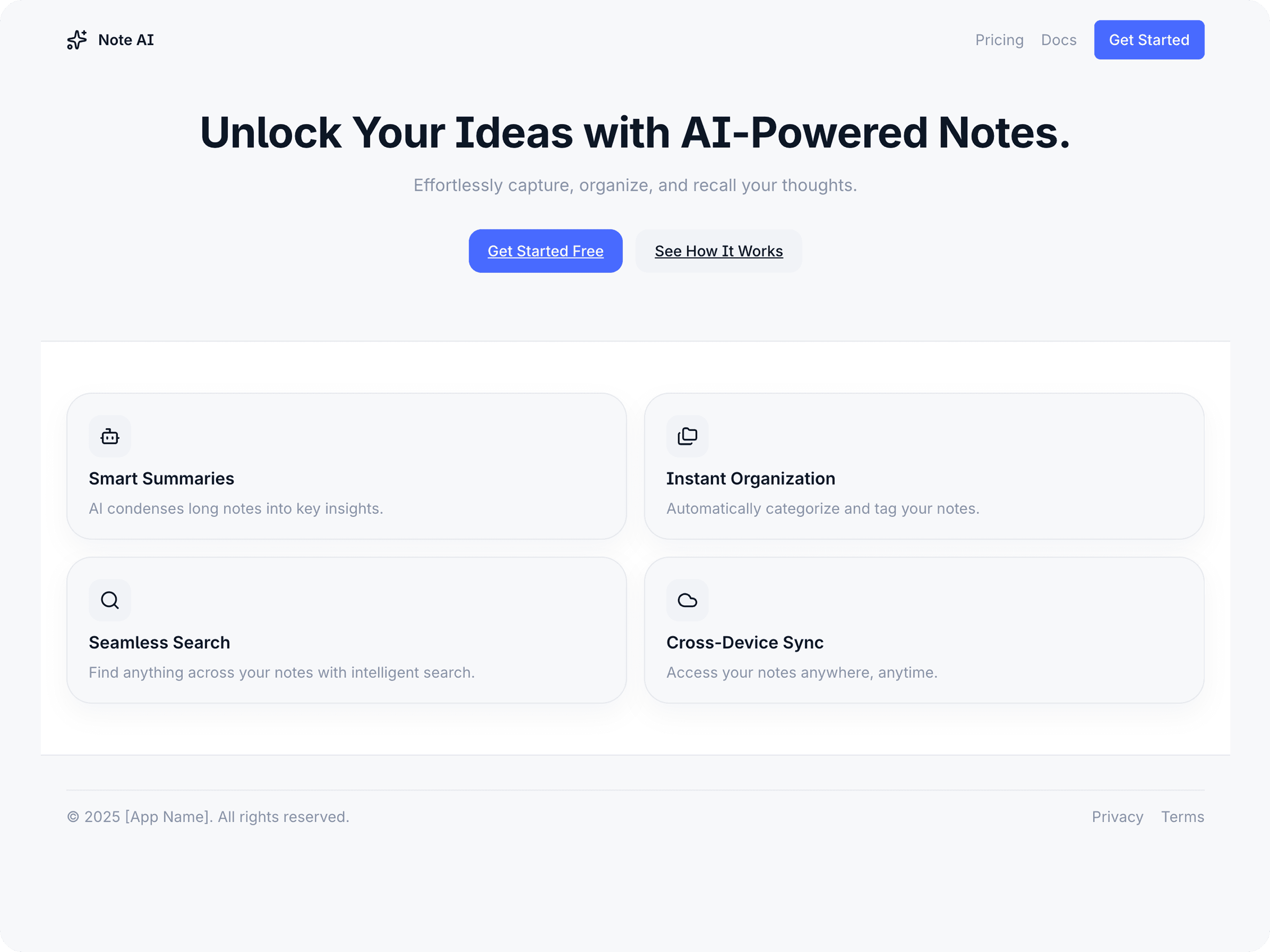
The copy is benefit-driven, clearly communicating the product's value to the user.
Colorful, distinct icons make the features more engaging and easier to differentiate.
The comprehensive navigation and footer feel slightly cluttered for a minimal aesthetic.
Inconsistent iconography between the feature grid and footer weakens design cohesion.
Create a dashboard UI for a SaaS project management tool. Include a sidebar with navigation, a top bar with search and notifications, a kanban board with draggable tasks, and a user settings modal. Apply a professional style guide with consistent colors, typography, and spacing.
UXMagic
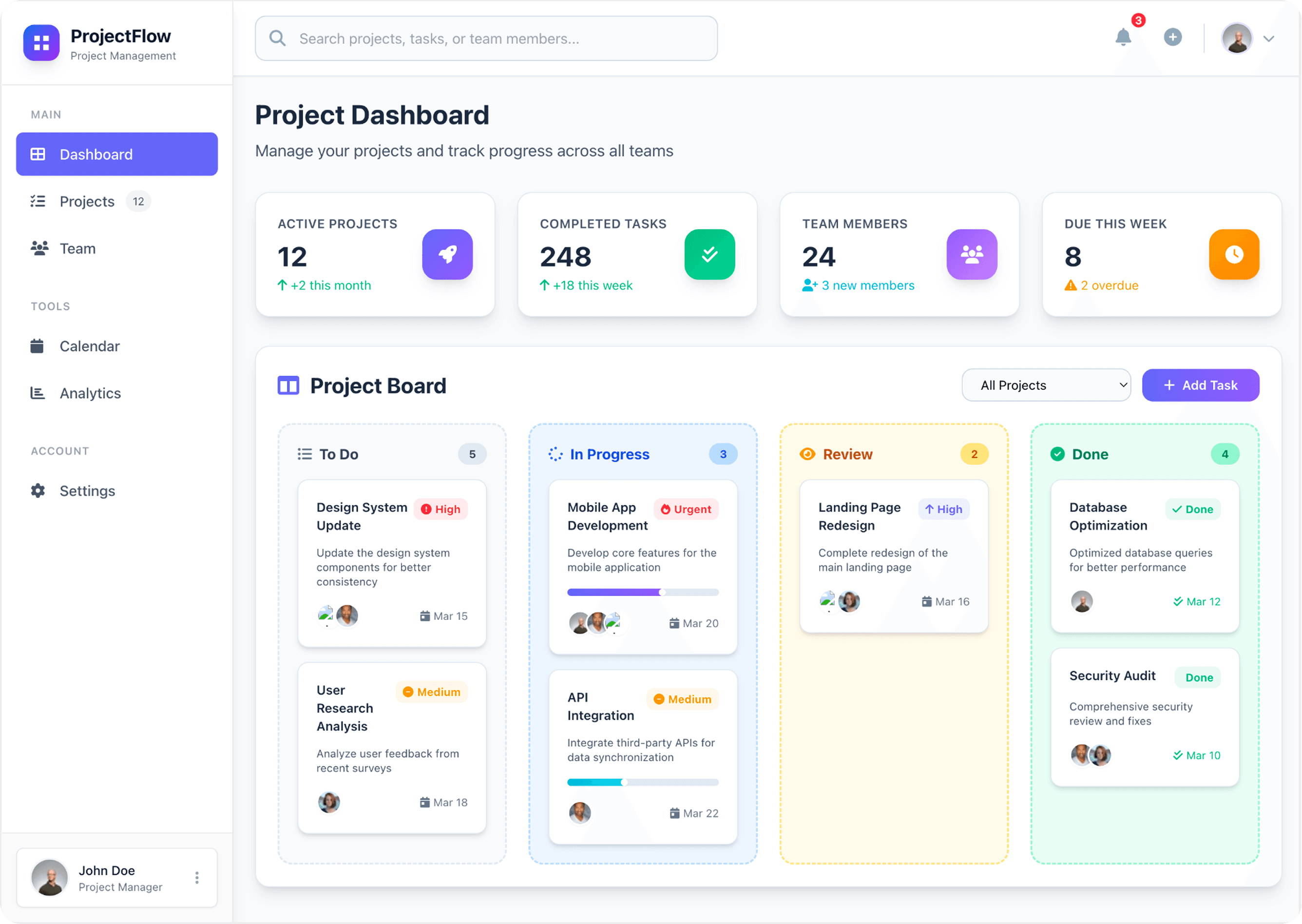
The top summary cards provide an excellent, scannable overview of key project metrics.
Colored borders on Kanban columns create strong visual grouping for different workflow stages.
Some text and UI elements have low color contrast, creating potential accessibility issues.
Banani
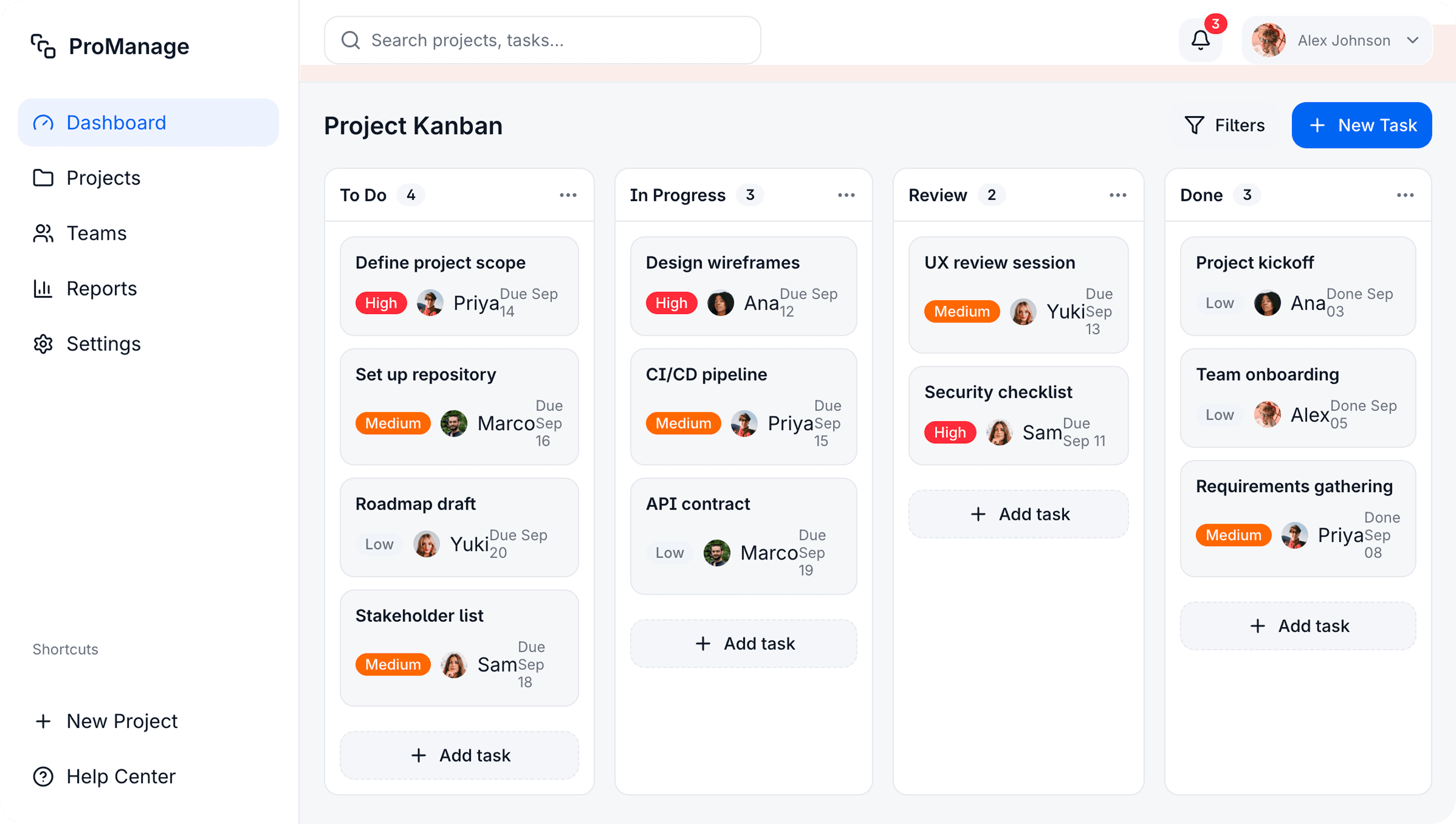
Kanban cards efficiently display key information (priority, assignee, due date) for quick scanning.
The clean and consistent UI follows intuitive layout patterns, making it easy to navigate.
Some text and UI elements have low color contrast, creating potential accessibility issues.
Redundant "Add task" buttons in each column add unnecessary visual clutter to the interface.

UXMagic
UXMagic is your AI-powered design copilot, built for creators who need to ship fast. It helps you go from prompt to responsive UI, clone entire websites, or generate screens from images, sketches, or URLs. With support for Figma, React, HTML, Webflow, and more, it’s ideal for teams that design in one tool and build in another. Whether you're ideating or deploying, UXMagic accelerates your entire pipeline. Explore its features or pricing to learn more.

Banani
Banani.ai was founded in 2024 in Berlin. Its mission is to make UI design accessible to non-designers, product managers, and early founders. Users simply type a description, and Banani instantly generates an interactive, multi-screen prototype. With over 14,000 monthly active users and nearly 350, 000 designs created, Banani AI has quickly become a go-to tool for rapid idea visualization.
Feature Comparison
| Feature | UXMagic | Banani |
|---|---|---|
| Prompt to UI | Multi-screen UIs from natural language, production-ready. | Interactive prototypes from text prompts for quick ideation. |
| Image to UI | Turns screenshots into editable Figma + code. | Not available. |
| Sketch to UI | Converts hand-drawn sketches into UI. | Not available |
| Clone Website (URL) | Imports live sites into editable designs + code. | Style inspiration only, no full cloning. |
| Figma Import | Imports Figma files with full edit + AI enhancements. | Supports import/export via plugin. |
| Style Guide Application | Applies full brand system across screens. | Quick style presets (colors, fonts). |
| Sectional Editing | Edit specific sections with AI. | Not supported |
| Real-Time Preview | Live interactive, responsive preview. | Interactive prototype preview. |
| Code Export | Production-ready HTML & React. | Limited code export (Pro only). |
| Sharing | Public/private links with permissions. | Public links; private on paid plans. |
Who Should Use UXMagic
Pricing Comparison

Free – $0/month
5 project, 120 free credits (one-time), upto 20 screens, 1 Figma export
Premium – $18/month
20 projects, 480 credits (monthly), upto 80 screens, 80 Figma exports, React/HTML exports
Ultimate – $35/month
Unlimited projects, 1500 credits (monthly), upto 250 screens, 250 Figma exports, unlimited React/HTML exports

Free Trial – $0
3 days free
Pro – $20/month
Unlimited AI generations, Unlimited AI edits, Figma export, Fastest speed
Final Verdict
Banani AI is the perfect democratizer—fast, simple, and built for ideation. It shines for founders, PMs, and students who need to turn ideas into clickable prototypes without design skills.
If you’re validating early ideas, Banani is great.
If you’re building real products, UXMagic is unmatched.
UXMagic, on the other hand, is the professional accelerator. It’s built for designers and developers shipping real products, with features like responsive Figma exports, production-ready code, and advanced editing tools.
¿tienes preguntas?tenemos respuestas.
UXMagic is better suited for professionals because it generates production-ready designs and code, while Banani focuses on rapid ideation.
Not really. Banani helps with brainstorming and prototyping, while UXMagic integrates into real design-to-development workflows. Many teams may use both at different stages.
Yes. Banani is built specifically for PMs, students, and early founders without design backgrounds. UXMagic is better for professional teams.
UXMagic can generate HTML & React code for developer handoff. Banani has limited code export, available only on higher plans.
Descubre nuestras funciones



Related comparisons
Weighing up more than one tool? Here is how UXMagic compares against the closest alternatives.