
Prompting a full-stack application into existence feels instantaneous until the fifth revision cycle, when visual styles drift, layout structures break, and the AI begins overwriting its own component logic. Most prompt-to-code builders rush straight to repository generation while skipping visual architecture almost entirely, leaving teams with working backends wrapped in UI debt that's genuinely hard to maintain.
You already understand React components, TypeScript, Tailwind CSS, Supabase backends, and Figma auto-layout structures. This isn't a primer on what an API is. It's a direct evaluation of whether Bolt.new, Lovable, and Base44 can handle full-stack execution on their own, or whether skipping visual design architecture is what actually creates the unmaintainable interfaces and broken flows teams keep running into.
Quick Comparison
| Tool | Pricing (verify at time of reading) | Backend Support | Code Export | Figma Support | Visual Editing |
|---|---|---|---|---|---|
| Bolt.new | Free tier + paid from ~$20/mo, token-based | External backend required | Yes | No | Conversational only |
| Lovable | Free tier + paid from ~$25/mo, credit-based | Native Supabase integration | Yes (GitHub sync) | No | Conversational + limited visual edits |
| Base44 | Free tier + paid from ~$16–20/mo | Fully managed, all-in-one | Limited | No | Conversational only |
| UXMagic | Free tier + paid plans | N/A — visual/flow layer, not backend | Yes (DOM-aware) | Yes, native | Full visual canvas |
The Vibe Coding Landscape: Code Builders vs. Visual Flow Generators
Prompt-to-App Engines: Bolt.new, Lovable, and Base44 Explained
Bolt.new provides an in-browser Node.js execution environment for scaffolding project code fast, but it generally expects an external backend rather than managing one natively. Lovable integrates React frontends with Supabase backends and exportable GitHub repositories, positioning itself as a more complete full-stack option. Base44 offers all-in-one managed backend and database infrastructure aimed specifically at rapid, non-technical prototyping. All three are genuinely fast at what they're built for; none of them were designed as visual design systems, and that distinction matters more than the marketing around them suggests.
The Missing Link: Why Code-First AI Tools Are Prone to Visual Drift
Text-to-code generators can produce visually inconsistent output when executed without prior flow architecture. Prompt-to-app tools like Bolt.new and Base44 attempt to solve visual design and backend logic simultaneously. Because large language models generate code statistically rather than maintaining a persistent visual model, they're prone to losing track of design-token context - spacing, typography, component styling across a long sequence of prompts. This is a widely reported pattern across user feedback and independent tool reviews rather than a guaranteed outcome every single time; a tightly scoped, short session is less likely to drift than a fifty-prompt marathon session. This breakdown of the real workflow behind vibe coding covers the same drift problem in more depth, including the specific failure patterns - design system destruction, disjointed screen architecture, and backend security gaps like unconfigured Row Level Security that show up once a prototype gets treated as production code without a review pass.
In-Depth Tool Comparison: Features, Architecture, and Code Ownership
Bolt.new: Fast In-Browser Scaffolding with External Backend Requirements
Bolt.new's strength is speed of initial scaffolding inside the browser, genuinely useful for standing up a functional shell fast, and it offers real flexibility in backend choice since it doesn't lock you into one provider. The trade-off: it generally requires connecting an external backend rather than managing that infrastructure natively, and its visual editing is conversational, not a dedicated layout interface.
Lovable: Full-Stack React and Supabase Integration
Lovable's React-plus-Supabase architecture makes it a reasonable choice for teams wanting a more complete full-stack starting point with a real exportable repository and bi-directional GitHub sync. It shares the same core limitation as Bolt.new, though visual refinement happens largely through re-prompting, even where limited visual edit features exist, rather than a precise visual editing suite built for pixel-level control.
Base44: Managed Backend Infrastructure for Non-Technical Builders
Base44's managed backend and database infrastructure genuinely lowers the technical bar for a non-technical founder standing up a first prototype, and its all-in-one approach means fewer moving pieces to configure. The visual layer is the same story as the other two: adjusting a single layout detail means re-prompting the screen and risking regressions in logic that was already working.
UXMagic: Token-Enforced Visual Architecture and Multi-Screen Flow Mode
UXMagic occupies a genuinely different position in this landscape - it's not attempting to compete on backend scaffolding speed. It generates connected, multi-screen user journeys with design tokens enforced across every screen, then exports both structured Figma auto-layout files and DOM-aware code - positioning it as the visual architecture layer that feeds a coding agent a clean target, rather than a fourth full-stack competitor in the same lane as Bolt, Lovable, and Base44.
Which Tool Should You Choose?
- Need a fast prototype and don't mind wiring your own backend → Bolt.new
- Building a full-stack SaaS product with real database needs → Lovable
- Non-technical builder wanting the fewest moving pieces → Base44
- Need connected, consistent multi-screen visual architecture before code → UXMagic
None of these are mutually exclusive - the strongest real-world stacks in this guide pair UXMagic for the visual layer with one of the other three for backend execution, not one tool doing every job.
Visual Control: A Direct Comparison
| Level of Control | Bolt / Lovable / Base44 | UXMagic |
|---|---|---|
| Conversational editing | Primary method for all visual changes | Available, but not the only method |
| Visual canvas editing | Limited or absent | Full visual canvas |
| Component-level editing | Indirect, via re-prompting | Direct |
| Multi-screen consistency | Not enforced by default | Enforced across the full flow |
This table is really the whole argument of this guide in one place: the code-first tools are built for conversational iteration, and that's a genuine strength for backend logic. It's a genuine weakness for pixel-level visual consistency across more than one or two screens.
The Workflow
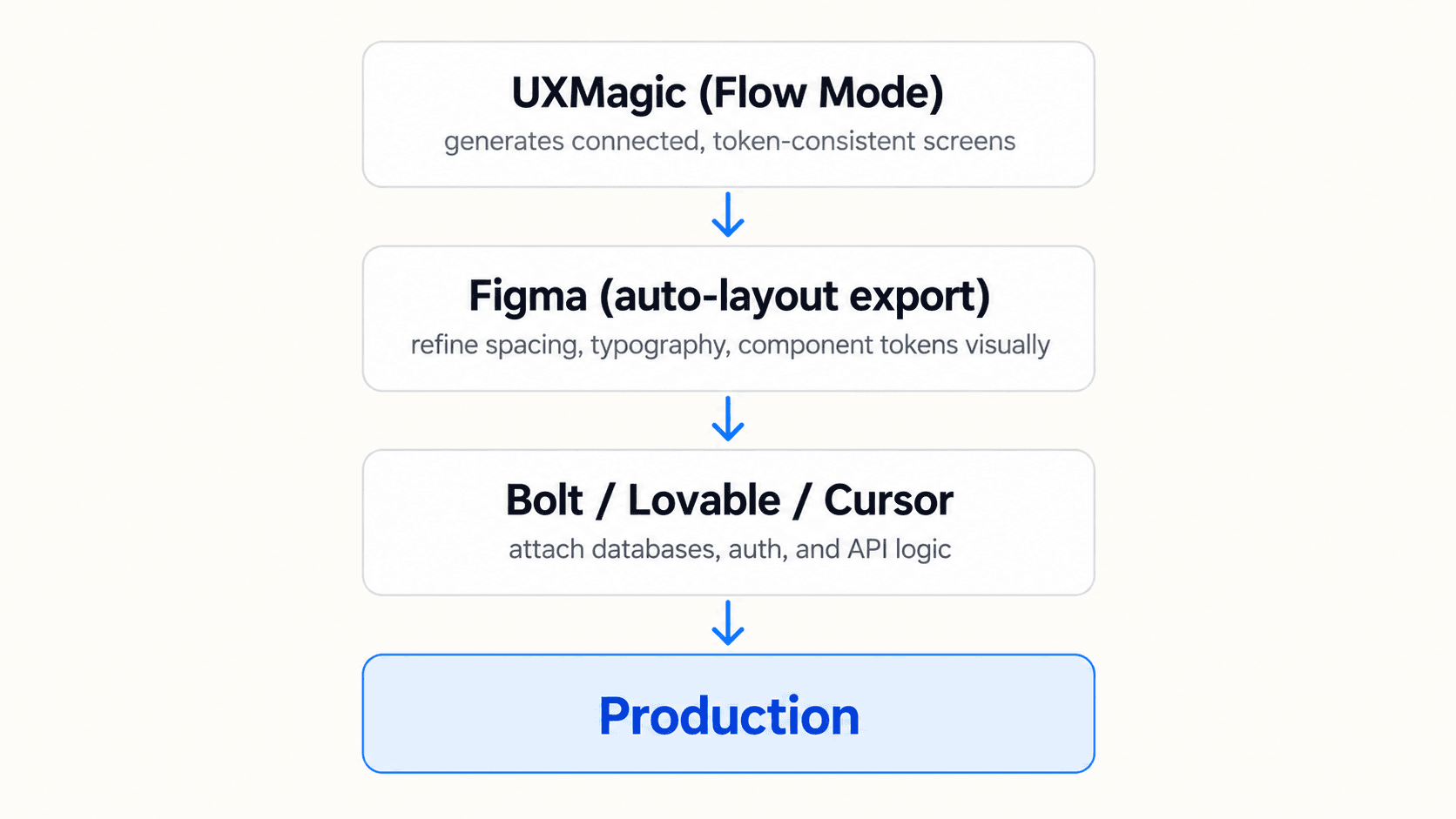
This maps closely onto what's sometimes called "agentic engineering" - the shift from blind vibe coding toward AI agents executing discrete implementation tasks bounded by human-defined architectural, security, and design constraints, rather than accepting whatever a single prompt generates. The full three-phase production pipeline walks through exactly what belongs in each phase, including the production-hardening step most teams skip entirely: auditing UI drift, verifying backend permissions, and testing real edge cases before code most people assumed was "just a prototype" quietly becomes the production app.
Step 1: Mapping Journeys in UXMagic Flow Mode
Before initiating development, product managers need to define the target user journeys, system roles, and core data requirements. UXMagic's Flow Mode generates connected screens - onboarding through dashboard through settings, for instance while holding visual consistency across every state, letting product teams validate layout structures and edge cases before writing a single line of backend logic.
Step 2: Refining Layout Tokens in Figma
Most teams get stuck attempting micro-UI adjustments inside coding environments like Bolt or Base44 - re-prompting a code engine to adjust padding or button alignment frequently breaks existing layout containers or triggers a full-page refactor nobody asked for. Establishing visual structure upfront inside UXMagic, then refining tokens directly in exported Figma files, keeps that refinement visual and precise instead of routing it through a conversational prompt loop.
Step 3: Attaching Databases and APIs in Code Environments
Once the visual spec is locked, engineering wires up authentication, database logic, and API integrations inside Bolt, Lovable, or a dedicated IDE like Cursor. The coding agent receives a pre-validated UI target at this stage, rather than being asked to solve visual design and backend logic simultaneously.
Practical Scenarios: Where Direct-to-Code Runs Into Trouble
Multi-step SaaS onboarding flow. A product team needs a multi-role onboarding experience for a B2B analytics platform. Prompting Lovable or Bolt directly generates working input fields, but screen two displays different typography sizing, screen three alters the main navigation layout, and secondary button states lose their styling - the team burns through credits attempting to re-prompt alignment fixes that keep introducing new inconsistencies elsewhere. The UXMagic workflow instead has the product manager input the brief into Flow Mode, which outputs five connected, visually aligned screens using standardized form components and consistent design tokens - the visual spec exports to Figma and gets verified before engineering wires up Supabase authentication.
Modernizing an existing SaaS interface. A founder needs to modernize an outdated dashboard while maintaining current design system standards. Uploading screenshots to generic prompt-to-app tools tends to result in unformatted HTML wrappers that disregard existing brand tokens and fail on mobile viewports. Using UXMagic's Image-to-UI or URL-to-UI capability instead converts legacy screenshots or a live reference page into editable layout frames - design system tokens apply across the flow, generating DOM-aware structures and code exports that actually preserve brand standards instead of overwriting them.
What Vibe Coding Tools Still Don't Solve
Even with a clean visual architecture feeding into them, code-first tools leave several things for a human to own explicitly:
- Security and authentication - access control, session handling, and permission logic still need deliberate specification; nothing generates that correctly by default without being told exactly what the rules are.
- Accessibility - generated components follow visual patterns without automatically guaranteeing keyboard navigation, ARIA correctness, or screen reader support.
- Responsive behavior - real content and unusual data volumes can break a layout in ways a clean generated preview with placeholder text never reveals.
- Code maintainability - a fast initial scaffold doesn't guarantee code a team can extend cleanly six months later; that depends on the underlying architecture choices, not just generation speed.
- Vendor lock-in - an all-in-one managed platform like Base44 trades setup simplicity for portability; migrating off it later is a real cost worth weighing before committing a production product to it.
A related, specific risk worth naming carefully: deploying an app straight from a prompt with no visual permissions flow designed beforehand can result in every logged-in user having access to every database row. This is a risk of underspecified requirements, not an inevitable outcome of using these tools - a team that explicitly defines role-based access as part of the brief, and reviews the generated permission logic before shipping, avoids it. The failure mode exists because access control was left implicit, not because the tool is fundamentally incapable of handling it correctly.
Build Token-Consistent Flows
Generate a token-consistent, multi-screen flow before you start coding, then give your coding agent a fixed visual target instead of rebuilding the interface through repeated prompts.