UXMagic vs Base44: Design Copilot or App Builder in 2026?
Looking at UXMagic vs Base44? Both are AI-powered, but they solve very different problems. UXMagic accelerates professional UI/UX design and front-end code, while Base44 (recently acquired by Wix) positions itself as an end-to-end no-code app builder.


Output Comparison: Side-by-Side Design Quality
Create a recipe-sharing platform where users can upload recipes, browse categories, and save favorites. Include clean navigation and mobile-first layout.
UXMagic.ai
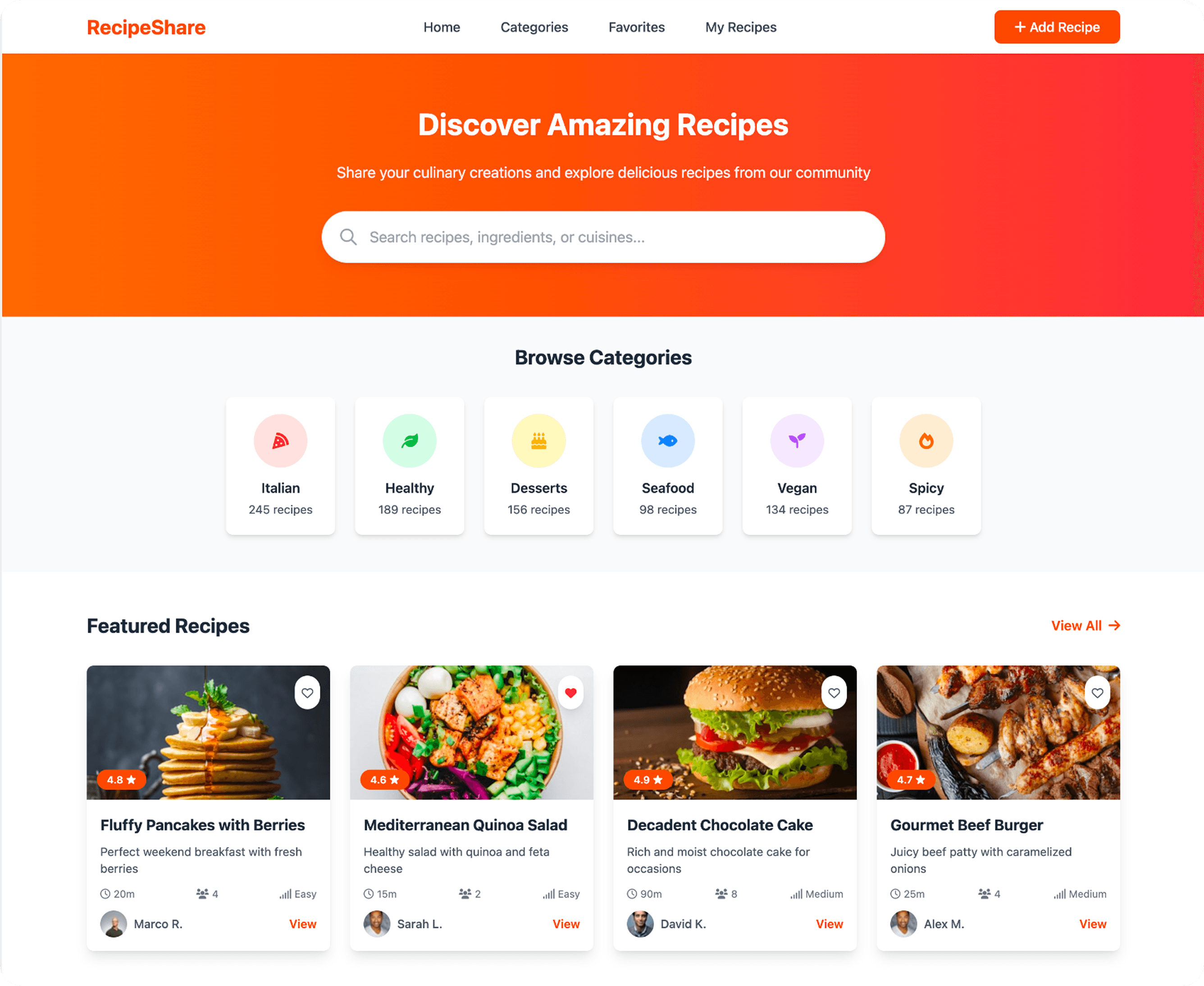
Recipe cards are information-rich, showing ratings, time, and servings at a glance.
The visual hierarchy is clear with a prominent search bar and a strong call-to-action.
Its wide, multi-column layout is desktop-centric and fails the mobile-first requirement.
Text on the hero gradient and light gray details on cards present potential accessibility issues.
Base44
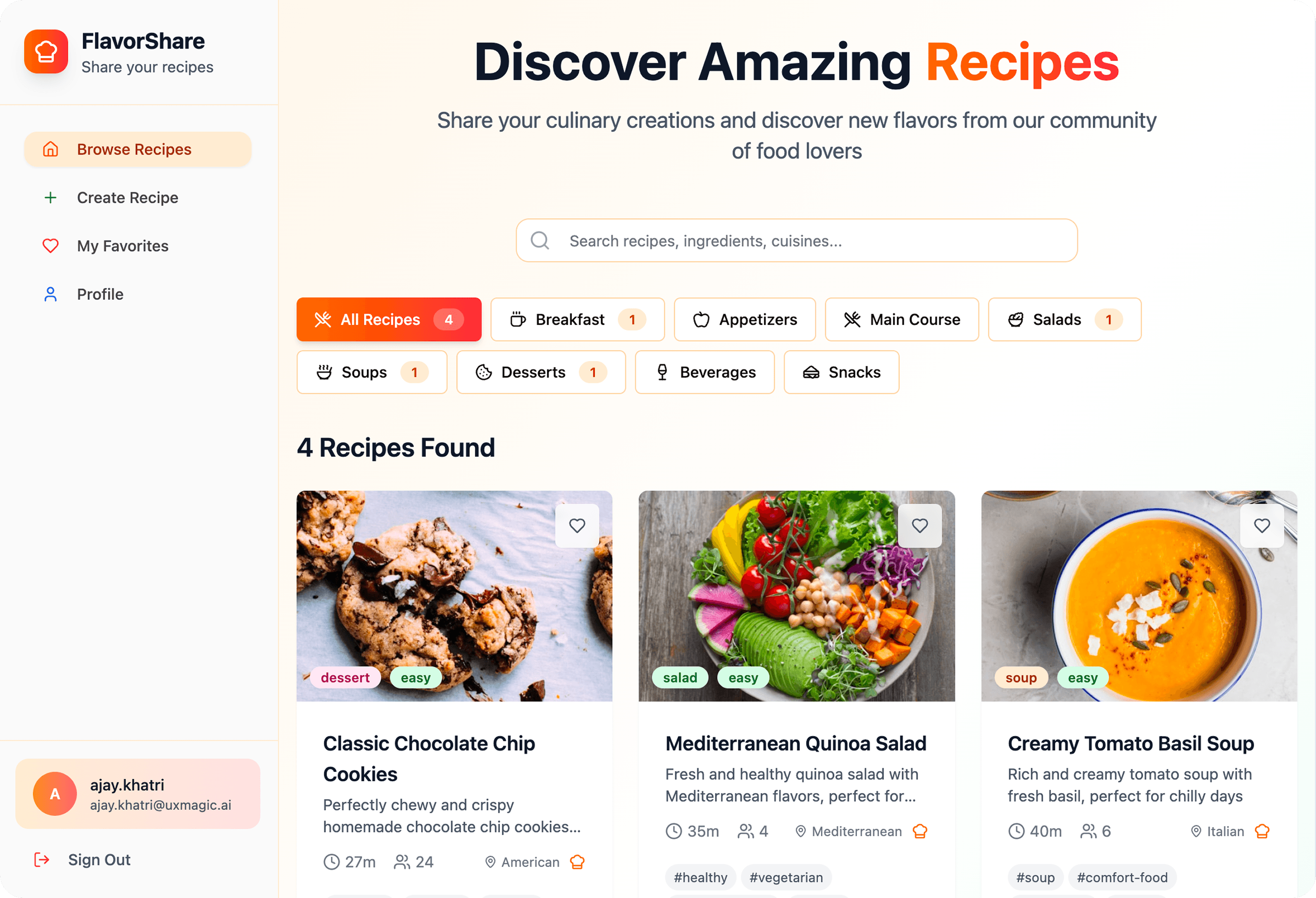
The app-like sidebar layout is more responsive and aligns better with mobile-first principles.
Interactive filter tags with recipe counts offer a superior browsing and feedback experience.
Recipe cards lack key data like ratings and cooking time, hindering quick user decisions.
Navigation is redundant, featuring both a sidebar link and category filters, which clutters the UI.
Design a modern marketplace home screen where users can browse products, apply filters, and see featured categories in a clean grid layout with a search bar on top.
UXMagic.ai

The structure, featuring a promo banner and curated sections, is ideal for an engaging home screen.
Navigation is intuitive, using familiar patterns like a top search bar and filter chips.
Product cards are just images and lack essential information like a name or price, hurting usability.
Inconsistent corner radii and element styling make the overall design feel less polished and systematic.
Base44
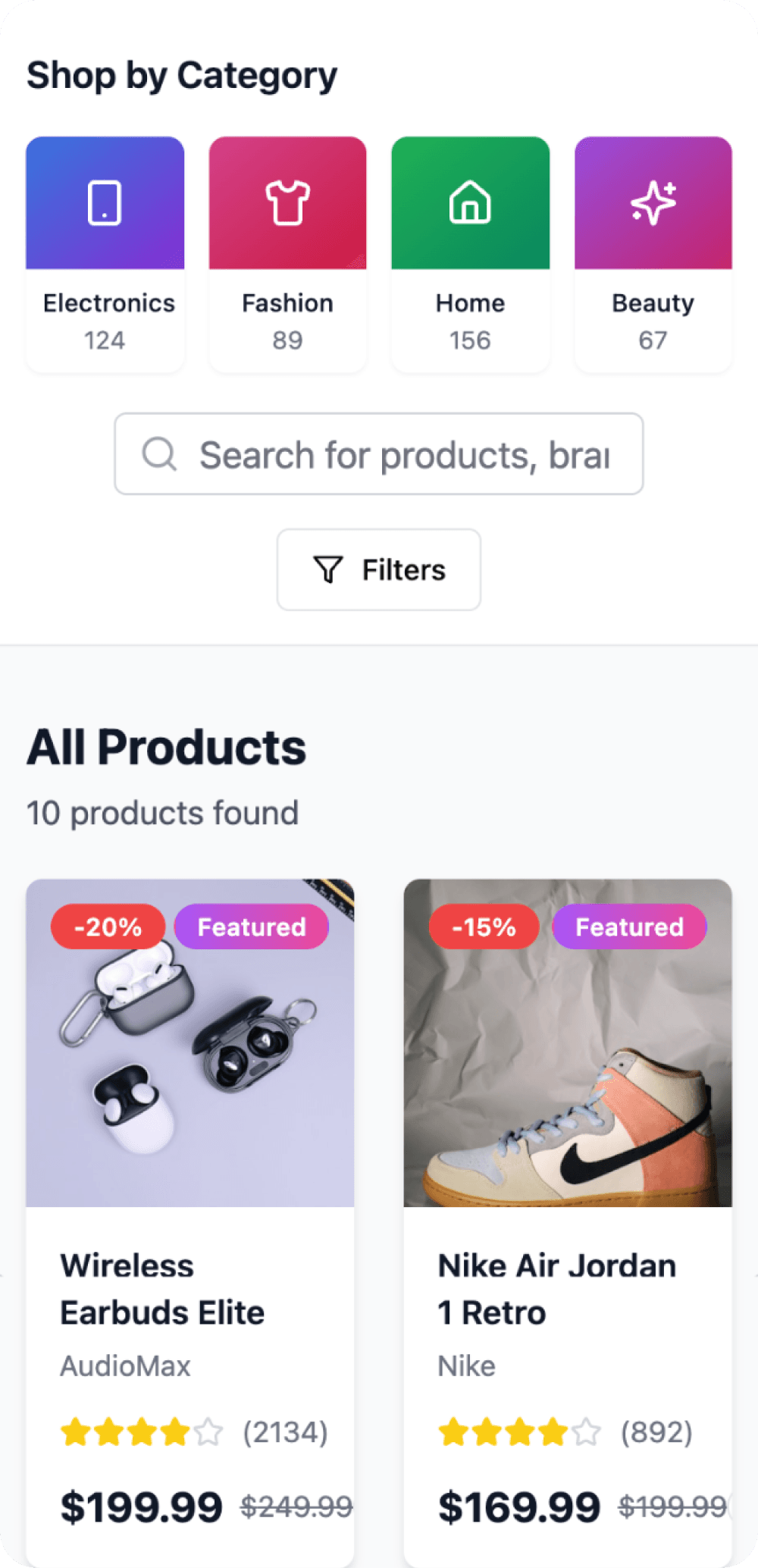
The minimalist layout is highly focused, guiding users directly to categories or products.
Product cards are information-rich, clearly showing discounts, ratings, and pricing.
It lacks engagement, feeling more like a search results page than a discovery-oriented home screen.
Placing the search bar and filters below the category grid creates an unconventional and confusing hierarchy.
UXMagic
UXMagic is an AI-first design copilot that accelerates the path from idea to production. It supports multiple inputs—text prompts, sketches, screenshots, or even website URLs—and generates high-fidelity UIs instantly. Unlike traditional planning tools, UXMagic bridges design and development by exporting directly to Figma, React, and HTML. With features like style guide application, sectional editing, and AI-assisted copy suggestions, it saves up to 70% of design time.
Base44
Base44 (recently acquired by Wix) is an AI-powered end-to-end no-code app builder. It positions itself as a comprehensive solution for building complete applications without coding, targeting users who want to create full-stack applications quickly through a visual, no-code approach.
Feature Comparison
| Feature | UXMagic | Base44 |
|---|---|---|
| Prompt to UI | Supports text, sketch, image, and URL inputs | Natural language prompts only |
| Export Options | Figma, HTML, React, Webflow | Limited code export (beta) + hosted deployment |
| Style Guide | Auto-applies design systems + brand guides | Template-based, limited design flexibility |
| Component Editing | Granular editing in Figma + sectional editing on the tool | Visual editor with limited customization |
| Figma Plugin | Deep integration, generate & edit in Figma | Not available |
| Real-Time Preview | Live preview | One-click deployment on Base44 subdomain |
| Backend & Hosting | Not included | Fully included with database + hosting |
Who Should Use UXMagic
Pricing Comparison

Free – $0
5 project, 120 free credits (one-time), upto 20 screens, 1 Figma export
Premium – $14/month
20 projects, 480 credits (monthly), upto 80 screens, 80 Figma exports, React/HTML exports
Ultimate – $28/month
Unlimited projects, 1500 credits (monthly), upto 250 screens, 250 Figma exports, unlimited React/HTML exports

Free – $0
25 message credits/month, 500 integration credits/month
Starter – $16/month
100 message credits/month, 2, 000 integration credits/month
Builder – $40/month
250 message credits/month, 10, 000 integration credits/month
Pro – $80/month
500 message credits/month, 20, 000 integration credits/month
Elite – $160/month
1, 200 message credits/month, 50, 000 integration credits/month
Final Verdict
Choosing UXMagic vs Base44 isn’t about which is “better” overall—it’s about your workflow.
Pick UXMagic if you want high-fidelity, production-ready UI assets that fit seamlessly into a professional workflow.
Pick Base44 if you need a live MVP today with zero coding or backend setup.
👉 For serious product teams, UXMagic ensures portability, flexibility, and long-term scalability.
есть вопросы?у нас есть ответы.
UXMagic generates professional UI/UX designs and production-ready code, while Base44 builds and hosts full apps with backend and database support.
Yes, if you need flexible design and code exports instead of an all-in-one hosted solution. Many designers look for Base44 alternatives when they need portability.
UXMagic has predictable monthly pricing, while Base44 costs can grow with app usage due to integration credits.
Base44 is better for non-technical founders or SMBs wanting fast MVPs. UXMagic is better for designers and dev teams.
No. UXMagic focuses on front-end design + code exports, while Base44 includes backend, database, and hosting.
Ознакомьтесь с нашими функциями




Related comparisons
Weighing up more than one tool? Here is how UXMagic compares against the closest alternatives.