UXMagic vs UXPin: Which AI UI Design Tool Wins in 2026?
UXMagic and UXPin both help bridge the gap between design and development, but they take different approaches. UXPin focuses on code-backed design systems and production-ready prototyping, while UXMagic prioritizes speed with AI-powered UI generation from prompts, screenshots, sketches, URLs, and existing designs. In this UXMagic vs UXPin comparison, we'll explore features, pricing, workflows, and outputs to help you choose the right tool for your team.


Output Comparison: Side-by-Side Design Quality
Design a responsive SaaS analytics dashboard for a B2B marketing platform. Include KPI cards, campaign performance charts, customer acquisition funnel, AI recommendations panel, notification center, role-based navigation, dark/light mode support, mobile responsiveness, and advanced filtering. Generate a desktop version with a consistent design system.
UXMagic.ai
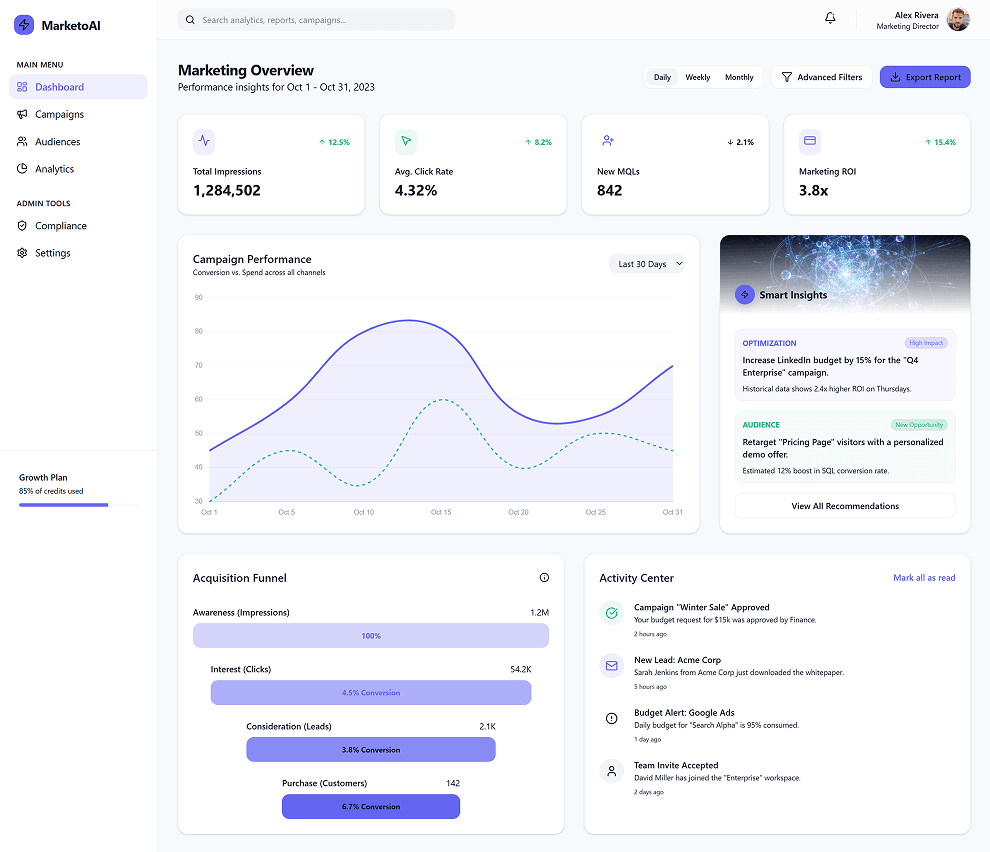
Clean, uncluttered layout makes the dashboard easy to scan and navigate.
AI recommendations are prominently placed and integrated into the main workflow.
Campaign performance charts lack depth and detailed analytics for decision-making.
Advanced filters and role-based controls are not clearly visible or emphasized.
UXPin
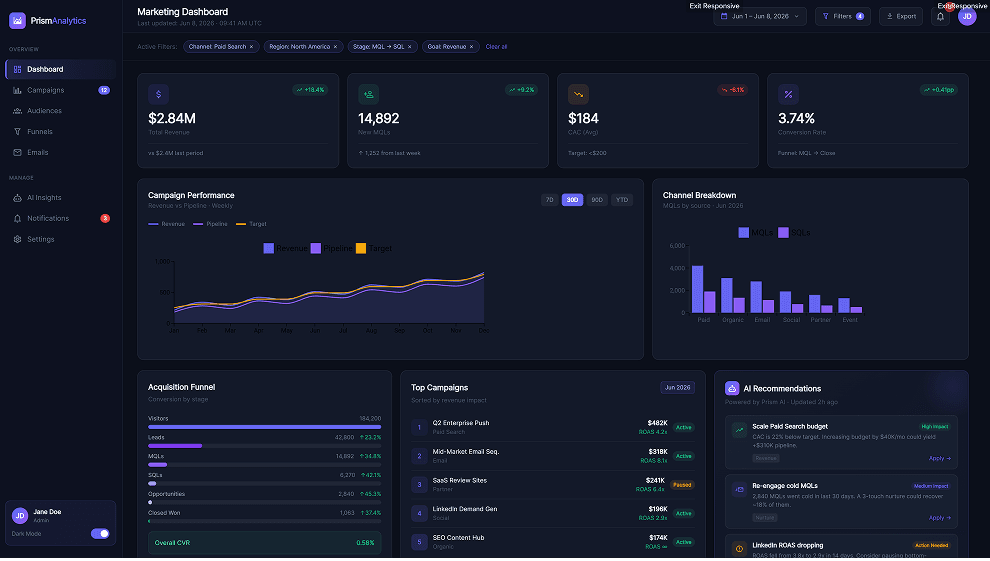
Clear KPI hierarchy makes key business metrics instantly visible.
Covers all major analytics needs with charts, funnels, campaign tracking, and AI insights.
Dense layout and low-contrast text reduce scanability.
AI recommendations are not visually prominent despite being a core feature.
Create a mobile banking application with onboarding, account overview, transaction history, spending analytics, bill payments, card management, fraud alerts, biometric login, and customer support chat. Maintain accessibility standards and generate a complete user flow with consistent UI patterns.
UXMagic.ai
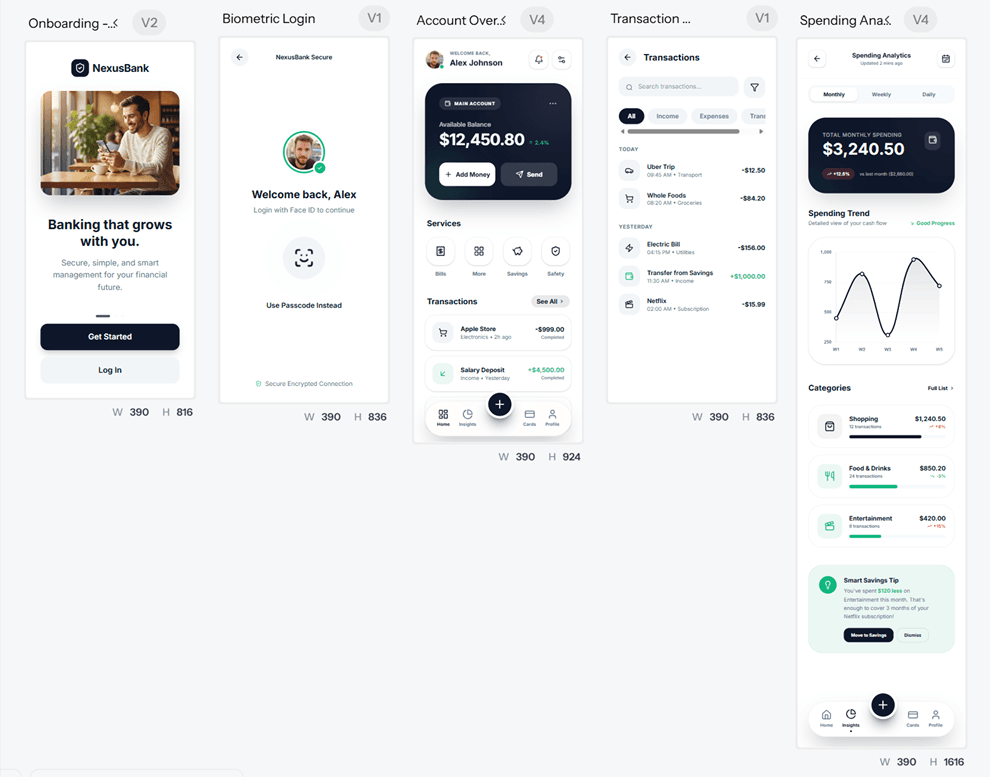
Complete user journey covers onboarding, login, account overview, transactions, and spending analytics.
Clean, accessible interface with consistent spacing and familiar banking patterns.
Missing key screens for fraud alerts, customer support chat, and card management.
Visual design feels generic and lacks strong fintech branding or differentiation.
UXPin
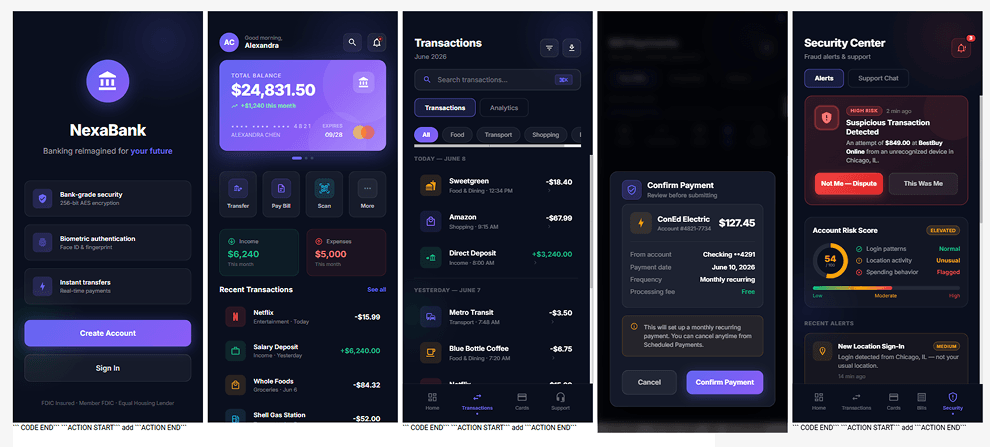
Includes critical banking features like fraud alerts, security center, payments, and transaction management.
Strong visual consistency with a premium fintech aesthetic across all screens
Spending analytics and budgeting insights are missing despite being part of the prompt.
Heavy use of dark backgrounds and glow effects may impact accessibility and readability.
About UXMagic
UXMagic is an AI-powered UI and UX generation platform built to eliminate the blank-canvas problem and help teams move from idea to interface faster. It enables users to generate responsive designs from prompts, screenshots, sketches, live URLs, and existing designs in seconds. With capabilities like website cloning, multi-screen flow generation, auto-generated style guides, and editable Figma exports, UXMagic streamlines the entire design process from ideation to delivery. It also supports React and HTML exports, making it easy to transition from design to development. Whether you're a founder, designer, agency, or product team, UXMagic helps accelerate workflows and turn concepts into production-ready interfaces. Explore its features or pricing to learn more.
About UXPin
UXPin is a code-based design and prototyping platform built around design system governance and developer collaboration. Its flagship technology, Merge, allows teams to design directly with coded components pulled from Storybook, Git repositories, npm packages, and component libraries. UXPin is particularly popular among enterprise teams that prioritize consistency, component governance, accessibility, and engineering alignment.
Feature Comparison
| Feature | UXMagic | UXPin |
|---|---|---|
| Prompt to UI | Generates complete layouts from natural language prompts | AI generates interfaces using approved component libraries |
| Screenshot to UI | Converts screenshots into editable designs | Not available |
| Sketch to UI | Converts paper sketches into structured layouts | Not available |
| Website Cloning | Clone websites from URLs into editable designs | Not available |
| Figma Export | Fully editable Auto Layout exports | No direct export available |
| Figma Import | Import and enhance existing designs | Import supported |
| Code Export | React, HTML, Webflow, Shopify, WordPress | JSX and component-based outputs |
| Style Guide Creation | Automatically generates design tokens | Relies on existing design systems |
| Design System Support | Import and apply custom systems | Deep design system integration |
| Component Editing | Visual editing and AI regeneration | Edit real code-backed components |
| Real-Time Preview | Interactive responsive previews | High-fidelity code rendering |
| Developer Handoff | Figma and code exports | Design and development unified on one platform |
Who should use UXMagic?
Pricing Comparision

Free – $0/month
5 projects, 30 free credits (one-time), upto 5 screens, 1 Figma export
Premium – $17.5/month
20 projects, 480 credits (monthly), upto 80 screens, 80 Figma exports, React/HTML exports
Ultimate – $35/month
Unlimited projects, 1500 credits (monthly), upto 250 screens, 250 Figma exports, unlimited React/HTML exports

Free – $0/month
50 credits
Core – $29/month
200 credits, Basic AI models
Growth – $40/month
500 credits, Advanced AI models
Final Verdict
The UXMagic vs UXPin comparison comes down to workflow priorities. UXMagic is built for fast-moving teams that want to generate, iterate, and export UI designs quickly using AI-powered workflows. UXPin focuses on code-backed design systems and high-fidelity prototyping for teams with established development processes. Both platforms help bridge the gap between design and development, but they serve different stages and styles of product creation.
Choose UXPin if your organization already relies on mature design systems, Storybook integrations, or Git-based component libraries. It is best suited for teams that require code-backed prototypes, strict design governance, and advanced logic capabilities such as variables and conditional interactions.
Choose UXMagic if your team values speed, flexibility, and AI-powered design generation. It is ideal for creating interfaces from prompts, screenshots, sketches, and URLs, while also providing editable Figma exports and multiple code export options. UXMagic is particularly well-suited for startups, agencies, founders, and product teams that need to move from idea to implementation quickly.
For most modern product teams, UXMagic offers a faster and more flexible design workflow. Its AI-first approach, broad input support, editable exports, and lower barrier to entry make it a strong choice for turning ideas into production-ready interfaces. UXPin remains a solid option for organizations focused on design system governance, but UXMagic provides greater versatility for today's AI-driven design workflows.
noch Fragen?wir haben Antworten.
UXMagic offers more input methods, including prompts, screenshots, sketches, and URLs. UXPin focuses on generating layouts using approved design system components.
UXMagic is generally more affordable, offering lower-priced plans, more AI credits, and broader export options. While UXPin focuses on enterprise-grade design system workflows, UXMagic provides better value for startups, agencies, and growing product teams.
No. UXPin does not currently provide website cloning capabilities. UXMagic can analyze a URL and generate editable designs from live websites.
UXMagic is the stronger option for Figma-centric workflows because it exports editable Auto Layout files directly into Figma.
Teams looking for a modern alternative to a traditional UXPin sketch plugin workflow often choose UXMagic because it can convert hand-drawn sketches directly into editable UI designs.



Related comparisons
Weighing up more than one tool? Here is how UXMagic compares against the closest alternatives.