Output Comparison: Side-by-Side Design Quality
Design a desktop productivity app for managing personal tasks. Include a main dashboard with task lists, a calendar view, and a settings panel. Use a light theme, rounded corners, and soft shadows.
UXMagic.ai
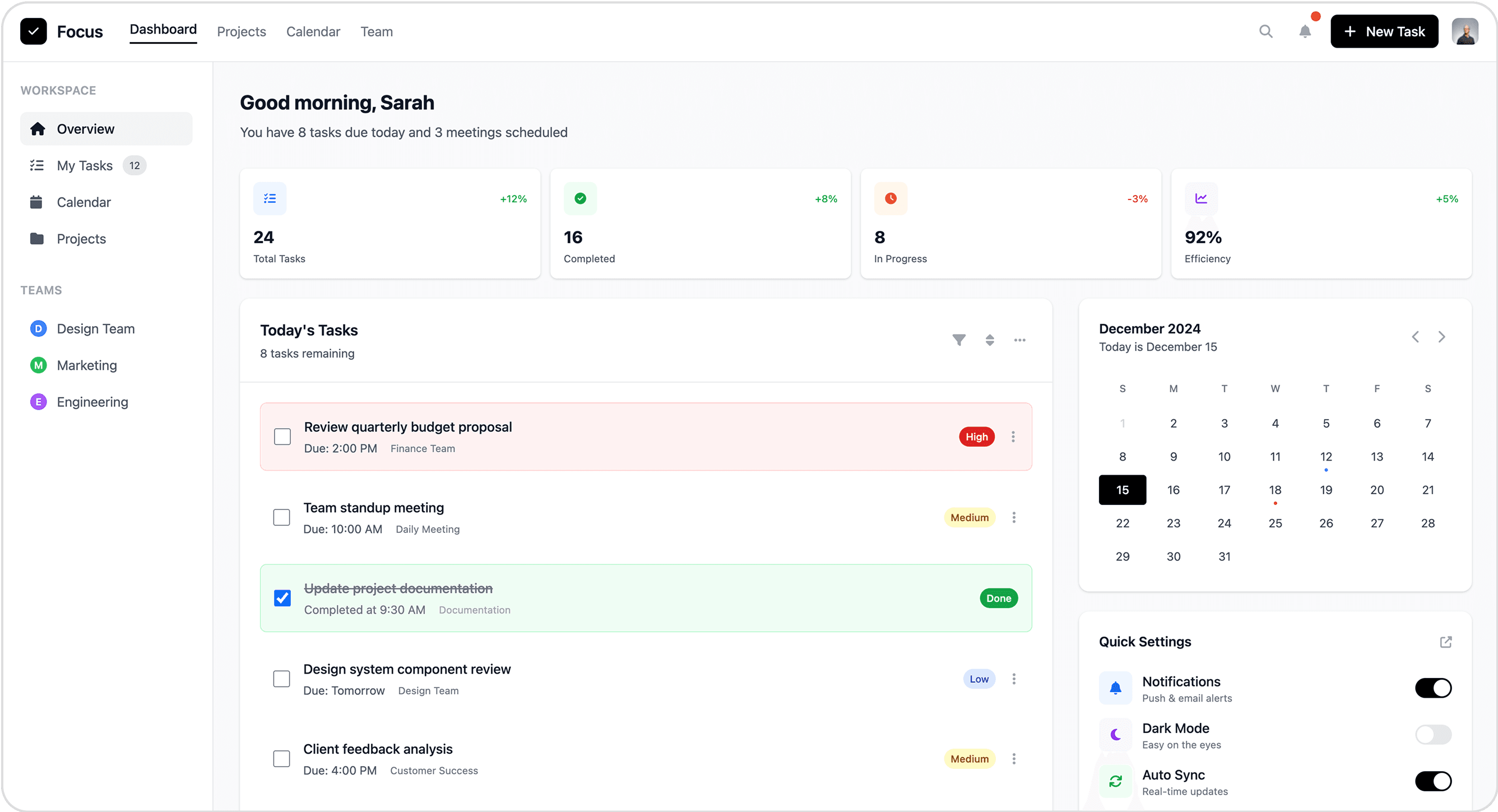
Dashboard gives a clear overview (tasks, progress, efficiency).
Integrated calendar + quick settings add useful context and control.
UI feels a bit cluttered with too many elements competing for attention.
Task list design is heavier visually (large colored tags, blocks) — could be more minimal for focus.
MagicPath
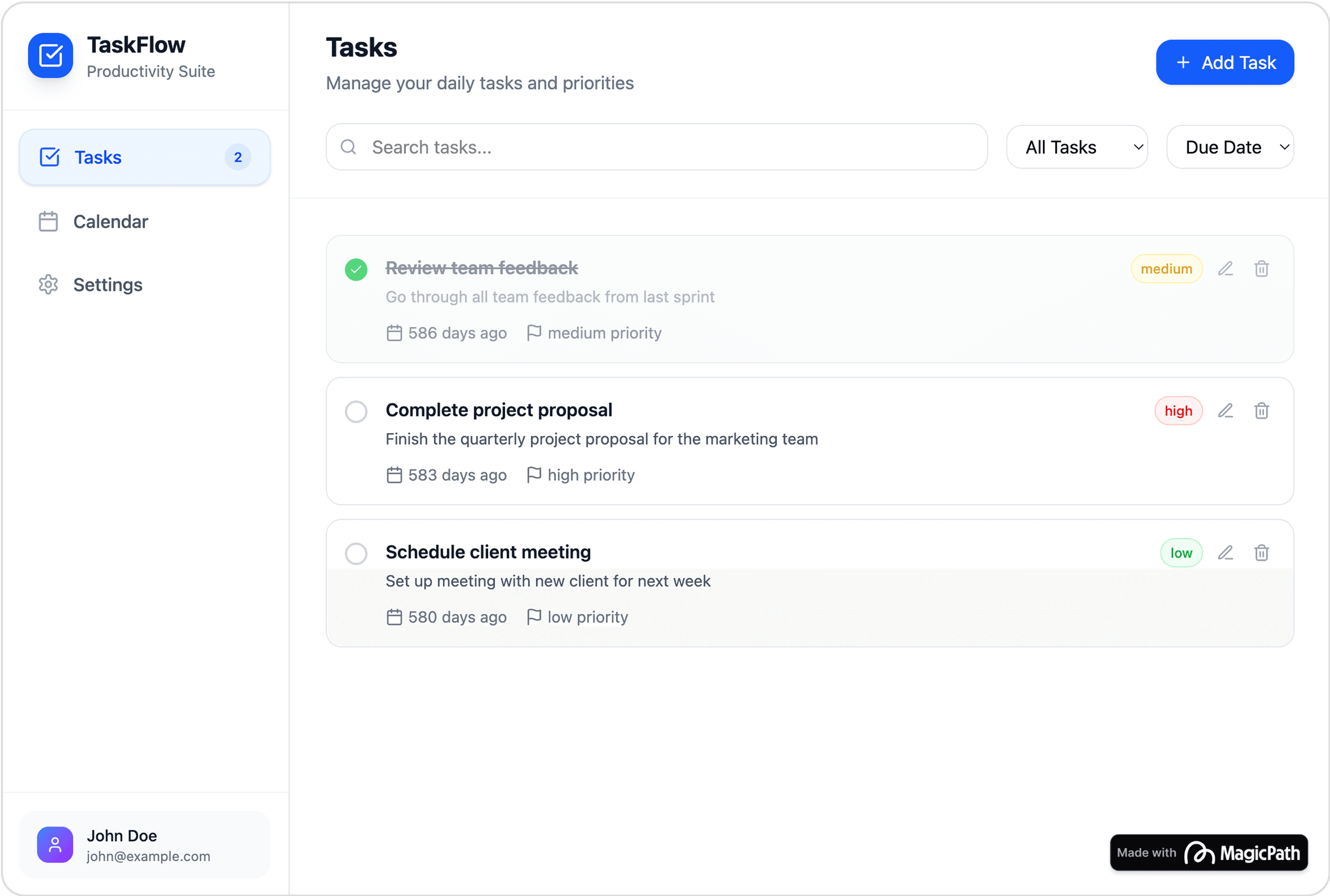
Very clean and minimal layout — tasks are easy to scan.
Strong focus on core task list without extra distractions.
Lacks a dashboard summary (no stats on tasks completed/progress).
Priority indicators are small and not visually prominent enough for quick distinction.
Design a desktop project management app for a small team. Include a kanban board, a timeline view, and a team chat sidebar. Use a professional blue-gray color palette and ensure responsive layout.
UXMagic.ai
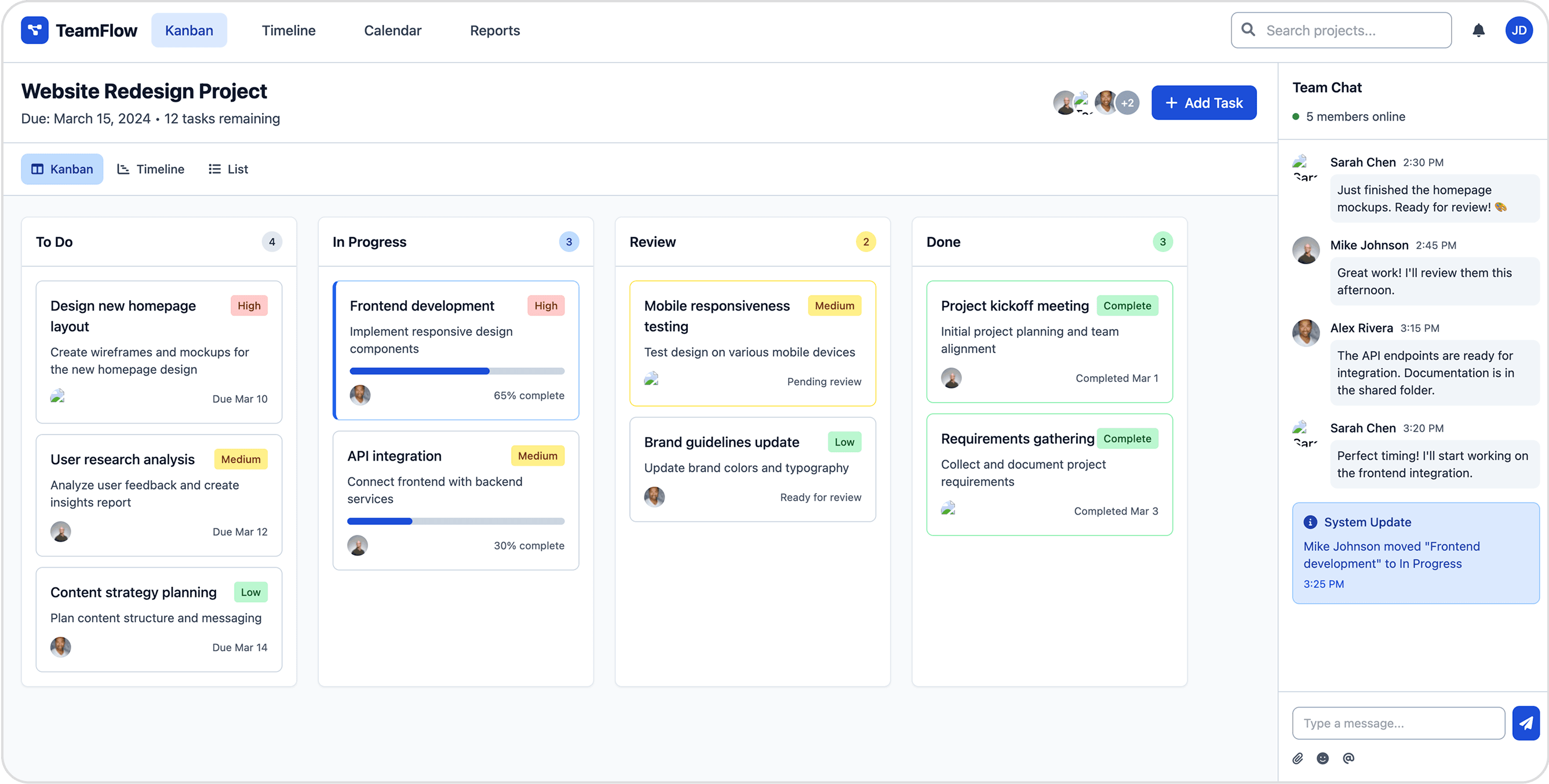
Task cards include progress bars, priorities, and due dates -> very informative at a glance.
Team chat integration on the right makes collaboration seamless.
The board feels a bit dense/cluttered - too much text and labels inside task cards.
Chat panel and task board together may split user focus, reducing clarity.
MagicPath
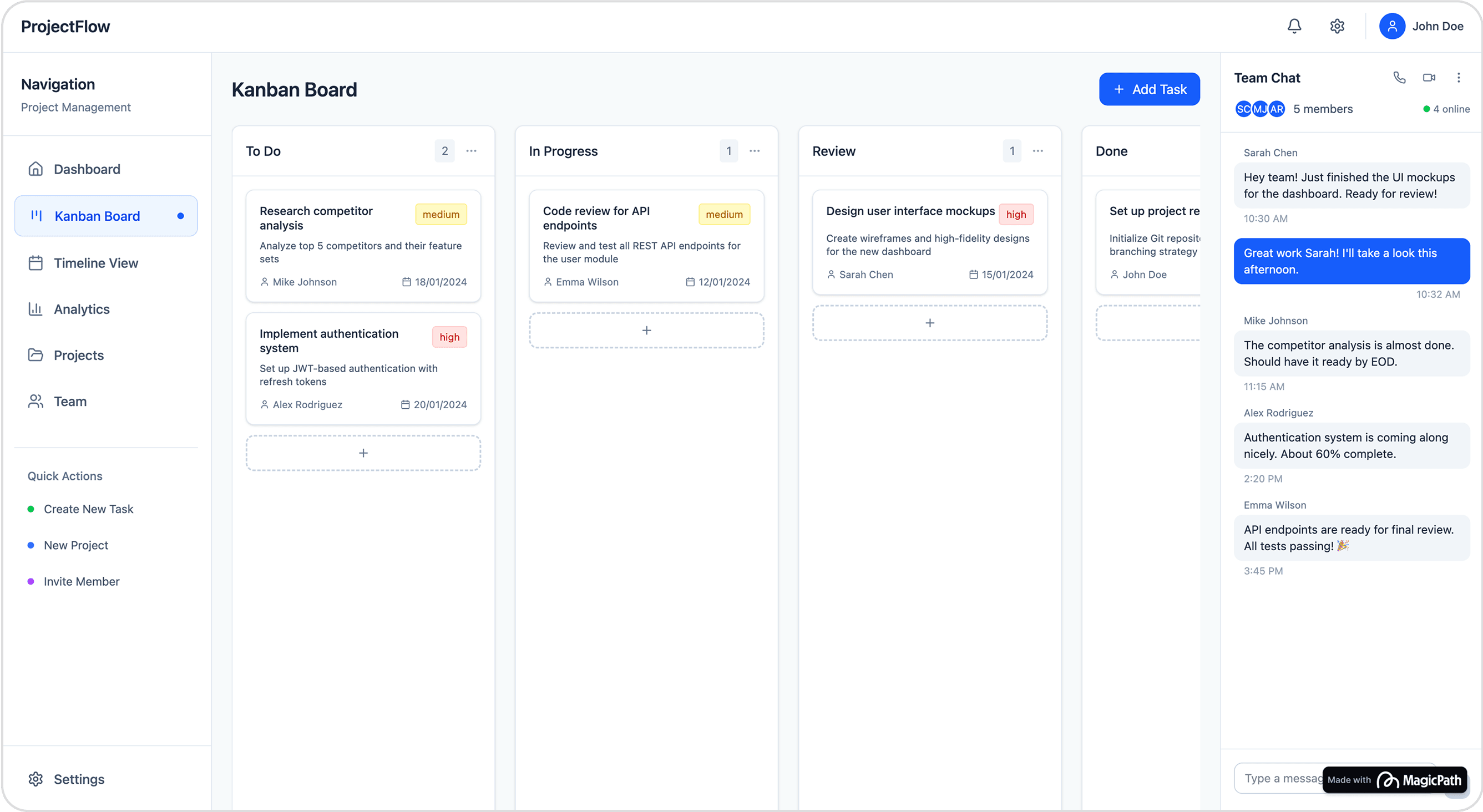
Minimal, clean layout with well-structured Kanban lanes -> easy to scan.
Side navigation with quick actions (create task/project/invite) makes workflow efficient.
Task cards lack visual richness (no progress bars, weaker hierarchy of info).
Feels too empty when few tasks exist - could benefit from subtle placeholders or hints.

About UXMagic
UXMagic is your AI-powered design copilot, built for creators who need to ship fast. It helps you go from prompt to responsive UI, clone entire websites, or generate screens from images, sketches, or URLs. With support for Figma, React, HTML, Webflow, and more, it’s ideal for teams that design in one tool and build in another. Whether you're ideating or deploying, UXMagic accelerates your entire pipeline. Explore its features or pricing to learn more.

About MagicPath
MagicPath (often searched as magic path or magicpath ai) is a conversational, infinite-canvas tool for rapid UI ideation. You “talk” components into existence, remix variations, and export React/HTML/CSS. It’s stellar for brainstorming and early mockups, but lacks direct Figma integration, which adds friction for professional teams.
Feature Comparison
| Feature | UXMagic Copilot | MagicPath |
|---|---|---|
| Prompt to UI | Generate multi-screen UI from natural language | Generate UI from text prompts |
| Image to UI | Converts images or screenshots into fully editable UI/code | Uses images as reference to build UI |
| Sketch to UI | Turn hand-drawn sketches into UI | Not available |
| Clone Website to UI | Imports any live website into an editable design via direct URL input | Not available |
| Connect Existing Figma Designs | Imports existing Figma files for editing and enhancement | Not available |
| Custom Design System Import | Allows importing brand design systems in Ultimate tier | Offers basic themes; “custom design systems” on Pro tier |
| Code Export (HTML/React) | Exports production-ready HTML and React code | Exports developer-focused React/HTML/CSS code |
| Apply Style Guide/Branding | Apply consistent design system across screens | Focuses on broad design themes rather than full style guide |
| Component Editing | Available (with prompts & Style Guide integration) | Point & prompt editing |
| Export | One-click export to Figma, Webflow, WordPress, etc. | Not available |
Who should use UXMagic?
Pricing Comparison

Free – $0/month
5 project, 120 free credits (one-time), upto 20 screens, 1 Figma export
Premium – $18/month
20 projects, 480 credits (monthly), upto 80 screens, 80 Figma exports, React/HTML exports
Ultimate – $35/month
Unlimited projects, 1500 credits (monthly), upto 250 screens, 250 Figma exports, unlimited React/HTML exports

Free – $0/month
5 project, 5 component credits per day (up to 30 per month)
Pro – $20/month
Unlimited projects, 200 component credits per month
Teams – $30/month
Unlimited projects, 200 component credits per month, Invite editors to your files
Final Verdict
In UXMagic vs MagicPath, the better choice depends on your workflow.
If your team needs fast brainstorming, lightweight UI generation, and doesn’t rely heavily on Figma, MagicPath Pro delivers speed — just be ready to handle code and design handoff manually.
If your workflow is Figma-first and focused on delivering production-ready designs with consistent branding, UXMagic is the stronger tool. Its wide input options, style guide integration, and one-click export make it ideal for designers and dev teams.
For most teams shipping real products, UXMagic offers better ROI and smoother handoff in 2026.
punya pertanyaan?kami punya jawabannya.
Yes, in UXMagic vs MagicPath, UXMagic’s direct Figma export and design system import reduce friction for teams shipping to production.
MagicPath. Its infinite canvas and conversational prompts make divergent exploration very quick.
UXMagic has Free, $7, $14, $28 tiers aligned to deliverables (Figma/code). MagicPath pricing is Free (5/day) and Pro ($20/mo) credit-based.
No. MagicPath currently lacks direct Figma export, so you’ll copy code or components. UXMagic pushes multi-screen layouts into Figma in one step.
If your team ships in Figma → code, choose UXMagic. If you’re pre-design and validating ideas, MagicPath is great for quick prototypes.
Lihat fitur-fitur kami



Related comparisons
Weighing up more than one tool? Here is how UXMagic compares against the closest alternatives.