
Spending hours building auto-layout components and wiring hotspot variants for an exploratory feature that gets rejected in a ten-minute stakeholder sync is a failure of process, not effort. Product ideas rarely fail because early prototypes lacked polished component variants; they fail because legacy vector tools are too slow to keep up with product iteration. What is rapid prototyping supposed to solve if the tooling itself is the bottleneck?
You already use design and prototyping software daily, manage component libraries, and understand standard usability heuristics. This isn't a wireframing 101 post. It's the actual workflow shift from manual canvas setup to prompt-driven multi-screen flows that lets a team validate an idea before engineering builds the feature faster than design can frame it.
Traditional vs. Rapid Prototyping Workflow
| Traditional Workflow | Rapid Prototyping Workflow |
|---|---|
| Design screens first | Validate flow logic first |
| Days of Figma setup | Minutes to generate flows |
| Focus on pixels | Focus on user behavior |
| Expensive changes later | Fast iteration early |
What Is Rapid Prototyping in Modern Software Product Design?
From Hardware Manufacturing Origins to AI-Driven UX
Rapid prototyping in UX design is an iterative process used to build testable models of a software concept. It lets product teams evaluate user flows, validate core functionality, and align stakeholders quickly before dedicating engineering resources or building out fully realized components. The core idea borrowed the name from physical manufacturing, but the actual practice in software is about speed of validation, not speed of fabrication.
Core Goal: Validating Interaction Logic Over Pixel Perfection
The goal is answering a specific question fast, not producing a polished artifact. A prototype exists to test whether a flow makes sense, not to demonstrate visual craft treating those as the same goal is where most prototyping timelines quietly balloon.
The Evolution of Rapid Prototyping Methodologies
Low-Fidelity Paper Sketching (And Why It Struggles for SaaS Teams)
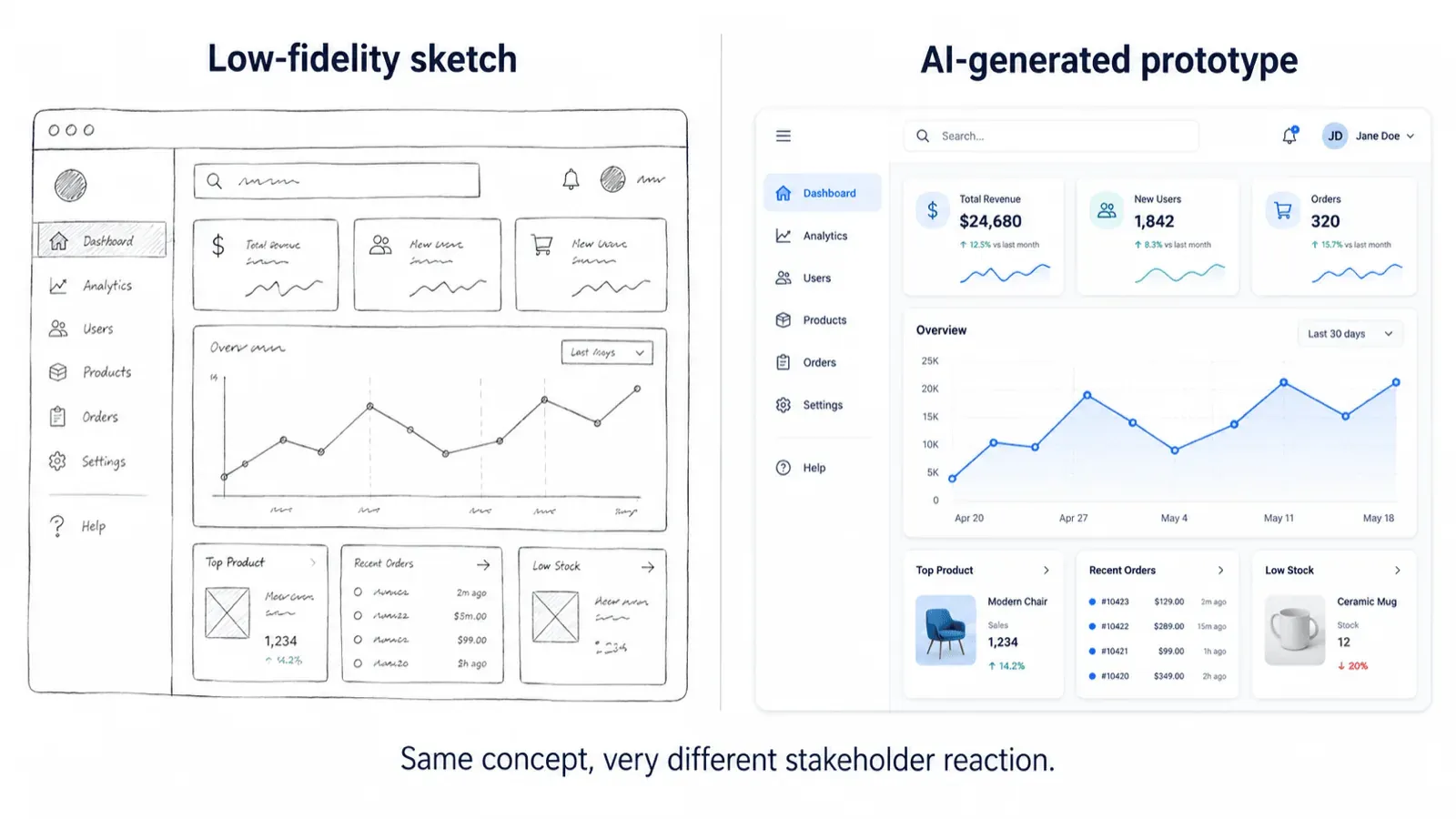
Paper prototypes can be genuinely useful for early ideation, but they often lack enough context for complex SaaS workflows. Legacy UX literature continuously promotes paper sketching as a premier rapid prototyping method, and for a simple flow with a small audience, that's often fine. Where it struggles: non-technical stakeholders routinely lack the spatial imagination to interpret abstract paper wireframes for anything multi-step or data-dense, leading to misaligned expectations and late-stage feature rewrites.
High-Fidelity Vector Prototyping (Figma, ProtoPie, Axure)
Standard vector environments can slow down early concept exploration. Tools like Figma are built for design system maintenance and precise developer handoff, but that same rigor creates friction during initial 0-to-1 concept generation. The manual labor required to manage auto-layout properties, variant properties, and screen transitions forces designers into pixel manipulation too early in the ideation phase before anyone's even confirmed the flow logic is right.
Generative UI Flow Prototyping: The Modern Paradigm
The long-held belief that rapid prototyping requires a trade-off between low-fidelity paper sketches and multi-day vector setup is increasingly outdated. Modern AI-native workflows let teams generate high-fidelity, interactive user flows quickly, without touching a manual vector frame first - the fidelity and the speed stop being opposing forces.
Evaluating the Best Rapid Prototyping Tools for SaaS Product Teams
| Tool | Best For | Limitation |
|---|---|---|
| Figma | Final design systems, developer handoff | Slower during early 0-to-1 exploration |
| ProtoPie | Advanced micro-interactions | More setup time for complex logic |
| Axure | Complex conditional logic, enterprise flows | Higher learning curve |
| AI Prototyping Tools | Fast multi-screen flow validation | Output still needs human review before shipping |
Direct code prototyping generates real visual debt worth knowing about. Prompting AI models directly for React or HTML/CSS code allows for rapid functional testing, but typically outputs visually unpolished and inconsistent UI elements. That visual debt requires designers to spend extra time rebuilding layouts inside a visual design editor before presenting to leadership eating into the original speed advantage the code-first approach was supposed to provide.
Vector tools like Figma, ProtoPie, and Axure remain the right choice once design system governance and precise engineering handoff matter that's genuinely their strength. Where they fall short is the earlier stage: validating whether a flow's logic even holds together, before component polish is a relevant concern at all.
A Modern 3-Step Rapid Prototyping Workflow
Step 1: Isolate the Core Usability Hypothesis
Define the specific user journey - a B2B workspace onboarding flow, for instance and establish precise evaluation criteria before opening any design tool. Input requirements are high-level user stories, functional requirements, and brand style preferences, not a fully specced feature list.
The common failure point here is trying to prototype an entire application at once rather than focusing on a single user interaction path. Scope creep at this stage defeats the entire purpose of moving fast.
Step 2: Generate Multi-Screen Visual Flows from Text
Instead of manually drawing screens, input high-level user requirements into a generative UI tool to output a full user journey - primary layout structures, input elements, and navigation flows generated together, not one frame at a time. Iterate by modifying component layouts, re-prompting specific screen states, and generating edge cases (empty states, validation errors) directly within the workspace.
The common failure point at this stage is spending time refining micro-interactions or precise component variables during early concept generation that level of polish belongs later, once the flow itself is validated.
Step 3: Validate with Stakeholders and Export to Design Systems
Conduct interactive review sessions with stakeholders using the generated visual flows directly. If the concept fails validation, discard or re-prompt the flow immediately that's the entire point of treating it as disposable. If approved, export structured UI assets into Figma for design system token alignment, or pass code structures to engineering.
The common failure point here is treating a throwaway exploratory prototype as a permanent source-of-truth file instead of extracting the validated layout cleanly into the actual design system afterward.
Here's what that looks like on a real project. A non-technical founder needs to demonstrate a cohesive product experience to venture investors to secure pre-seed funding. The traditional approach hires an agency to draft static Figma frames, spending weeks setting up layouts, component states, and screen links. Prompting the entire sequence instead "database setup screen, auto-generating dashboard, metric filtering modal" generates an interactive, multi-screen flow in minutes, ready for the investor presentation.
A second case follows the same pattern at a larger org. A SaaS product manager needs to validate a multi-step user permissions assignment workflow across complex organizational hierarchies. The traditional approach has the PM write a technical PRD while a designer spends two full design sprints building fifteen static wireframe variations in Figma. Inputting the same requirements directly into a generative flow tool instead generates permission modals, user list tables, and confirmation states immediately the team reviews the interactive logic in a single sync, catching workflow issues before design engineering even begins.
Process Traps That Kill Prototyping Velocity
A few specific patterns worth watching for, since they show up constantly across product design teams:
- Auto-layout setup before flow approval. Setting up auto-layout constraints, component variants, and multi-state connections in Figma takes real hours before a basic multi-screen flow can even be shown to leadership for feedback - hours spent before anyone's confirmed the flow is worth building at all.
- Micro-detail distraction in early reviews. Stakeholders frequently get pulled into specific UI micro-details - corner radii, padding, exact hex codes during early feedback sessions, ignoring the core logic of the user flow that the session was actually meant to validate.
- Functional-but-ugly code prototypes. LLM code generation creates interactive functional flows, but the visual interface is often too unrefined and inconsistent to present to executive stakeholders as-is.
- Manual hotspot linking for disposable work. Manually linking dozens of hotspot transitions across edge cases takes significant effort for an exploratory prototype that might get discarded after a single review - effort that was never going to survive contact with the next iteration anyway.
- Static mockups that skip technical feasibility. Designers spend days polishing static mockups only to learn from engineering that the underlying interaction model is technically unfeasible - a check that should have happened before the polish pass, not after.
When NOT to Use Rapid Prototyping
Rapid prototyping is the right tool for validating flow logic fast - it's the wrong tool for a few specific situations:
- Final production UI decisions. A rapid prototype validates that a flow makes sense; it's not built to carry the pixel-level precision a shipped interface needs.
- Complex accessibility audits. WCAG compliance, screen reader behavior, and keyboard navigation need to be tested against real, production-grade components, not a fast exploratory flow built to answer a different question.
- Detailed engineering handoff. A rapid prototype communicates intent; it isn't a substitute for the structured specs, tokens, and component states engineering actually needs to build from.
- Mature design system updates. Changes to an established, widely-used design system need the governance and consistency review a rapid, disposable prototype was never meant to provide.
Generate Multi-Screen Prototypes Faster
Create interactive, multi-screen user flows in minutes without manually wiring disposable prototypes or rebuilding screens from scratch.