You’ve seen the demos.
“Type a prompt → get a perfect dashboard.”
Then you try it on a real B2B product and spend three hours fixing spacing, rewriting hallucinated copy, and aligning it back to your design system.
That’s the gap no one talks about.
Designers aren’t asking “what can AI generate?” anymore. They’re asking:
- How do I actually use AI in UX design workflow without creating UX debt?
- How do I keep consistency across 50 screens?
- How do I stop regenerating from scratch every time a stakeholder says, “Make it bigger”?
Let’s skip the hype and talk about what actually works.
The Shift: From AI Novelty to Workflow Reality
In 2022, designers searched:
“Best AI image generator”
In 2025, they search:
“How designers actually use AI in real projects”
That word “actually” says everything.
We’re past the novelty phase. We’re in the “this better work inside my messy SaaS product” phase.
There are two dominant personas here:
The Senior Product Designer (The Skeptic)
- Worried about losing control.
- Hates broken hierarchy and random hex codes.
- Wants automation for drudgery, not creative takeover.
- Cares about fidelity, tokens, and system integrity.
The Bootstrapped Founder (The Pragmatist)
- Needs speed.
- Needs “good enough” to ship.
- Can’t afford UX debt.
- Wants something that won’t collapse when engineers scale it.
Both are searching for the same thing: A process. Not a toy.
The Real Problems Designers Are Facing
- Context Amnesia
You generate a dashboard.
Then a settings page.
Now the padding is slightly off. The blue is slightly different. The typography hierarchy is inconsistent.
AI forgot your brand.
This is why generic tools fail inside real SaaS products. They treat every prompt like a new universe.
If you care about design system automation, you need constraint-aware tools, not aesthetic generators.
- The Verification Tax
AI is like a junior designer:
- Fast
- Confident
- Occasionally wrong
You don’t just design anymore, you review.
Reviewing hallucinated UX patterns is more mentally exhausting than designing from scratch.
The solution isn’t better prompts. It’s higher structural fidelity from the start.
- “Vibe Coding” vs. System Design
Tools like Lovable, Replit, and Cursor let founders generate full apps directly from prompts. Great for velocity.
Terrible for long-term UX governance.
If you skip validation and jump straight to code, you create what designers call: Spaghetti design.
There’s no source of truth. No Figma file. No documented components. This is why the Figma to React AI workflow still matters.
Design → Validate → Then Code. Not the other way around.
Strong Opinions You Need to Hear
Prompt Engineering Is a Dead-End Skill
Memorizing magic prompts won’t make you future-proof. The real skill shift is:
From prompt engineering → to context engineering.
Senior designers win by defining:
- Design tokens
- System constraints
- Component architecture
- Instruction files
AI needs guardrails. Without a system, it’s noise.
AI Is Creating a Mediocrity Crisis
AI makes “average” free. That means “average” is worthless.
If your value is “making things look clean,” you’re in trouble.
If your value is:
- Research synthesis
- Information architecture
- Decision clarity
- Taste
You become more valuable. AI raises the bar. It doesn’t lower it.
Design Systems Are Now Mandatory
AI without a design system = chaos. AI with a design system = leverage.
The system is not the constraint.
It’s the API through which you control the AI. If you haven’t invested in a system, AI won’t save you.
The 3 Real AI Workflows Designers Use
Let’s get practical.
These are real, field-tested workflows.
Workflow 1: The “Sandwich” Method (Human → AI → Human)
This is the most reliable AI in UX design workflow for product teams.
Phase 1: Human Context
You define:
- Business goal
- User problem
- Flow intent
Example: “This dashboard must reduce support tickets by surfacing order status immediately.”
AI cannot infer this. You must inject it.
Phase 2: AI Acceleration
Step 1: Text → Structure
Use an LLM to turn notes into structured flows. Example prompt: “Generate a user flow for canceling an order with edge cases.”
Step 2: Structure → UI
Now you move into generative UI. This is where tools like UXMagic shine.
Instead of generating a single screen, you use Flow Mode to create: Dashboard → Order Detail → Cancel Modal
In one connected sequence.
You apply a style guide so spacing, tokens, and hierarchy remain consistent. This compresses hours of layout work into minutes — without sacrificing structure.
Phase 3: Human Refinement
Export to Figma.
Fix:
- Copy tone
- Icon swaps
- Grid alignment
- Edge states
Then optionally feed it back into AI for:
- User stories
- Acceptance criteria
- QA documentation
You never ship raw AI output. That’s the rule.
While mastering workflows like the ‘Sandwich Method’ is essential for production, the rapidly evolving landscape of 2026 means designers need to stay updated on the specific tools powering these shifts. Beyond just generative UI, there are specialized platforms emerging for everything from user research to automated accessibility audits. For a comprehensive look at the ecosystem, you might find this curated list of AI tools for UX design helpful for identifying which technologies best complement your specific design stack.
Workflow 2: Founder Fast-Track (Rapid MVP Design Process)
This is aggressive. It works — if you’re careful.
- Define idea with ChatGPT.
- Generate visual prototype first.
- Then generate code.
The safety layer here is crucial.
Instead of jumping straight to React, founders use tools like UXMagic to visualize the flow first. Why?
Because visualizing exposes missing features early. “Oh. There’s no chat screen.”
That’s cheaper to fix in design than in a deployed codebase. Then you feed the validated design into a code builder.
This avoids UX debt.
Workflow 3: Enterprise Component Factory
For large teams focused on compliance.
Use AI to:
- Generate new component variants
- Enforce tokens
- Audit inconsistencies
Example: “Generate a table using existing Badge component for status.”
Then run an AI linter to catch:
- Hard-coded hex values
- Rogue spacing
- Non-semantic colors
This is where design system automation becomes real ROI.
Practical Scenarios (Not Dribbble Shots)
Scenario A: Generative UI for B2B Dashboards
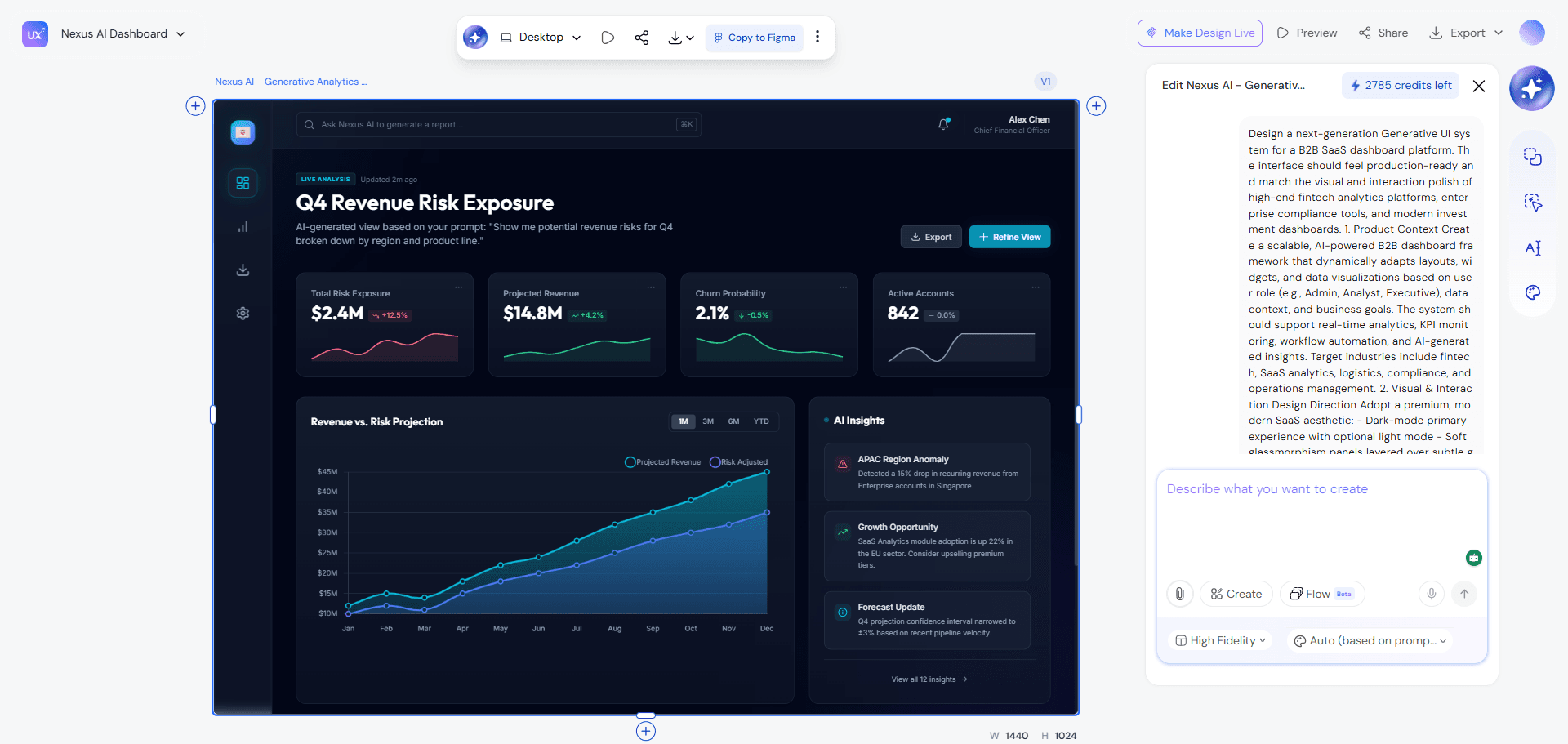
Legacy inventory dashboard. Dense. Unreadable.
You:
- Upload screenshot.
- Prompt for improved readability.
- Convert rows into card layouts for mobile.
- Generate 3–4 variations instantly.
Now the team debates layout direction, not pixel color.
Concept phase: one afternoon. Not two weeks.
Scenario B: Content-First Landing Pages
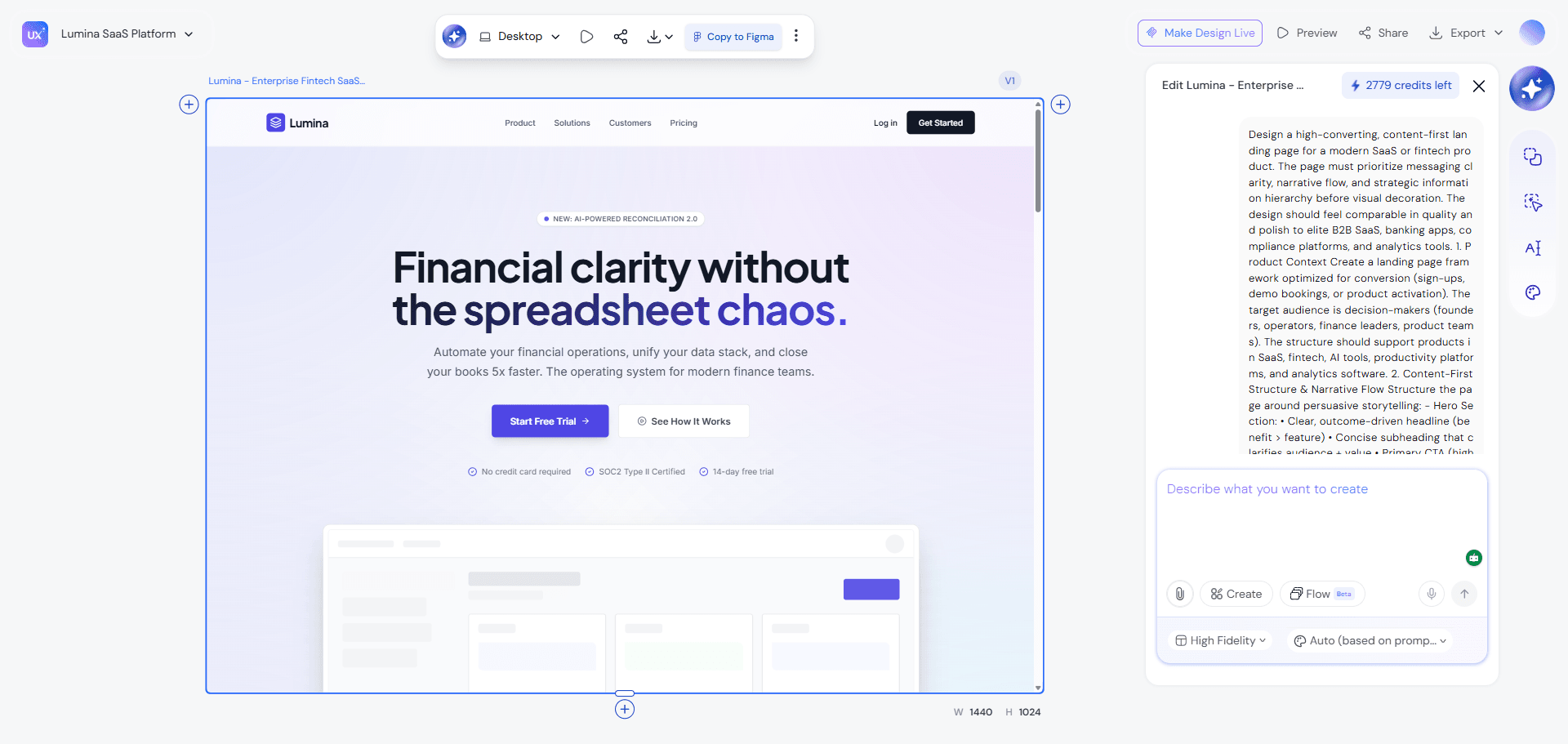
Designers often use Lorem Ipsum. Stakeholders can’t react to fake content.
Instead:
- Generate real copy.
- Inject it into design generation.
- Adjust copy length based on layout constraints.
When the headline breaks the grid, you don’t resize fonts. You rewrite the headline. That’s how AI prototyping tools for SaaS should be used. Design and content evolve together.
Scenario C: Design System Audit
Massive Figma file. 50 shades of gray. Run AI analysis. Merge tokens. Set up linting guardrails. What used to take weeks now takes hours. That’s real leverage.
Start Using AI Without Breaking Your Product
If you take one thing from this: Don’t use AI as a magic wand.
Use it as:
- An intern for boring tasks
- A multiplier for exploration
- A generator inside constraints
And if you’re evaluating tools, look for:
- Flow generation (not isolated screens)
- Style guide enforcement
- Editable fidelity
- Figma & React export
If you want to experiment with a structured, constraint-aware workflow, try building one real feature in UXMagic using Flow Mode, from rough intent to export-ready screen, and see how much “verification tax” you eliminate.
The designers who win won’t be the fastest prompt writers. They’ll be the best editors.
Add UXMagic to your workflow
Move beyond vibe generation. Design one real feature using Flow Mode, enforce your style guide, and export production-ready UI without structural chaos or verification tax.