Output Comparison: Side-by-Side Design Quality
Design a one-fold dashboard for a crypto portfolio tracker. Show total value, individual token charts, daily change %, and recent transactions. Use dark theme, neon accents, and clean grid layout.
UXMagic.ai
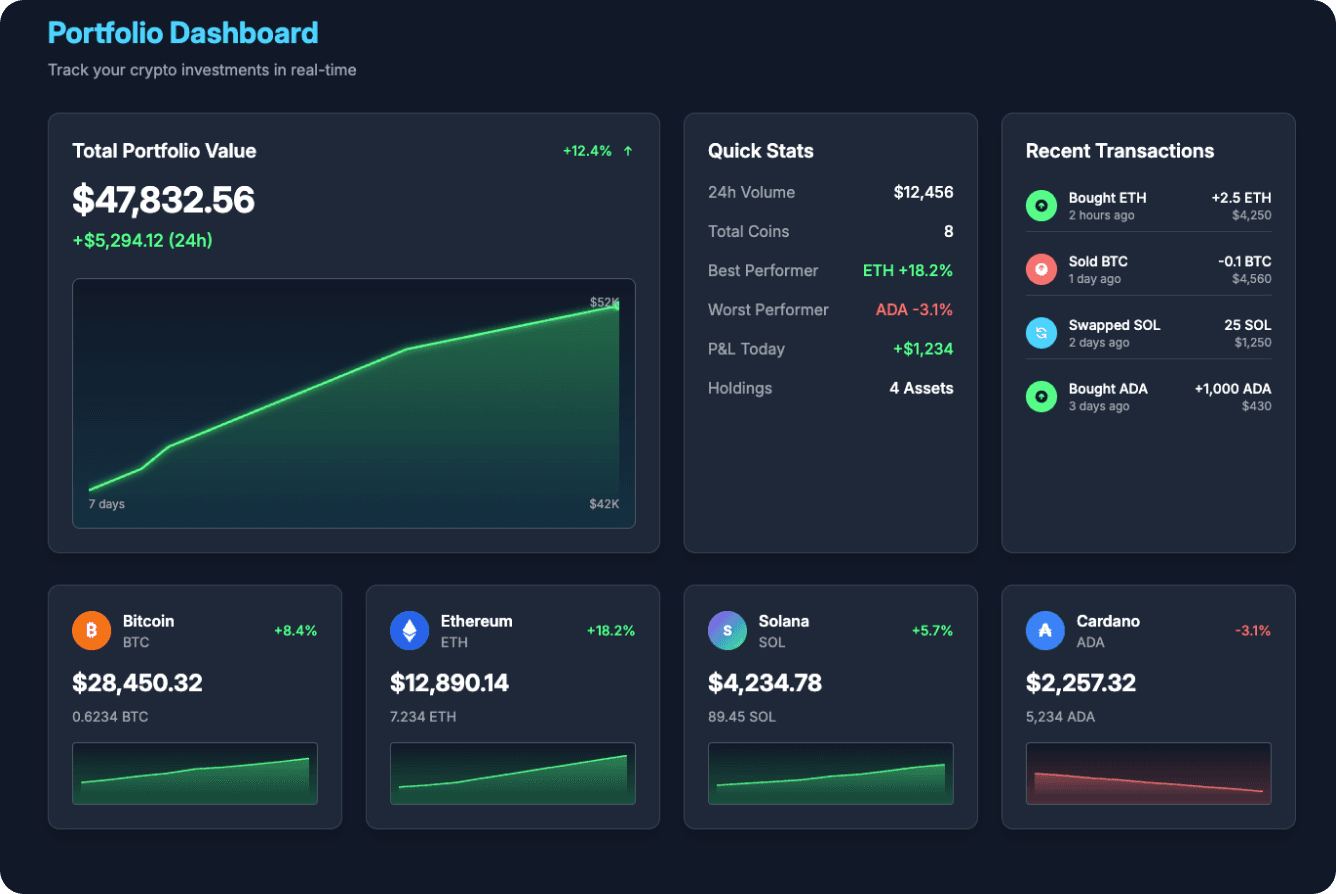
Follows a clean grid layout with clear separation of data blocks.
The design effectively uses neon accents to spotlight key metrics like growth and token performance.
Missing action buttons reduces its utility as a functional dashboard.
Doesn't fully showcase all token mini-charts equally, only BTC, ETH, SOL, ADA are visualized.
UX Pilot
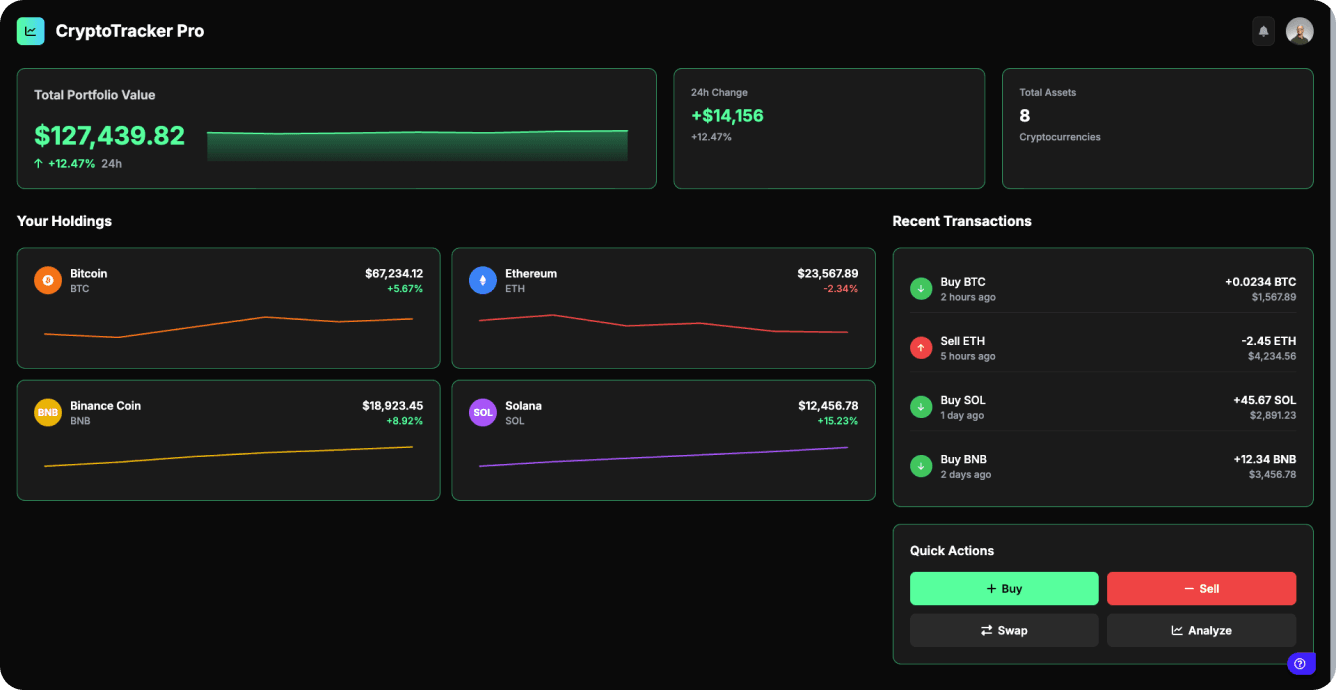
Covers all prompt elements: value, daily change, token charts, recent transactions, and quick actions.
Clean, functional layout with strong interactivity.
Visual hierarchy is weaker, key metrics don't stand out enough.
Neon accents feel underused; the visual doesn't fully embrace the neon aesthetic.
Create a beauty brand dashboard with bottom navigation, sales analytics, revenue charts, product performance metrics, customer insights, inventory status, and key business KPIs. Clean, modern design with data visualizations for tracking beauty product sales, trends, and business growth. Target: beauty brand managers and executives. Use brand color: #8152E1
UXMagic.ai
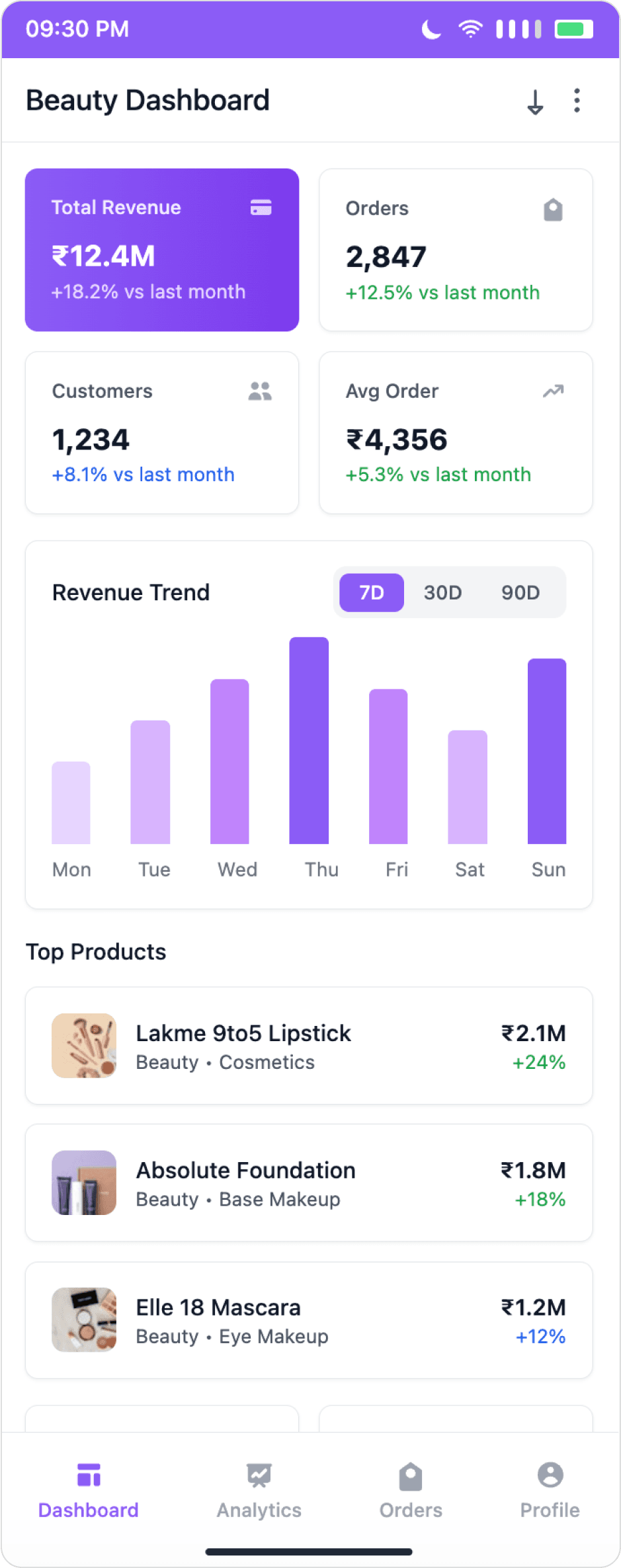
Effectively integrates the brand color #8152E1, ensuring a cohesive visual experience.
Includes all requested metrics: KPIs, revenue trends, product performance, and customer insights.
Inventory status is missing, no mention of stock or supply data.
Slightly less polish in visual hierarchy compared to UX Pilot, everything feels equally weighted.
UX Pilot
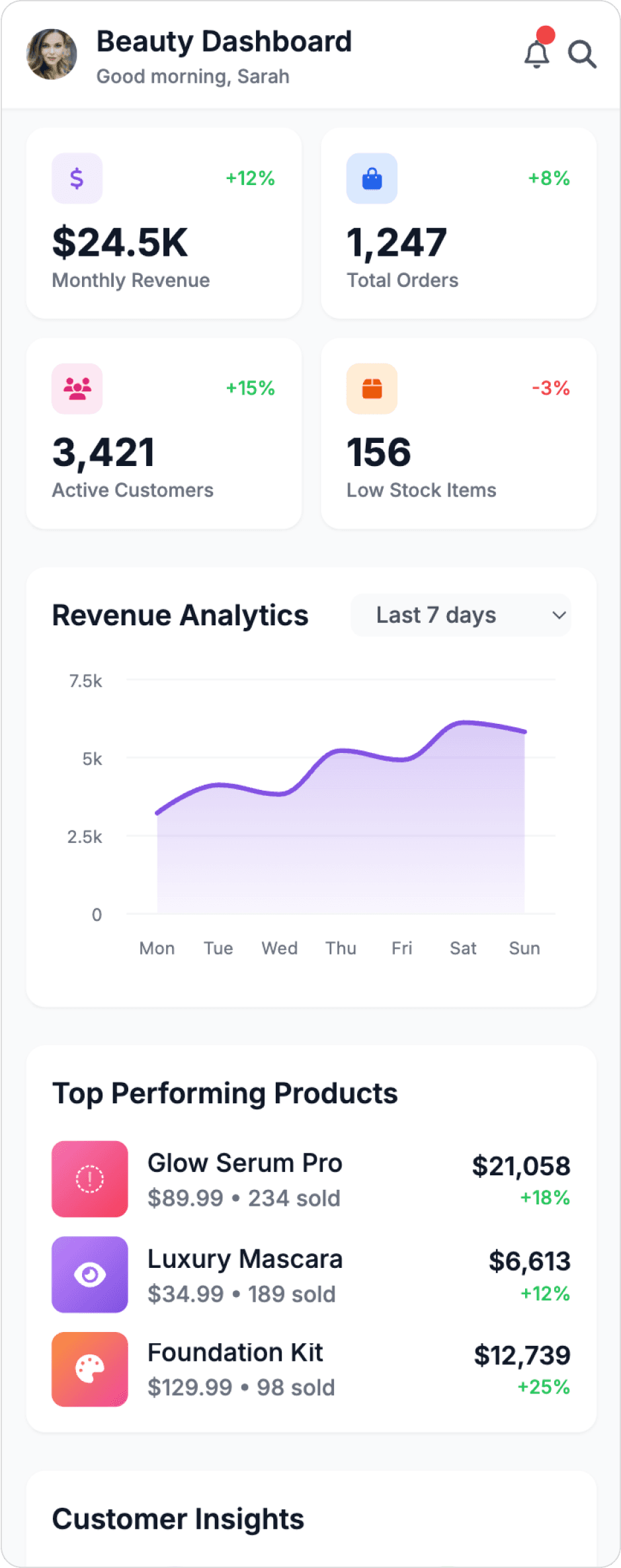
Strong visual hierarchy with clear grouping of KPIs, charts, and product insights.
Includes inventory data (low stock items), matching the prompt fully.
The brand color #8152E1 is minimally applied, missing an opportunity for a strong brand presence.
Minor spacing and padding inconsistencies are present.

About UXMagic
UXMagic is your AI-powered design copilot, built for creators who need to ship fast. It helps you go from prompt to responsive UI, clone entire websites, or generate screens from images, sketches, or URLs. With support for Figma, React, HTML, Webflow, and more, it's ideal for teams that design in one tool and build in another. Whether you're ideating or deploying, UXMagic accelerates your entire pipeline. Explore its features or pricing to learn more.

About UX Pilot
UXPilot is positioned as an AI-powered assistant for the entire UX process—from research and wireframes to heatmaps and design reviews. It's deeply embedded within the Figma ecosystem, offering a plugin-based experience where designers can generate screens, create user flows, and analyze usability—all inside Figma. Its core strength is holistic support for researchers, PMs, and UX generalists, not just visual designers.
Feature Comparison
| Feature | UXMagic Copilot | UXPilot |
|---|---|---|
| Prompt to UI | Generate multi-screen UI from natural language | Generate UI from text prompts |
| Image to UI | Convert screenshots/images to editable UI | Convert images to UI (limited styling controls) |
| Sketch to UI | Turn hand–drawn sketches into UI | Not available |
| Clone Website to UI | Clone any website to editable design | Not available |
| Apply Style Guide/Branding | Apply consistent design system across screens | Basic theming only |
| Connect Existing Figma Designs | Import existing designs from Figma | Figma plugin support |
| Export to Figma | One-click export to Figma | Export via plugin |
| Reference Frame for new designs | Auto–style new screens based on a reference frame | Style consistency from previous frames |
| Code Export (HTML/React) | Production-ready HTML/React code | HTML code only |
Who should use UXMagic?
Pricing Comparision

Free – $0/month
5 projects, 60 free credits (one-time), upto 10 screens, 1 Figma export
Premium – $14/month
20 projects, 480 credits (monthly), upto 80 screens, 80 Figma exports, React/HTML exports
Ultimate – $28/month
Unlimited projects, 1500 credits (monthly), upto 250 screens, 250 Figma exports, unlimited React/HTML exports

Free – $0/month
90 credits, Hifi UI, Wireframe, Design Review, Predictive Heatmap
Standard – $12/month
420 credits, Hifi UI, Wireframe, Design Review, Predictive Heatmap, Export to Figma, Export code, Screen Flows (max. 5 screens)
Pro – $22/month
1200 credits, Hifi UI, Wireframe, Design Review, Predictive Heatmap, Export to Figma, Export code, Screen flows, Section Edit, Image-to-Design
Final Verdict
UXMagic and UXPilot are both excellent tools for different stages of the design process. UXMagic is ideal for teams that need to ship fast and have a robust design system, while UXPilot is perfect for beginners and those who prefer a more hands-on approach. The choice ultimately depends on your specific needs and workflow.
UXPilot is an excellent choice for beginners and those who prefer a more guided, plugin-based experience. It offers a simpler, more streamlined workflow for quick mockups and ideation.
UXMagic is the clear winner for professional designers and teams that require production-ready outputs. Its robust feature set, Figma integration, and advanced styling capabilities make it a powerful tool for the entire design-to-dev pipeline.
Ultimately, the decision between UXMagic and UXPilot comes down to your specific goals and workflow. If you need a fast, production-ready tool with a robust design system, UXMagic is the way to go. If you are just starting out or prefer a more hands-on approach, UXPilot is a fantastic option.
لديك أسئلة؟لدينا الإجابات.
UXMagic is built for professional designers and teams, offering production-ready code, design system integration, and superior output quality for real-world projects. UXPilot is ideal for beginners or for creating quick, basic mockups, but lacks the advanced capabilities needed for professional design workflows.
Yes, both tools offer code export capabilities, enabling you to bring your designs to life in your preferred programming language.
Both tools can be seamlessly integrated with Figma, allowing you to import and export your designs directly from and to Figma.
UXPilot offers a free plan with 90 credits and access to its wireframe and HiFi UI tools. UXMagic also has a free plan - 30 one-time credits, 5 projects, and up to 5 screens with fuller code export (React, HTML, Tailwind) available on the free tier, which UXPilot reserves for paid plans.
Outside of the product name, "UX pilot" isn't a standard job title in the design industry; it's most commonly searched in reference to UXPilot, the AI design tool. The closest formal role is typically "UX Designer" or "Product Designer," roles that tools like UXPilot and UXMagic are built to speed up, not replace.
AI is changing the earliest, most repetitive parts of UX and UI work - blank-canvas wireframing, first-draft mockups, and basic layout but it doesn't replace user research, judgment about what to build, or accountability for whether a design actually works for real users. Tools like UXMagic and UXPilot are built to remove the repetitive parts of the job, not the role itself.
تعرّف على ميزاتنا



Related comparisons
Weighing up more than one tool? Here is how UXMagic compares against the closest alternatives.