
Product teams spend hours prompting AI design platforms only to watch a single layout modification destroy an entire multi-screen workflow. Most AI generators treat wireframing as isolated image rendering rather than structured product architecture. The result is a chaotic canvas of unlinked screens that takes longer to repair in Figma than drawing from scratch.
You already understand responsive grid layouts, design token architectures, and agile development cycles. This isn't a primer on the difference between low-fidelity and high-fidelity wireframes. It's a technical comparison of vector layer structures during Figma exports, Auto-Layout retention, credit consumption economics, and multi-screen logic handling across real edge cases - the benchmarks a superficial top-ten list skips entirely.
How We Evaluated These Tools
This is a comparison, not a scored ranking - there isn't enough independently verified quantitative benchmark data across every tool here to justify precise rankings, and claiming otherwise would overstate the evidence. What follows is organized around six evaluation criteria, applied consistently to every platform covered:
- Multi-screen generation - does the tool produce a connected flow, or isolated screens?
- Editing consistency - does a small edit stay scoped, or does it regenerate the whole canvas?
- Edge-state handling - does the tool generate error, empty, and loading states, or only the happy path?
- Figma export quality - does exported work arrive with native Auto-Layout intact?
- Design-system governance - does the tool respect existing tokens, or invent its own?
- Developer handoff - is there a clean code or MCP export path, not just a visual file?
The Paradigm Shift in AI Wireframing: Beyond Single-Screen Generation
The High-Fidelity Trap: Why Grey-Box Wireframing Accelerates Discovery
Generating polished, full-color mockups during early wireframing can introduce real bias into stakeholder feedback loops. When the AI jumps directly to full-color visual mockups, stakeholders can end up spending real meeting time on button drop-shadows instead of validating the underlying user flow. Low-fidelity, grey-box wireframing remains genuinely useful precisely because it strips away visual distractions, letting cross-functional teams evaluate information hierarchy, navigation structure, and functional copy before anyone debates color.
Maintaining Multi-Screen Context Memory Across Edge Cases
Generating isolated UI screens from individual text prompts is an increasingly outdated method for software design. Product design relies inherently on multi-step context, so real value in a modern AI tool comes from flow integrity across a complete user journey, not the polish of any single frame. Platforms that fail to maintain state memory across primary views, edge cases, modal overlays, and empty states fail to solve the core product problem, regardless of how good any individual screen looks.
Platform Comparison at a Glance
| Tool | Starting Price | Multi-Screen Flows | Figma Export (Auto-Layout) | Code Export | MCP Support | Free Tier |
|---|---|---|---|---|---|---|
| UXMagic | Free tier + paid plans | Yes, connected flows | Yes, structured Auto Layout | Yes (React/Tailwind) | Yes | Yes |
| Visily | ~$11/editor/mo | Primarily single-screen workflows | Yes | Limited | No | Yes |
| Flowstep | ~$15/mo (usage-based) | Yes, connected canvas | Copy/paste; no dedicated plugin | Yes (React/TypeScript/Tailwind) | Not confirmed | Confirm on site |
| Anima / Buddy (Figma-native agents) | Varies by Figma plan | Canvas-scoped | Native (in-canvas) | Via plugin | Not confirmed | Confirm on site |
| Uizard | ~$12/mo annual | Limited by prompt character caps | No native export; SVG only | No | No | Yes |
| Balsamiq | Desktop sales end Dec 31, 2026 | No — isolated frames | No | No | No | Trial only |
2026 Platform Comparison: Primary Use Cases
UXMagic: PRD-to-Flow Architecture and Dual Handoff
UXMagic processes a PRD directly to generate interconnected user flows while maintaining state consistency across primary and secondary screens - a direct answer to the unlinked-screen-sprawl problem covered above. On export, it delivers structured Figma frames with native Auto-Layout alongside production-ready React/Tailwind code.
Visily: Single-Screen Drafting and Screenshot Imports
Visily is genuinely strong for fast, single-screen drafting and converting a screenshot into an editable starting point. It's a weaker fit once the job shifts to a connected, multi-screen enterprise flow that needs to hold together across several linked states.
Flowstep: Interactive Canvas Prompting and Developer Handoff
Flowstep's infinite-canvas approach suits teams that want to prompt and adjust directly on a working surface, generating multiple connected screens (login, dashboard, settings, onboarding) in one session. Its Figma handoff works via direct copy-paste rather than a dedicated plugin, and it exports React, TypeScript, and Tailwind CSS.
Anima & Buddy: Figma-Native Agent Workflows
Figma's built-in AI capabilities, including third-party agents like Anima and Buddy operating inside the canvas, tend to excel at micro-edits and localized component generation within an already-established file. Dedicated AI wireframing platforms tend to offer stronger execution for initial zero-to-one exploration - generating structured multi-screen architecture from a PRD before design system ingestion - which is a genuinely different job than refining something that already exists.
Uizard: High-Speed Early Conceptualization
Uizard remains a fast option for rough early conceptualization, particularly for a non-designer who needs a quick first pass at an idea. Its Autodesigner prompt is capped at 300 characters regardless of tier, per Uizard's own documentation, which limits how much of a complex multi-screen brief it can absorb in one pass.
Balsamiq: Intentional Low-Fidelity Sketching
Balsamiq's deliberately rough sketch aesthetic still earns its place for teams that specifically want a first conversation focused on structure, not visual polish. Per Balsamiq's own official announcement, desktop sales stop December 31, 2026, with support continuing through December 31, 2027.
Technical Evaluation Framework: Choosing an Enterprise AI Wireframer
Multi-State Logic and Edge-Case Handling
Prompting UI directly into code can work fine for a basic contact form, but as soon as complex role-based access controls appear, the front-end structure can break down. Bypassing dedicated design environments to prompt application code directly via an LLM risks creating fragile front-end architectures - when teams skip structural wireframing, they can miss edge cases, error states, and responsive breakpoints that a proper blueprint would have surfaced first.
Figma Auto-Layout Export Integrity
Some AI wireframing tools can export ungrouped vector layers that require substantial manual cleanup once they land in Figma - a documented, commonly reported pattern across generic single-screen generators rather than a universal failure of every tool in this category. This is the single most consequential technical benchmark in this whole comparison: a tool that fails here has effectively handed back manual work disguised as automation.
Design System Governance and Layout Tokens
Generative UI tools can sometimes ignore an existing design system entirely, inventing arbitrary margins, padding values, and non-standard form components that don't match anything already in production. A tool worth adopting enforces layout rules and token consistency by default, not as a manual cleanup pass a designer has to run after every generation.
Tactical Execution: From PRD Ingestion to Figma and Code Handoff
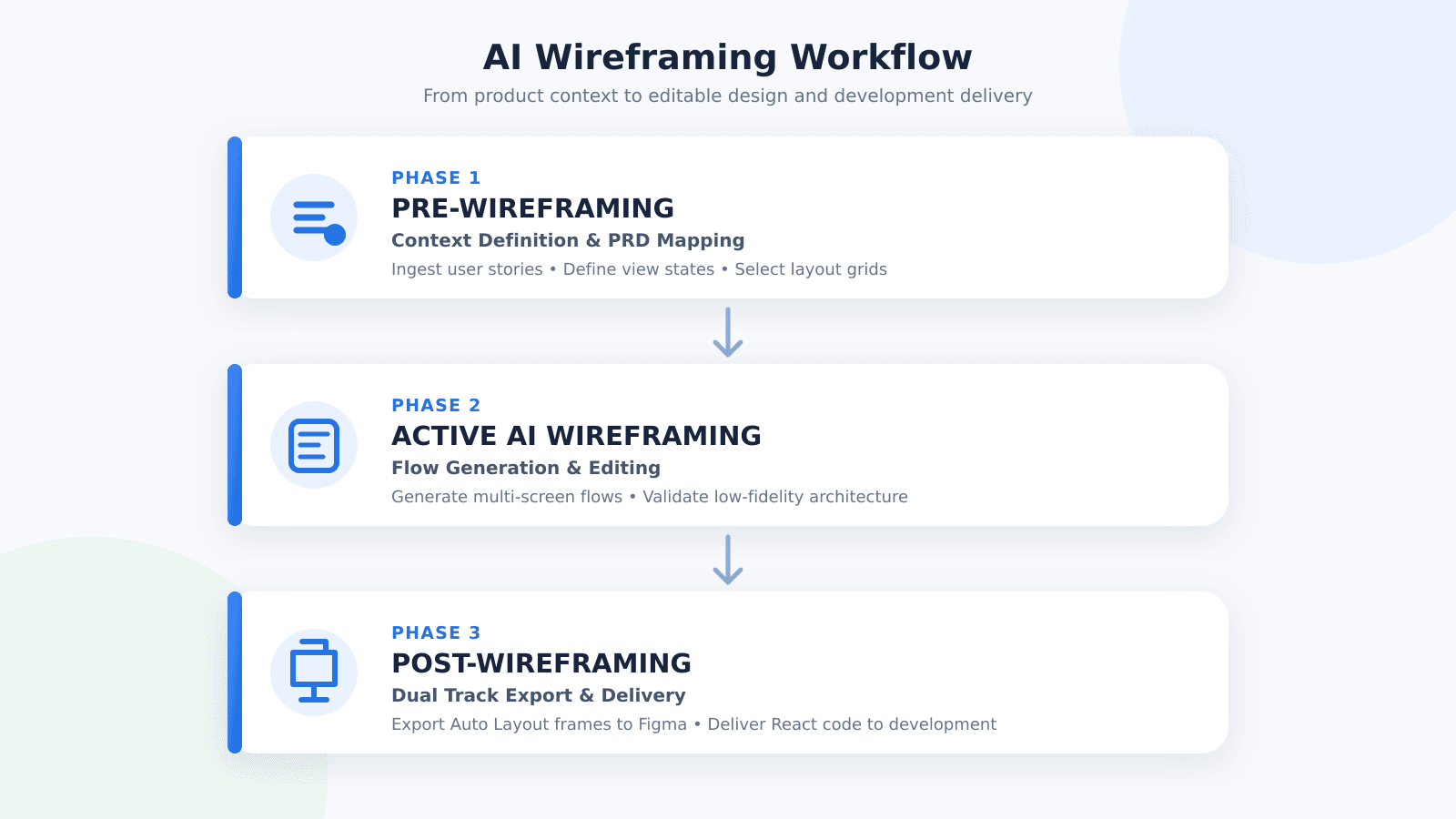
Phase 1 - Pre-wireframing context definition.
Before initiating AI generation, product leads define functional parameters to prevent model hallucination and layout drift. The team gathers core user stories, target persona requirements, and functional constraints from the PRD, then maps required view states - default screens, populated data views, loading skeletons, empty states, error handling. Structural navigation patterns get specified upfront to anchor the layout grid.
Phase 2 - Active AI wireframing and flow generation.
The team prompts the platform to construct entire user journeys simultaneously rather than generating isolated screens. Generated layouts get reviewed in grey-box low-fidelity to evaluate information hierarchy, button placement, and copy structure without visual bias. Designers make targeted micro-edits to specific components using localized canvas controls, preserving the surrounding screen structure rather than triggering a full regeneration. Finally, the platform generates required exception flows - input validation errors, permission denials, empty search results - as part of the same pass.
Phase 3 - Post-wireframing dual-track handoff.
Once the flow is approved, it enters two parallel delivery paths. The design track exports structured artboards directly into Figma, with layers arriving organized, native Auto-Layout intact. The engineering track generates production-ready React and HTML/Tailwind components, with design context connecting to developer environments like Cursor or Claude Code via Model Context Protocol (MCP) servers for rapid front-end implementation.
Practical Scenarios: Where Generic Tools Break
B2B enterprise multi-tenant onboarding flow. A product manager at a Series B SaaS company needs to design a multi-step onboarding flow featuring workspace setup, team invitations, and role-based access control matrices. Under a traditional workflow, a designer spends several days setting up Auto-Layout frames, drafting dropdown menus, and manually copying screens to represent different permission levels.
Using flow-native AI wireframing instead, the PM inputs the PRD directly, and the tool generates a continuous four-screen onboarding flow - Workspace Setup → Team Invitation → Permission Assignment Matrix → Confirmation Dashboard - in one pass. Generic AI tools tend to fail this scenario specifically by generating disconnected screens with inconsistent permissions data, omitting back-navigation, or applying consumer-app UI patterns that don't suit dense enterprise software.
E-commerce subscription payment failure recovery. A growth product lead needs to redesign a subscription checkout experience, specifically the recovery flow when a recurring payment fails. Under sprint deadline pressure, teams routinely skip wireframing error states entirely, handing engineering an ideal-path design and letting them improvise the error modal in code.
Prompting a flow-native system specifically for payment failure scenarios instead generates both the standard renewal screen and the corresponding error modal - updated payment input forms, secondary payment method selection - as a matched pair. Generic AI tools tend to fail here because prompting for the error state can trigger a full canvas re-render, shifting navigation header positions and footer components across screens that were already approved.
Executive business intelligence analytics dashboard. A senior UX designer needs an executive financial dashboard with top-level KPI cards, dynamic date range pickers, and drill-down data tables. Traditional workflows require extensive component library setup and tedious manual alignment. Prompting a flow-native platform for the executive view instead produces a structured dashboard - balanced KPI cards, readable data grids, filter sidebars - built around established data visualization conventions.
Where Layout Governance Actually Shows Up
Preventing premature high-fidelity review is a governance decision, not just a stylistic preference - enforcing grey-box layout rules ensures stakeholders evaluate information hierarchy and functional logic before visual styling ever enters the conversation. On the export side, structured designs move into Figma pre-configured with Auto-Layout constraints, alongside clean React/Tailwind code for engineering.
Test AI Wireframe Flow Integrity
Generate a connected PRD-to-flow architecture that preserves approved screens and layout structure when individual states are edited.