UXMagic vs Rocket.new: Which AI App Builder Wins in 2026?
UXMagic.ai is an AI-powered tool for generating editable UI designs from prompts, sketches, images, or existing websites, streamlining UX workflows. In contrast, Rocket.new, appears to be a no-code/low-code platform focused on quickly building web and mobile apps, including short-video sharing platforms, without writing code.

Output Comparison : Side-by-Side Design Quality
Design a SaaS dashboard with dark mode, analytics charts, and team collaboration features.
UXMagic.ai
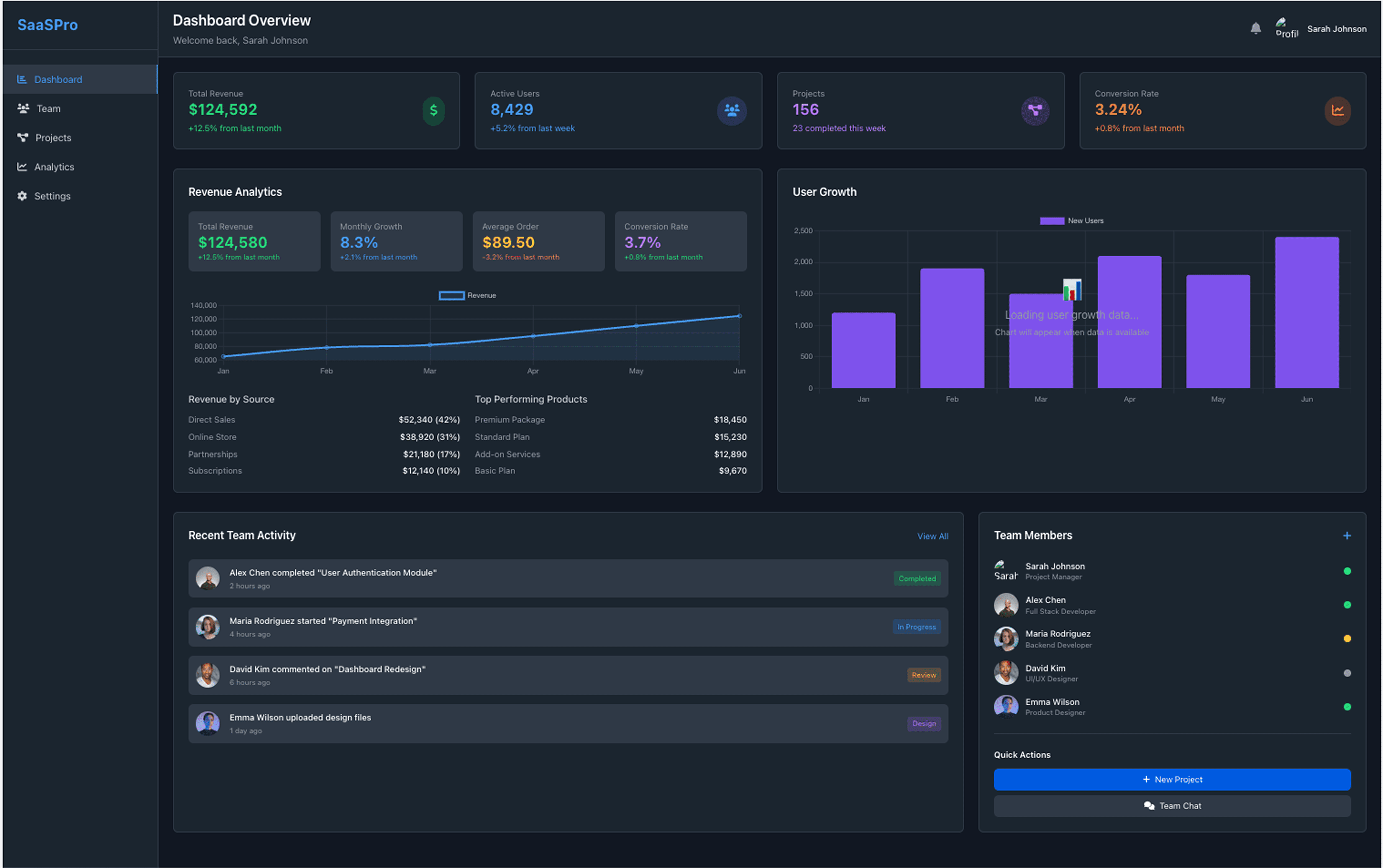
Multiple Charts for analytics
Team section is added.
SideBar also present for clear navigation.
Rocket.new
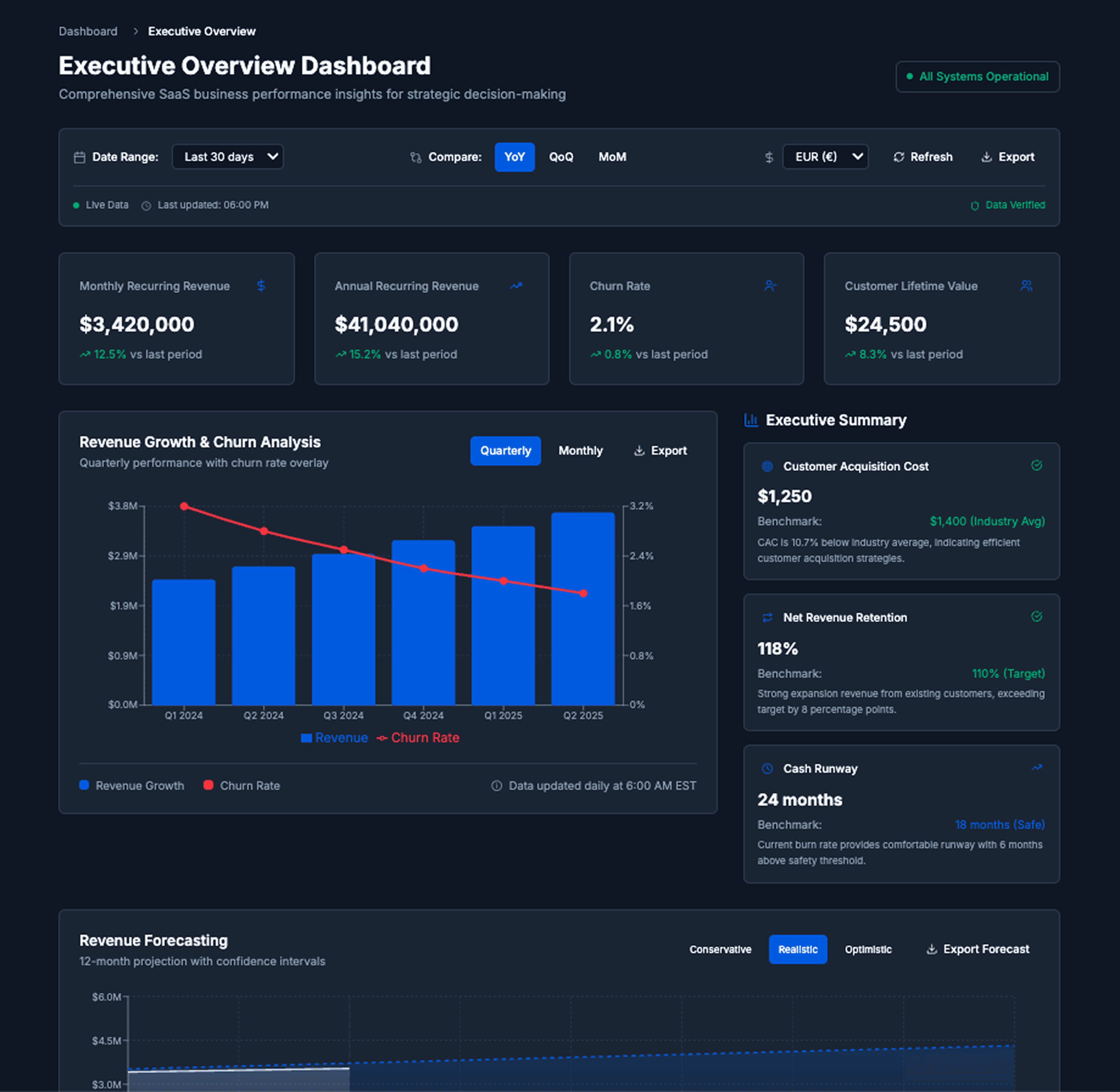
Charts are concise and clear.
Contains the overwhelming depth of the Information
Team section is entirely missing
Build a mobile app for booking fitness classes calendar sync
UXMagic.ai

Available Footer Design
Clear and Intuitive
Contains information such as users subscribed to a particular session. rating & timings etc.
Rocket.new

Missing Footer design
Much better generation in the mobile view
The Slider view in the top looks intuitive.
UXMagic.ai
UXMagic is an AI-powered design-to-code tool built for professionals. It transforms prompts, sketches, or Figma files into production-ready UIs, complete with style guides, component libraries, and seamless exports to Figma or React. With real-time preview, collaboration features, and a rich toolkit, UXMagic accelerates idea-to-interface faster than traditional workflows. Checkout our pricing for plans.
Rocket.new
Rocket.new is an AI-powered no-code/full-stack platform that turns natural language prompts and Figma designs into fully functional applications. Supporting React, Next.js, Flutter, and HTML, it produces exportable code, integrates with GitHub, Stripe, Supabase, and more, and enables one-click deployments. Positioned as a “full-stack product team in your browser,” Rocket.new caters to startups, developers, and agencies who need apps fast.
Feature Comparison
| Feature | UXMagic.ai | Rocket.new |
|---|---|---|
| Prompt to UI | Converts text, sketches, URLs, and Figma into UIs | Converts text, Figma, and screenshots into full apps |
| Export Options | Figma, React, clean code exports | React, Next.js, Flutter, HTML with GitHub push |
| Style Guide | Auto-generated style guide for consistent design | Template-driven consistency, limited style flexibility |
| Component Editing | Advanced editing with reusable UI components | Visual editor with customization of generated elements |
| Team Features | Collaboration tools for designers & developers | Limited—optimized for solo founders/SMBs |
| Figma Plugin | Direct Figma plugin support | Strong Figma import but no plugin ecosystem |
| Real-Time Preview | Live UI + code preview side by side | Real-time code preview and deployment options |
| Integrations | Focused on design/dev handoff | Extensive: Stripe, Supabase, OpenAI, GitHub, etc. |
UXMagic
Pricing Comparison

Free – $0/month
5 project, 120 free credits (one-time), upto 20 screens, 1 Figma export
Premium – $18/month
20 projects, 480 credits (monthly), upto 80 screens, 80 Figma exports, React/HTML exports
Ultimate – $35/month
Unlimited projects, 1500 credits (monthly), upto 250 screens, 250 Figma exports, unlimited React/HTML exports
Personal plan – $ 25 /month
5M tokens. 6 Figma screen to code conversion or 20 screens of apps, websites, dashboards, internal tools, etc.
Rocket plan – $ 50 /month
10.5M tokens, 12 Figma screen to code conversion or 45 screens of apps, websites, dashboards, internal tools, etc.
Booster plan – $ 100 /month
22M tokens. 25 Figma screen to code conversion or 100 screens of apps, websites, dashboards, internal tools, etc
Final Verdict
When it comes to UXMagic vs Rocket.new, the choice depends on your needs.
If you’re a founder or agency looking for complete app development with backend, APIs, and hosting, Rocket.new delivers more end-to-end functionality.
If you’re a designer, product manager, or dev who needs high-quality UIs, style consistency, and smooth handoff, UXMagic is the clear winner.
Bottom line: UXMagic is the tool for professionals obsessed with great design and front-end quality, while Rocket.new shines as a rapid MVP and full-stack accelerator.
des questions ?nous avons les réponses.
UXMagic focuses on design-to-code workflows, while Rocket.new generates full applications with backend and deployment.
Yes—UXMagic offers style guides, consistent UI exports, and Figma integration, making it better for designers.
Rocket.new uses a token-based model ($25–$100/month), while UXMagic keeps it simple with flat pricing ($14–$28/month).
Choose Rocket.new if you need a working MVP with backend and deployment. Choose UXMagic if you want high-quality UIs with clean exports.
UXMagic is easier for design-first users, while Rocket.new has a steeper learning curve due to token management and full-stack complexity.



Related comparisons
Weighing up more than one tool? Here is how UXMagic compares against the closest alternatives.