UXMagic vs. AppAlchemy: The 2026 AI Design Showdown
UXMagic and AppAlchemy are both AI-powered design platforms, but their focus and capabilities differ significantly. AppAlchemy emphasizes speed, turning prompts into fully executable mobile prototypes in React Native almost instantly - great for founders or small teams. UXMagic prioritizes structured, production-ready outputs with editable Figma layers and multi-screen flows, ideal for professional product teams. Understanding these differences will save you wasted time and money.


Output Comparison: Side-by-Side Design Quality
Design a fintech mobile app onboarding flow with 4 screens: a welcome screen with brand logo, a KYC document upload screen with a progress indicator, a biometric verification screen with a fallback PIN option, and a success screen with a CTA to fund the account. Use a dark navy and teal color palette, rounded card components, and ensure the flow accounts for an error state if document upload fails.
UXMagic
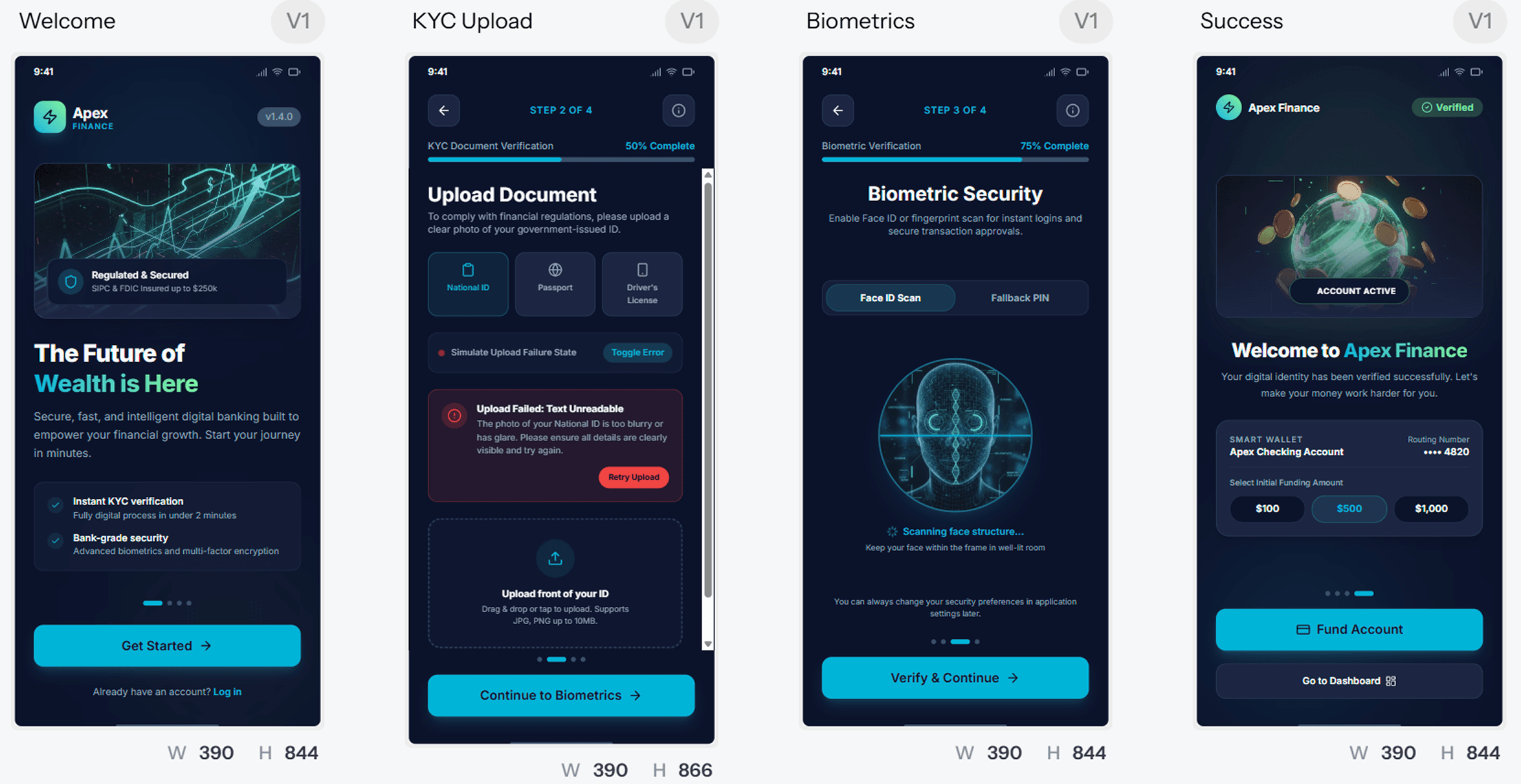
Clean, consistent visual hierarchy across all 4 screens.
Clear progress indicators and fallback/error states are included.
Slightly dense information on KYC screen; could simplify instructions.
Brand identity on the success screen could stand out more visually.
AppAlchemy
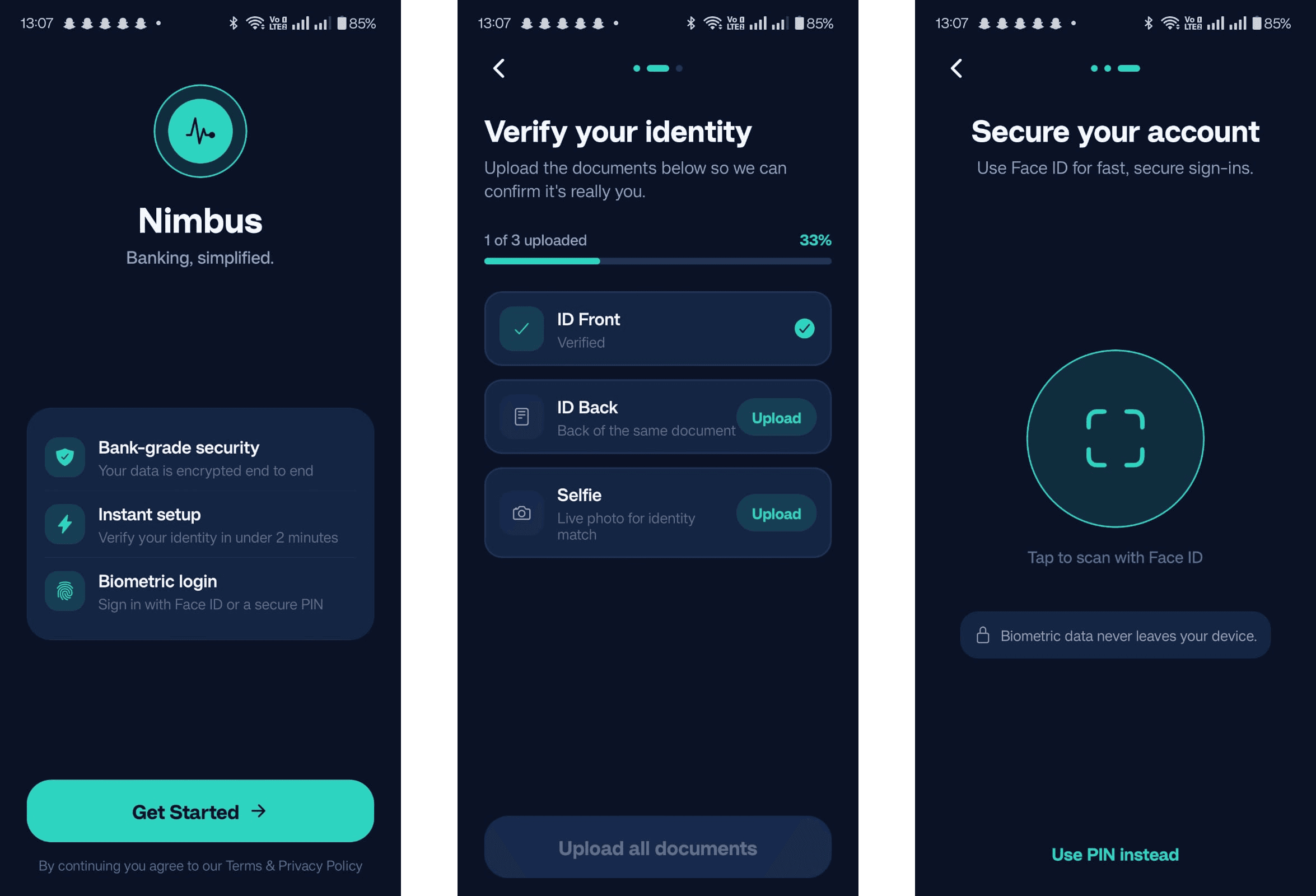
Minimalist and visually uncluttered UI.
Simple, straightforward onboarding steps.
Lacks detailed error/fallback handling (e.g., failed uploads).
No visible progress indicator; users may be unsure how many steps remain.
Design a logistics tracking dashboard with a sidebar navigation, a live shipment map placeholder, a data table showing shipment status with sortable columns, and a KPI summary row showing on-time delivery rate, average transit time, and total active shipments. Include an empty state for when no shipments exist and a dark mode variant.
UXMagic
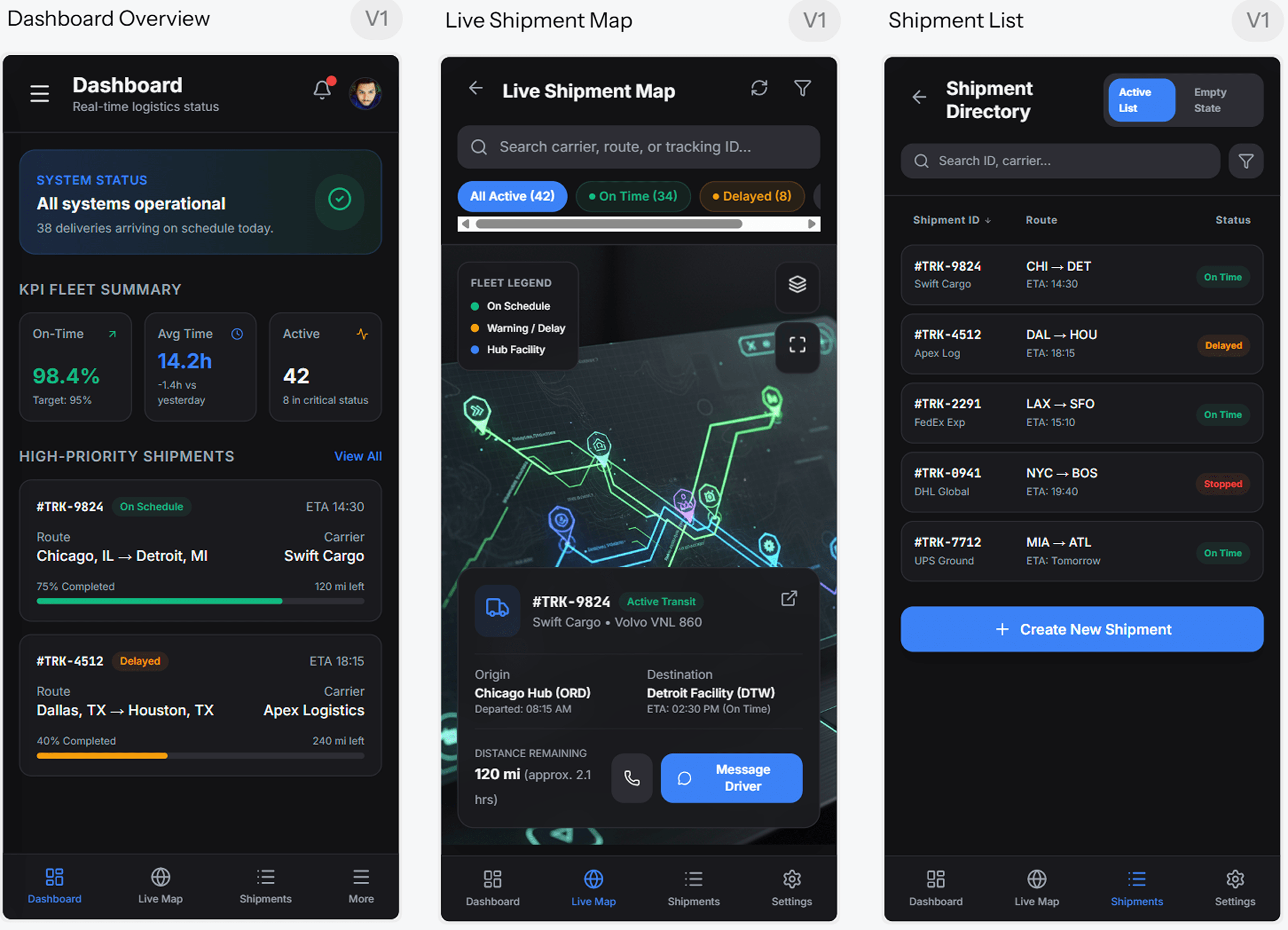
Clean, consistent dark mode UI with clear hierarchy.
KPIs, map, and shipment status are visually easy to read.
Tables feel cramped on mobile.
Map screen lacks interactive cues for user actions.
AppAlchemy
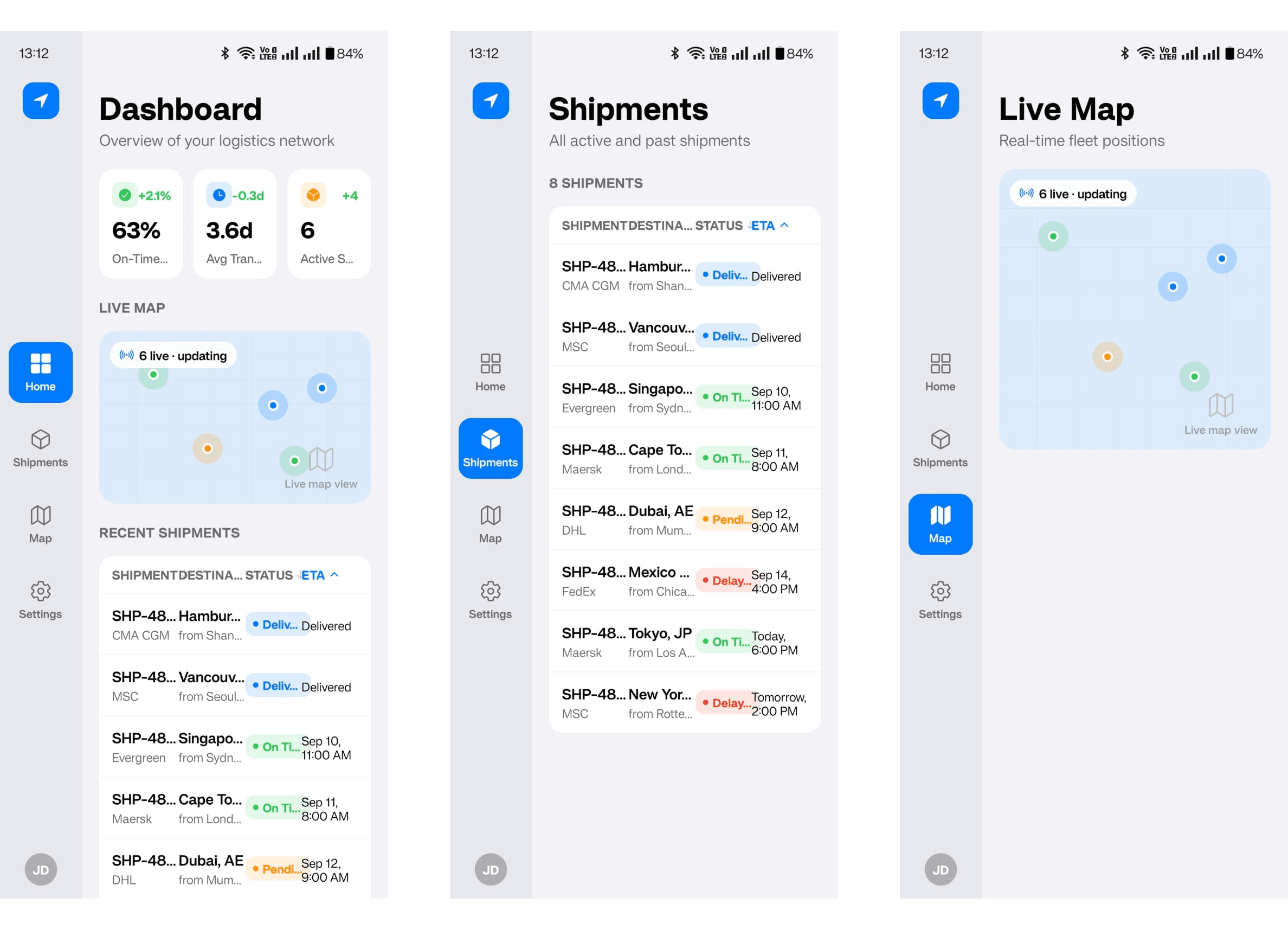
Quick representation of data points in table and map.
Mobile-like spacing for readable card components.
UI feels slightly fragmented; sidebar and main area not fully aligned.
Typography and spacing are inconsistent, less polished for enterprise dashboards.
UXMagic
UXMagic is an AI-powered UX and UI generation platform that turns prompts, sketches, screenshots, and live websites into fully editable product designs and production-ready code. It enables teams to generate complete user flows, enforce design systems, clone websites, and export seamlessly to Figma, React, and HTML. With UXMagic, teams can move from idea to launch faster - explore the full features or check the pricing page to find the best fit for your workflow.
AppAlchemy
AppAlchemy is a U.S based, rapid mobile app development platform designed for speed and ease of use. Initially an AI-powered UI design tool, it has evolved into a conversational mobile app builder that translates natural language prompts into deployable React Native code via the Expo framework. Users can instantly preview live apps on their devices via QR code, making it ideal for fast prototyping and iteration.
Feature Comparison
| Feature | UXMagic | AppAlchemy |
|---|---|---|
| Prompt to UI | Generates connected, multi-screen flows from text prompts | Generates functional mobile app code from chat-based prompts |
| Additional Inputs | Also accepts sketches, screenshots, and live URLs | Chat-only; a separate legacy subdomain offers static design generation |
| Export Options | Exports to Figma (auto-layout, editable layers) & clean React/HTML | Exports raw React Native source code; no Figma or vector export |
| Style Guide / Design System | Imports and enforces corporate design tokens, typography, and components | No design-system import; styling is AI-managed per generation |
| Component Editing | Full granular control via native Figma integration | Edits happen via re-prompting in chat; no direct visual/vector editing |
| Team Features | Built for collaborative stakeholder review and structured handoff | Built for solo builders; no noted multi-stakeholder review workflow |
| Figma Plugin / Integration | Deep, native Figma integration | None - output is code, not a design file |
| Real-Time Preview | In-browser rendering and native Figma prototyping | Live on-device rendering via Expo QR code scan onto a physical phone |
| Platform Coverage | Omnichannel - web, SaaS dashboards, mobile UI, landing pages | Mobile only (iOS/Android via React Native) |
UXMagic
Pricing Comparision

Free – $0/mo
30 free credits 5 Projects Up to 5 screens 1 Figma export UI design Wireframe mode Sectional editing
Pro – $17.5/mo
1200 credits Unlimited Projects Up to 200 screens 250 Figma exports Export code UI Design Wireframe Flows Screenshot to UI Sketch to UI Text Editing & upload images Clone a site (from URL)
Enterprise – Custom
Everything in Pro Unlimited AI generations Dedicated support SSO Setup call to get your whole team running from day one.

Free – No dedicated free tier
Pro – $20/mo
100 credits / month Build apps with frontier AI Live preview on your phone Export your code
Max – $200/mo
1000 credits / month Everything in Pro Priority throughput Best for heavy daily use
Final Verdict
UXMagic vs AppAlchemy ultimately comes down to what stage your product is at. AppAlchemy is the faster path to proving an app should exist - a live, installable mobile prototype with zero design or coding skill required. UXMagic is the better choice for teams deciding how a product should be built, offering structured Figma files, enforced design systems, omnichannel output, and a scalable handoff process.
AppAlchemy is ideal for solo founders or small teams racing to validate an app idea quickly. It produces a live, installable mobile prototype without requiring design or coding skills.
UXMagic is ideal for design teams building governed, multi-platform products where structure, consistency, and developer handoff matter. It ensures design artifacts are production-ready and scalable across teams and platforms.
Neither tool is strictly "better" in isolation - early-stage concept validation favors AppAlchemy, while governed, multi-platform product design favors UXMagic. Many teams start with AppAlchemy for rapid validation, then transition to UXMagic for structured design and scalable handoff.
des questions ?nous avons les réponses.
Not entirely - the two tools solve different problems. UXMagic vs AppAlchemy is really a comparison between a design-and-handoff platform and a mobile app compiler, so the "better" choice depends on whether you need an editable design system or a fast, working app.
UXMagic is cheaper on a monthly subscription basis at every tier, topping out around $35 for monthly plan versus AppAlchemy's $200/month Max plan. However, AppAlchemy's higher tier can offset the cost of hiring a mobile developer, which may make it cheaper overall depending on your situation.
No. AppAlchemy generates React Native code directly with no Figma or vector export, while UXMagic natively integrates with Figma, producing fully editable, auto-layout-enabled design files professional designers can work in directly.
Yes - UXMagic generates mobile UI as part of its omnichannel coverage, alongside web dashboards and landing pages, though it outputs Figma files and code components rather than a live, deployable mobile app the way AppAlchemy does.
Yes, that's specifically who it's built for. AppAlchemy's chat-based interface lets non-technical founders and "vibe coders" describe an app in plain language and get a working mobile prototype, without needing design software or coding skills.
Découvrez nos fonctionnalités



Related comparisons
Weighing up more than one tool? Here is how UXMagic compares against the closest alternatives.