
Boutique agencies are still issuing $80,000 proposals for standard CRUD platforms while quietly using AI tools to generate the underlying codebase in days. Meanwhile, founders attempting to launch production SaaS using consumer text-to-app generators end up with unmaintainable code that fails basic security audits. The real cost equation in 2026 isn't about cheaper syntax - it's about identifying where the actual bottleneck shifted.
A note on the numbers throughout this piece: cost figures below come from two different kinds of sources, labeled clearly as we go. Some are market benchmarks - ranges drawn from published 2026 industry data across multiple sources. Others are illustrative project figures - real build-log examples that show a pattern, not a guaranteed price. Published market data on SaaS MVP costs in 2026 shows wide variance depending on region, team structure, and scope - commonly $35,000 to $95,000+ for a lean, single-platform build. Treat any single number in this piece in that context, not as a universal quote.
You already understand authentication, multi-tenancy, APIs, and basic wireframing. This isn't a beginner's cost primer. It's the component-level breakdown, the real post-launch overhead, and the exact phase where AI compresses cost versus where it doesn't - the data most agency-written cost guides conveniently skip.
Three Budget Scenarios
| Tier | Estimated Range | Typical Scope |
|---|---|---|
| Lean MVP | $20K–$35K | Single core workflow, managed auth (e.g., Clerk/Auth0), managed AI API if any, minimal integrations, single platform |
| Standard SaaS MVP | $35K–$75K | Multi-tenant architecture, subscription billing, role-based permissions, several third-party integrations |
| Complex SaaS MVP | $75K+ | Custom AI/ML features, SOC 2 or HIPAA readiness, multi-region infrastructure, enterprise security review |
These bands reflect the wide range seen across current market data - where your project lands depends heavily on regulatory scope, integration count, and whether AI features are managed-API-based or custom-built (more on that distinction below).
MVP Cost Formula
A simple way to think about what actually makes up a quote:

Every section in this guide maps to one term in that formula. When a quote feels inflated or suspiciously cheap, checking it against each term individually is a better diagnostic than comparing the single bottom-line number to something you saw online.
Cost Breakdown by Component
| Component | What It Covers | Relative Cost Weight |
|---|---|---|
| Discovery | Personas, database schema, API contracts, architecture scoping | Low–Moderate |
| UI/UX | Screen flows, component design, interactive states, design system | Moderate–High |
| Backend | Auth, multi-tenancy, database, core business logic | Moderate (compressed by AI tooling) |
| AI features | LLM API integration or custom model work, if applicable | Variable - see table below |
| QA/security | Integration testing, rate limiting, security review | Moderate |
| Deployment | Cloud infrastructure setup, CI/CD, launch configuration | Low–Moderate |
| Post-launch | Hosting, API usage, maintenance (ongoing, not one-time) | Ongoing, ~15–20% of build cost annually |
The 2026 SaaS MVP Cost Landscape: Real Benchmark Data
Why Code Generation Did Not Make Software Free
AI didn't make software development free; it made code syntax cheap while making poor design decisions and flawed database architecture exponentially more expensive if they go unchecked. Manual code entry never accounted for more than roughly 30% of a software development invoice in the first place - the rest was always discovery, design, integration debugging, and iteration. Founders who confuse a generated screen demo with a shippable multi-tenant product tend to end up paying twice: once for the demo, and again for the rewrite.
Text-to-App Generators Produce Demos, Not Shippable SaaS
Common advice suggests no-code platforms and conversational app builders let non-technical founders build complete, enterprise-grade SaaS products without writing code. In practice, prompt-based app generators commonly produce non-scalable prototypes - a frequent, well-documented limitation rather than a universal failure of every tool in this category. They often lack robust multi-tenancy architecture, granular role-based access control, optimized database indexing, and compliant data handling. Attempting to scale a prompt-generated app frequently forces a full rewrite, converting an initial savings into a technical debt recovery project.
Where AI Saves Money vs. Where It Doesn't
| Savings Level | Areas | Why |
|---|---|---|
| High savings | Boilerplate code, standard CRUD operations, database migrations, unit/integration tests | Well-documented, pattern-heavy work AI handles reliably with senior review |
| Moderate savings | UI scaffolding, third-party API integrations | Faster with the right tooling, but still needs human judgment on flow logic and edge cases |
| Low savings | Architecture decisions, product research, strategic prioritization, security review | These require domain judgment AI can't substitute for - the actual bottleneck lives here now |
2023 vs. 2026 Component Breakdown: How Engineering Line Items Compressed
Authentication, Multi-Tenancy, and Subscription Billing Costs
AI code assistants have compressed boilerplate backend implementation, database migration scripts, and unit test generation significantly compared to pre-2024 baselines - this is real, and it's the genuine source of most legitimate cost reduction. Authentication flows, standard CRUD operations, and Stripe billing integration are exactly the kind of well-documented, pattern-heavy code that AI coding assistants handle well with senior oversight.
The UI/UX Flow Bottleneck: Why Design Is the New Development
Traditional development models assume backend engineering represents the bulk of MVP costs and timeline delay. That assumption is increasingly outdated. Visual layout consistency, screen-to-screen user flow logic, and component state management now represent a real primary friction point in shipping software - engineering velocity accelerated with AI code assistants, but interface design and screen flow alignment can still consume real weeks when teams rely on prompt-based UI tools that yield inconsistent visual outputs screen to screen. For a broader look at how AI is reshaping this specific part of the workflow, this breakdown of AI in modern UX design covers the pattern in more depth.
The Real Cost of Adding AI Features to Your SaaS MVP
API-Driven AI vs. Custom Model Engineering
Standard market advice pushes early-stage founders to incorporate generative AI features to compete for capital and users. In practice, incorporating generative AI features tends to increase initial build costs by roughly 15% to 40% and introduces variable cost of goods sold through LLM API tokens, vector database hosting, and GPU compute overhead. Unless per-tenant rate limits and strict caching are implemented on day one, unexpected inference usage can eat into early operating margins fast.
A specialized legal document summarizer illustrates the trade-off directly - this is an illustrative project example, not a market benchmark. An API-driven architecture leveraging managed models (OpenAI/Claude) and vector databases (Pinecone/Qdrant) can land an initial build in the low-to-mid five figures with a matter of weeks to launch, alongside modest ongoing API and hosting fees. An over-engineered alternative - fine-tuning open-source models on dedicated GPU infrastructure - can run many times that cost, with several months of build time and thousands of dollars in fixed monthly GPU compute commitments. Standard SaaS products should generally launch on pre-built managed AI APIs to preserve capital prior to market validation, reserving custom model investment for after that validation happens.
Post-Launch Overhead: LLM Tokens, Vector Databases, and Hosting
Post-launch operational costs typically include cloud hosting, third-party services like authentication and email, LLM API token consumption, and ongoing system maintenance running roughly 15% to 20% of the initial build cost annually. Reserve real budget for this specifically - a common founder mistake is treating the initial build number as the total cost, when infrastructure and maintenance are an ongoing line item from day one of launch.
Choosing Your 2026 Build Model: Agency, Freelancers, or Solo AI Engineer?
Agencies frequently claim that building an investor-ready SaaS requires a full agency pod - a project manager, lead architect, frontend developer, backend engineer, and dedicated designer. Market data increasingly suggests a single senior full-stack engineer leveraging advanced AI coding tools and production-ready UI flow generators can achieve strong output velocity with zero team coordination overhead. The five-person agency pod model primarily serves agency management margin more than it serves engineering output in many cases - worth weighing directly before signing a proposal built around that structure, though a larger team can still be the right call for genuinely complex, multi-stream projects.
Strategic Blueprint: Scoping a Lean MVP (Roughly $20K–$35K)
A scope clarification first: the lean-MVP band above assumes a single core workflow, managed authentication, minimal third-party integrations, and no custom AI model work - a managed API integration at most. Add multi-tenancy, several integrations, or custom AI/ML, and the realistic range shifts up into the Standard or Complex tiers from the table earlier. Don't expect enterprise-grade scope at lean-MVP pricing; the number reflects the scope, not a discount on complexity.
Phase 1 - Discovery and architecture scoping. Define user personas, core database schemas, multi-tenant boundaries, and API contracts. Engineers can use LLMs to convert high-level product requirements into relational database schemas (PostgreSQL with Prisma ORM, for instance) and OpenAPI specifications quickly. Structuring that discovery output as a real spec rather than scattered notes is exactly what UXMagic's PRD Generator is built for - producing the requirements document and a matching set of screens together. A common pitfall here: over-architecting for multi-region scalability before market validation, spending real budget on a scale problem you don't have yet.
Phase 2 - Interface design and UI flow generation. Translate user stories into screen flows, navigation layouts, and interactive states. Designers or founders can prompt UXMagic to generate implementation-ready UI flows directly, with the tool enforcing consistent spacing, typography, and component hierarchies across screens. Teams starting from an early sketch rather than a blank prompt can use Sketch to UI to carry that same discipline back to the earliest stage of the process. A frequent mistake at this phase: using generic vector generators that output disconnected screens with no flow logic or state management, which just relocates the manual assembly work rather than eliminating it.
Phase 3 - Core module implementation and API integration. Engineers build authentication, subscription billing, role management, database queries, and third-party API connections. Using modern AI coding assistants like Cursor or Claude, a senior developer can generate functional boilerplate and database access layers substantially faster than fully manual implementation. Once a UI flow is validated, UXMagic's MCP integration connects it directly into that coding assistant, so the frontend structure lands in the codebase without a manual copy-paste step. The primary risk in this phase: accepting unverified AI-generated code containing security vulnerabilities or unindexed database queries without a real review pass.
Phase 4 - QA, security, and deployment. Execute integration tests, establish rate limits, set up cloud infrastructure, and conduct security reviews. Automated AI test generators can now produce unit and integration test suites directly from function signatures. A critical, genuinely common error during deployment: failing to configure per-tenant rate limits on LLM API calls, exposing the platform to unexpected usage spikes and real cost surprises.
Real-World Scenarios
A founder building a multi-tenant B2B project management platform with workspace separation, team permissions, Stripe subscription management, and customizable analytics dashboards illustrates the shift directly - an illustrative build-log example, not a benchmarked market average. Under a traditional agency-pod model - project manager, UX designer, two developers - the build reportedly ran into the mid-five-figure-to-low-six-figure range over roughly fourteen weeks. Using a single senior developer with AI code assistants alongside UXMagic for UI flow generation instead, the same scope reportedly cost meaningfully less and shipped in about five weeks - a real example of the pattern this guide describes, not a guaranteed price for every project of similar scope.
Where Generic AI Tools Commonly Fall Short
Generic prompt-to-code builders frequently run into trouble with complex UX states - a common, well-documented limitation rather than something every tool does identically. Generating a multi-step user onboarding flow with conditional logic, consumer text-to-code generators often output isolated screens that lack variable sharing, produce conflicting class names, and fail to handle network errors gracefully - forcing developers to dissect and manually refactor the generated code, which is exactly the cost the tool was supposed to eliminate in the first place.
Resolving the Design-to-Code Bottleneck
During interface design specifically, solo engineers or small teams need to transform raw product specifications into functional interfaces. AI code assistants excel at backend logic; they tend to struggle at creating visually polished, responsive user interfaces. UXMagic bridges that gap by converting natural language prompts into implementation-ready UI flows and component systems, cutting into the weeks that would otherwise go toward wireframing or resolving custom CSS layout bugs.
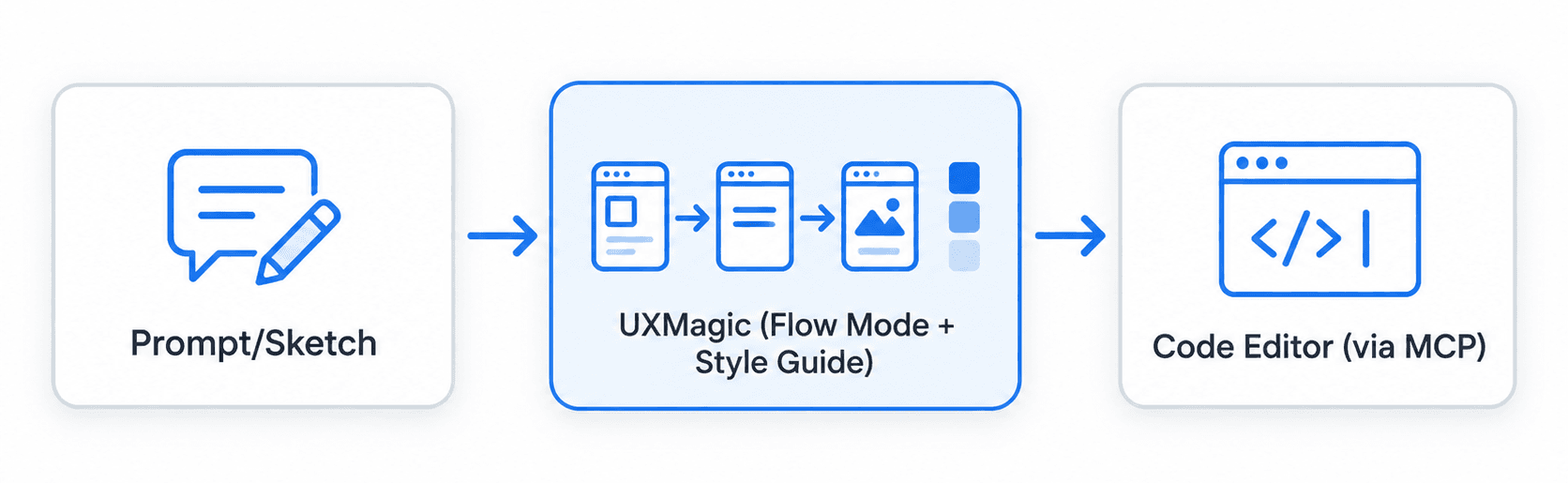
Expanding a single-screen dashboard MVP into a multi-screen SaaS application means maintaining consistent visual hierarchy across settings, billing portals, team management, and modal dialogs. Standard AI image tools tend to generate disparate components that break design coherence. UXMagic's Style Guide Generator locks colors, typography, and spacing as a real token system upfront, and Flow Mode enforces those tokens across every generated screen, reducing visual fragmentation without requiring manual design system administration screen by screen. As with any generated output, engineering review of accessibility, security, and production behavior remains a required step before anything ships.
Build Implementation-Ready UI
Generate a design-system-consistent UI flow from a text prompt and reduce the time lost to inconsistent interface generation.