Output Comparison
Design a SaaS landing hero with big headline, subtext, CTA button, screenshot mockup and small logo strip below. Premium, airy, minimal.
UXMagic
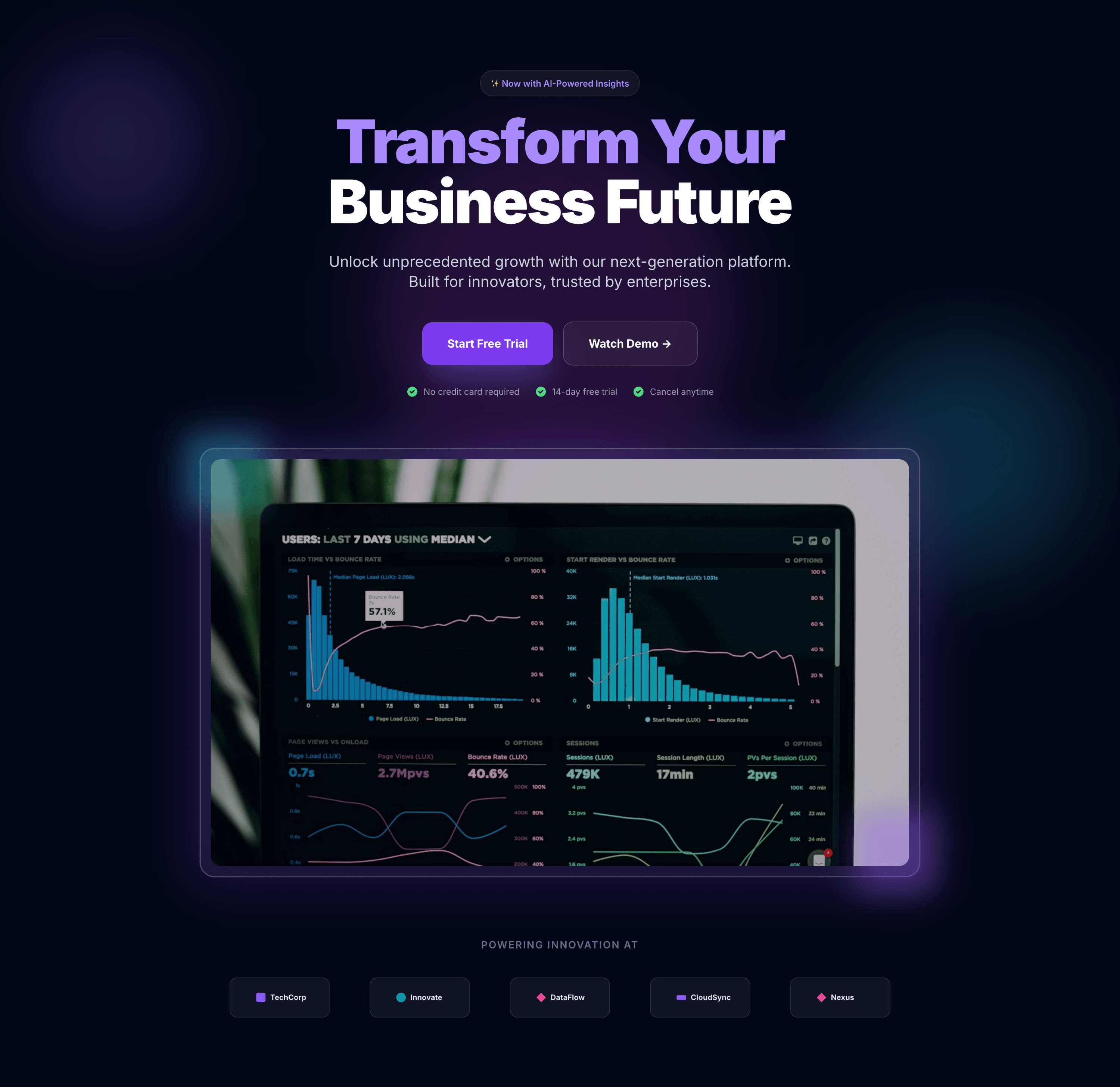
Strong premium presence — Glossy gradients, lighting effects, and polished UI give the hero a high-end, enterprise-grade feel.
Clear hierarchy & structure — Headline, subtext, CTAs, mockup, and logo strip are all correctly placed and visually balanced.
Less “airy” than requested — Heavy visual effects and dense color gradients reduce the light, spacious minimalism the prompt calls for.
CTAs slightly blend into background — Button contrast could be improved for better visibility against the neon-toned backdrop.
Framer AI
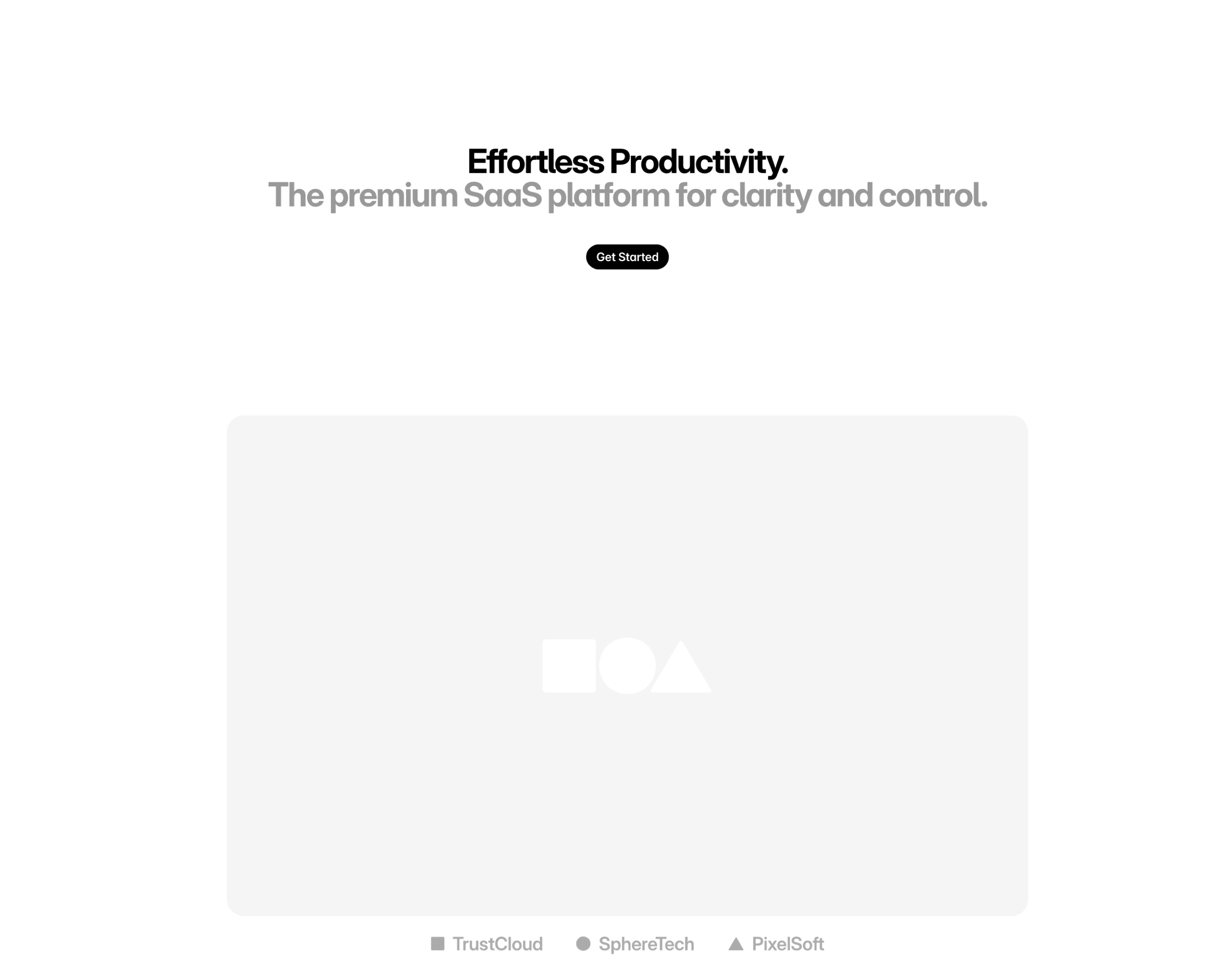
Exceptionally airy and minimal — Abundant white space and reduced visual noise strongly align with the “premium, minimal” direction.
Clean, modern typography — Elegant type choices enhance clarity and reinforce a high-end brand feel.
Screenshot mockup is underdeveloped — The placeholder block lacks detail; a refined mockup is essential for SaaS credibility.
Section feels sparse — The hero risks feeling too empty; small enhancements (light shadows, subtle framing, micro-details) would improve engagement without breaking minimalism.
Create a personal portfolio hero with portrait, name, title, short intro, CTA, and 3 featured project thumbnails. Sleek, editorial style.
UXMagic
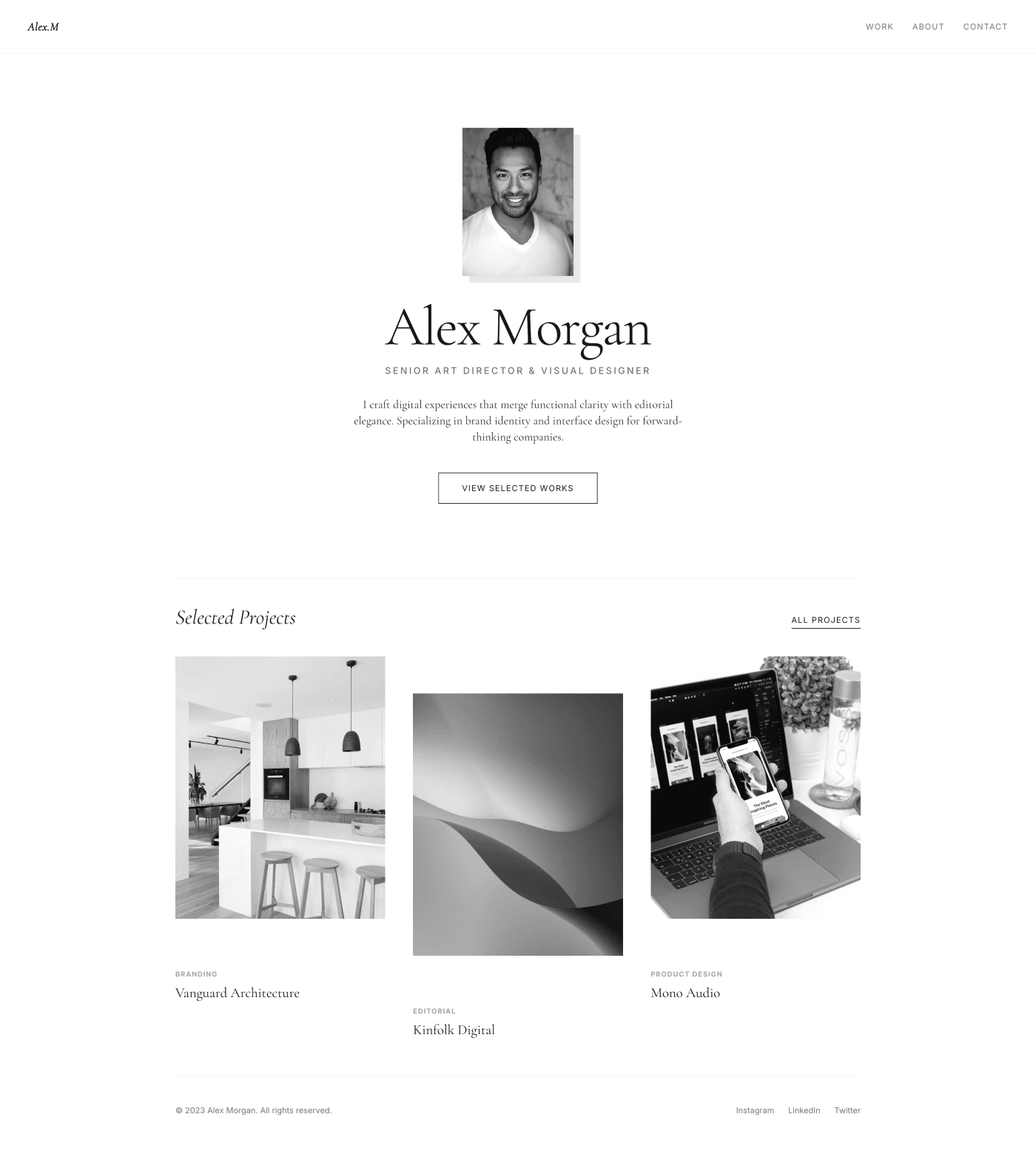
Strong editorial presence — Bold typography, clean spacing, and a well-framed portrait create a refined, magazine-style hero.
Clear hierarchy — Name → title → intro → CTA flow is intuitive and visually well-structured.
Project thumbnails may feel too uniform — Adding variation in crop, scale, or layout could add visual interest.
CTA styling could stand out more — Slightly low contrast or subtle placement may cause it to blend into the layout.
Framer AI
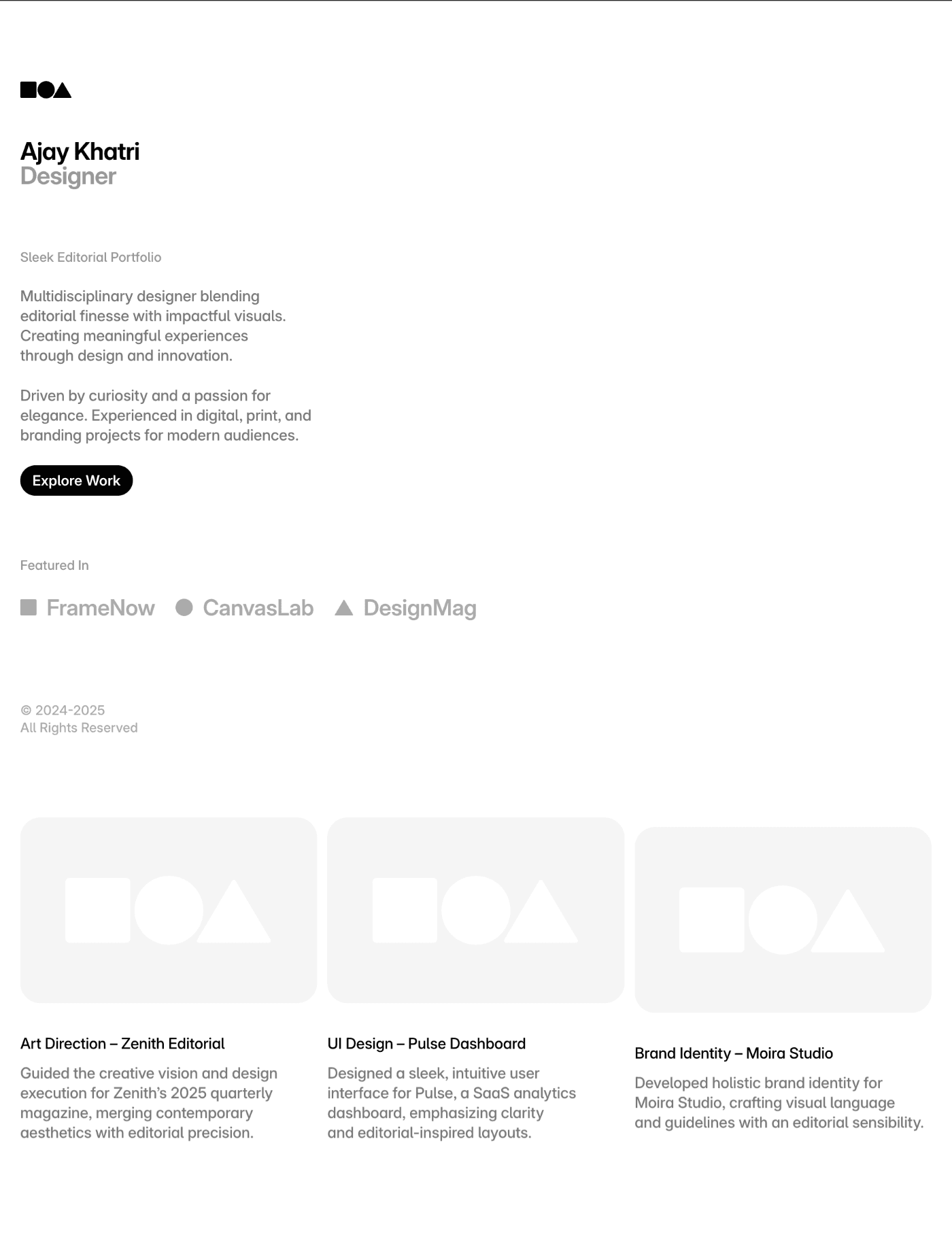
Elegant minimalism — Plenty of white space and clean typography support the sleek, editorial direction.
Portrait integration is tasteful — Typically well-balanced with text, giving a modern, high-end aesthetic.
Featured project area may feel sparse — Framer often defaults to simple grey blocks or low-detail thumbnails; requires stronger visual storytelling.
Hero may lack personality — Minimal type + minimal imagery can come across overly plain; needs micro-details (accents, typographic nuance) to elevate editorial polish.

UXMagic
UXMagic is an AI design copilot focused on rapid ideation, multimodal input (text, screenshot, sketch, URL), and clean exports for Figma and React/HTML. It’s built to accelerate the design-to-code handoff and reduce repetitive layout work, with a clear focus on design system consistency and predictable budgeting.

Framer AI
Framer AI is a design-to-live platform that prioritizes in-canvas design, advanced interactions, and native publishing. Framer’s Studio + Workshop tools let designers build and ship production sites in one environment—excellent for marketing teams and creators who want the live site to match the design exactly.
Feature Comparison
| Feature | UXMagic | Framer AI |
|---|---|---|
| Prompt to UI | Converts prompts, images, sketches, and URLs into structured screens quickly | Prompt-powered wireframing inside the editor with visual refinement |
| Export Options | Exports to Figma + HTML/React scaffolds for developer handoff | Publishes live sites on Framer hosting; limited raw code export |
| Style Guide | Imports design systems and enforces consistency across screens | Strong in-canvas styling, but style reuse stays in Framer canvas |
| Figma Plugin | Native Figma export and plug-in workflows | Figma assets can be imported; primary work stays inside Framer |
| Real-time Preview | Instant previews; exportable artifacts for dev | Live preview and direct publish to hosted site (frictionless) |
| Ideal Delivery | Portable design + code for integration into CI/CD | Fast, integrated publish — design → live site in one place |
UXMagic
Pricing Comparison

Free – $0/month
30 free credits per month Upto 5 screens 5 Projects 1 Figma export UI Design Wireframe Mode Sectional Editing
Premium – $17.5/month
480 credits per month Upto 80 screens 20 Projects 80 Figma exports UI Design Wireframe Mode Sectional Editing Export Code Flows Screenshot to UI Sketch to UI Text Editing and Upload Images
Ultimate – $35/month
1500 credits per month Upto 250 screens Unlimited Projects 250 Figma exports UI Design Wireframe Mode Sectional Editing Export Code Flows Screenshot to UI Sketch to UI Text Editing and Upload Images Import Figma components/design system Clone a site

Basic – $4/month
Connect your own domain AI-powered design tools Fast and secure hosting Built-in SEO
Pro – $12/month
Everything from Basic, plus: Staging and instant rollback Roles and permissions Relational CMS Site redirects Multiple locales (add-on)
Scale – $40.15/month
Everything from Pro, plus: Custom locale regions Events and funnels Priority support Premium CDN Flexible limits A/B testing (add-on) Custom proxy setup (add-on)
Final Verdict
UXMagic vs Framer AI is not “which is better” — it’s “which solves your bottleneck.”
Use UXMagic when your org prioritizes design velocity, rigorous Figma-based handoffs, and cross-team portability; it reduces rework and keeps exports clean for engineering.
Adopt Framer when you want to collapse design → publish into one environment (marketing-led sites and live interactions) and are comfortable with a hosted, single-platform workflow.
For repeatable product work that must integrate into existing engineering pipelines, UXMagic is the safer, more interoperable choice; for rapid go-live marketing experiences where hosting and interactions are paramount, Framer AI is a strong, integrated option.
có thắc mắc?chúng tôi có câu trả lời.
UXMagic — it’s built to output Figma-ready screens, style guides, and component exports that plug directly into existing Figma workflows.
Framer AI — because design and hosting live in one place, publishing is faster; UXMagic accelerates design but requires a separate deployment step.
UXMagic generates clean HTML/React scaffolds suitable for handoff; Framer generates live sites optimized for Framer hosting (raw code export is limited).
UXMagic uses predictable credit/plan tiers (Free → $14 → $28) focused on design outputs; Framer’s tiers emphasize hosting and publishing (Free → Basic → Pro → Scale) which can be more expensive for professional teams.
They’re complementary — many teams prototype in UXMagic for design iteration and then use Framer (or another host) for final publishing if desired.
Khám phá các tính năng của chúng tôi




Related comparisons
Weighing up more than one tool? Here is how UXMagic compares against the closest alternatives.