Trang chủ UXMagic
  • English
  • Español
  • हिन्दी
  • Bahasa Indonesia
  • Tiếng Việt
  • Português
  • Русский
  • 中文
  • العربية
  • Deutsch
  • Français
  • Tính năng
  • Thư viện
  • Mẫu
  • Bảng giá
  • Tiếp thị liên kết
  • Tài nguyên
Trang chủ UXMagic
  • English
  • Español
  • हिन्दी
  • Bahasa Indonesia
  • Tiếng Việt
  • Português
  • Русский
  • 中文
  • العربية
  • Deutsch
  • Français
Trang chủ UXMagic

Thư viện

MẫuMới
Khung cộng đồng
Bảng giá
Tiếp thị liên kết

Tài nguyên

Theo dõi chúng tôi trên:
  • Theo dõi chúng tôi trên Slack
  • Theo dõi chúng tôi trên Twitter
  • Theo dõi chúng tôi trên Linkedin
  • Theo dõi chúng tôi trên Youtube
  • Theo dõi chúng tôi trên Instagram
Tất cả bài so sánh công cụ thiết kế AI

UXMagic vs Flowmapp: Planning or Production in 2026?

Choosing between UXMagic vs Flowmapp is like deciding whether you want to plan every detail first or ship faster with automation.

UXMagic Logo
vs
UXMagic Logo

Output Comparison: Side-by-Side Design Quality

Prompt1

Create a desktop analytics dashboard optimized for a 1440px screen. Use a left sidebar for navigation, a top bar with search and notifications, and a main content area with KPI cards at the top, a line chart in the middle, and a table of recent activity at the bottom. Style it with modern typography, balanced spacing, and clear data visualization.

UXMagic.ai
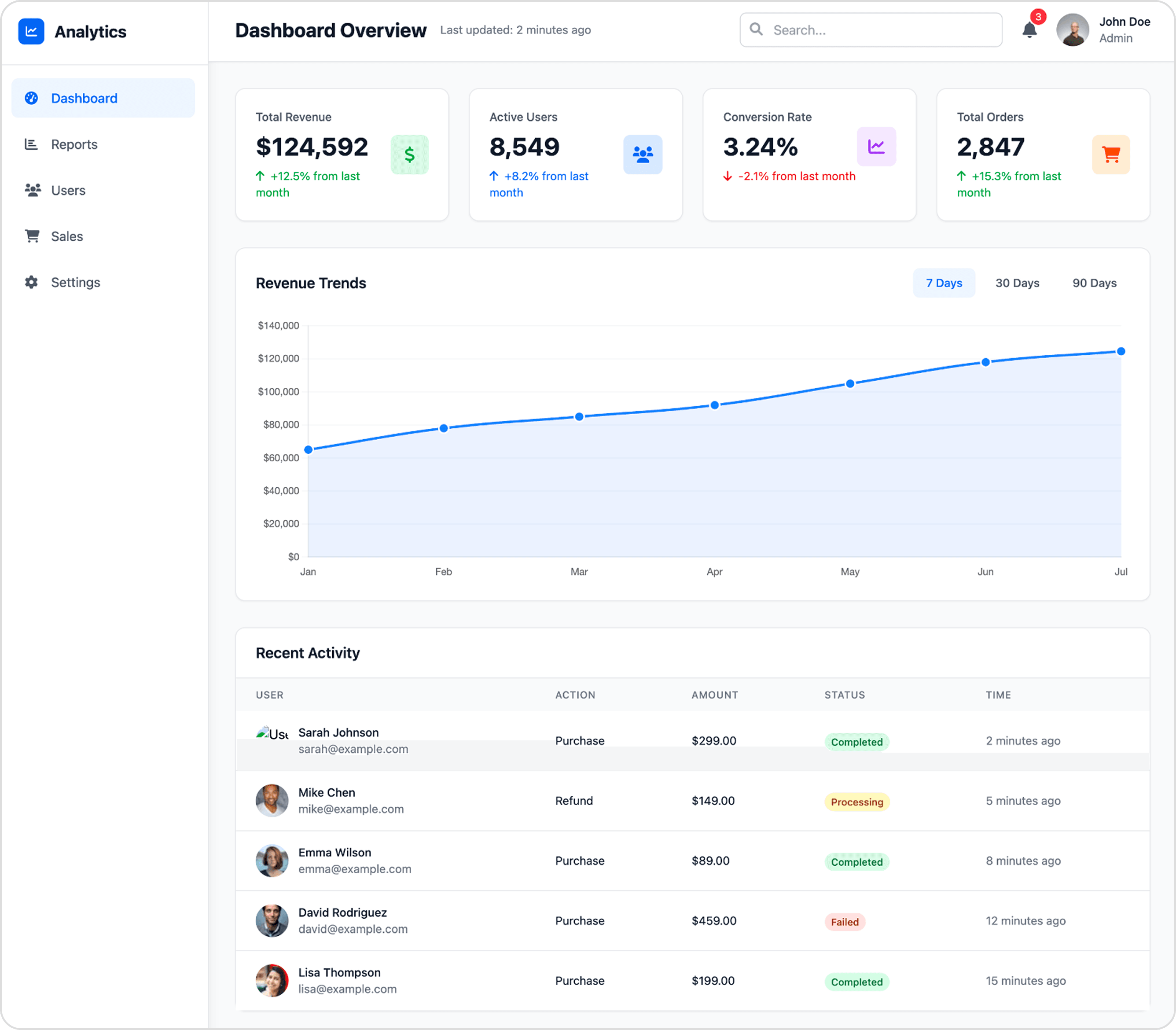
UXMagic.ai Prompt

Excellent information hierarchy and clean visual structure make the key data instantly scannable.

The use of color and icons in the KPI cards provides a quick, clear summary of performance metrics.

Status tags in the "Recent Activity" table rely only on color, creating an accessibility issue for colorblind users.

Flowmapp

Flowmapp Prompt
Prompt2

Design a modern mobile social feed screen for a 6-inch phone. Include a fixed top bar with logo, search, and profile icon. Below, show a scrollable feed of posts with profile pictures, images, captions, likes, and comments. Add a floating '+' action button at the bottom right. Keep the layout clean, touch-friendly, and visually engaging.

UXMagic.ai

UXMagic.ai Prompt

The design effectively uses cards to neatly contain and separate individual posts, making the feed easy to scroll.

Action icons (like, comment, share) are well-sized and spaced, creating clear and accessible touch targets.

The floating action button partially obstructs the content of the post directly beneath it.

Flowmapp

Flowmapp Prompt
UXMagic

UXMagic

UXMagic is an AI-first design copilot that accelerates the path from idea to production. It supports multiple inputs—text prompts, sketches, screenshots, or even website URLs—and generates high-fidelity UIs instantly. Unlike traditional planning tools, UXMagic bridges design and development by exporting directly to Figma, React, and HTML. With features like style guide application, sectional editing, and AI-assisted copy suggestions, it saves up to 70% of design time.

Flowmapp

Flowmapp

Flowmapp is a UX planning and proposal tool designed for agencies, studios, and freelancers. Its focus is on information architecture, user flows, wireframes, and content planning. Flowmapp also integrates client-facing business tools, including cost estimation, timelines, and invoicing—making it a strong sales enablement platform. Positioned as the tool you use “before opening Figma,” Flowmapp helps teams align clients on scope and structure before execution.

Feature Comparison

FeatureUXMagicFlowmapp
Prompt to UI

Generates multi-screen designs from natural language

Only AI-assisted sitemap generation

Export Options

Figma, HTML, React (Webflow & Framer coming soon)

Figma/PDF for planning docs

Style Guide

Auto-applies brand style guides

No advanced style system

Component Editing

Sectional editing & reusable components

Block-based wireframes

Figma Plugin

Native integration for editable exports

Exports plans to Figma only

Real-Time Preview

Interactive UI preview + code handoff

Static diagrams and flow maps

Content Features

AI text + content suggestions in context

“Notion-like” content briefs and SEO fields

Client Proposal Tools

Not available

Cost estimation, timing breakdown, invoicing

UXMagic

UI/UX Designers & Developers who need production-ready UIs fast.
Startups validating MVPs with speed.
Product teams that iterate rapidly and value direct-to-code exports.
Anyone frustrated with “handoff gaps” between design and development.
Flowmapp
Agencies & Freelancers preparing proposals and pitches.
Project Managers & UX Architects who need client alignment before design starts.
eams handling complex websites where sitemaps and flows matter more than rapid prototyping.
Businesses that need integrated planning + sales enablement in one platform.

Pricing Comparison

UXMagic Logo

Free – $0

5 project, 120 free credits (one-time), upto 20 screens, 1 Figma export

Premium – $14/month

20 projects, 480 credits (monthly), upto 80 screens, 80 Figma exports, React/HTML exports

Ultimate – $28/month

Unlimited projects, 1500 credits (monthly), upto 250 screens, 250 Figma exports, unlimited React/HTML exports

UXPilot Logo

Free – $0

5 project, 20 pages

Pro – $8.25/month

15 active projects, ∞ pages, ∞ editors

Team – $19.25/month

Unlimited projects, ∞ pages, ∞ editors, 1 Workspace up to 25 members

Agency – $54.45/month

Unlimited projects, ∞ pages, ∞ editors, Unlimited Workspaces

Final Verdict

Both tools shine in their own way:

Flowmapp = Best for agencies that need structured planning, client presentations, and proposal tools.

UXMagic = Best for designers and developers who want speed, automation, and production-ready outputs.

In short: Use Flowmapp to win clients, and use UXMagic to build products. Together, they complement each other—but if you must pick one, UXMagic is the future-proof choice for 2026.

Faq

có thắc mắc?chúng tôi có câu trả lời.

Flowmapp focuses on structured planning (sitemaps, flows, proposals), while UXMagic automates design generation and exports code for developers.

Flowmapp is a strong choice if you need client alignment and planning, but if you’re seeking execution speed and production-ready design, UXMagic is the better pick.

Not entirely—Flowmapp’s deep client proposal and IA features are unique. However, UXMagic automates wireframes, sitemaps, and flows for teams that prioritize speed.

Both start under $15/month. Flowmapp uses project-based tiers, while UXMagic is credit-based—so value depends on whether you need planning deliverables (Flowmapp) or generated UIs (UXMagic).

If you’re researching flowmapp alternatives, UXMagic is the top choice for moving beyond planning into high-speed, AI-powered design and development.

Khám phá các tính năng của chúng tôi

Prompt to UI
Quy trình UX với AI

Prompt to UI

Instantly turn text descriptions into functional UI designs.

Image to UI
Quy trình UX với AI

Image to UI

Upload a design screenshot to get production-ready code.

Clone a Website
Quy trình UX với AI

Clone a Website

Recreate any website design by simply providing a URL.

AI Landing Page Generator
Quy trình UX với AI

AI Landing Page Generator

Describe your idea and get a high-converting landing page instantly.

AI Style Guide Generator
Quy trình UX với AI

AI Style Guide Generator

Generate a brand style guide: colors, typography, spacing, and components, ready to export to Figma in seconds.

Image to Wireframe
Quy trình UX với AI

Image to Wireframe

Convert screenshots or UI images into clean, editable wireframes instantly with AI and start building real interfaces faster.

AI Mockup Generator
Quy trình UX với AI

AI Mockup Generator

Turn any idea into a polished, ready-to-use mockup from a simple prompt.

AI Dashboard Generator
Quy trình UX với AI

AI Dashboard Generator

Describe your dashboard and UXMagic instantly generates a complete layout with charts, metrics, and navigation.

AI Website Redesigner
Quy trình UX với AI

AI Website Redesigner

Clone or upload a image, describe changes, and UXMagic delivers an editable redesign in seconds.

AI App Builder
Quy trình UX với AI

AI App Builder

Describe your app idea, and UXMagic generates connected, multi-screen designs. Refine with prompts, then export to Figma or code.

Design to Code Generator
Quy trình UX với AI

Design to Code Generator

Upload a screenshot, mockup, or Figma design. UXMagic generates clean, production-ready code - not a rough draft your team has to rebuild.

AI MVP Builder
Quy trình UX với AI

AI MVP Builder

Describe your startup concept. UXMagic generates every screen in the journey ready to test, pitch, or hand off to developers.

Related comparisons

Weighing up more than one tool? Here is how UXMagic compares against the closest alternatives.

Design platforms

UXMagic vs Dora AI

Design platforms

UXMagic vs Paper

Design platforms

UXMagic vs Alloy

Design platforms

UXMagic vs Mocha

Tất cả bài so sánh công cụ thiết kế AI

Tham gia cộng đồng của chúng tôi

Chia sẻ sản phẩm, tìm hỗ trợ, cập nhật tin tức và kết nối với những người dùng UXmagic.ai khác

ý tưởng tiếp theo của bạn
xứng đáng được ra đời

đừng chỉ nghĩ về nó nữa. cứ gõ ra đi. Vụng về, dang dở, sao cũng được. Chúng tôi sẽ biến nó thành điều có thật.

Sản phẩm

  • Mẫu
  • Cộng đồng
  • Các gói giá
  • Chương trình tiếp thị liên kết
  • UXMagic MCP
  • Claude MCP
  • Thông tin AI

Tài nguyên

  • Trung tâm trợ giúp
  • Thư viện Figma
  • Thư viện React
  • Mẫu ứng dụng di động
  • Tài liệu
  • Hướng dẫn

Tính năng

  • Từ câu lệnh thành UI
  • Từ hình ảnh thành UI
  • Từ bản phác thảo thành UI
  • Sao chép website
  • Nhập từ Figma
  • AI Wireframe Generator
  • AI Mockup Generator
  • AI Prototype Generator
  • AI Dashboard Generator
  • Tất cả tính năng

So sánh

  • vs UX Pilot
  • vs Relume
  • vs MagicPath
  • vs Magic Patterns
  • vs Banani
  • vs Galileo AI
  • vs v0
  • vs Lovable
  • vs Base44
  • Tất cả đối thủ

Blog

  • AI trong quy trình thiết kế UX: Điều gì thực sự hiệu quả
  • Mẫu câu lệnh cho dashboard SaaS
  • Những câu lệnh thực tế chúng tôi dùng để tạo luồng sản phẩm
  • Prompt Engineering cho UX Designer
  • Công cụ Wireframe tốt nhất năm 2026: So sánh 10 lựa chọn miễn phí & trả phí
  • Tất cả bài viết

Công ty & Hỗ trợ

  • Tuyển dụng
  • Liên hệ
  • Chính sách bảo mật
  • Điều khoản sử dụng
  • Cài đặt cookie
  • Theo dõi chúng tôi trên Slack
  • Theo dõi chúng tôi trên Twitter
  • Theo dõi chúng tôi trên Linkedin
  • Theo dõi chúng tôi trên Youtube
  • Theo dõi chúng tôi trên Instagram

© 2026 UXMagic AI Technologies Inc.