
Output Comparison: Side-by-Side Design Quality
Create a desktop analytics dashboard optimized for a 1440px screen. Use a left sidebar for navigation, a top bar with search and notifications, and a main content area with KPI cards at the top, a line chart in the middle, and a table of recent activity at the bottom. Style it with modern typography, balanced spacing, and clear data visualization.
UXMagic.ai
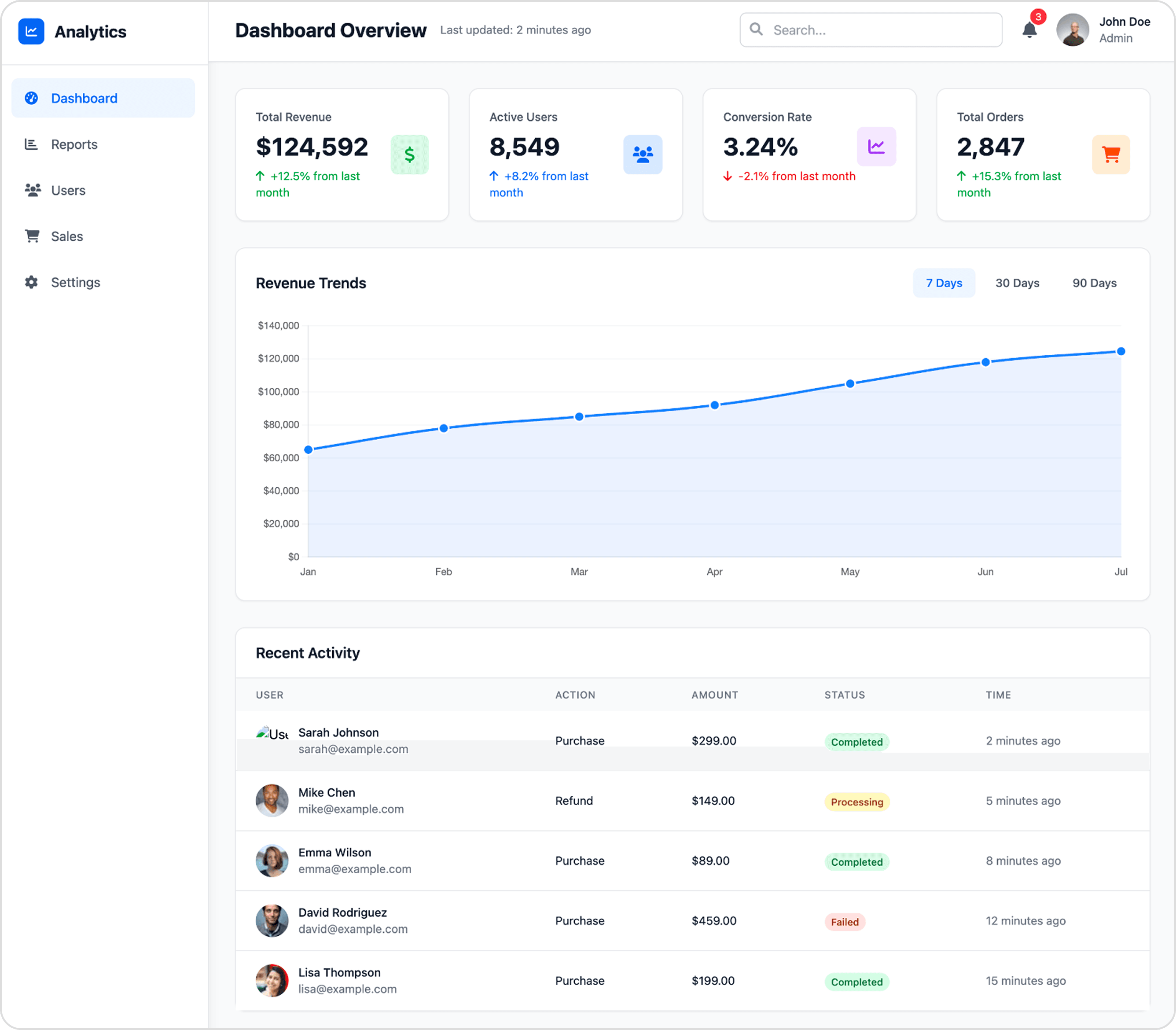
Excellent information hierarchy and clean visual structure make the key data instantly scannable.
The use of color and icons in the KPI cards provides a quick, clear summary of performance metrics.
Status tags in the "Recent Activity" table rely only on color, creating an accessibility issue for colorblind users.
Flowmapp

Design a modern mobile social feed screen for a 6-inch phone. Include a fixed top bar with logo, search, and profile icon. Below, show a scrollable feed of posts with profile pictures, images, captions, likes, and comments. Add a floating '+' action button at the bottom right. Keep the layout clean, touch-friendly, and visually engaging.
UXMagic.ai

The design effectively uses cards to neatly contain and separate individual posts, making the feed easy to scroll.
Action icons (like, comment, share) are well-sized and spaced, creating clear and accessible touch targets.
The floating action button partially obstructs the content of the post directly beneath it.
Flowmapp


UXMagic
UXMagic is an AI-first design copilot that accelerates the path from idea to production. It supports multiple inputs—text prompts, sketches, screenshots, or even website URLs—and generates high-fidelity UIs instantly. Unlike traditional planning tools, UXMagic bridges design and development by exporting directly to Figma, React, and HTML. With features like style guide application, sectional editing, and AI-assisted copy suggestions, it saves up to 70% of design time.

Flowmapp
Flowmapp is a UX planning and proposal tool designed for agencies, studios, and freelancers. Its focus is on information architecture, user flows, wireframes, and content planning. Flowmapp also integrates client-facing business tools, including cost estimation, timelines, and invoicing—making it a strong sales enablement platform. Positioned as the tool you use “before opening Figma,” Flowmapp helps teams align clients on scope and structure before execution.
Feature Comparison
| Feature | UXMagic | Flowmapp |
|---|---|---|
| Prompt to UI | Generates multi-screen designs from natural language | Only AI-assisted sitemap generation |
| Export Options | Figma, HTML, React (Webflow & Framer coming soon) | Figma/PDF for planning docs |
| Style Guide | Auto-applies brand style guides | No advanced style system |
| Component Editing | Sectional editing & reusable components | Block-based wireframes |
| Figma Plugin | Native integration for editable exports | Exports plans to Figma only |
| Real-Time Preview | Interactive UI preview + code handoff | Static diagrams and flow maps |
| Content Features | AI text + content suggestions in context | “Notion-like” content briefs and SEO fields |
| Client Proposal Tools | Not available | Cost estimation, timing breakdown, invoicing |
UXMagic
Pricing Comparison

Free – $0
5 project, 120 free credits (one-time), upto 20 screens, 1 Figma export
Premium – $14/month
20 projects, 480 credits (monthly), upto 80 screens, 80 Figma exports, React/HTML exports
Ultimate – $28/month
Unlimited projects, 1500 credits (monthly), upto 250 screens, 250 Figma exports, unlimited React/HTML exports

Free – $0
5 project, 20 pages
Pro – $8.25/month
15 active projects, ∞ pages, ∞ editors
Team – $19.25/month
Unlimited projects, ∞ pages, ∞ editors, 1 Workspace up to 25 members
Agency – $54.45/month
Unlimited projects, ∞ pages, ∞ editors, Unlimited Workspaces
Final Verdict
Both tools shine in their own way:
Flowmapp = Best for agencies that need structured planning, client presentations, and proposal tools.
UXMagic = Best for designers and developers who want speed, automation, and production-ready outputs.
In short: Use Flowmapp to win clients, and use UXMagic to build products. Together, they complement each other—but if you must pick one, UXMagic is the future-proof choice for 2026.
got questions?we have answers.
Flowmapp focuses on structured planning (sitemaps, flows, proposals), while UXMagic automates design generation and exports code for developers.
Flowmapp is a strong choice if you need client alignment and planning, but if you’re seeking execution speed and production-ready design, UXMagic is the better pick.
Not entirely—Flowmapp’s deep client proposal and IA features are unique. However, UXMagic automates wireframes, sitemaps, and flows for teams that prioritize speed.
Both start under $15/month. Flowmapp uses project-based tiers, while UXMagic is credit-based—so value depends on whether you need planning deliverables (Flowmapp) or generated UIs (UXMagic).
If you’re researching flowmapp alternatives, UXMagic is the top choice for moving beyond planning into high-speed, AI-powered design and development.
Checkout our Features












Related comparisons
Weighing up more than one tool? Here is how UXMagic compares against the closest alternatives.