
UXMagic vs v0.dev: Design Velocity or Production Acceleration?
Quick, practical comparison to help you pick the right AI tool for your team — whether you need rapid design exploration and Figma-ready outputs (UXMagic) or opinionated, deploy-ready React/Next.js components tightly coupled to Vercel (v0.dev).


Output Comparison
Design a CRM contacts table screen with avatar, name, email, tag, status, and actions. Include a top search bar, filters, and an ‘Add Contact’ button. Clean, dev-friendly layout.
UXMagic
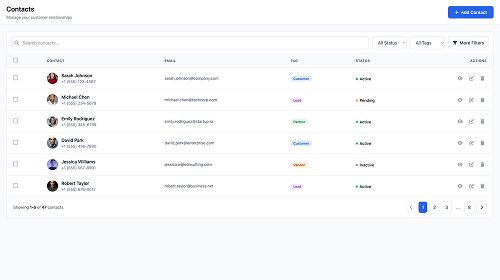
Clean visual hierarchy and row spacing make the table highly scannable for ops and CRM teams.
Tag and status styling feel polished and enterprise-ready, improving clarity at a glance.
Pagination and filters could feel more refined with slightly lighter visual weight to match the calm UI tone.
Action icons are functional but could use clearer grouping or hover states for better usability.
v0.dev
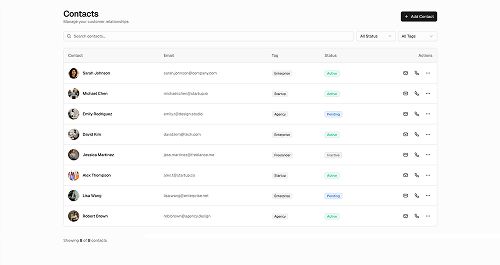
Simple, dev-friendly table structure makes it easy to plug into a React/Next.js app immediately.
Minimalist layout keeps focus on content, which suits engineering-led workflows.
Visual hierarchy is weaker, making the rows feel a bit flat and less readable at scale.
Tag and status styling lacks contrast, reducing quick-scan efficiency for CRM use cases.
Create a business info form screen with text fields, dropdowns, upload button and a right-side summary card. Neutral, calm, structured design.
UXMagic

Strong alignment and spacing give the form a clean, structured, and premium onboarding feel.
The right-side summary card is visually clear and mirrors enterprise onboarding patterns well.
Field grouping could be slightly more compact to reduce vertical scroll on large forms.
The file upload section is functional but could benefit from a clearer affordance or visual cue.
v0.dev
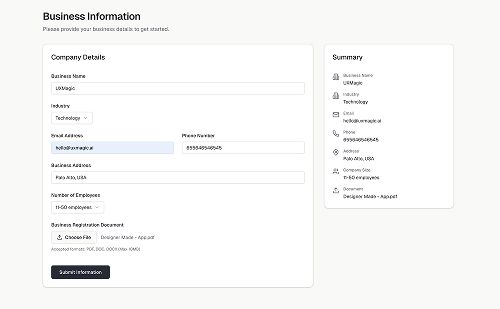
Developer-friendly, minimalist layout makes implementation straightforward for production workflows.
The form structure is balanced and uncluttered, supporting efficient data entry.
The overall aesthetic feels under-styled, missing the neutral, calm polish expected in onboarding flows.
The summary card lacks visual definition, making it blend too much with the primary form area.
UXMagic
UXMagic is an AI design copilot built for designers and product teams. It accepts multimodal inputs (text prompts, sketches, screenshots, URLs, and Figma files) and produces Figma-ready screens, wireframes, style-guide-aware mockups, and exportable React/HTML snippets — all with a subscription model designed for predictable budgeting. UXMagic focuses on accelerating the early-to-mid stages of the design lifecycle and smoothing handoff to engineering via structured exports and component libraries.
v0.dev
v0.dev (now often referenced as v0.app in the Vercel ecosystem) is an agentic UI component factory tightly integrated with Vercel. It emphasizes production-grade React/Next.js component generation, auto-deploy workflows, and multi-agent reasoning to plan, debug, and output modular UI code. v0.dev targets frontend engineers seeking code-first acceleration inside the Next.js/Vercel stack, with a usage-based credit model and deep CI/CD integrations.
Feature Comparison
| Feature | UXMagic | v0.dev |
|---|---|---|
| Prompt to UI | Converts prompts, screenshots, sketches into multi-screen designs | Converts prompts and Figma imports into component suggestions |
| Export Options | Exports to Figma, React/HTML, and standard assets | Exports modular React / Next.js components and GitHub sync |
| Figma Plugin | Native plugin and robust Figma exports | Figma import support (to convert into components) |
| Style Guide | Import custom design systems; applies style tokens consistently | Uses opinionated Tailwind/shadcn/ui patterns for uniform code |
| Real-Time Preview | Visual previews + Figma live files | Live component previews + deploy preview on Vercel |
| Cost Model | Fixed subscription tiers with credit caps for screens/exports | Usage-based credit/token model; can be volatile for agent runs |
UXMagic
Pricing Comparison

Free – $0
30 free credits per month Upto 5 screens 5 Projects 1 Figma export UI Design Wireframe Mode Sectional Editing
Premium – $17.5/month
480 credits per month Upto 80 screens 20 Projects 80 Figma exports UI Design Wireframe Mode Sectional Editing Export Code Flows Screenshot to UI Sketch to UI Text Editing and Upload Images
Ulitmate – $35/month
1500 credits per month Upto 250 screens Unlimited Projects 250 Figma exports UI Design Wireframe Mode Sectional Editing Export Code Flows Screenshot to UI Sketch to UI Text Editing and Upload Images Import Figma components/design system Clone a site

Team – $30/user/month
$30 of included monthly credits per user $2 of free daily credits on login per user Purchase additional credits outside of your monthly usage shared across your team Centralized billing on vercel.com Share chats and collaborate with your team
Business – $100/user/month
$30 of included monthly credits per user $2 of free daily credits on login per user Training opt-out by default Purchase additional credits outside of your monthly usage shared across your team Centralized billing on vercel.com Share chats and collaborate with your team
Enterprise – Custom pricing
Training opt-out by default SAML SSO Role-based access control Priority access for better performance and no queues Guaranteed customer support SLAs
Final Verdict
Choosing between UXMagic and v0.dev comes down to what your team values most. Both tools excel in different parts of the product lifecycle, but their strengths serve very different workflows.
v0.dev is the better option when your primary goal is high-fidelity, production-ready Next.js components and seamless Vercel deployment — provided you accept the credit-based economics and the need to manually handle server-side security and backend logic.
UXMagic is the safer, faster pick when your priority is design velocity, cross-discipline collaboration, and predictable cost: it accelerates ideation, produces Figma-first deliverables, and keeps budgets stable.
Choose UXMagic for design-led teams and predictable ROI; choose v0.dev if your org is engineering-first and deeply invested in the Vercel/Next.js stack.
got questions?we have answers.
UXMagic — it’s Figma-first, accepts sketches/screenshots, and produces design artifacts optimized for designer workflows.
v0.dev — outputs modular React/Next.js components designed for direct integration and Vercel deployment.
v0.dev uses a usage-based credit/token model (variable); UXMagic uses fixed subscription tiers for predictable monthly spend.
Yes — UXMagic exports React/HTML and Figma files, but expect engineering polishing for large-scale production needs.
Yes — v0.dev is tightly integrated with the Vercel ecosystem for GitHub sync and one-click deployment.







Related comparisons
Weighing up more than one tool? Here is how UXMagic compares against the closest alternatives.