Blocking five full working days for eight cross-functional stakeholders to maneuver sticky notes across a digital canvas frequently strains modern product teams. Most design sprints don't stall during ideation - they stall on Day 4, when prototyping becomes a visual assembly bottleneck that exhausts senior design resources. Compressing product discovery in 2026 means adapting the classic framework with automated, prompt-driven UI flow generation, not abandoning the underlying methodology.
You already understand user personas, wireframing, and why usability testing matters. This isn't a design-sprint 101 post recapping the classic Jake Knapp / Google Ventures structure. It's an accelerated adaptation of that same proven framework- condensed timeline, single-decider governance, generative prototyping - built for teams who can't or don't need to block a full five days, while keeping the research rigor intact.
A quick note on positioning before diving in: the classic 5-day sprint remains genuinely useful, especially for complex problems needing deep group exploration. This guide isn't arguing it's obsolete - it's offering a tested adaptation for teams with tighter calendars and access to generative prototyping tools, and flagging later on exactly when the original 5-day version, or no sprint at all, is still the better call.
The Sprint Timeline, Visually
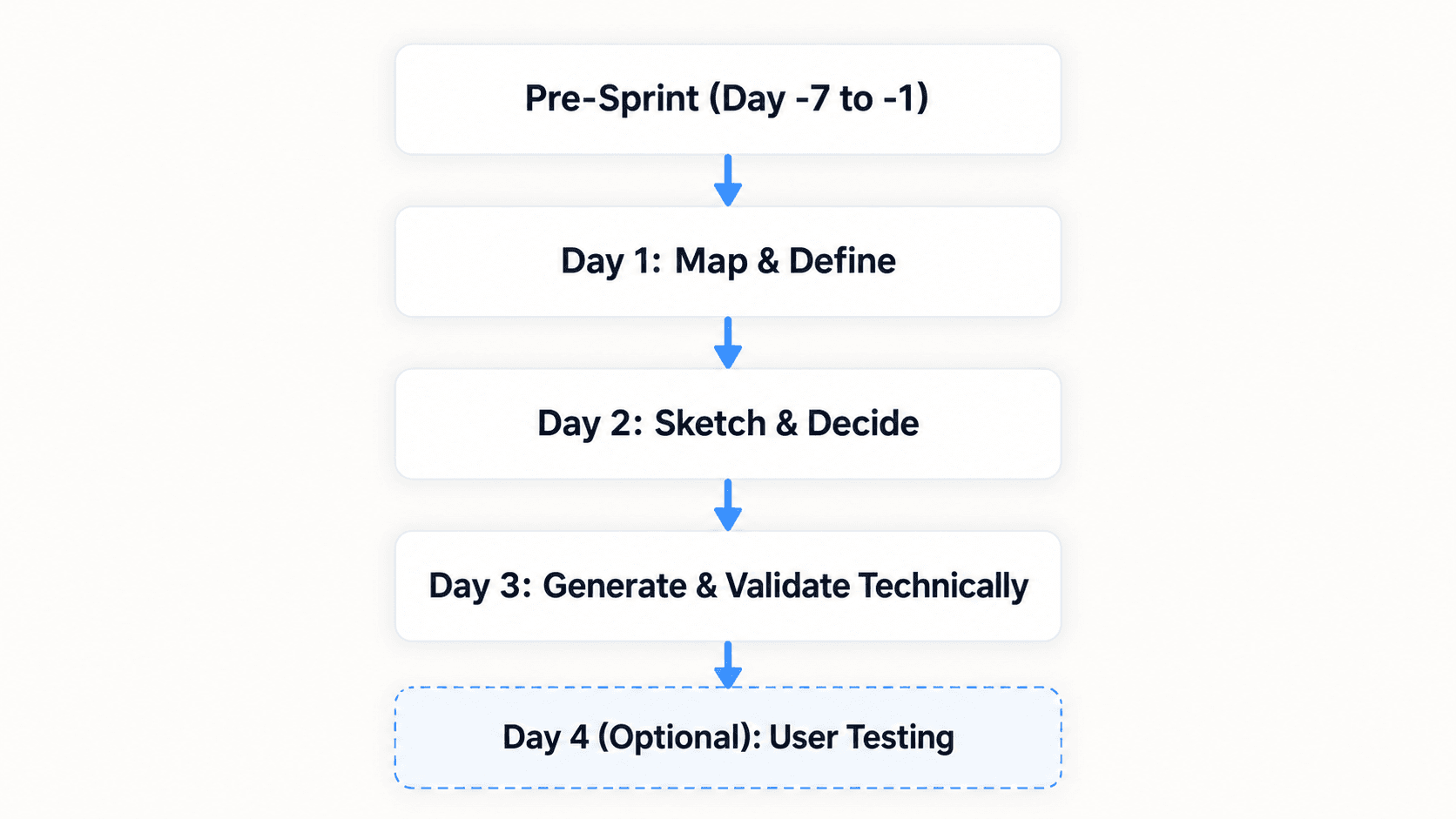
One important clarification up front, since sources on this topic sometimes conflate steps: in this 3-day framework, Day 3 covers generation and technical/engineering validation not user testing. User testing happens on Day 4, as a distinct, optional-but-recommended step once the prototype is confirmed technically sound. Keep those two kinds of "validation" separate: engineering feasibility is a Day 3 concern, real user feedback is a Day 4 concern.
3-Day vs. 5-Day Sprint: Side by Side
| Day | Traditional (5-Day) Activity | Accelerated (3-Day) Activity | AI-Assisted Step | Output |
|---|---|---|---|---|
| Day 1 | Map problem, expert interviews | Same — map problem, expert interviews | None | Journey map, focal point |
| Day 2 | Sketch solutions only | Sketch + Decide (combined) | None | Storyboard, Decider selection |
| Day 3 | Decide + storyboard only | Generate flow + technical review (combined) | Prompt-to-UI flow generation | Clickable prototype |
| Day 4 | Manual prototyping (full day) | (absorbed into Day 3) | — | — |
| Day 5 / Day 4 (3-day) | User testing | User testing (now Day 4, optional) | Real-time prompt-based fixes between sessions | Validated findings matrix |
The compression comes from two places: combining Sketch+Decide into one day, and replacing the manual Thursday prototyping marathon with generated flows not from cutting corners on research or testing.
Pre-Sprint Preparation: Setting Parameters for Success
Asynchronous Market Intelligence and Research Synthesis
Spending Monday educating the sprint team on basic market conditions wastes executive and engineering time. Pre-sprint synthesis of customer support analytics, telemetry, and competitive benchmarks should happen before kickoff, not during it - Day 1 should focus exclusively on mapping target parameters, not conducting surface-level research the team could have prepared beforehand.
Participant Selection and User Recruitment Mechanics
Before starting the sprint, the facilitator needs to secure executive commitment, recruit five target user participants for validation testing, and compile existing research. Recruitment must begin at least seven days before the sprint kicks off - leverage platforms like UserTesting or Respondent, tap existing customer advisory panels, or use support ticket lists. Delaying recruitment until midweek is the single most common way Friday's (or Day 4's) testing sessions get canceled.
What You Need Before Day 1
- Sprint challenge - a specific, written problem statement, not a vague goal
- Existing research - support analytics, telemetry, and competitive benchmarks synthesized in advance
- User participants - five target users confirmed and scheduled, not just "planned to recruit"
- Decider - one named person with final authority, agreed on before Day 1 starts
- Design system - an existing token/component system the generated flow can reference, if one exists
- Prototype requirements - a clear sense of what needs to be testable by Day 3 (a full flow? a single critical interaction?)
Modern Sprint Execution: The 3-Day Accelerated Discovery Framework
Day 1: Journey Mapping, Problem Framing, and Target Selection
Morning: establish the two-year goal, document sprint questions, and draft the primary user journey map.
Afternoon: conduct "Ask the Experts" interviews, record "How Might We" (HMW) opportunity notes, and dot-vote to lock the specific journey focal point.
Output: a unified journey map with a single targeted interaction point highlighted.
Day 2: Solution Sketching, Prompt Engineering, and Decider Alignment
The workshop shifts from group discussion to individual execution. Participants review external inspirations and translate concepts into structured UI prompts and sketches.
Morning: deliver "Lightning Demos" highlighting effective interaction patterns from adjacent industries.
Afternoon: execute the four-step sketching process (Notes, Ideas, Crazy 8s, detailed solution concepts), then move into decision-making - conduct a silent visual review ("Art Gallery"), run structured speed critiques, cast straw-poll votes, and get the final Decider selection.
Output: self-contained, anonymous solution concepts with functional text specifications, plus a structured storyboard detailing screen-by-screen interaction logic.
Day 3: Automated Flow Generation and Technical Validation
This is where the accelerated framework diverges most from the original five-day structure. Instead of manually assembling vector shapes, auto-layout frames, and UI components, the storyboard's text descriptions go directly into a generative UI engine.
Morning: input storyboard screen parameters into a prompt-driven UI generation tool to create initial application flows. UXMagic's Flow Mode is built exactly for this handoff - converting a storyboard's text specifications into a connected, multi-screen flow directly, rather than a designer manually building each frame from scratch. Worth being precise about terminology here: the output is better described as test-ready or a high-fidelity prototype, not "production-ready" - it's built to withstand real user testing, not to ship as-is without an engineering build pass.
Afternoon: connect screen navigation states, refine microcopy, and run an engineering feasibility review - this is the technical validation step, checked against real data architecture and system constraints, separate from user testing.
Output: a clickable, high-fidelity prototype confirmed technically feasible and ready for user validation - compressed from what used to be a full Thursday of manual assembly into a morning's work in this specific worked example (actual time savings will vary with storyboard complexity and how well-scoped the initial prompt is).
Day 4: User Testing and Feedback Synthesis
Writing the Testing Script
A structured 5-Act interview format works well: (1) a brief context-setting introduction with no leading language, (2) initial reactions to the prototype before any task is given, (3) task-based scenarios mirroring real use cases, (4) a debrief capturing overall impressions, (5) a wrap-up covering anything unaddressed. Keep task prompts behavior-focused ("Show me how you'd set up your first project") rather than opinion-focused ("Do you like this layout?") - behavior reveals real friction; opinions often just reflect politeness.
What to Measure
Track specific, observable signals during each session: where users hesitate or backtrack, which labels or icons get misread, whether the core task gets completed without facilitator help, and what users say unprompted versus what they say when asked directly. The unprompted comments are usually the most honest signal.
Prioritizing Findings After Sessions
Run five 45-minute interviews, capturing real-time behavioral observations and qualitative feedback. Afterward, build a findings matrix sorting issues into three tiers: blockers (a user couldn't complete the core task), friction (task completed, but with visible hesitation or confusion), and preference (a stated opinion with no behavioral evidence behind it). Fix blockers before anything else - friction and preference items are worth noting but shouldn't derail the roadmap on their own.
Real-time iteration during testing: if a specific interaction causes confusion partway through the session block, a 15-minute buffer between interviews is enough time to modify components or update screen transitions via natural language prompts and re-test the fix in the very next session, rather than noting the problem and fixing it a week later.
Adapting Generative AI Tools for Production-Ready Prototyping
What AI Actually Replaces and What It Doesn't
Worth being direct about the scope of what's changing here. AI genuinely compresses UI production time - the manual vector assembly, the auto-layout configuration, the component styling that used to eat a full Thursday. It does not replace user research, prioritization, facilitation, or decision-making. A generated flow still needs a real Decider choosing between directions, a real facilitator running the room, and real human judgment interpreting what Friday's or Day 4's test sessions actually mean. The time saved is specifically in the mechanical assembly step, not in the thinking.
Preserving Design System Consistency Across Generated Flows
On Day 2, sprint participants create competing solution concepts that need visual standardization before executive evaluation. Generic AI image generators produce screens with inconsistent button styling, mismatched typography, and conflicting padding - genuinely confusing for research participants trying to evaluate a concept on its merits rather than getting distracted by visual noise. UXMagic's Flow Mode converts diverse text specifications into visual flows that automatically adhere to a unified design system, keeping component styling consistent across every evaluated proposal.
Preventing Component Drift and Hallucinated Interaction Logic
Two failure modes are worth naming directly. Hallucinated navigation logic - unconstrained prompt models generating non-standard UI components that contradict established web usability patterns, confusing test participants who expect familiar interaction conventions. Superficial polish without state logic - generating visual mockups without explicit interaction specifications, which masks underlying functional flaws until they surface mid-interview, when there's no time left to fix them properly.
Here's what the compressed framework looks like on two real projects. A Series B fintech startup redesigning its enterprise permission management interface to reduce onboarding friction: the traditional approach spends two weeks manually drafting wireframes in Figma, with extended debates between engineering and design over modal interaction states. The accelerated approach has the designer input permission storyboard requirements into a generative prompt engine on Day 3, generating three multi-screen navigation variations quickly - the Decider selects a flow, engineering verifies data handling, and the prototype is ready for user testing by Day 4.
A non-technical founder validating a complex onboarding sequence for a consumer SaaS platform before hiring a full-stack engineering team: the traditional approach hires a contract designer who takes three weeks constructing vector wireframes, delaying validation and burning capital. The accelerated approach runs a compressed 3-day sprint - constructing a complete onboarding sequence directly from text specifications on Day 2, generating and technically validating it on Day 3, and running user interviews on Day 4.
When to Skip the 3-Day Sprint (Or Skip Sprints Entirely)
A few situations where the compressed framework or a design sprint in general - isn't the right tool:
- Complex technical architecture - if the underlying system constraints are genuinely unclear, no amount of fast prototyping fixes that; resolve the architecture question first.
- Highly regulated products - compliance and legal review cycles in healthcare, finance, or similar spaces often can't move at sprint speed regardless of how fast the UI gets generated.
- Major unresolved research questions - a sprint validates a specific solution; it's the wrong tool for "we don't actually know what our users' core problem is yet." Run discovery research first.
- Large stakeholder groups - sprints (3-day or 5-day) work best with 5–7 participants; a sprint isn't built to manage genuine alignment across fifteen stakeholders with competing priorities.
- No access to target users - without real user testing, a sprint produces a confident-looking prototype nobody's actually validated; that's a liability, not a shortcut.
Accelerate Your Design Sprint
Turn your Day 2 storyboard into a testable multi-screen flow faster and spend more time validating ideas with real users.