Output Comparison
Design a simple dashboard screen with greeting text, 3 small widgets, a task list, and a top bar with search + profile. Friendly, beginner-focused style.
UXMagic
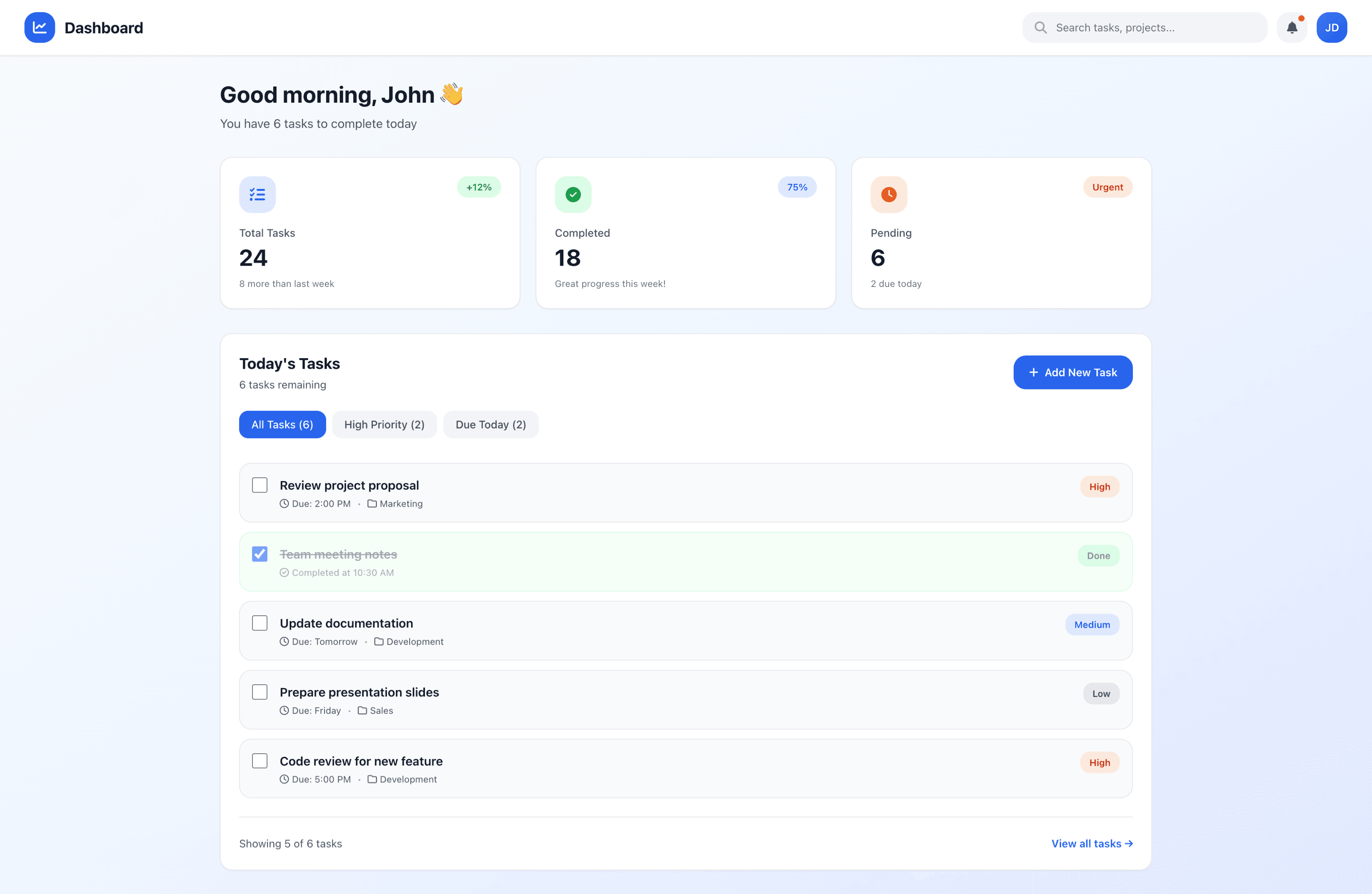
Clear, friendly visual tone — Soft gradients, rounded cards, and calm color usage make the UI approachable for beginners.
Strong structure & hierarchy — Greeting, widgets, and task list are well-organized with good spacing and visual clarity.
Widget icons and colors feel slightly muted — Increasing contrast or icon weight could improve quick readability for beginners.
Task list density — The list appears slightly long and evenly weighted; stronger grouping or subtle dividers could improve scanability.
Readdy AI
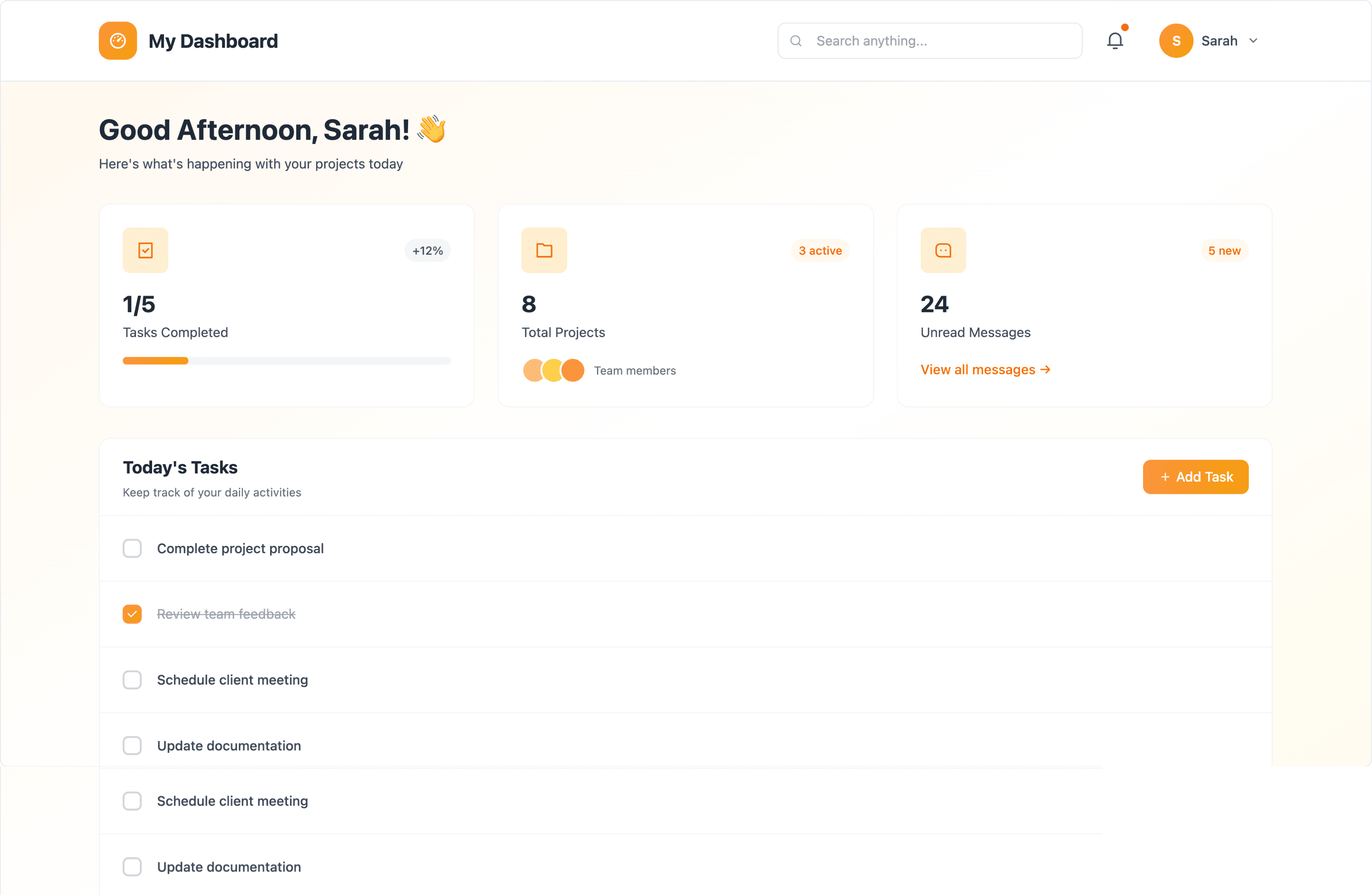
Warm, welcoming style — Light orange accent palette and rounded elements give a friendly, beginner-friendly appearance.
Clean top bar and widget layout — Search, profile, and widgets are simple and easy to understand at a glance.
Task list hierarchy is weaker — All tasks look visually identical, making important items harder to distinguish for new users.
Widget spacing feels slightly loose — More consistent padding and alignment would help the layout feel more polished and structured.
Generate a one-page MVP landing for a subscription SaaS that collects signups: hero headline, short feature grid, pricing teaser, newsletter/signup form (email + company), and an admin callback widget. Output should include deployable frontend and clear export for backend hookup (e.g., Supabase).
UXMagic
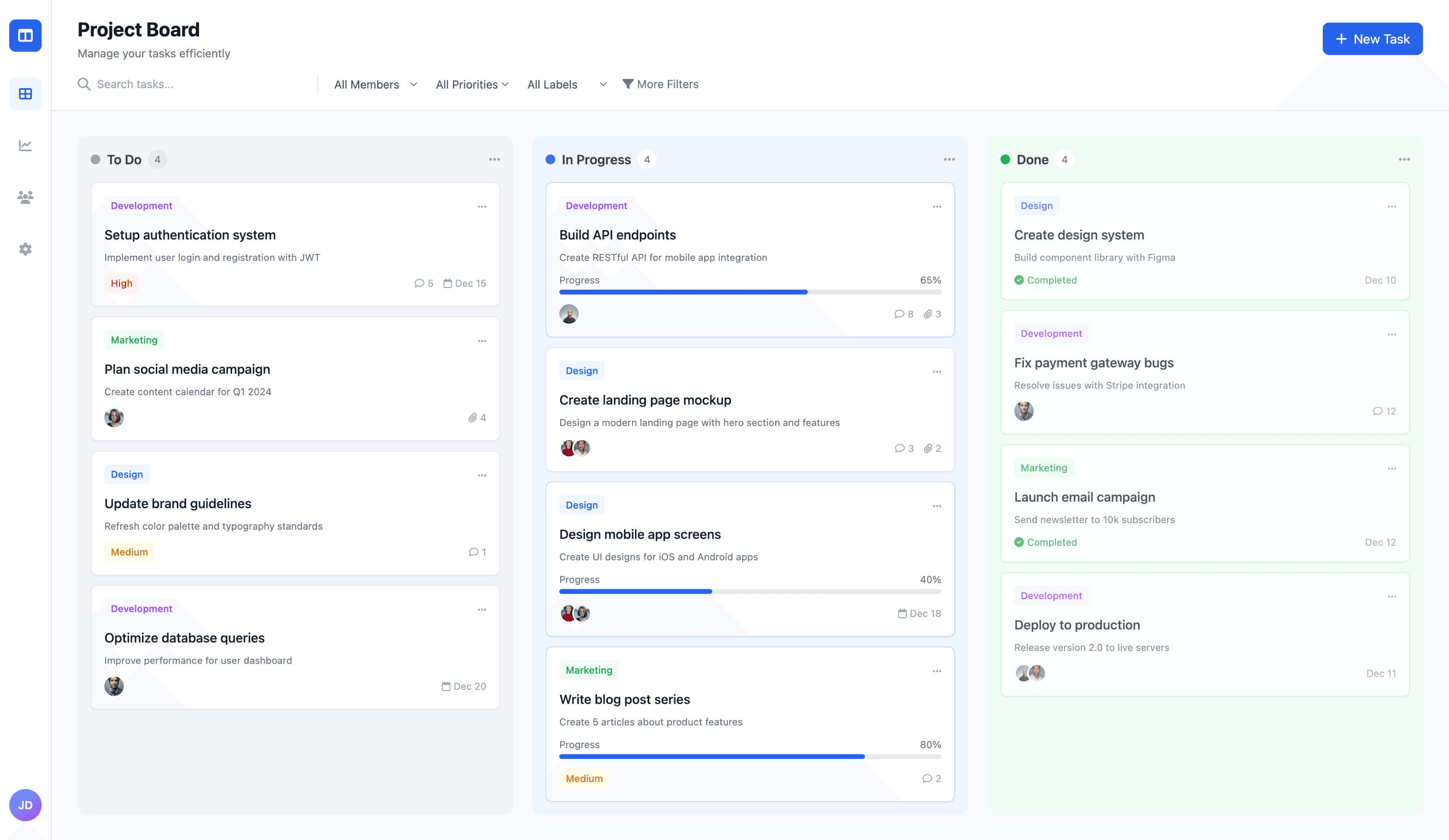
Clean, modern visual execution — Soft color backgrounds for each column and well-spaced cards create a crisp, easy-to-scan layout.
Strong hierarchy & usability cues — Avatars, tags, progress bars, and statuses are well balanced, making tasks feel interactive and draggable.
Column density could be optimized — Some cards have larger vertical spacing than needed, reducing visible task count on a single screen.
Sidebar minimalism could go further — Icons feel slightly oversized; tighter sizing would better fit the “minimal sidebar” requirement.
Readdy AI
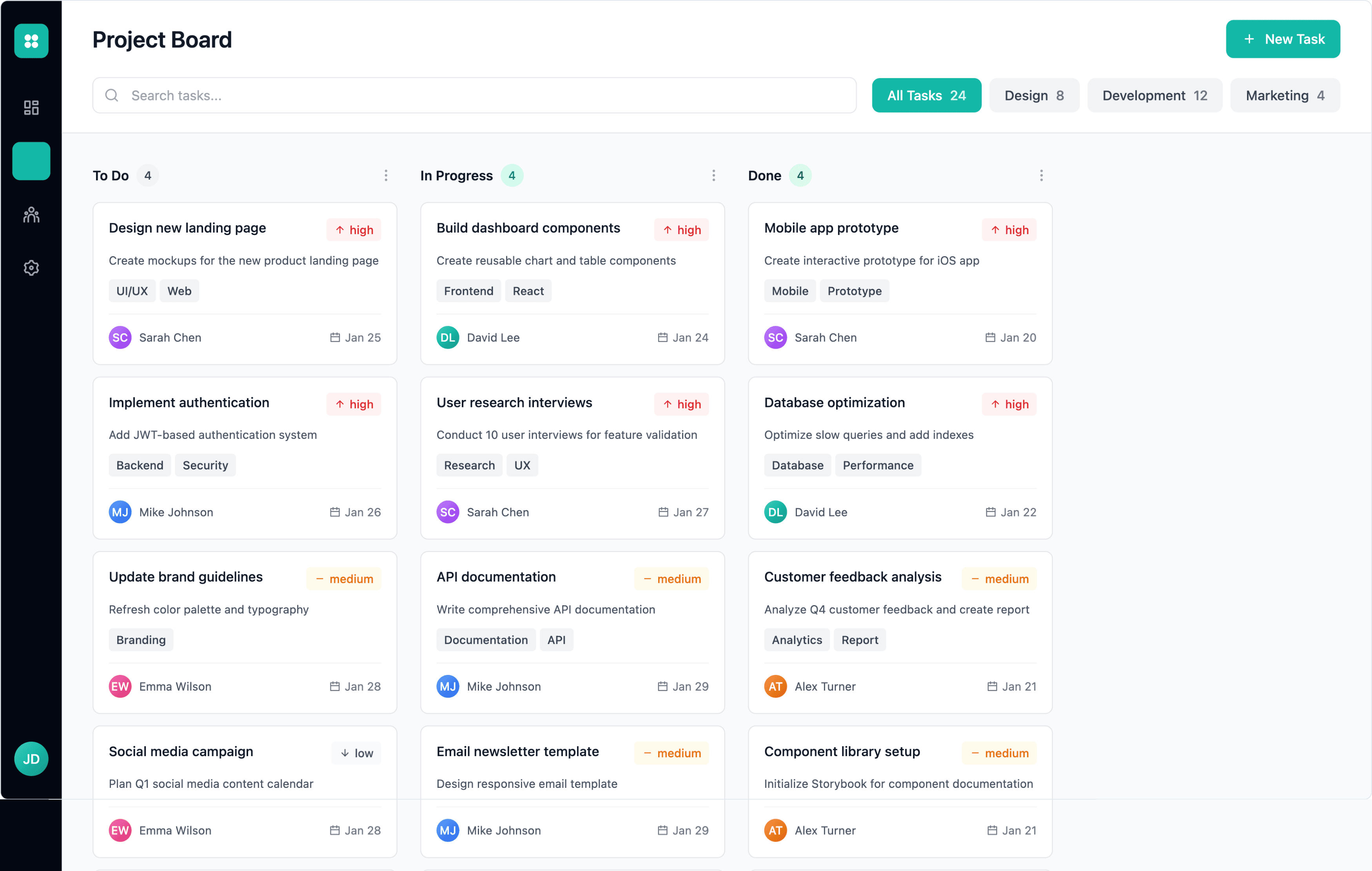
Clear categorization & color coding — Priority labels and task tags add strong visual structure and help users parse tasks quickly.
Compact card layout — Cards are tighter and more data-dense, allowing more tasks to fit within the viewport.
Visual crispness is lower — Darker, busier card styling introduces noise compared to a cleaner, modern kanban aesthetic.
Column headers feel crowded — Badges, counts, and filter labels stack together, reducing breathing room and clarity.

UXMagic
UXMagic is an AI design copilot focused on turning prompts, sketches, screenshots, and URLs into production-ready design artifacts — Figma files, component libraries, and exportable React/HTML. UXMagic’s Agentic AI automates system-wide edits, enforces style guide consistency, and accelerates design-to-dev handoff.

Readdy AI
Readdy is a prompt-first platform that turns conversational text into multi-page websites and apps, emphasizing speed-to-market and code portability. Readdy integrates with Supabase to scaffold full-stack apps and offers code export (React/HTML) with a “no lock-in” promise. It’s aimed at founders and dev-led teams who want a working artifact quickly.
Feature Comparison
| Feature | UXMagic | Readdy AI |
|---|---|---|
| Prompt to UI | Converts prompts + images/sketches/screenshots into structured, editable screens | Converts conversational prompts to multi-page sites and apps |
| Screenshot / Sketch Input | Image-to-UI and Sketch-to-UI into Figma-ready designs | Limited — primarily conversational prompt input |
| URL-to-UI Cloning | Clones and imports existing sites into editable layouts | Not primary — focus is prompt-driven generation |
| Design System Support | Global style guide, tokens, and component consistency | Freeform design with less systematic governance |
| Design System Support | Import tokens, enforce style guides, Magic Patterns component library | Limited; orieTemplate-driven themes; less system governancented to custom visuals, not systems |
| Code Export | Exports Figma + React/HTML + multi-platform options | Exports clean React/HTML and Supabase integration (full-stack scaffold) |
| Real-time Preview | Device previews, interactive prototypes | Live site preview + hosting options |
UXMagic
Pricing Comparison

Free – $0
30 free credits per month Upto 5 screens 5 Projects 1 Figma export UI Design Wireframe Mode Sectional Editing
Premium – $17.5/month
480 credits per month Upto 80 screens 20 Projects 80 Figma exports UI Design Wireframe Mode Sectional Editing Export Code Flows Screenshot to UI Sketch to UI Text Editing and Upload Images
Ulitmate – $35/month
1500 credits per month Upto 250 screens Unlimited Projects 250 Figma exports UI Design Wireframe Mode Sectional Editing Export Code Flows Screenshot to UI Sketch to UI Text Editing and Upload Images Import Figma components/design system Clone a site

Starter – $0
250 credits per month 2 projects Share your projects Leads capture via Readdy Agent, with 5 minutes of Voice and 50 Chats per month
Starter – $15/month
Everything in Free, plus: Get 1 free custom domain for a year 2, 500 credits per month 10 projects Export to Figma & download code Publish with custom domain Leads capture via Readdy Agent, with 20 minutes of Voice and 200 Chats per month 50 form submissions per month
Pro – $24/month
Everything in Starter, plus: Get 1 free custom domain for a year 6, 000 credits per month Unlimited projects Leads capture via Readdy Agent, with 80 minutes of Voice & 800 Chats per month 10, 000 form submissions per month
Final Verdict
UXMagic and Readdy solve different problems.
UXMagic professionalizes the design phase with multimodal inputs, system governance, and reliable handoff for teams that must ship maintainable UIs. So for product teams, agencies, and enterprises that need consistent design quality and lower operational risk, UXMagic is the safer, more integrative choice.
Readdy accelerates idea → deploy with full-stack scaffolding (great for fast MVPs), making it a compelling choice for startups needing to test concept-market fits fast.
UXMagic is the stronger choice for teams that need consistent, polished design output and a reliable workflow they can confidently ship to production. Readdy shines for rapid MVP creation, but UXMagic delivers the stability, structure, and professional handoff today’s product teams depend on.
有疑问?我们来解答。
Readdy is optimized for rapid MVP creation with backend scaffolding, while UXMagic is better when design fidelity and handoff are required.
Yes — UXMagic exports Figma and production-ready React/HTML; Readdy exports deployable site code and Supabase-ready scaffolds.
Readdy focuses on credit volume with wide Pro pricing; UXMagic uses predictable tiers tuned for professional workflows.
UXMagic is a strong Readdy AI alternative when your priority is design system control, multimodal inputs, and clean handoff to engineers.



Related comparisons
Weighing up more than one tool? Here is how UXMagic compares against the closest alternatives.