Página inicial da UXMagic
  • English
  • Español
  • हिन्दी
  • Bahasa Indonesia
  • Tiếng Việt
  • Português
  • Русский
  • 中文
  • العربية
  • Deutsch
  • Français
  • Funcionalidades
  • Bibliotecas
  • Modelos
  • Preços
  • Afiliados
  • Recursos
Página inicial da UXMagic
  • English
  • Español
  • हिन्दी
  • Bahasa Indonesia
  • Tiếng Việt
  • Português
  • Русский
  • 中文
  • العربية
  • Deutsch
  • Français
Página inicial da UXMagic

Bibliotecas

ModelosNovo
Frames da comunidade
Preços
Afiliados

Recursos

Siga a gente:
  • Siga a gente no Slack
  • Siga a gente no Twitter
  • Siga a gente no LinkedIn
  • Siga a gente no YouTube
  • Siga a gente no Instagram
Todas as comparações de ferramentas de design com IA

UXMagic vs Sleek Design: Which AI Design Tool Actually Scales?

Two AI design tools. Two philosophies. One clear winner—depending on what you’re building.

UXMagic Logo
vs
UXMagic Logo

Output Comparison

Prompt 1

Design a mobile app onboarding flow for a first time user that converts a website URL into editable design screens, including paste URL, loading, preview, and export states, optimized for clarity and speed.

UXMagic
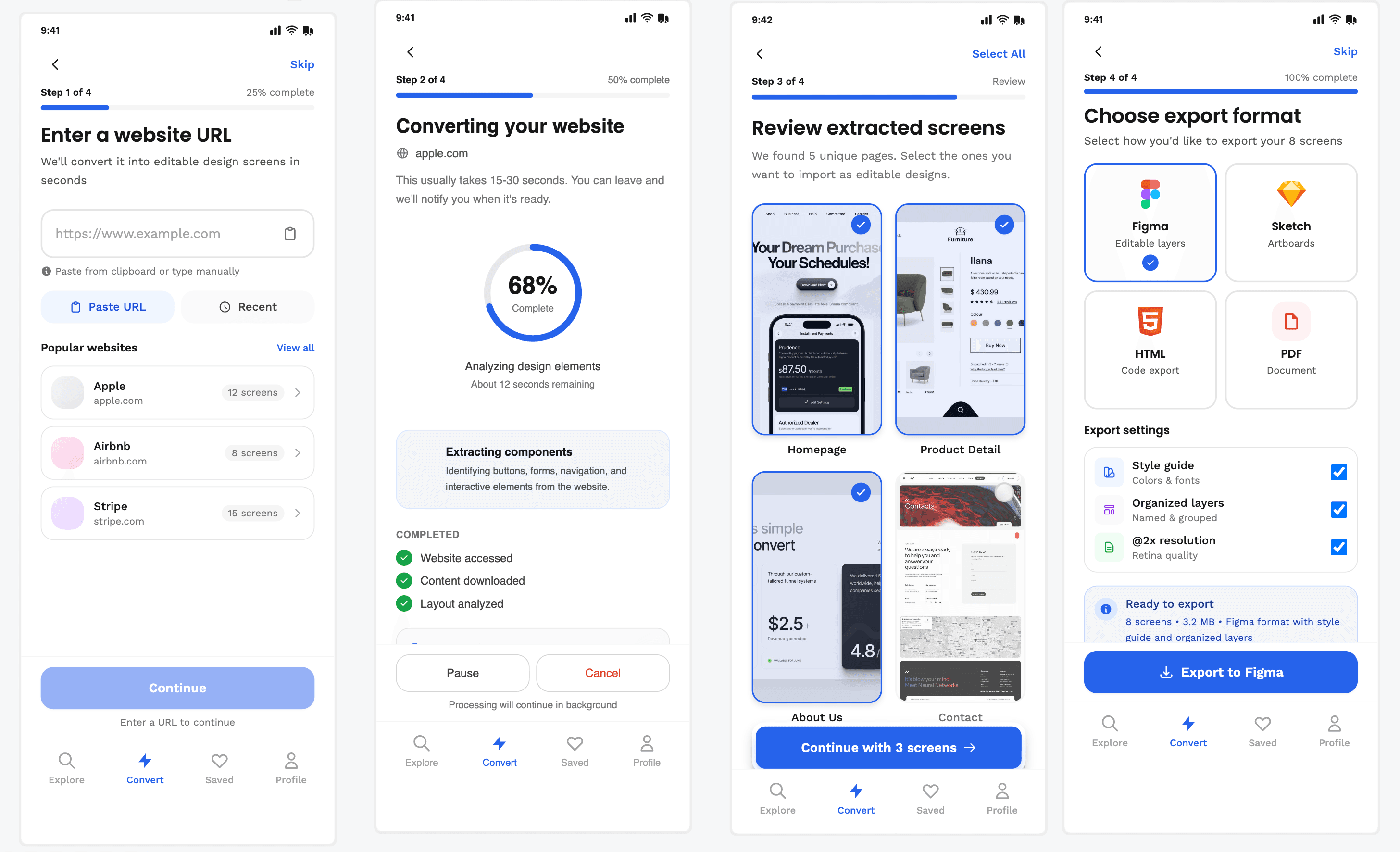
UXMagic Prompt

Clear step-by-step progress → reduces uncertainty

Strong control over screens & export settings

Later steps feel overwhelming

Too process-heavy, not value-focused

Sleek.design
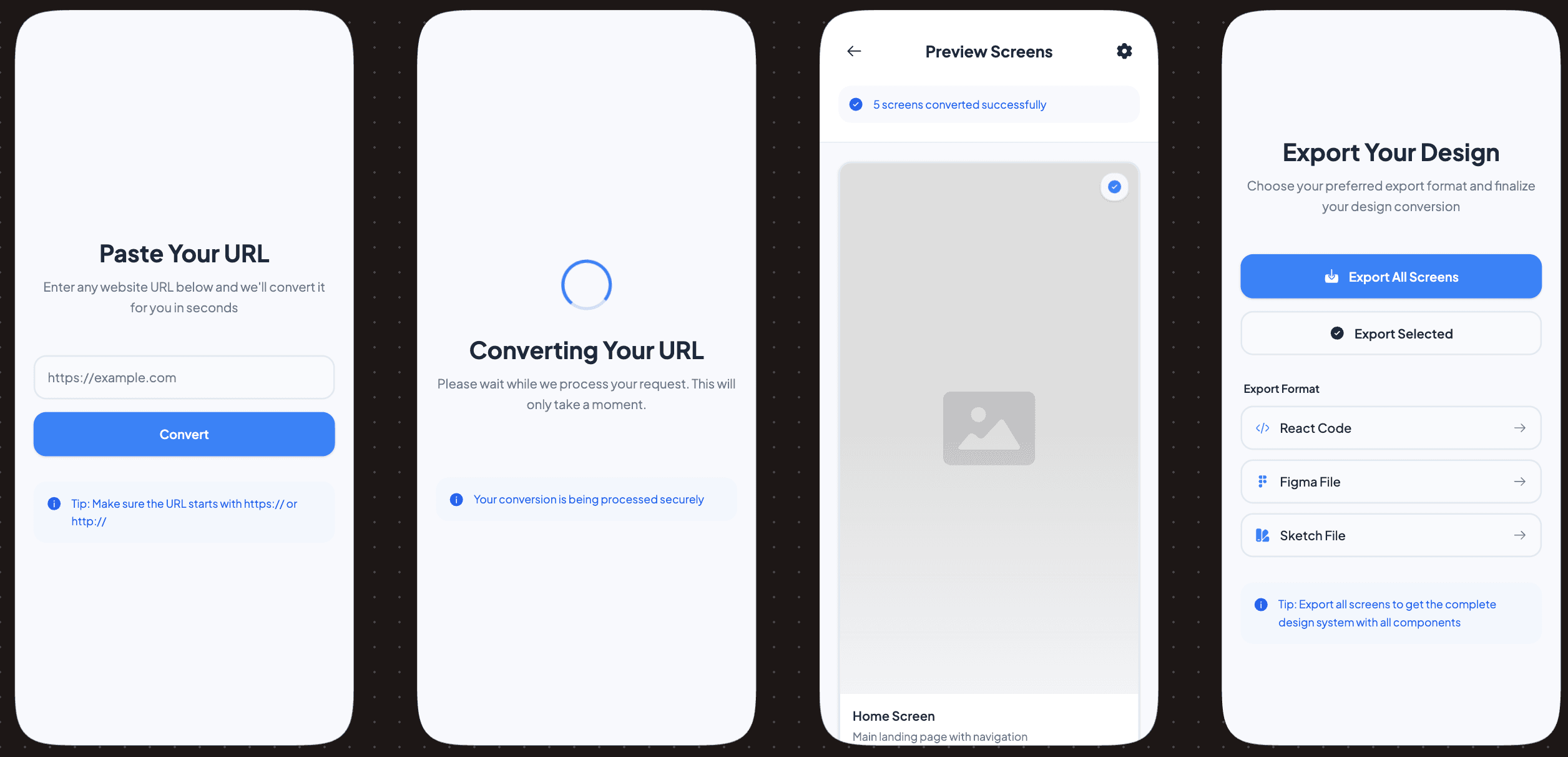
Sleek.design Prompt

Very clean, fast-feeling flow

Outcome-driven copy builds confidence

The conversion state lacks transparency

The preview step feels underused

Prompt 2

Design a mobile app home screen for a design automation tool where users can quickly start a new conversion, view recent projects, and understand the product value in under 5 seconds.

UXMagic
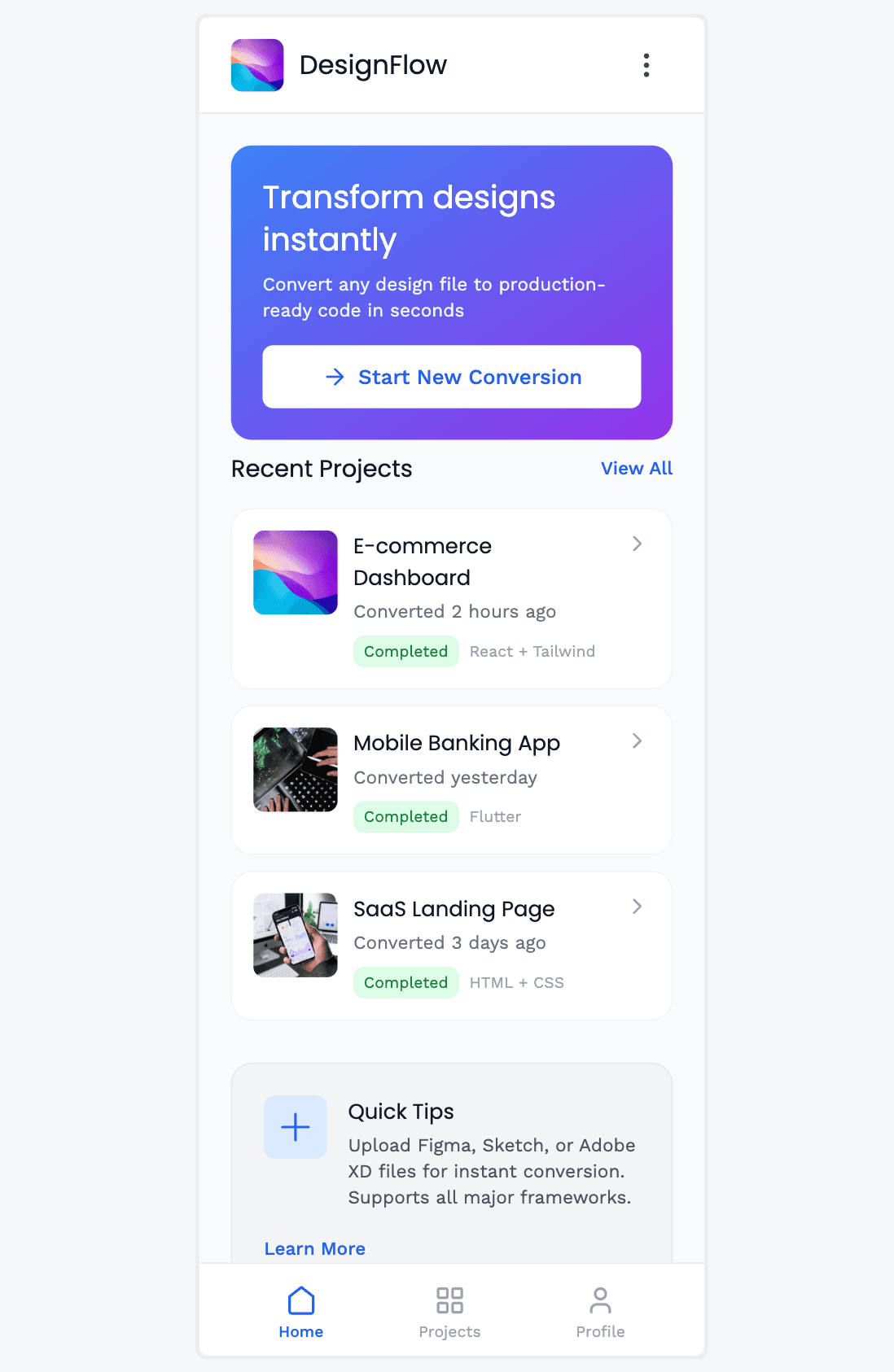
UXMagic Prompt

Strong CTA hierarchy → “Start New Conversion” is unmissable

Recent projects give immediate credibility and reuse value

Hero copy is generic (“Transform designs instantly”)

The home screen feels slightly busy for a primary entry point

Sleek.design
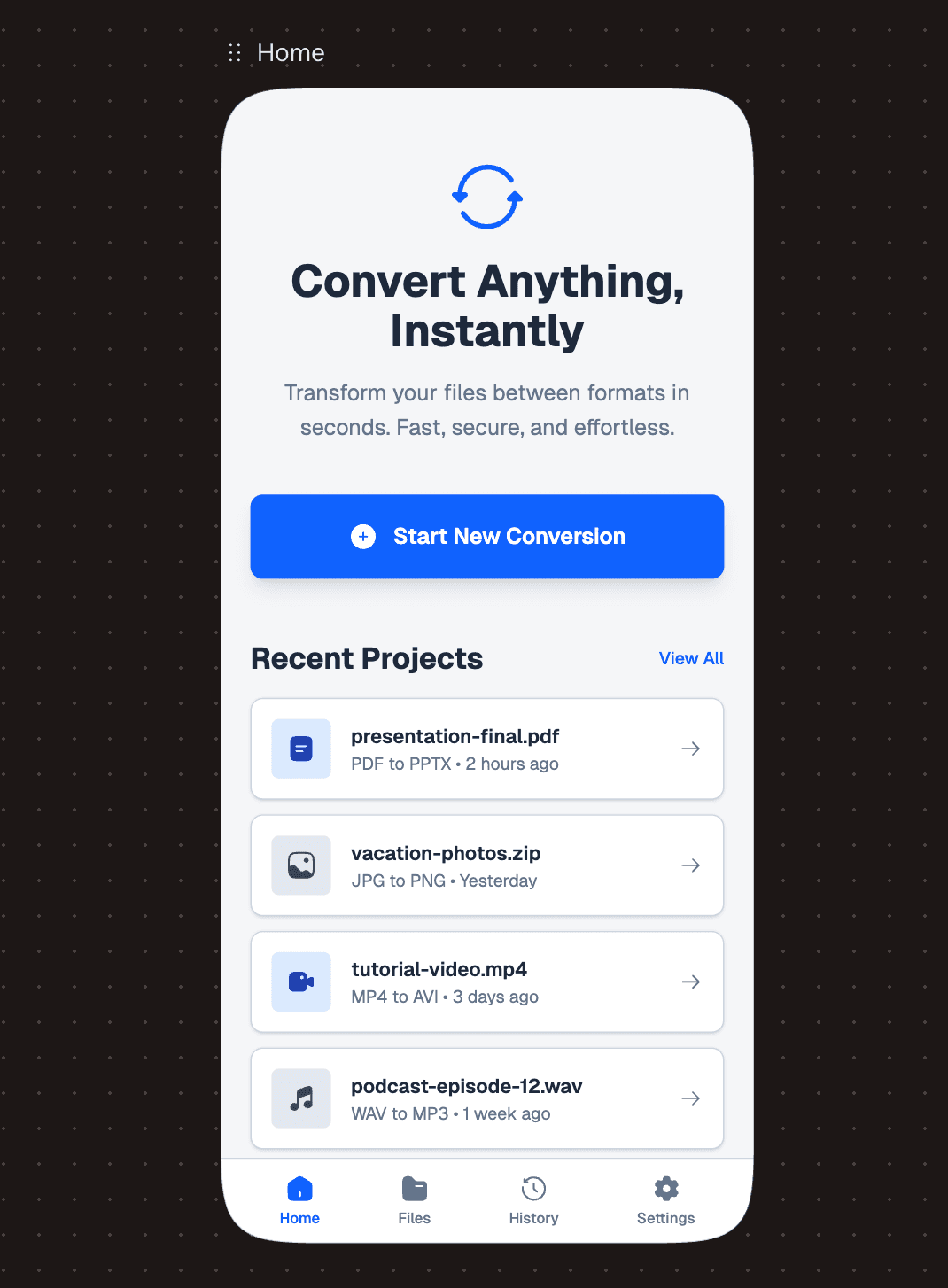
Sleek.design Prompt

Extremely clean, calm layout → low cognitive load

Clear “Convert Anything” promise + focused CTA

Too generic in scope (no clear niche or specialization)

Lacks quick proof signals (formats, success cues, or stats upfront)

UXMagic.ai

UXMagic.ai

UXMagic is an AI Design Copilot built for professional product teams. It integrates directly into Figma and focuses on speed without sacrificing structure—Auto Layouts, responsive logic, and editable systems that scale beyond a single screen.

UXMagic is designed to remove repetitive setup work so designers can focus on UX thinking, not pixel cleanup.

Sleek.design

Sleek.design

Sleek Design is a mobile-first AI UI generator optimized for rapid app visuals. It targets founders and indie builders who need instant credibility without learning design tools.

Sleek Design UI outputs are visually polished and trend-aligned, but its scope remains intentionally narrow—mobile only.

Feature Comparison

FeatureUXMAGICSLEEK.DESIGN
Prompt-to-UI

Generates responsive web & mobile layouts

Generates mobile app screens only

Clone any existing website

Clones with an accuracy of approximately 95%.

Doesn't support as it generates mobile app screens only.

Image/Sketch input

Supports images, sketches, and URLs

Supports Images and sketches

Figma Plugin

Native plugin with Auto Layout

Doesn't have Figma plugin

Style Guide Support

Uses existing design systems

Fixed aesthetic presets

Component Editing

Section-level regeneration

Doesn't have component editing

Responsiveness

Desktop, tablet, mobile views

Mobile only

Code Export

React, HTML

React, HTML

UXMagic

You design real products, not just mockups
You work in Figma-based workflows
You need responsive layouts across devices
You care about design systems and scalability
You want an advanced Sleek Design alternative for long-term work
Sleek.design
You are building a mobile-only app
You need investor-ready visuals fast
You don’t require deep editing or systems
You want polished UI without learning design tools

Pricing Comparison

UXMagic Logo

Free – $0

30 free credits(One Time) upto 5 screens 5 projects 1 Figma Export UI Design Wireframe Mode Sectional Editing

Premium – $25/month

480 credits (Monthly) upto 80 screens 20 Projects 80 Figma Exports Export Code UI Design Wireframe Screenshot to UI Sketch to UI Text Editing & Upload Images Sectional Editing

Ulitmate – $50/month

1500 credits (Monthly) upto 250 screens Unlimited Projects 250 Figma Exports Export Code UI Design Wireframe Screenshot to UI Sketch to UI Import your Figma components/Design System Clone a site(from URL) Sectional Editiing Text Editing & Upload Images

UXPilot Logo

Lite – $8/month

2, 000 AI credits / month ≈ 40 messages Includes 2 projects Unlimited code exports Unlimited Figma exports Export to AI builders

Starter – $14/month

7, 000 AI credits / month ≈ 150 messages Includes 5 projects Purchase additional credits Unlimited code exports Unlimited Figma exports Export to AI builders Share preview links

Pro – $35/month

20, 000 AI credits / month ≈ 400 messages Includes Unlimited projects Purchase additional credits Unlimited code exports Unlimited Figma exports Export to AI builders Share preview links

Final Verdict

In the UXMagic vs Sleek Design debate, the winner depends on intent:

Choose Sleek Design if you need quick, high-polish mobile UI and nothing else.

Choose UXMagic if you’re building scalable, multi-device products and need serious workflow acceleration.

For most professionals, UXMagic is the smarter long-term investment.

Faq

tem dúvidas?nós temos as respostas.

For professional workflows and scalable products—yes. UXMagic goes far beyond mobile-only UI.

UXMagic, thanks to its native Figma plugin and Auto Layout support.

Absolutely. Especially if you need responsive web + mobile design in one tool.

It generates solid mobile-focused code, but lacks flexibility for broader systems.

UXMagic—hands down.

Conheça nossos recursos

Image to UI
Fluxo de UX com IA

Image to UI

Upload a design screenshot to get production-ready code.

Clone a Website
Fluxo de UX com IA

Clone a Website

Recreate any website design by simply providing a URL.

Prompt to UI
Fluxo de UX com IA

Prompt to UI

Instantly turn text descriptions into functional UI designs.

AI Wireframe Generator
Fluxo de UX com IA

AI Wireframe Generator

Generate low-fidelity wireframes to plan your design structure.

Image to Wireframe
Fluxo de UX com IA

Image to Wireframe

Convert screenshots or UI images into clean, editable wireframes instantly with AI and start building real interfaces faster.

AI Mockup Generator
Fluxo de UX com IA

AI Mockup Generator

Turn any idea into a polished, ready-to-use mockup from a simple prompt.

AI Dashboard Generator
Fluxo de UX com IA

AI Dashboard Generator

Describe your dashboard and UXMagic instantly generates a complete layout with charts, metrics, and navigation.

AI Prototype Generator
Fluxo de UX com IA

AI Prototype Generator

Describe your product and UXMagic generates a complete, clickable prototype ready to test.

AI App Builder
Fluxo de UX com IA

AI App Builder

Describe your app idea, and UXMagic generates connected, multi-screen designs. Refine with prompts, then export to Figma or code.

HTML to Design
Fluxo de UX com IA

HTML to Design

Paste a URL or HTML. Get a fully editable design - no plugin needed. Refine with prompts, then export to Figma or code.

AI PRD Generator
Fluxo de UX com IA

AI PRD Generator

Describe your product concept. UXMagic generates a structured PRD and matching UI screens together ready to review or refine.

Related comparisons

Weighing up more than one tool? Here is how UXMagic compares against the closest alternatives.

Design to code

UXMagic vs v0

Design to code

UXMagic vs Onlook

Design to code

UXMagic vs TeleportHQ

Design to code

UXMagic vs Variant AI

Todas as comparações de ferramentas de design com IA

Entre na nossa comunidade

Compartilhe trabalhos, peça ajuda, fique por dentro das novidades e faça networking com outras pessoas do UXmagic.ai

sua próxima ideia
merece existir

pare de só pensar nela. escreva de qualquer jeito. Mal escrita, pela metade, tanto faz. A gente transforma em algo real.

Produto

  • Modelos
  • Comunidade
  • Planos e preços
  • Programa de afiliados
  • UXMagic MCP
  • Claude MCP
  • Informações para IA

Recursos

  • Central de ajuda
  • Biblioteca Figma
  • Biblioteca React
  • Templates de apps mobile
  • Documentação
  • Tutoriais

Funcionalidades

  • De prompt para UI
  • De imagem para UI
  • De esboço para UI
  • Clonar site
  • Importar do Figma
  • AI Wireframe Generator
  • AI Mockup Generator
  • AI Prototype Generator
  • AI Dashboard Generator
  • Todas as funcionalidades

Comparar

  • vs UX Pilot
  • vs Relume
  • vs MagicPath
  • vs Magic Patterns
  • vs Banani
  • vs Galileo AI
  • vs v0
  • vs Lovable
  • vs Base44
  • Todos os concorrentes

Blogs

  • IA no fluxo de trabalho de UX design: o que funciona de verdade
  • Templates de prompt para dashboards SaaS
  • Prompts reais que usamos para gerar fluxos de produto
  • Engenharia de prompt para designers de UX
  • Melhores ferramentas de wireframe em 2026: 10 opções gratuitas e pagas comparadas
  • Todos os blogs

Empresa e suporte

  • Carreiras
  • Fale conosco
  • Política de privacidade
  • Termos de uso
  • Configurações de cookies
  • Siga a gente no Slack
  • Siga a gente no Twitter
  • Siga a gente no LinkedIn
  • Siga a gente no YouTube
  • Siga a gente no Instagram

© 2026 UXMagic AI Technologies Inc.