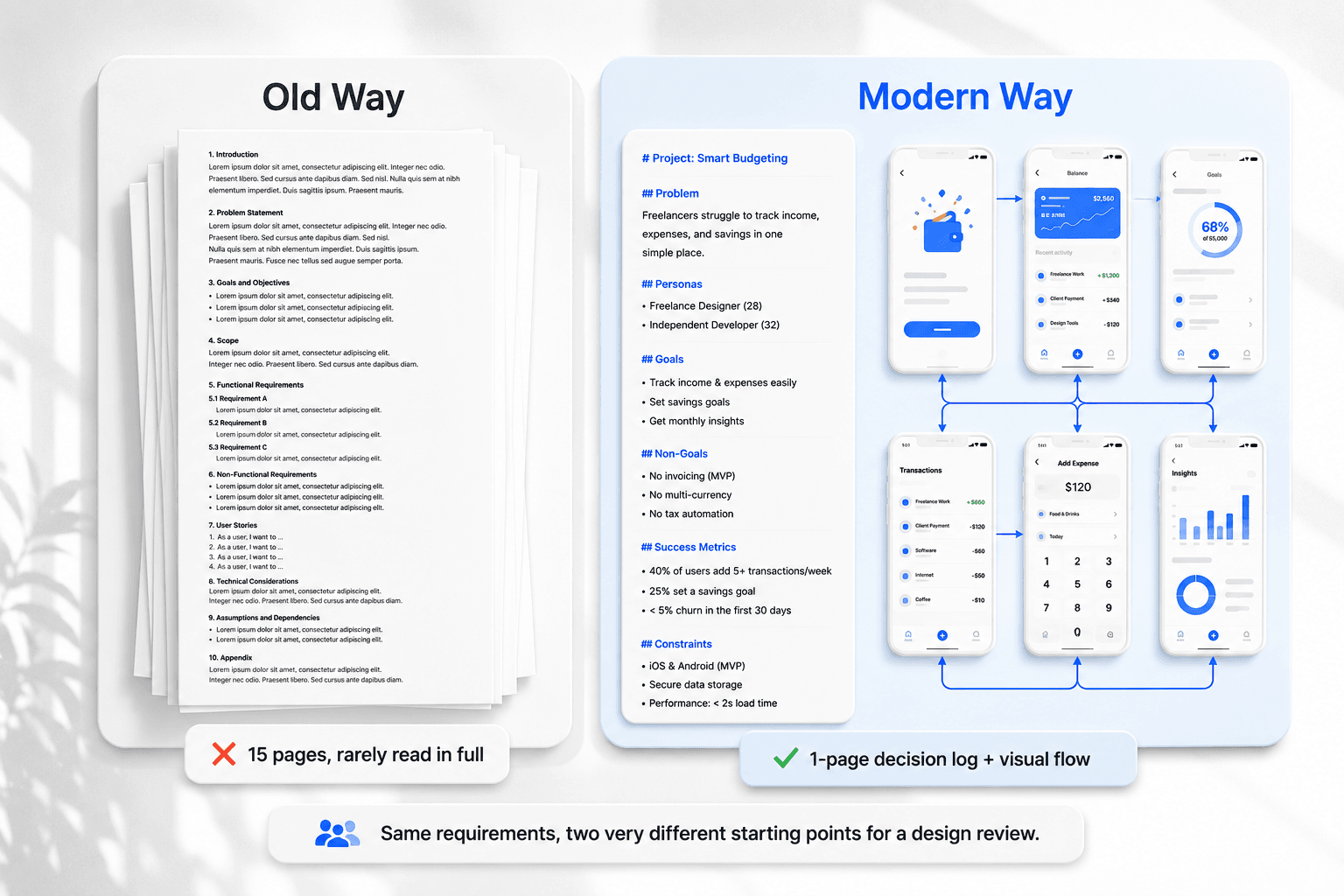
If you've ever watched a fifteen-page requirements doc go quietly unread the moment sprint planning starts, you already know the real question: what is a PRD supposed to do if nobody reads it past page one? The document itself was never the point getting a team to actually agree on what they're building.
You already know what a sprint is, what a user story looks like, and why a wireframe isn't a finished design. This isn't a definition post. It's a straight answer on what a PRD actually needs to contain in 2026, and how to move from written requirements to something your team can look at and agree on together.
The short version: the PRD was never meant to be the final deliverable. Shared visual clarity is the document that is just the decision log that supports it.
What Is a Product Requirements Document (PRD) in Modern SaaS?
A PRD defines the purpose, features, and success criteria of a planned release as a shared reference point for engineering, design, and business teams before technical work starts. That's the textbook version, and it's still accurate. What's changed is what a good one actually looks like.
PRD vs. MRD: Understanding the Strategic Difference
A Market Requirements Document focuses on business opportunity revenue targets, customer demand, market positioning. A PRD focuses on functional capability and what the product actually does. Product marketing typically owns the MRD; product managers write the PRD to guide what engineering builds.
Why Traditional 20-Page Specs Fail Agile Teams
A product manager spends fifteen hours drafting a dense requirements doc in Confluence or Notion, and developers still ask basic functional questions at sprint kickoff not because anyone did anything wrong, but because fifteen pages of prose is genuinely hard to hold in your head during a fast-moving sprint.
The document also goes stale fast. Written requirements become outdated the moment a designer explores screen flows in Figma or a developer surfaces a back-end case the doc never anticipated. Now there are two sources of truth, and they quietly disagree with each other.
There's a harder tension underneath both problems: technical leads want micro-level edge-case detail, executives want high-level commercial outcomes, and trying to satisfy both in one document tends to produce something bloated that serves neither audience well.
PRD vs. User Story vs. Design Brief
These three get confused constantly, and the confusion itself causes real handoff problems worth being precise about where each one starts and stops.
A PRD is made up of several user stories, not the other way around and a design brief is narrower still, scoped to how one screen or flow should look and feel once the PRD's logic is already settled. Confusing these three is exactly how a design brief ends up trying to carry business logic it was never meant to hold.
The Anatomy of a Lean PRD Template
A lean PRD covers four things, and nothing else needs to live in the same document:
Core Problem Statement & Target Persona - who this is for, and the specific problem it solves for them, in a few sentences, not a page.
Functional Requirements & User Stories - the actual capabilities being built, framed as user stories your team already knows how to write.
Non-Goals - features, platforms, or capabilities explicitly excluded from this release. This is the section most PRDs skip, and it's the one that actually prevents scope creep.
Success Metrics & Technical Constraints - how you'll know it worked, and any backend or platform limits the design has to respect.
That's it. No 15-row permission tables, no multi-paragraph justification for decisions the team already agreed on in a meeting. If it's not one of those four things, it probably doesn't belong in the PRD itself.
How to Write an Actionable PRD Step-by-Step
Step 1: Define the Strategic Hypothesis
Gather customer feedback, analytics, and the actual commercial objective before writing anything. Outline the core problem, key user stories, technical constraints, and non-goals in concise markdown not prose.
Step 2: Generate the Visual Flow, Not Just the Document
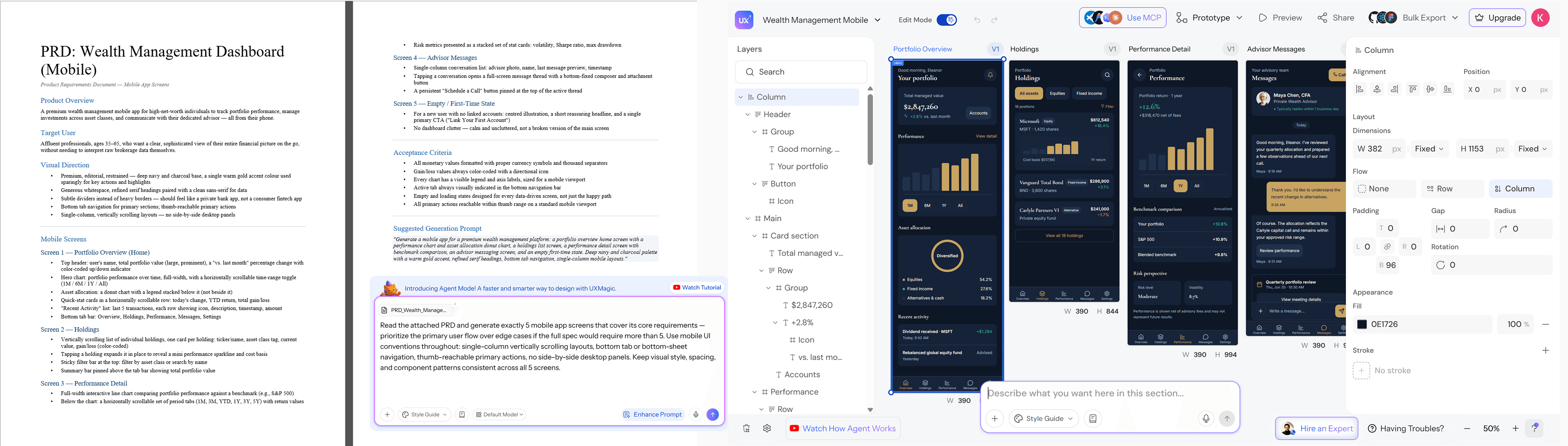
This is the step most PRD guides skip, and it's the one that matters most. Instead of handing a designer an abstract paragraph and waiting days for a first draft, feed the functional requirements into an AI UI tool and generate the actual screen architecture directly.
UXMagic's AI PRD Generator takes the same functional requirements you'd otherwise leave as bullet points in Notion and turns them into connected, multi-screen UI flows so the team validates actual screen behavior before committing engineering time to a sprint, not after a technical review catches the gap late.
Step 3: Run Interactive Cross-Functional Reviews
Review component states and user interactions against the generated visual flow, not a document. A visual flow makes it much harder for a stakeholder to nod along without actually absorbing what they're agreeing to, since people react to what they can see breaking far more readily than what they read past.
Step 4: Lock Technical Specs & Analytics Tracking
Lock the final visual flow alongside a markdown decision log backend API requirements, data schema constraints, tracking metrics appended directly to the spec. Push modular user stories into the engineering backlog from there. Treat this as a living artifact, not a one-time drop; requirements will keep changing, and the spec needs to change with them instead of quietly going stale.
Real-World Examples Across Industries
B2B SaaS Onboarding (Non-Technical Founder). A founder spends several days writing a multi-page doc detailing a team invitation flow. A contract developer misreads the permission logic, and three weeks of backend refactoring follows after testing already exposed the problem. The faster version: draft a prompt describing the user roles, generate a complete multi-screen onboarding flow, and let the developer inspect the actual permission states visually before writing a line of code.
Enterprise Role-Based Access Control (Product Manager). A PM builds a fifteen-row table in Confluence describing button visibility per role Admin, Manager, Viewer. Developers struggle to visualize where those rules actually apply across screens, and cluttered navigation surfaces during QA. Generating screen variants for each persona directly resolves layout density at kickoff instead of during testing.
Mobile App Launch. A team specs a fitness app's onboarding goal selection, permissions, first workout in a written doc that describes each screen in a paragraph. The design team interprets "clean and motivating" three different ways across three screens. Generating the sequence directly from the requirement text keeps tone and component styling consistent from the first screen, since nothing is left to individual interpretation mid-flow.
E-Commerce Feature (Cart Abandonment Recovery). A PM writes requirements for a save-for-later feature to move an item from cart to a wishlist without losing checkout progress. The written spec doesn't clarify what the cart looks like with zero items left, or how the wishlist behaves on mobile. Generating the flow surfaces both empty states immediately, before a developer has to guess at them during implementation.
Enterprise Workflow (Internal Approval Chain). An operations lead specs a multi-step expense approval flow submission, manager review, finance sign-off, payout. A text-only version buries the branching logic (what happens on rejection, what happens above a dollar threshold) in dense paragraphs developers have to re-read multiple times. A generated flow shows each branch as its own screen path, making the logic visible instead of requiring it to be reconstructed from prose.
Across all five, the same pattern repeats: a written description works fine for describing intent, but it consistently fails at the exact moment someone needs to picture an edge case, an empty state, or a branch in the logic. That's the specific gap a generated visual flow closes not because text is bad, but because spatial and conditional logic was never text's strongest format.
Free PRD Template
Copy this structure - it's deliberately short:
Problem Statement
[1-2 sentences: what problem, for whom]
[1-2 sentences: what problem, for whom]
Target Persona
[Who this is for, specifically]
User Stories
As a [user], I want to [action], so that [outcome]
(repeat for each core capability)
Non-Goals
[Explicitly excluded from this release]
[Explicitly excluded from this release]
Success Metrics
[How you'll know this worked]
Technical Constraints
[Backend, platform, or data limits the design must respect]
Visual Flow
[Link to generated UI flow — this replaces pages of layout description]
Turn Requirements Into Reality
Stop writing specs nobody uses. Try UXMagic free and transform your product requirements into a connected visual flow your team can review, refine, and build from.
A Product Requirements Document defines the purpose, features, functionality, and success criteria of a planned product release. It serves as a shared reference for engineering, design, and business teams, ensuring cross-functional alignment on what needs to be built before technical development begins.
A Market Requirements Document focuses on business opportunities, revenue targets, and customer demand, whereas a PRD focuses on functional capabilities, use cases, and product behavior. Product marketing typically owns the MRD, while product managers write the PRD to guide engineering execution.
Product managers or product owners write the PRD, but agile practices involve UX designers and engineering leads early in the drafting process. Collaborative authoring ensures technical feasibility, user experience alignment, and shared ownership before requirements are finalized for sprint planning.
Traditional 20-page text PRDs are largely obsolete because they become out of date during fast sprint cycles. Modern teams use lightweight markdown PRDs alongside interactive visual UI prototypes, combining strategic business goals with visual logic validation to accelerate product delivery.
Non-goals explicitly define features, platforms, or capabilities that the team intentionally chooses not to build in a specific release. Documenting non-goals prevents scope creep, sets clear expectations with executive stakeholders, and keeps engineering teams focused exclusively on core deliverables.
A PRD should not include detailed visual design decisions, exhaustive edge-case prose, or backend implementation details better suited to engineering docs. Keep it to the problem, personas, user stories, non-goals, and metrics anything requiring spatial or visual reasoning belongs in the generated flow, not the text.
A modern PRD should fit on one to two pages of markdown, not 15-20 pages of prose. If a section is running long, it's usually a sign that content belongs in the visual flow instead screen behavior and layout logic are rarely well served by more paragraphs.
AI can help draft the markdown sections problem statement, user stories, non-goals from rough notes or a transcript, but the actual product thinking still has to come from the team. Where AI adds the most value isn't writing the text; it's converting that text into the visual flow that makes the requirements testable.