

If your product team is still spending three weeks on the "Discover" phase of the Double Diamond, your startup is going to run out of runway before you ship a single validated feature. The academic UX design methodologies you learned a few years ago are breaking under the pressure of 2026 shipping cadences - not because the theory was wrong, but because nobody accounted for a founder who wants a working prototype by Friday.
This isn't a refresher on what Design Thinking is. You already run sprints, you already know what an MVP is, and you've already built more empathy maps than you'd like to admit. What you actually need is a straight answer: which of these frameworks survive contact with AI-speed product cycles, and which ones are just slide-deck theater at this point.
Here's the honest version, plus the workflow that's replaced most of what you were taught.
The Core UX Methodologies (And Why They're Breaking)
Design Thinking vs. the Speed of SaaS Delivery
Design Thinking's five stages - Empathize, Define, Ideate, Prototype, Test - aren't wrong. What's wrong is treating them as sequential, evenly-weighted phases when "Ideate" and "Prototype" have effectively collapsed under generative AI. In 2026, the discipline that matters is front-loaded into Empathize and Define, because execution stopped being the bottleneck a while ago.
If a designer's core value used to be turning a defined problem into a well-crafted screen, that value proposition just got thinner. The framework survives, but only if you stop pretending the last three stages take as long as they used to.
Why the Double Diamond Fails in Agile Environments
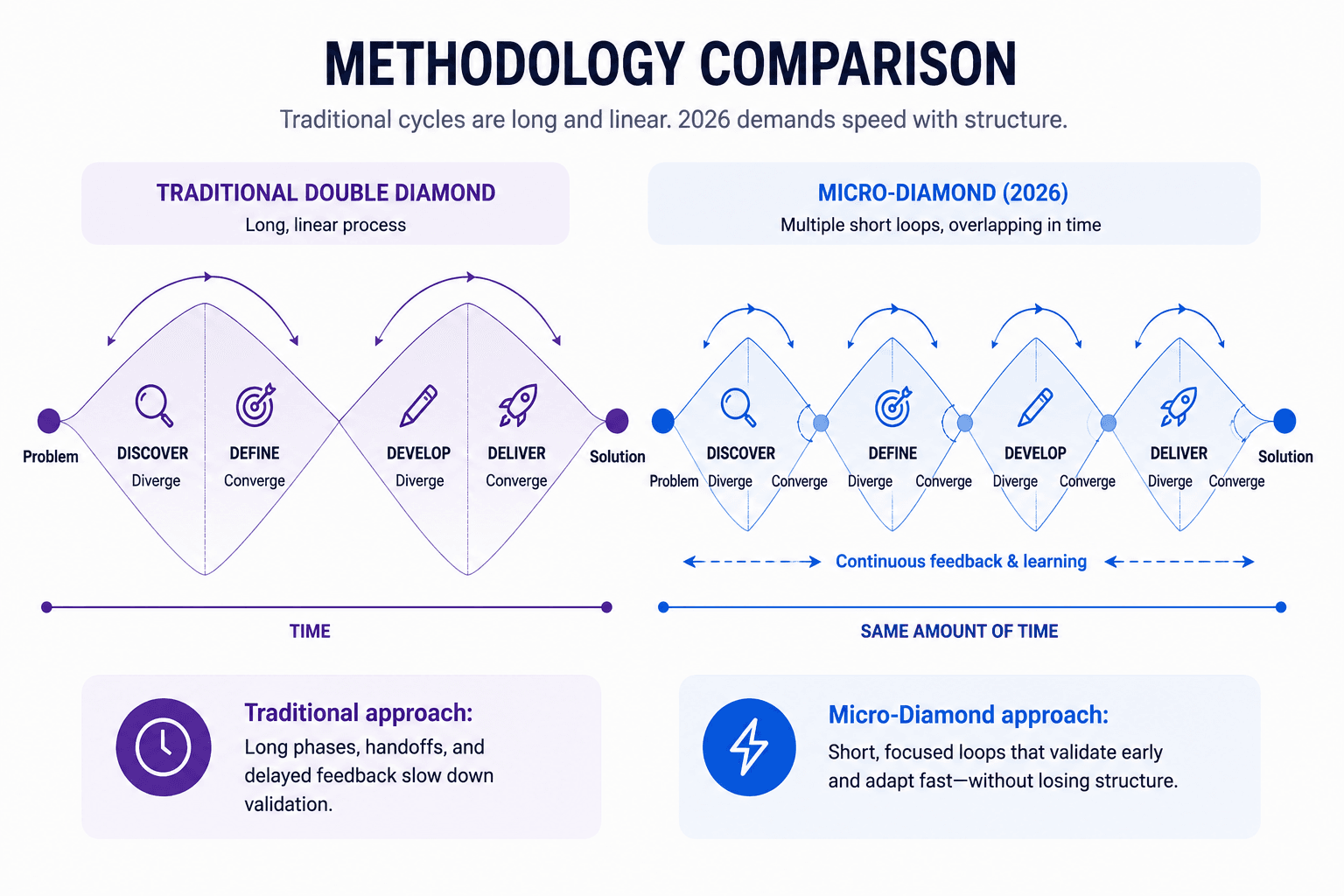
The Double Diamond - Discover, Define, Develop, Deliver - is taught as a linear, sacred path to innovation. In practice, most companies operate on a compressed cycle where direction gets chosen before design work even starts, making the first diamond mostly performative. Call it what it is: a lot of teams are running a Reverse Double Diamond, working backward to invent user problems that justify a feature a founder already decided to build over the weekend.
"The first diamond isn't discovery anymore. It's a justification exercise for a decision that already happened."
Fighting that reality by demanding a longer discovery phase is a losing argument. The better move is a Micro-Diamond using rapid, AI-generated high-fidelity prototypes to force stakeholder convergence and test hypotheses in real time, validating assumptions during development instead of before it.
Lean UX and the Hidden Danger of Design Debt
Lean UX's build-measure-learn loop is sound in theory. In practice, it's frequently hijacked by fast-moving engineering cultures as justification to ship fragmented, inconsistent interfaces just to harvest quantitative data - "shipping bad UX fast to see if anyone complains" dressed up as methodology.
Speed without structure accumulates catastrophic design debt, and design debt isn't an abstract cost - it's the same failure pattern behind some of the most expensive bad UX decisions on record. Fast-moving teams need architectural guardrails - rigorous design systems, global style guides, design tokens - enforced before Lean UX gets applied, not after. A team moving fast without a system constraining both human and AI output ends up with a fragmented product that takes months to untangle.
User-Centered Design in an Automated Workflow
UCD's core principle - built around user needs, not internal system logic - hasn't changed. What's changed is where that principle gets enforced. It used to live in wireframes and testing sessions; now it has to live in the constraints you feed an AI generation engine, because that's where the interface actually gets produced.
Methodology Comparison: What Each One Actually Gets You
| Category | Design Thinking | Double Diamond | Lean UX | Micro-Diamond (2026) |
|---|---|---|---|---|
| Core focus | Human empathy, problem framing | Divergent/convergent discovery | Fast validation via MVPs | Rapid, AI-accelerated convergence |
| Where it breaks in 2026 | Ideate/Prototype stages assume manual execution time | First diamond assumes real discovery time exists | Gets used to excuse shipping inconsistent UI | Requires strict constraints or output is unusable |
| Where it still holds | Empathize, Define | Second diamond (Develop/Deliver) | Build-measure-learn loop itself | Entire framework, if paired with a design system |
| Best paired with | AI flow generation for execution | Compressed cycles, parallel testing | Enforced design tokens/style guides | Sandwich Method (Human → AI → Human) |
The Mediocrity Crisis: How AI Shifts the UX Value Proposition
The common industry fear is that AI will replace designers by pumping out "good enough" interfaces, commoditizing the profession. That's backwards. AI actually creates a mediocrity crisis: generative models produce the statistical average of the internet's design patterns, which means "average" is now free. If a designer's primary value was making screens look clean, that value just evaporated - anyone can prompt for clean.
What doesn't evaporate is the upstream work: systems thinking, mapping complex information architecture, and injecting real-world constraints - edge cases, brand rules, actual user pain into the generation engine. That's the part AI still can't do for you, and it's exactly where a designer's value has to relocate.
"AI didn't lower the bar for design. It just made 'average' a commodity — which means average is now worthless, and the floor for what counts as valuable work just got a lot higher."
Here's what that looks like in practice: two designers prompt the same AI tool for a subscription cancellation flow. The first prompts "cancellation screen with a retention offer" and ships whatever comes back - a generic modal with a discount code, indistinguishable from a thousand other SaaS products. The second prompts with the actual constraints: the specific reasons users cite for churning in support tickets, the legal requirement to make cancellation a single click, and the brand's existing tone of voice. The output isn't just prettier - it's the only one that actually reflects the business. The tool was identical. The value came entirely from what got fed into it.
This isn't a minor productivity tweak, either. Controlled field experiments show that using AI purely for task-level speedups - an LLM writing interview scripts, summarizing transcripts produces only about a 5% systemic improvement. Startups that structurally redesign their entire UX workflow around AI, embedding it into the actual mechanics of product development rather than bolting it onto individual tasks, see up to 90% more revenue than equally equipped peers. The gain isn't in the tool. It's in restructuring the workflow around it.
The Micro-Diamond Workflow: Adapting Methodology for 2026
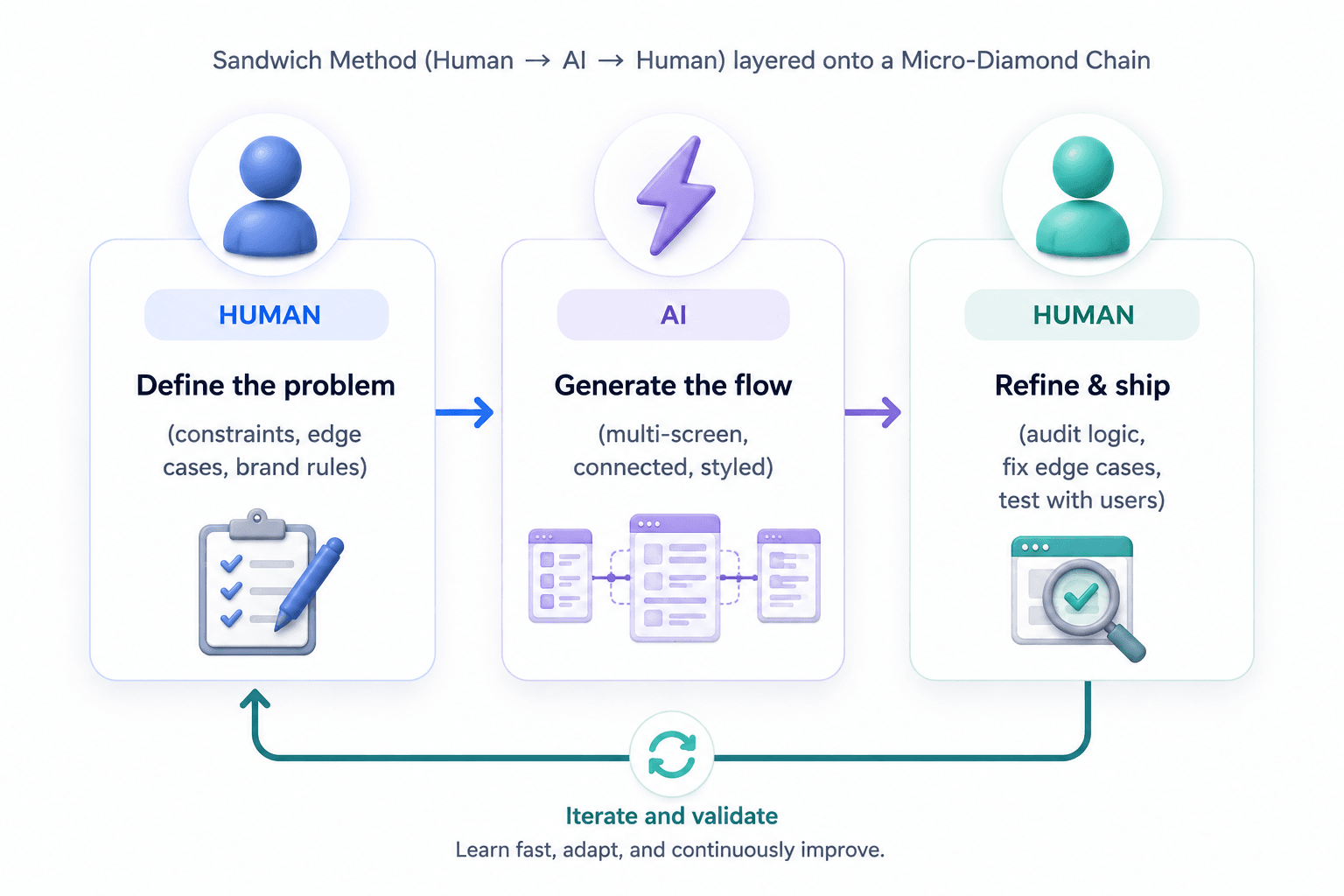
The practical answer to all of the above is a synthesized framework: the Sandwich Method (Human → AI → Human) layered onto a Micro-Diamond Chain. It restructures the five stages of Design Thinking into something that survives a two-week sprint.
Phase 1: Human Context & Rigorous Constraint Setting
This is where the designer acts as a strategist, not an executor - conducting real user research, mapping information architecture, and writing the actual problem statement. AI's only job here is synthesis: transcribing interviews, clustering qualitative data into themes.
The failure mode is the "Blank Canvas" trap - feeding an AI a vague prompt like "design a B2B SaaS dashboard" and expecting something usable. AI needs deterministic constraints: target user, specific data points, brand rules, and edge cases. Skip this and you get generic Dribbble bait, not a product.
Phase 2: AI Acceleration & Flow Generation
This is the phase that used to eat weeks of manual labor. Take a concrete case: a designer needs a checkout flow for a subscription product, with a free trial, a paid tier, and a failed-payment recovery path. Instead of manually wireframing all three states across five screens, the designer prompts UXMagic's AI UI generator with those exact constraints - trial length, pricing tiers, what happens when a card is declined and gets back a connected flow covering all of it, styled and structured, in the time it used to take to sketch one screen.
The mistake to avoid: prompting for isolated screens instead of connected flows. A designer who only prompts for a "checkout screen" gets a checkout screen - not the failed-payment state, not the trial-to-paid transition, not the confirmation. The value isn't screen generation. It's mapping state changes and interaction logic across the entire narrative, which is a different job than making one screen look nice.
Phase 3: AI Convergence & Design System Enforcement
Divergent ideas need to get narrowed down and locked into the actual product ecosystem here. If a team's onboarding flow needs to obey existing spacing, type scale, and component rules, that enforcement has to happen automatically - otherwise every AI-generated screen introduces its own slightly-different button radius and color token, and someone spends next Tuesday manually reconciling all of it. This is exactly the job a constrained generation engine handles: mapping new output onto the existing system instead of inventing a new one per screen.
"An AI tool that ignores your design system isn't saving you time. It's handing you a cleanup job with better lighting."
Phase 4: Human Refinement & Usability Testing
The designer steps back into audit output - checking the AI's logic, repairing edge cases, adjusting hierarchy against real cognitive load and Gestalt principles, and preparing the handoff. When the flow needs to move from design file to shippable code, that's a Figma-to-code problem, not a design problem - and it should be treated as its own discrete step, not an afterthought bolted onto Phase 4.
The cardinal rule of this workflow: never ship raw AI output. AI is the acceleration engine. The senior human designer is still the final editor for accessibility, ethics, and actual usability.
Common Mistakes: 4 Ways Teams Misuse Design Thinking in AI Workflows
- Skipping Define and going straight to prompting. A vague prompt produces a vague result. If you haven't written the actual constraints down, the AI is guessing, and you'll spend more time fixing the output than you saved generating it.
- Treating AI output as final instead of a draft. Shipping raw generation skips the entire "Human Refinement" phase - which is where accessibility, edge cases, and actual usability get caught.
- Generating isolated screens instead of flows. A pretty login screen with no connection to what comes after it isn't a validated user journey. It's a single frame with no movie.
- Running Lean UX with no design system underneath it. Speed without architectural constraints doesn't produce fast iteration - it produces a fragmented product that costs months to reconcile later.
Stop Wireframing: Generating Production-Ready Flows Instantly
Two scenarios show what this workflow actually buys you.
The Agile sprint pivot. A team is three days into a two-week sprint building a desktop analytics dashboard for factory managers, when the PM announces the dashboard needs to be mobile-first for the factory floor instead.
The old version: days of wireframing get discarded, the deadline gets missed, and "Develop" restarts from scratch.
The 2026 version: the designer keeps the data and metrics from Phase 1, feeds the desktop layout back in, and prompts a refactor of the architecture for mobile - converting dense data rows into digestible card layouts, generating three variations in minutes. A generic image generator handling the same prompt would return a flattened, un-clickable mockup full of Lorem Ipsum, leaving the designer to rebuild the whole thing by hand anyway.
The Lean MVP launch. A bootstrapped founder needs to validate a multi-step fintech onboarding flow using build-measure-learn. Building it the old way costs three weeks of contractor time, delaying the "Measure" phase and burning capital the founder doesn't have to spare. Defining the onboarding logic in a prompt and generating the connected sequence with a consistent style guide gets the team testing a high-fidelity prototype by Tuesday afternoon. Generic chat tools handling this task tend to forget context between screens, producing broken navigation and inconsistent styling that makes the prototype untestable.
Related guides
- The UX Case Study Template Hiring Managers Actually Read
- What Is Design Thinking in 2026? (And Why Most Teams Get It Wrong)
- AI Design Myths Designers Still Believe
- What Is a Prototype in UX Design (And Why Most Teams Build Them Wrong)
- Low-Fidelity Wireframes in the AI Era: What Still Matters
- How to Run a Design Sprint in 2026: The 3-Day Accelerated Framework
- How to Build a UX Portfolio That Gets You Hired in 2026
- Fast AI Design is Easy, Shipping Reliable Products isn’t
- What Is UX Design in 2026? A Practical Guide for Shipping Faster
- What Is a Mockup? Everything Product Teams Actually Need to Know
Stop Drawing Gray Boxes. Start Solving the Right Problems.
Turn your next PRD into a connected, high-fidelity user flow in minutes instead of spending days wireframing by hand. Let AI handle the repetitive work so you can focus on product decisions, edge cases, and user experience.