
TL;DR
A UI/UX designer turns user needs and business requirements into usable digital experiences. Responsibilities vary by employer, but the role usually combines problem framing, interaction design, interface design, validation, and collaboration. As AI speeds up routine production, judgment, systems thinking, accessibility, and evidence-based decision-making become more valuable.
What does a UI/UX designer actually do?
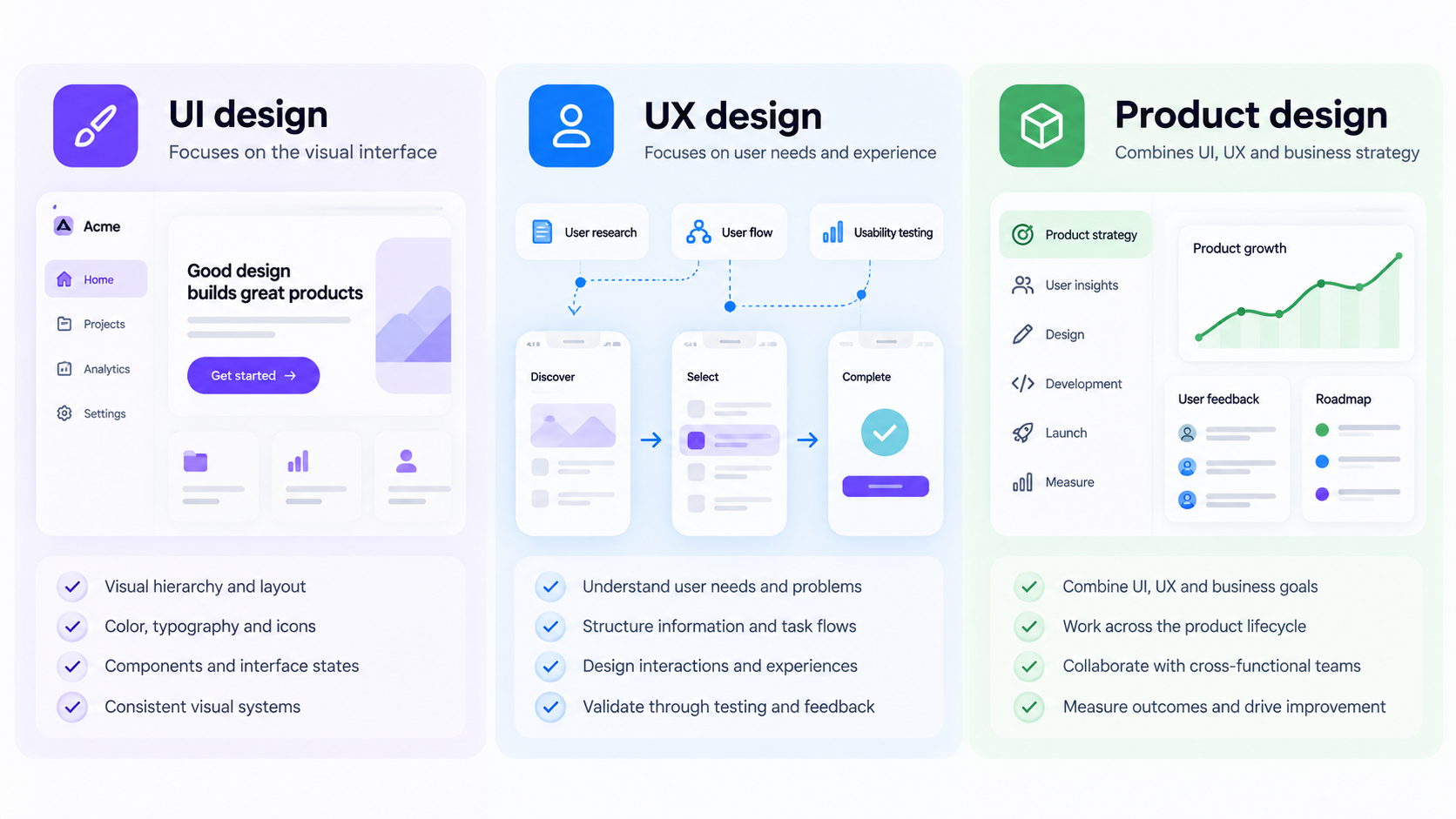 A UI/UX designer shapes how a digital product works, looks, and supports user goals. The role can cover research, information architecture, interaction design, visual design, prototyping, testing, and implementation support.
UI and UX overlap, but they are not interchangeable. UI concerns the interface people encounter. UX covers the wider journey, logic, usability, and outcome.
The role in one sentence
A UI/UX designer identifies user problems, structures experiences, designs interfaces, and checks whether the resulting product works.
Most roles include four areas:
- Understanding user and business problems
- Structuring information, tasks, and flows
- Designing interactions and interfaces
- Testing decisions and reviewing outcomes
Why the same title describes different jobs
A startup designer may handle research, flows, interfaces, components, and product strategy. An enterprise designer may specialize while working with researchers, content designers, accessibility specialists, and design-system teams.
We recommend judging a role by its ownership, deliverables, decision authority, and available collaborators—not its title alone.
UI vs. UX vs. product design: responsibilities and ownership
UI design focuses on visual hierarchy, components, interface states, and presentation. UX design focuses on user needs, information structure, task flows, usability, and validation. Product design often combines both with broader responsibility for strategy and product outcomes.
| Activity | UI design | UX design | Product design |
|---|---|---|---|
| User research | Supports | Often owns | Owns or coordinates |
| Information architecture | Contributes | Often owns | Often owns |
| Interaction design | Owns or shares | Owns or shares | Often owns |
| Visual systems | Often owns | Contributes | Owns or collaborates |
| Prototyping | Owns | Owns | Owns |
| Usability testing | Supports | Often owns | Owns or coordinates |
| Product strategy | Limited or shared | Contributes | Often owns |
| Outcome measurement | Contributes | Contributes | Often owns |
These are practical distinctions, not fixed rules. Employers use the titles inconsistently.
Where UI, UX, and product design overlap
Flows, hierarchy, content, states, prototypes, and usability rarely belong to one discipline. A polished checkout can still fail if its sequence, error handling, or language is confusing.
What is a UI/UX graphic designer?
A UI/UX graphic designer is usually a visually focused hybrid role. It may combine interface styling, brand assets, marketing graphics, wireframes, and limited UX work. We suggest checking whether the job includes research, interaction design, and testing or mainly requests attractive screens.
An ownership model for lean and large teams
One designer may cover the full process on a lean team. Larger organizations can distribute the work across specialists. In either model, someone should remain accountable for the complete experience, including accessibility, consistency, validation, and post-release improvement.
UI/UX designer job description and common deliverables
Job descriptions often hide practical expectations behind phrases such as “create intuitive experiences.” We translate those phrases into four areas: strategy, execution, collaboration, and validation.
Typical responsibilities
Typical duties include researching requirements, organizing information, mapping flows, designing interactions, creating interfaces, prototyping solutions, testing concepts, and supporting implementation.
Designers also work with product managers, engineers, researchers, analysts, content specialists, support teams, and stakeholders. Collaboration is part of the design work.
Common deliverables
Common outputs include:
- Research summaries and problem statements
- Journey maps, sitemaps, and user flows
- Wireframes and interactive prototypes
- Interface designs and component specifications
- Usability findings, accessibility notes, and design QA
These outputs are decision tools, not paperwork for its own sake.
How to read UI/UX designer job listings critically
Look for research access, decision authority, engineering support, success criteria, collaborators, and reporting structure. If one position combines production coding with full UX, UI, and graphic-design ownership, its scope and compensation should reflect that workload.
A realistic UI/UX workflow: from brief to shipped interface
The UI/UX process is rarely linear. In our experience, effective teams move from ambiguity to structure, validation, implementation, and measurement while revisiting earlier decisions as evidence changes.
- Frame the problem before drawing screens
Define who is struggling, where the problem occurs, which constraints apply, and what outcome should improve. This prevents a vague request such as “improve onboarding” from becoming an unsupported redesign.
- Structure flows, content, and states
Map primary routes alongside errors, permissions, empty states, loading behavior, and responsive requirements. Our AI wireframe generator can turn structured requirements into editable starting points, helping teams compare flows before applying final styling.
- Explore, prototype, and validate
Explore several plausible directions. Prototype only to the fidelity needed for the question, then use usability sessions, stakeholder reviews, technical checks, or accessibility evaluation to identify risks.
- Apply the visual system and support implementation
Once the flow is sound, apply established components, tokens, and interaction patterns. A reusable Figma component library can support consistency.
Handoff should explain breakpoints, state changes, content limits, keyboard behavior, errors, and component logic—not just dimensions.
- Measure and iterate after release
Compare the released experience with the original success criteria. Analytics, usability observations, feedback, and support themes can show where further work is needed.
Core UI/UX designer skills that matter in practice
We organize UI/UX designer skills around the decisions they support. Software can accelerate execution, but it does not replace reasoning, communication, visual judgment, or product understanding.
Research and synthesis
Designers must distinguish evidence from assumptions and turn findings into priorities. Useful inputs include interviews, behavioral data, usability evidence, competitive analysis, and support conversations.
Information architecture and interaction design
Information architecture determines how content is organized and found. Interaction design defines tasks, system responses, feedback, and recovery paths. Strong designers consider complete flows rather than ideal-state screens alone.
Visual hierarchy and design systems
Layout, typography, color, spacing, and motion should communicate meaning and priority. Design systems support consistency through reusable components and tokens while giving both designers and AI tools useful constraints.
Prototyping, testing, accessibility, and communication
Designers need to select suitable prototypes, plan tests, interpret observations, account for accessibility, and explain trade-offs. Clear communication connects evidence, constraints, decisions, and consequences.
Is UI/UX the same as coding?
No. UI/UX design focuses on the experience; front-end development builds the functioning interface. Technical literacy is still useful because it improves feasibility discussions and implementation support.
Technical knowledge designers actually need
We recommend understanding:
- Responsive layouts and reusable components
- Loading, success, empty, and error states
- Browser and device constraints
- Accessibility semantics and keyboard behavior
- How design decisions translate into implementation
When coding is useful—but optional
Coding can help with prototypes, design systems, and engineering collaboration. The required depth depends on the position; it is not a universal requirement for design work.
Designer, design engineer, or front-end developer?
Designers own experience decisions. Design engineers bridge design and implementation, often through code. Front-end developers build and maintain production interfaces. Job candidates should clarify which responsibility an employer expects.
How AI is changing the UI/UX designer role
AI can accelerate repetitive production, including draft wireframes, layout variations, placeholder content, and component combinations. It does not remove the need to frame problems, evaluate alternatives, or validate decisions.
What AI can automate now
AI tools can produce early interface directions and editable starting points. An AI UI generator is most useful when it expands the options a team can evaluate rather than replacing review.
Where human judgment remains essential
People remain accountable for research synthesis, prioritization, ethics, accessibility, contextual nuance, and stakeholder alignment. A plausible interface does not prove that the right problem has been solved.
Why AI-generated interfaces are not automatically faster
Generated work may contain inconsistent components, weak content, inaccessible choices, or missing states. Our guide to what actually works in an AI-assisted UX workflow treats generation as one controlled step within a broader process.
A safer prompt-to-interface workflow
Before generating, define the users, problem, platform, content, constraints, available components, required states, accessibility expectations, and success criteria. Then compare alternatives, test the strongest direction, and review its implementation.
UI/UX designer jobs, salary, courses, and career paths
There is no single route into UI/UX design, and no course guarantees employment. We recommend comparing roles by autonomy, expected decisions, collaborators, and impact.
Common career paths
Possible paths include UI design, UX design, research, product design, content design, design systems, design engineering, and design leadership. Lateral moves are common because these roles share underlying skills.
What affects a UI/UX designer salary?
Salary depends on location, seniority, industry, company stage, specialization, management scope, technical depth, and demonstrated impact. Current local compensation data is more useful than title-based assumptions.
What pays better, UX or UI?
Neither consistently pays more. Compensation usually reflects scarcity, complexity, responsibility, and impact rather than whether a title contains “UI” or “UX.”
Do you need a UI/UX designer course?
A course can provide structure, feedback, and practice. It cannot replace applied work or sound judgment. We favor curricula covering research, accessibility, interaction states, systems thinking, testing, and portfolio development.
Build a portfolio that proves decisions, not decoration
A strong portfolio shows how a designer handled constraints, uncertainty, alternatives, feedback, and results—not only polished screens.
A decision-led case study structure
Cover the problem, scope, constraints, personal responsibilities, evidence, alternatives, trade-offs, validation, result, and reflection. Make the connection between evidence and design choices clear.
What hiring teams need to see
Show complete flows, edge cases, accessibility thinking, system use, collaboration, and responses to feedback. State individual contributions without claiming sole ownership of team work.
Portfolio mistakes to avoid
Avoid unsupported metrics, unexplained redesigns, generic process diagrams, hidden constraints, ideal-state screens without edge cases, and first concepts presented as inevitable.
Measure UI/UX design by product outcomes
Design should connect to user behavior, product quality, business performance, or operational cost. Establish a baseline before redesigning and choose measures that match the problem.
Useful metrics by design problem
Usability measures can cover task completion, errors, learnability, and satisfaction. Funnel analysis may examine activation, conversion, abandonment, or completion. Quality measures can include accessibility defects, support themes, implementation rework, and design-system adoption.
Pair numbers with qualitative evidence
Data can show what happened without explaining why. We recommend combining it with interviews, usability observations, surveys, session evidence, and customer-support themes.
Show impact responsibly
Document the baseline, intervention, timeframe, limitations, and other contributing changes. Engineering, marketing, pricing, or market conditions may also affect results, so avoid claiming that design caused every positive outcome.
Describe, design, and ship
Turn a structured product brief into editable, Figma-ready directions with uxmagic.ai’s AI UI/UX design features, then validate and refine the experience before it ships.