
TL;DR
A login form wireframe is complete only when it defines authentication choices, errors, loading behavior, recovery routes, accessibility, and responsive states. We recommend mapping failures early because they expose product, security, and engineering requirements before visual polish distracts reviewers.
What is a login form wireframe—and what must it decide?
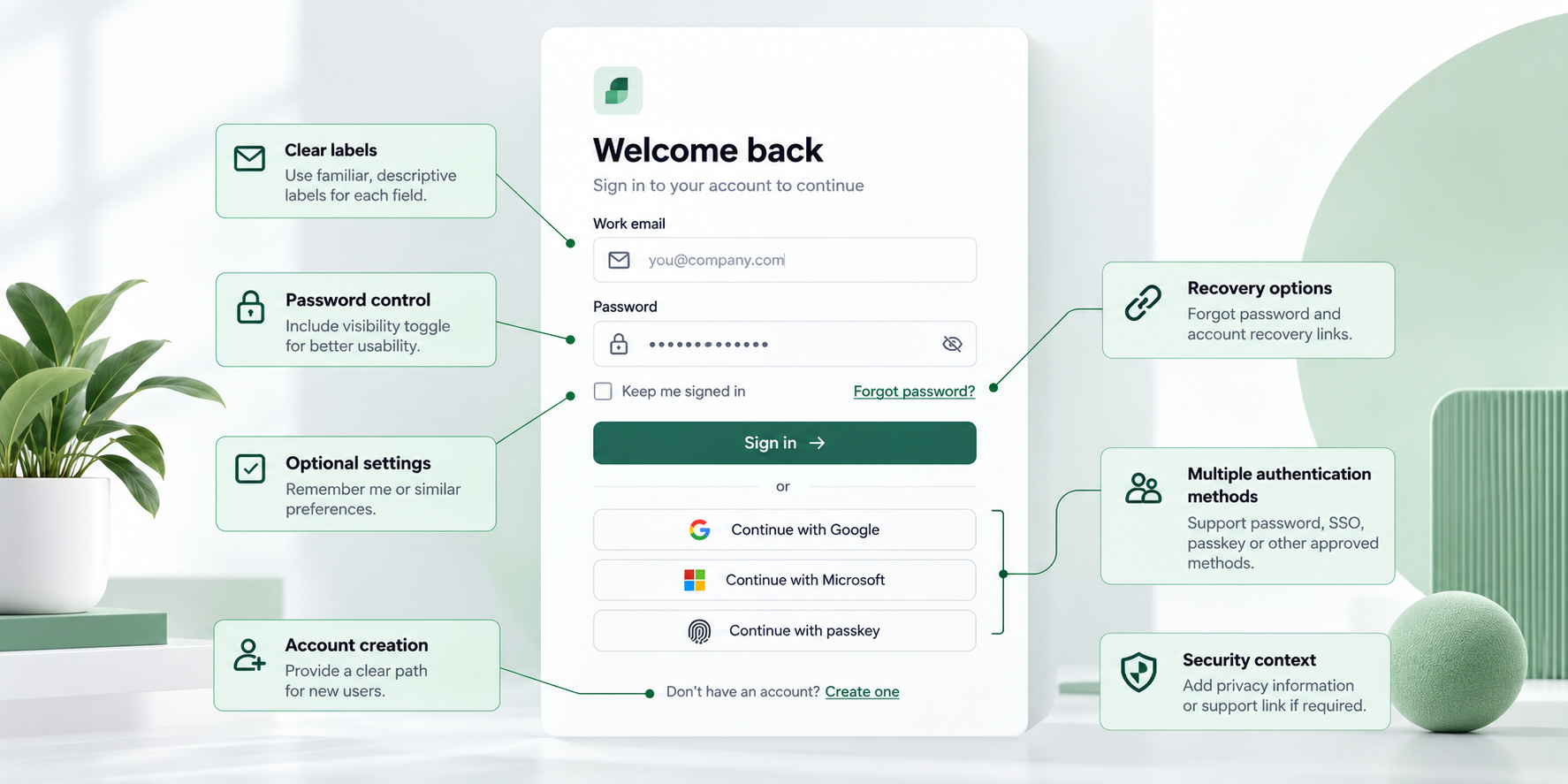 A login form wireframe is a structural model of an authentication experience. It defines the interface hierarchy, sign-in methods, interaction states, messages, transitions, and recovery paths—not just two fields and a button.
Wireframes establish structure and behavior. Polished UI adds brand styling, while an interactive prototype demonstrates transitions and supports usability feedback. Separating these stages helps our teams settle authentication logic before debating visual details.
The anatomy of a complete login form
A password login may include:
- Persistent email or username label
- Password label and visibility control
- Primary sign-in action
- Forgot-password link
- Account-creation path
- SSO or another approved method
- Privacy context and support route
Requirements should determine the components. An enterprise tool may prohibit self-service registration but require organization discovery and SSO fallback.
Low fidelity does not mean low detail
Low fidelity keeps styling light so reviewers can focus on structure. It should not make content anonymous.
Labels such as “Work email,” “Continue with passkey,” and “Try another method” reveal more than gray rectangles. Realistic language lets us assess hierarchy and behavior before refinement.
Choose the authentication model before arranging the screen
Authentication depends on the audience, account model, security policy, device context, and recovery risk. Decide whether people will use email, username, password, magic link, passkey, SSO, or a controlled combination before arranging the page.
More choices do not always remove friction. We recommend emphasizing the expected method and progressively disclosing legitimate alternatives.
Password, magic link, passkey, or SSO?
Each method creates distinct design obligations:
- Password: requires reset, password-manager, lockout, and credential-error states.
- Magic link: needs sent, resend, wrong-email, expired-link, and cross-device guidance.
- Passkey: needs cancellation, unsupported-device, security-key, and recovery paths.
- SSO: requires organization discovery, provider redirection, unmatched-domain handling, and support.
Before wireframing, confirm enrollment assumptions, supported devices, required factors, retry rules, recovery ownership, and fallbacks.
Single-method versus combined login
A single method works when account policy is consistent. Combined login suits audiences that genuinely require different methods, but one path should remain visually dominant.
Enterprise products might request a work email first and then route the person to an approved provider. Keep sign-up separate when enrollment has different eligibility, consent, or verification requirements.
Wireframe failure and recovery states before the happy path
The default screen is usually the simplest state. Invalid credentials, connection failures, rate limits, lockouts, and interrupted recovery expose unresolved decisions.
For each state, specify changes to fields, messages, actions, focus, announcements, and destination. Avoid disabling submission without explanation. Clear validation is usually more useful than a button that silently remains unavailable.
The essential login state matrix
| State | Response | Recovery or next action |
|---|---|---|
| Default or focus | Clear labels and visible focus | Enter credentials |
| Field validation | Field-level instruction | Correct the field |
| Invalid credentials | Privacy-safe form error | Retry or recover access |
| Loading | Progress status; duplicate submission prevented | Wait or cancel |
| Offline | Connection-specific message | Retry |
| Rate-limited | Safe timing guidance where permitted | Wait, recover, or seek support |
| Locked account | Privacy-safe explanation | Recovery or support |
| Success | Confirmed transition | Continue |
Field validation addresses missing or malformed input. Authentication failure occurs after valid-looking input reaches the service. Keep these triggers and messages distinct.
Write errors that help without exposing accounts
Use a safe, actionable explanation whenever possible. Say whether the connection failed, a link expired, or another attempt can be made later.
Credential and recovery messages should not reveal whether an account exists. Rate limits, service failures, and lockouts also need a clear next step without exposing sensitive account status.
Five login page wireframe examples—and when to use each
These login page wireframe examples are patterns rather than universal templates. Each needs a primary action, controlled alternatives, and recovery states.
Password and SSO-first login examples
- Conventional password login: Show labeled email and password fields, password visibility, a primary sign-in action, recovery, and support. Include invalid credentials, loading, offline, and lockout states.
- Enterprise SSO-first login: Request a work email, route recognized organizations to their provider, and provide safe handling for unmatched domains, provider downtime, and failed redirects.
Magic-link, passkey, and combined login examples
- Magic-link login: Confirm the submitted address and cover correction, resend, expired links, and links opened on another device.
- Passkey login: Show cancellation, unsupported devices, unavailable credentials, alternate devices, and recovery.
- Combined authentication: Present one recommended method prominently and place alternatives behind clear progressive disclosure. Never trap returning users when their previous method is unavailable.
Design forgot-password and security checks as connected flows
Account recovery belongs within the login architecture. Adding it later often creates inconsistent messages, missing transitions, and dead ends.
Map the request, privacy-safe confirmation, delivery, resend, expired or used link, password creation, success, and return-to-login states. Include MFA, suspicious-login verification, session timeout, and step-up authentication when policy requires them.
Forgot-password and reset-password states
Keep the entered identifier visible and editable. Explain the next step without confirming whether an account exists.
Define resend rules, link-expiration behavior, password requirements, and reset confirmation. An expired-link screen should provide a direct route to request another link.
MFA, suspicious login, and session timeout
Preserve context while explaining why additional verification is required. Define alternate factors, retries, lost-device recovery, cancellation, and support where permitted.
For session timeouts, explain what was preserved, what must be repeated, and where login will return the person.
Make the wireframe accessible, responsive, and conversion-friendly
Use persistent labels instead of relying on placeholders, which disappear during input. Annotate tab order, visible focus, screen-reader announcements, contrast expectations, touch targets, and zoom-safe layouts.
We also recommend supporting password managers, autofill, paste, and suitable input semantics. Clear hierarchy and visible recovery address practical barriers that decoration cannot fix.
Accessibility requirements to annotate
Associate labels, instructions, requirements, and errors programmatically. After an unsuccessful submission, move focus intentionally to an error summary or the first invalid field, depending on the chosen pattern.
Loading, link-sent, rate-limit, and completion statuses should be announced. Every control needs a clear accessible name, state, and keyboard operation.
Desktop and mobile differences
Authentication logic should remain consistent across breakpoints, although spacing, viewport height, keyboard behavior, touch targets, and secondary-option placement may change.
A practical mobile wireframe flow system should account for autofill overlays, interrupted sessions, mobile keyboards, and links opened elsewhere. Test passkeys and magic links as cross-device flows.
How to create a wireframe for a login page
Start with users, authentication constraints, risks, and recovery—not component placement. Teams can sketch manually or use an AI wireframe generator; the method matters less than complete state coverage.
Move from task flow to low-fidelity structure, realistic content, review, and refinement. Use a high-fidelity wireframe when added realism will support more useful testing.
- Capture requirements and user risks
List account identifiers, authentication methods, enrollment assumptions, security rules, supported devices, and support constraints. For each likely failure, define the next safe action.
- Map the flow, hierarchy, and states
Document entry points, the primary path, alternatives, recovery routes, and exits. Convert each rule or risk into a screen, state, message, or fallback. Draft realistic interface copy while structural changes remain easy.
- Review before adding visual polish
Test keyboard use, narrow screens, autofill, invalid input, service failure, lockout, and recovery. We recommend reviewing the flow with product, security, accessibility, content, and engineering stakeholders.
Generate and refine the starting UI with UXMagic
UXMagic helps our teams generate a starting UI from an authentication brief. We use an action-led workflow: describe, generate, inspect, refine, and share.
AI can accelerate structure and variation, but the team still owns product logic, security policy, content accuracy, and state coverage. That distinction matters when using an AI design assistant for shippable UI.
Describe the complete flow
Specify the audience, device target, authentication method, hierarchy, accessibility requirements, and recovery paths. Include invalid credentials, loading, offline, rate-limit, lockout, recovery, and success states—not only the default screen.
Generate, inspect, and refine
Compare the output with the state matrix and requirements. Remove unnecessary choices, strengthen recovery routes, and prepare focused variants for review.
Once the structure is approved, an AI-to-Figma workflow can support continued editing and team feedback.
Login form wireframe handoff checklist
A finished wireframe should serve as acceptance criteria, not merely look complete.
Flow and state coverage
- Default, focus, filled, validation, and credential-error states
- Loading, offline, rate-limited, and locked states
- Recovery, alternative-method, and success states
- A next action for every blocked path
- Responsive and interrupted-session behavior
Accessibility, security, and implementation notes
- Labels, focus order, announcements, contrast, and touch targets
- Autofill, paste, and password-manager compatibility
- Account-enumeration safeguards and MFA behavior
- Timeout rules, retry policies, and dependencies
- Breakpoints, open questions, analytics needs, and acceptance criteria
Turn your login requirements into an editable starting UI
Describe your authentication methods, required states, errors, accessibility needs, and recovery paths in UXMagic. Generate an editable starting point, inspect every route, and refine the flow with your team.