
TL;DR
In a prototype vs POC comparison, the distinction comes down to risk. A proof of concept tests whether a technical capability can work. A prototype tests whether people can understand, use or value an experience. We recommend proving the capability first when necessary, then testing the experience. Neither artifact should be mistaken for a production-ready product.
Prototype vs POC: the difference in one minute
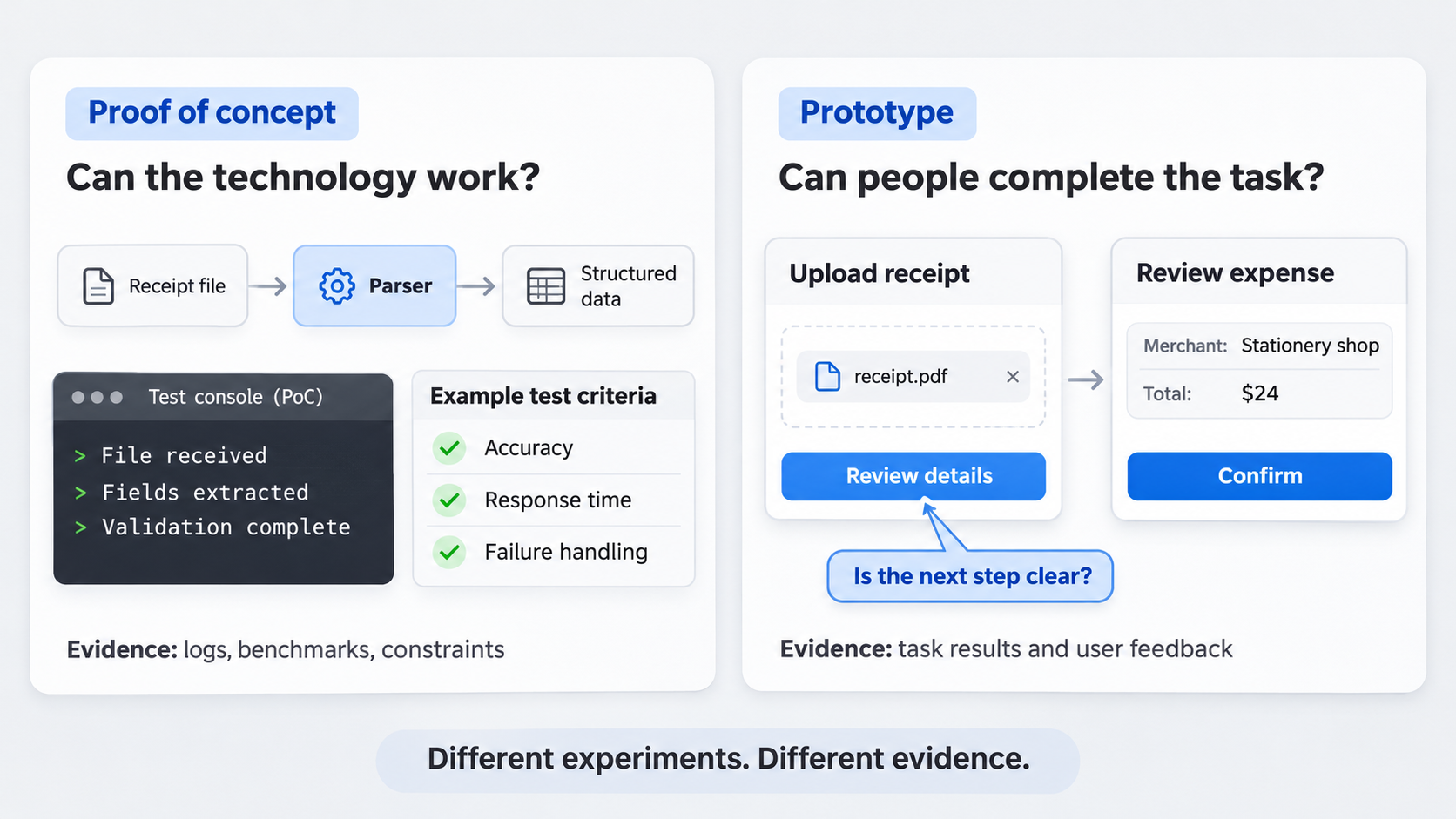 A proof of concept tests technical feasibility within defined constraints. A prototype represents or simulates a user experience so a team can assess usability, comprehension or desirability.
A clickable prototype does not prove that its underlying technology is viable. Likewise, a functioning POC does not prove that customers understand, trust or want the resulting product.
POC vs prototype comparison table
| Dimension | POC | Prototype |
|---|---|---|
| Question answered | Can the technical concept work within the required constraints? | Can people understand and complete the intended experience? |
| Primary audience | Engineering, architecture and product leadership | Design, product, users and stakeholders |
| Typical owner | Engineering-led | Design-led |
| Fidelity | Technically focused and often visually rough | Low to high visual and interaction fidelity |
| Functionality | Narrow, real functionality around one technical risk | Partially or fully simulated interactions |
| Evidence produced | Benchmarks, logs, constraints and failure modes | User behavior, task results and qualitative feedback |
| Success criteria | Meets a defined feasibility threshold | Meets defined usability or comprehension criteria |
Both should be bounded experiments rather than incomplete versions of the final product. A combined POC prototype can sometimes help, but mixing both purposes often makes the evidence harder to interpret.
What does POC mean in a software project?
POC means proof of concept. In software, it is a small experiment designed to determine whether a risky technical assumption is viable before broader development begins.
A software POC does not need a complete interface or production architecture. It should isolate one uncertainty and test it against a predefined threshold.
“Make the feature work” is too vague. A better objective is: “Determine whether the system can return an acceptable result within the response time required by the proposed experience.” That creates evidence for a clear decision.
Technical feasibility POC examples
Common POC experiments include:
- AI output quality: Assess outputs against agreed relevance, accuracy or consistency criteria.
- API integration: Check authentication, data availability, rate limits and vendor restrictions.
- Data processing: Examine throughput, accuracy, infrastructure requirements and expected volume.
- Latency: Determine whether response times suit the intended experience.
- Device constraints: Test memory use, battery consumption, connectivity or offline operation.
For example, an AI product team might first assess whether a model can turn support tickets into useful recommendations. Designing a polished dashboard before validating that capability would test the wrong risk.
What a POC should produce
A useful POC should document:
- Results and relevant logs
- Technical constraints and dependencies
- Known failure modes
- Testing limitations
- A concise recommendation
The outcome should direct the team to proceed, revise the constraint, evaluate an alternative or stop. An open-ended conclusion usually signals that the experiment lacked a clear threshold.
What is a prototype in product design?
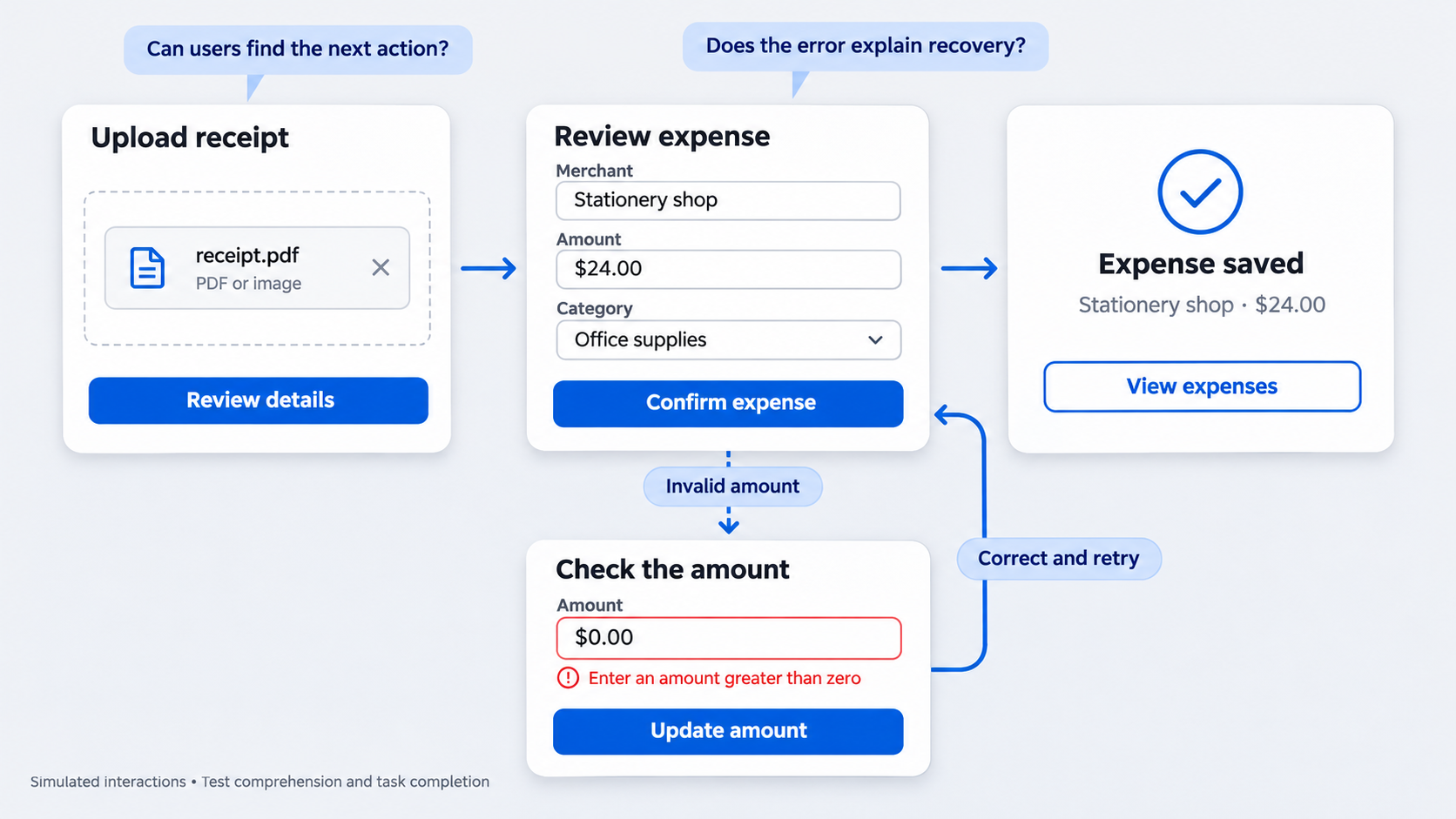 A product prototype represents an experience so a team can test how people understand, navigate and complete a flow. Its interactions may be simulated even when the underlying services do not exist.
That makes prototypes useful for testing usability and desirability. It does not make them evidence of technical feasibility.
Prototype fidelity should match the research question. Our guide to building a clickable prototype for a startup shows how to focus the artifact on the flow that needs validation.
Experiential prototype examples
A UI or UX prototype can explore questions such as:
- Onboarding: Do users understand the product’s value and setup process?
- Checkout: Can they complete payment and recognize confirmation?
- Dashboard navigation: Can they find the right metric or action?
- Form completion: Are labels, requirements and errors clear?
- AI review: Can users inspect, edit and approve generated output?
For a website, we recommend prototyping the critical journey rather than every page. A focused website prototype workflow keeps research tied to the decision instead of visual completeness.
Choose the lowest useful fidelity
Use the least expensive fidelity that can produce credible evidence:
- Paper sketches for concept direction and information order
- Wireframes for structure, hierarchy and flow
- Clickable mockups for navigation and task testing
- High-fidelity flows when visual cues, motion or realistic content affect the test
High fidelity can distract from the core assumption. Teams may debate color and spacing while overlooking whether the concept makes sense.
POC vs prototype vs MVP: do not build more than the question requires
A POC gathers feasibility evidence. A prototype simulates an experience. An MVP is a usable product released to real users.
Unlike an experimental artifact, an MVP requires appropriate attention to reliability, security, support, analytics and maintainability. It must deliver value beyond a controlled demonstration or research session.
Our approach to an MVP prototype begins by identifying the assumption that needs validation before release planning expands the scope.
A fast classification test
Classify the artifact by its intended success signal:
- If success is a technical benchmark or constraint, build a POC.
- If success is comprehension or task completion, build a prototype.
- If success requires live usage and ongoing delivery, consider an MVP.
- If technical and experiential risks remain, separate the experiments.
We recommend choosing the smallest artifact capable of disproving the idea. Evidence matters more than output volume.
Should you build a POC, a prototype or both?
Start with risk, not deliverable preference. Identify the assumption most likely to invalidate the concept, then choose the experiment that addresses it.
Build a POC when the main unknown involves technology, integration, performance or operating constraints. Build a prototype when it concerns user understanding, value or task completion.
Use both when an experience depends on an unproven capability. In that case, sequence matters.
Start with the assumption that can kill the idea
Before building:
- Write the assumption as a falsifiable statement.
- Consider the cost of discovering it is wrong later.
- Select the smallest credible experiment.
- Define the stop condition before work begins.
For an enterprise workflow, permissions or legacy integrations might require a POC first. If those constraints are already understood, a prototype may be the better starting point.
When a project needs both
Run a narrow technical POC first. Use it to expose constraints such as delays, incomplete data, uncertain output or unavailable states.
Next, reflect those constraints in a prototype of the critical workflow. Avoid combining brittle experimental code with polished UI in one oversized artifact. It becomes difficult to test, interpret and discard.
From POC to prototype: a practical workflow
We recommend a cross-functional process that ends with a decision. UXMagic fits at the interface-design stage, after the team understands the capability and the states users need to encounter.
- Define the risky assumption
Classify the uncertainty as technical, experiential or both. Name the decision the evidence will support.
- Set a pass/fail threshold
Choose the benchmark before implementation. Agree on what happens if the result passes, narrowly misses or fails.
- Run the smallest technical test
Isolate the uncertain capability. Record interface-relevant constraints, including delays, errors and fallback behavior.
- Map the critical user flow
Include only the steps and states needed to test the central experience. Represent real limitations rather than an idealized path.
- Generate UI concepts in UXMagic
Use the AI UI generator to explore interface directions for the intended user and critical flow before investing in polish.
- Connect key states and test comprehension
Connect the minimum screens required for the task. Test whether users understand what happened, what comes next and how to recover from failure or uncertain output.
Set exit criteria before either experiment begins
A time box limits effort, but it does not guarantee a useful conclusion. Each experiment also needs evidence standards and a decision owner.
We recommend a brief covering the hypothesis, method, threshold, result, limitations and next decision. Clear exit criteria prevent experiments from becoming permanent side projects.
POC evidence and exit criteria
Depending on the question, POC evidence may cover:
- Output quality
- Response time and throughput
- Error behavior
- Integration coverage
- Device performance
- Operating requirements
The conclusion should tell the team whether to proceed, revise, evaluate an alternative or stop.
Prototype evidence and exit criteria
Prototype research may examine:
- Task completion
- Critical errors
- Comprehension and confidence
- Observed hesitation
- Qualitative feedback
Before testing, define which problems would block progression. Keep those separate from minor refinements that can wait.
Ownership and decision-making
We usually recommend engineering leadership for technical evidence and design leadership for prototype research. Product should connect both experiments to product risk and the resulting prioritization decision.
Keep POCs and prototypes disposable by default
POC code is built to answer a question, not automatically to meet production requirements for security, scalability, accessibility or maintainability. A successful demonstration should not move into production without review.
Prototype UI has similar limitations. It may contain simulated data, incomplete states and assumptions that have not faced production conditions.
We recommend rebuilding validated ideas around production requirements. Reuse should follow an explicit engineering or design review.
Common handoff mistakes to avoid
Watch for teams:
- Treating clickable screens as proof that integrations or AI behavior are feasible
- Treating technical success as proof that customers value the workflow
- Letting polished visuals override contradictory research
- Expanding the experiment instead of ending with a decision
- Allowing temporary code or generated UI to become permanent without review
The value of a POC or prototype lies in the evidence it produces, not how much of the artifact survives.
Turn validated capabilities into testable UI
Once the technical risk is understood, use UXMagic to create the critical interface states, connect the flow and test comprehension before committing to production design. Start generating your testable UI in UXMagic.