
TL;DR
Testing prototypes should reveal whether representative users can complete realistic tasks—not whether they simply like the interface. We recommend tracking unassisted success, errors, backtracking, assistance, confidence, and route quality. Turn each supported finding into a clear decision: keep, revise, retest, or remove.
What is prototype testing—and what does it validate?
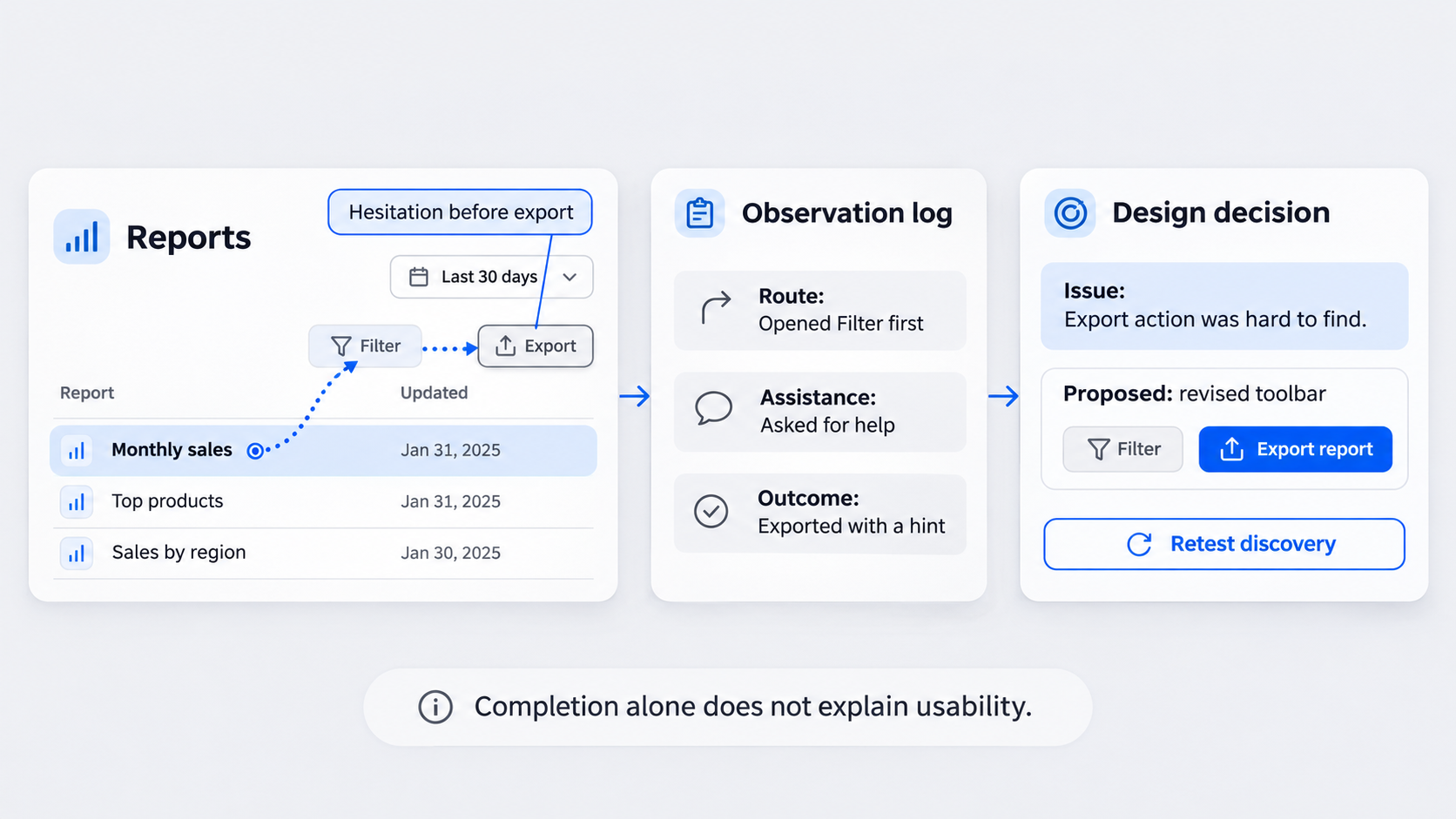 Task completion alone does not prove that a prototype is usable. If participants need hints, guess repeatedly, or reach the wrong result, the interaction has failed.
In software engineering, a prototype is an interactive representation used to explore workflows, interface behavior, and assumptions before full implementation. Testing can expose unclear controls, missing states, risky assumptions, and broken recovery paths before development makes them harder to change.
Our guiding principle is simple: begin with observed behavior and finish with a decision for every supported issue.
Prototype testing vs. concept testing, usability testing, and MVP validation
These methods answer different questions:
- Concept testing: Does the idea or value proposition resonate?
- Prototype usability testing: Can people understand and operate the proposed experience?
- MVP validation: Does a functioning minimum product deliver value under real conditions?
Calling all three “validation” hides useful distinctions. A usable prototype does not prove market demand, while strong demand cannot make a confusing interface usable.
Why preference is weak evidence
We do not recommend relying on whether participants say they like a design. Visual preference can coexist with hesitation, wrong turns, and task failure.
Prioritize observed routes, errors, recovery behavior, and requests for help. Comments about colors or copy matter when they reveal problems with comprehension, trust, accessibility, or performance—not merely personal taste.
Choose the right prototype testing method
Choose a method based on the research question, prototype fidelity, task complexity, participant access, and need for follow-up. Moderated sessions suit nuanced or domain-specific flows. Unmoderated testing works better for stable tasks where instructions and interactions need little clarification.
We often combine qualitative observation with lightweight metrics. Behavioral detail and measurable outcomes can strengthen each other.
Moderated, unmoderated, remote, and in-person tests
Each format has trade-offs:
- Moderated: Supports probing and setup control, but the facilitator can influence behavior.
- Unmoderated: Offers repeatability and flexible participation, but limits clarification.
- Remote: Reaches distributed participants on their own devices.
- In-person: Provides richer context around physical environments or specialist equipment.
Pilot an unmoderated study before wider distribution. Consider contextual observation when a workflow involves multiple devices, interruptions, workplace constraints, or tools the prototype cannot represent.
Match fidelity to the learning goal
Low-fidelity prototypes can test structure, sequence, terminology, and broad interaction models. Higher fidelity may be necessary when hierarchy, trust, detailed controls, responsiveness, or system feedback could affect behavior.
Do not polish every screen automatically. A realistic-looking but incomplete interface can make missing interactions appear intentional. Our guide to interactive prototype behavior, states, and transitions explains how to match interaction depth to the research goal.
Make the prototype realistic enough to test
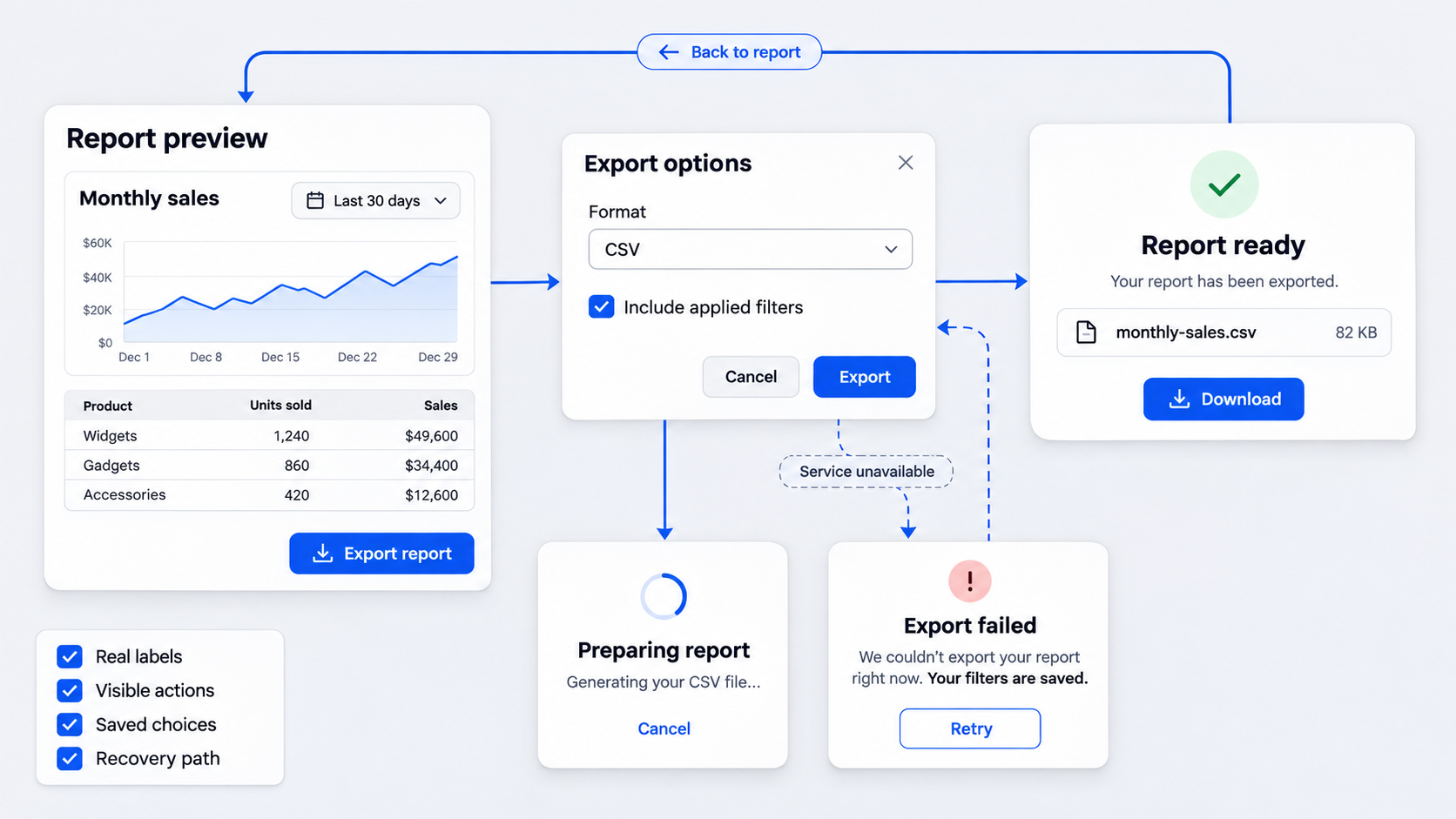 A test-ready prototype does not need to reproduce the whole product. It needs credible, complete routes for the assigned tasks.
Use realistic labels, content, and data. Explain technical limitations without revealing the intended route, then run an internal pilot to catch broken links and unclear instructions.
Interaction-readiness checklist
Before interactive prototype testing, confirm that it includes:
- Starting points, primary actions, alternate routes, confirmations, and return paths
- Relevant loading, empty, disabled, success, error, and partial-completion states
- Recovery from invalid input, denied permissions, accidental navigation, and failed actions
- Consistent control responses without invisible hotspots that reward guessing
- Realistic content for each decision
- Dead ends only where the intended product genuinely has them
For authentication flows, our login form wireframe guide explains why error and recovery paths should be designed rather than implied.
When the prototype—not the research plan—needs revision first
Fix technical dead ends when they stop participants from demonstrating what they understand. If the same step repeatedly fails for the same observable reason, inspect the prototype before blaming recruitment or instructions.
Do not recruit more people to confirm an obvious blocker. Repair the flow, then test the changed behavior.
Plan a moderated prototype test without leading users
A useful test plan defines the research goal, target behavior, hypotheses, scope, and expected decisions. Tasks should describe user goals rather than controls, interface labels, or feature names.
Set success criteria before the sessions. This helps us avoid reinterpreting ambiguous behavior as support for a preferred design.
Turn assumptions into testable hypotheses
Build each hypothesis around:
- A target participant and context
- A task they need to complete
- The expected behavior
- An observable outcome
- Evidence that would support, weaken, or leave it unresolved
Keep usability hypotheses separate from desirability, technical feasibility, and business viability. Finding a button does not prove that someone values the feature.
Write neutral task scenarios and follow-up questions
Replace “Click Export” with a goal: “Prepare last quarter’s enterprise report for a colleague, filtered to the European segment.”
During the task, ask, “What would you do next?” or “What did you expect to happen?” Avoid defending terminology or pointing towards a control. Afterwards, probe hesitation, confidence, perceived outcomes, and routes considered.
Use think-aloud prompts without taking over
Invite participants to narrate expectations, decisions, and surprises. They do not need to speak constantly. After a silence, try a neutral prompt such as, “What are you thinking now?”
Do not intervene simply because someone hesitates. Hesitation is evidence. Record every necessary hint, reset, or explanation because assisted completion is not unassisted success.
Recruit representative participants
For focused formative research, we recommend starting with a small group from each meaningfully distinct audience segment, then recruiting further when the evidence remains unclear.
Sample needs vary with audience diversity, accessibility requirements, comparison goals, and decision risk. A few behaviorally matched participants may reveal more actionable problems than a larger but poorly targeted sample.
Create behavior-based screeners
Screen for recent task experience, frequency, tools used, responsibilities, decision authority, constraints, and domain knowledge. Demographics alone rarely show whether someone represents the intended workflow.
Include disqualifying conditions without revealing the desired answers or exact feature under evaluation. Otherwise, participants may infer how they are expected to respond.
Know when the sample is sufficient
Look for repeated breakdowns and stable patterns within each relevant segment. Recruit further when findings conflict, segments behave differently, or high-risk questions remain unresolved.
Avoid presenting percentages from a small formative sample as population estimates. Report the participant count and observed behavior directly instead.
Measure behavior with usability testing metrics that matter
Use a compact scorecard tied to the research goal. Separate unassisted success, assisted success, partial success, and failure rather than combining every finish into one completion rate.
Metrics describe behavior but rarely explain its cause. Interpret them alongside observations, participant context, and critical individual failures.
Core metrics: success, errors, routes, assistance, confidence, and SEQ
Track:
- Task success: Record each outcome category separately.
- Time on task: Measure from the start to the outcome, then inspect the route.
- Errors and misclicks: Separate meaningful mistakes from exploration and prototype artefacts.
- Backtracking: Note reopened screens, reversed choices, and repeated navigation.
- Assistance rate: Count hints, explanations, and technical resets.
- Confidence and SEQ: Record confidence and a post-task Single Ease Question after observing behavior.
Track misclicks where relevant, but do not classify every stray click as an interface failure.
Why task completion can be a vanity metric
Someone who finishes after repeated guessing, a facilitator hint, or a critical detour has not demonstrated clean usability. Report assisted and unassisted completion separately.
Pair completion with dead ends, hesitation, confidence, path efficiency, and result accuracy. Reaching a confirmation screen with the wrong settings is not success.
Metric guardrails for low-fidelity prototypes
Do not compare timing results when typing, scrolling, transitions, or system feedback are simulated inconsistently. Misclicks may reflect constrained hit areas rather than poor interface design.
Time on task can also punish careful participants and reward lucky clicks. In formative studies, we use metrics directionally and inspect each route before judging performance.
Turn observations into prioritized design decisions
Analyze evidence by task and behavior pattern, not as a chronological recap. Separate what happened, what the participant said, and what the researcher inferred.
Combine repeated evidence while preserving meaningful segment differences. Stakeholders need a concise decision record, not disconnected quotes.
Use a structured observation template
For each observation, record:
- Participant and segment
- Task step and observed action
- Spoken comment
- Facilitator intervention
- Outcome and inferred cause
- Confidence in the inference
- Recording timestamp
Tag prototype failures separately from usability failures. Quotes can add context, but they should not replace behavioral evidence.
Prioritize by frequency, severity, criticality, and confidence
Frequency shows how often a pattern occurred. Severity captures its effect on progress, accuracy, recovery, trust, or accessibility.
Criticality reflects the importance and risk of the affected goal. Confidence depends on repetition, observational clarity, prototype realism, and plausible alternative explanations. A recurring checkout dead end should outrank cosmetic preferences.
Avoid designing from isolated comments
Do not implement suggestions literally without finding the underlying breakdown. A request for a larger button may indicate weak hierarchy, unclear terminology, or poor feedback.
Repeated confusion usually deserves more weight than one strong preference. Preserve isolated evidence when it exposes a serious safety, compliance, or accessibility risk.
Testing prototype examples: onboarding and analytics
Examples show why completion alone is inadequate. Connect the research question to the task, observation, metric, diagnosis, and decision.
Generated UI variations can speed up iteration, but human behavior determines whether they work. Teams building web flows can use a structured website prototype validation workflow.
Example 1: onboarding with permissions and recovery states
Goal: Determine whether new users understand progress, optional permissions, and the consequences of skipping.
Ask participants to create an account, decline a permission, and later attempt an action that requires it. Observe skipped explanations, repeated prompts, backtracking, dead ends, assistance, confidence, and post-task ease.
If participants finish but cannot recover without help, revise the flow. Potential changes include clearer consequences, visible progress, and a direct route to settings.
Example 2: find, filter, and export an analytics report
Goal: Determine whether users can locate a report, apply filters, verify the active criteria, and export the intended data.
Observe search strategy, filter discovery, hidden states, backtracking, accidental exports, and confirmation feedback. Measure unassisted success, errors, assistance, route efficiency, and confidence.
Completion does not justify shipping if people export the wrong scope. Revise the filter state and confirmation, then retest.
Decide whether to ship, revise, retest, or remove
Translate every supported issue into an action: keep, revise, retest, or remove. Set decision criteria before testing and calibrate them to task risk, prototype fidelity, context, and sample quality.
After launch, compare prototype findings with product analytics, support signals, and continued research.
A practical decision framework
- Keep: Target users complete the critical task cleanly, with no material reason to change it.
- Revise: The cause is clear enough and materially harms performance.
- Retest: Evidence conflicts, the cause remains uncertain, or the change is substantial.
- Remove: A step adds confusion without supporting a validated need.
- Reconsider the flow: Its underlying interaction model keeps failing after meaningful revisions.
For smaller teams, a focused clickable startup prototype can keep research centred on the riskiest flow.
Where AI-assisted design fits
AI can help generate connected screens, realistic variants, alternate states, and revised paths. It cannot certify usability.
We use UXMagic to help teams describe, design & ship iterations, including Figma-ready interface designs, while treating every generated design as a hypothesis. Representative participants and human judgement still determine whether an interaction works.
Quick answers about prototypes, MVPs, and tools
A prototype simulates an experience for learning. An MVP is a functioning product used under real conditions. They provide different evidence and carry different levels of implementation and operational exposure.
Prototyping tools create the experience being evaluated; testing tools deliver studies and capture evidence. Some platforms support both. We recommend choosing tools based on required fidelity, state coverage, collaboration, handoff, and testing compatibility.
Describe, design & ship a test-ready prototype
Use UXMagic’s AI UI workflow to create and refine connected interface variations. Then test them with representative users, measure behavior rather than politeness, and turn the evidence into a clear product decision.