
TL;DR
In a Proto.io vs Figma decision, Figma usually supports faster approval when designs, components, comments, and revisions need to remain in one workspace. Proto.io becomes worth evaluating when approval depends on demonstrating richer inputs, conditional states, transitions, or system-like behavior.
We recommend choosing the minimum fidelity needed to resolve the riskiest assumption. More realism is useful only when it changes the decision.
Proto.io vs Figma: Which Gets a Prototype Approved Faster?
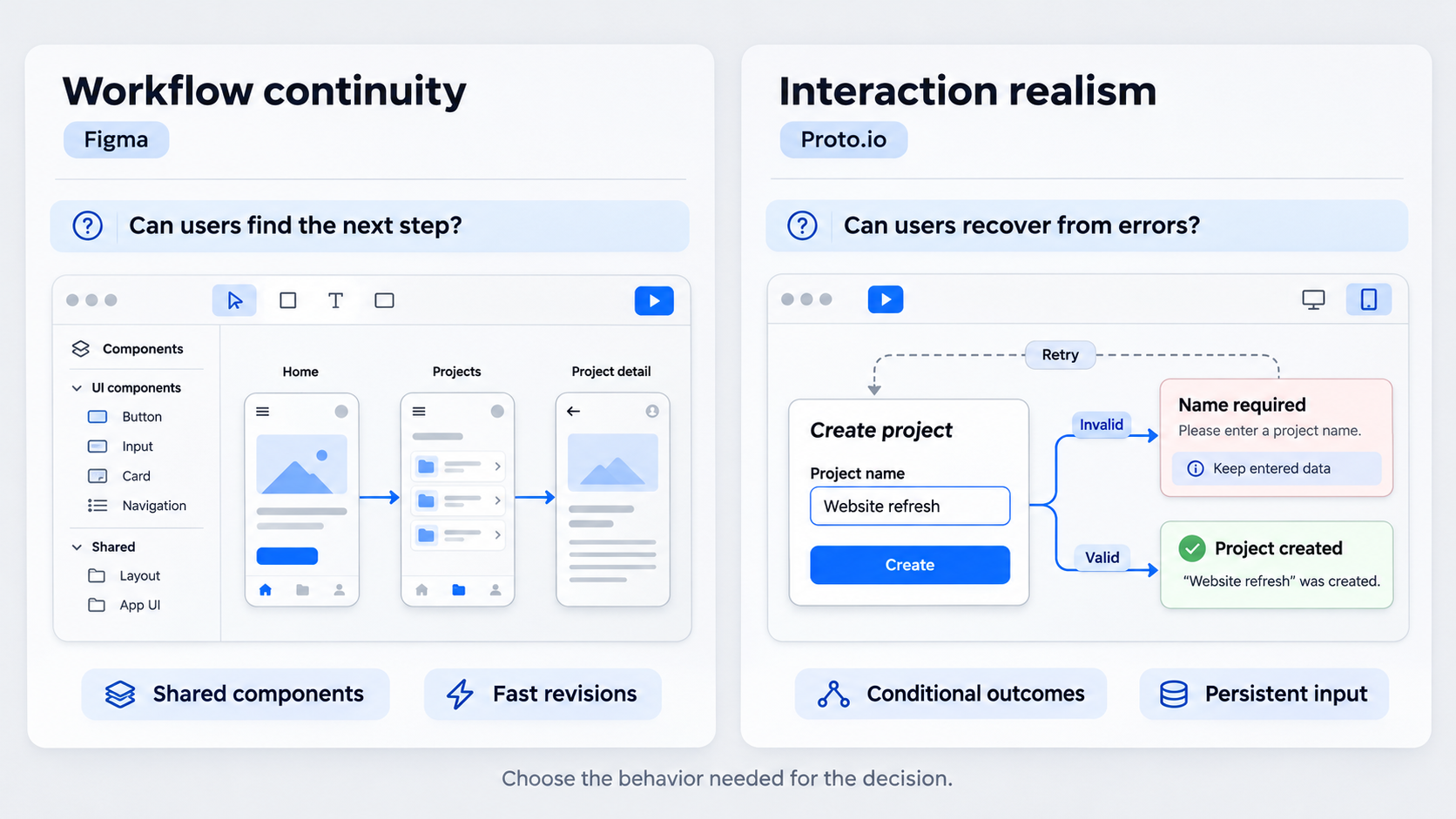 Our verdict is conditional: choose Figma when approval depends on workflow continuity; consider Proto.io when it depends on interaction realism.
A polished prototype can still fail review. Stakeholders may expect fields to accept input, validation errors to appear, filters to affect data, or transitions to explain how the product responds.
The decision is therefore not a contest between feature lists. It is a choice between keeping the prototype close to the source design and adding a dedicated workspace for more behavior-rich demonstrations.
| Decision factor | Figma is usually stronger when… | Proto.io becomes relevant when… |
|---|---|---|
| Prototype goal | The team needs to validate hierarchy, navigation, content, or a straightforward task | The team must demonstrate detailed behavior or a product-like experience |
| Required behavior | Connected screens, overlays, scrolling, transitions, variables, and component states are sufficient | Inputs, conditional outcomes, detailed animation, or multiple system states drive the decision |
| Revision frequency | Screens and components will change repeatedly | The visual direction is stable enough to justify more interaction setup |
| Source of truth | Production designs and the design system live in Figma | The prototype can operate as a controlled demonstration layer |
| Team ownership | Product designers need to revise the flow directly | A specialist can maintain the behavioral simulation |
| Approval impact | Reviewers need clarity and traceability | Reviewers need to see realistic behavior before approving the concept |
Choose Based on the Riskiest Assumption
Start with the reviewer’s unanswered question. If it is “Can people find the next step?”, a focused Figma flow may be enough. If it is “Can people recover from invalid input without losing their previous choices?”, a richer behavioral layer may be justified.
Use Figma for assumptions involving:
- Information hierarchy
- Navigation and wayfinding
- Content comprehension
- CTA clarity
- Basic task sequences
- Broad interaction flows
Consider deeper prototyping when validation depends on:
- User-entered data
- Conditional branches
- Error and recovery states
- Persistent selections
- Detailed motion
- System-like feedback
We recommend mapping every interaction to a research or approval question. Our guide to designing behavior, states, and transitions explains how to do this without turning the prototype into a shadow development project.
More fidelity is not automatically more persuasive. If an interaction cannot affect the decision, it probably does not justify extra setup and maintenance.
The Quick Commercial Verdict
For teams already centered on Figma, the burden of proof is on adding Proto.io. A second tool introduces training, ownership, transfer, review, and synchronization costs, regardless of its subscription price.
Those costs may be justified for a behavior-heavy executive demo or usability study. A realistic checkout failure, dashboard filter sequence, or mobile input flow may reveal risks that linked screens cannot.
Keep UI production separate from interaction depth. If the team is slow because every screen starts with a blank canvas, changing prototyping tools will not fix the underlying bottleneck.
Proto.io Is Not ProtoPie: Avoid the Comparison Trap
Proto.io and ProtoPie are separate products with different vendors, workflows, integrations, and pricing.
This distinction matters because searches for Proto.io vs Figma can surface ProtoPie pages. The supplied ProtoPie product page promotes dynamic and conditional interactions, Figma imports, and an official plugin. None of those claims establishes an equivalent Proto.io integration.
Do not base a Proto.io purchase on instructions that say:
- Install the ProtoPie Figma plugin
- Import Figma layers into ProtoPie
- Send a project to ProtoPie Studio
- Use a ProtoPie-specific cloud service or player
Those are ProtoPie workflows. Verify any claim about Proto.io and Figma through current Proto.io documentation.
What Is ProtoPie Used For?
ProtoPie is an interaction-prototyping product for creating dynamic experiences. According to the supplied ProtoPie page, its positioning includes conditional interactions and a Figma plugin.
It is not another name for Proto.io. Because this article compares Proto.io with Figma, ProtoPie’s features must not be transferred into the comparison.
Product naming has commercial consequences. Confusing the tools could lead a team to purchase one product while expecting another vendor’s plugin, import process, or interaction model.
How to Verify an Import or Plugin Claim
Before accepting an integration claim, check:
- Publisher: Which company created and maintains the plugin?
- Destination: Does the design move to Proto.io, ProtoPie, or another product?
- Transferred objects: Are layers, components, variants, text, and images preserved?
- Editability: Do transferred elements remain structurally editable?
- Update behavior: Do source changes synchronize, or is another import required?
- Maintenance: Is the integration current and compatible with the Figma features the team uses?
Test the workflow with a representative component before committing a project. Include variants, nested components, custom fonts, responsive behavior, and existing interactions rather than relying on a simple static frame.
What Prototyping Means in Figma—and Where Fidelity Changes
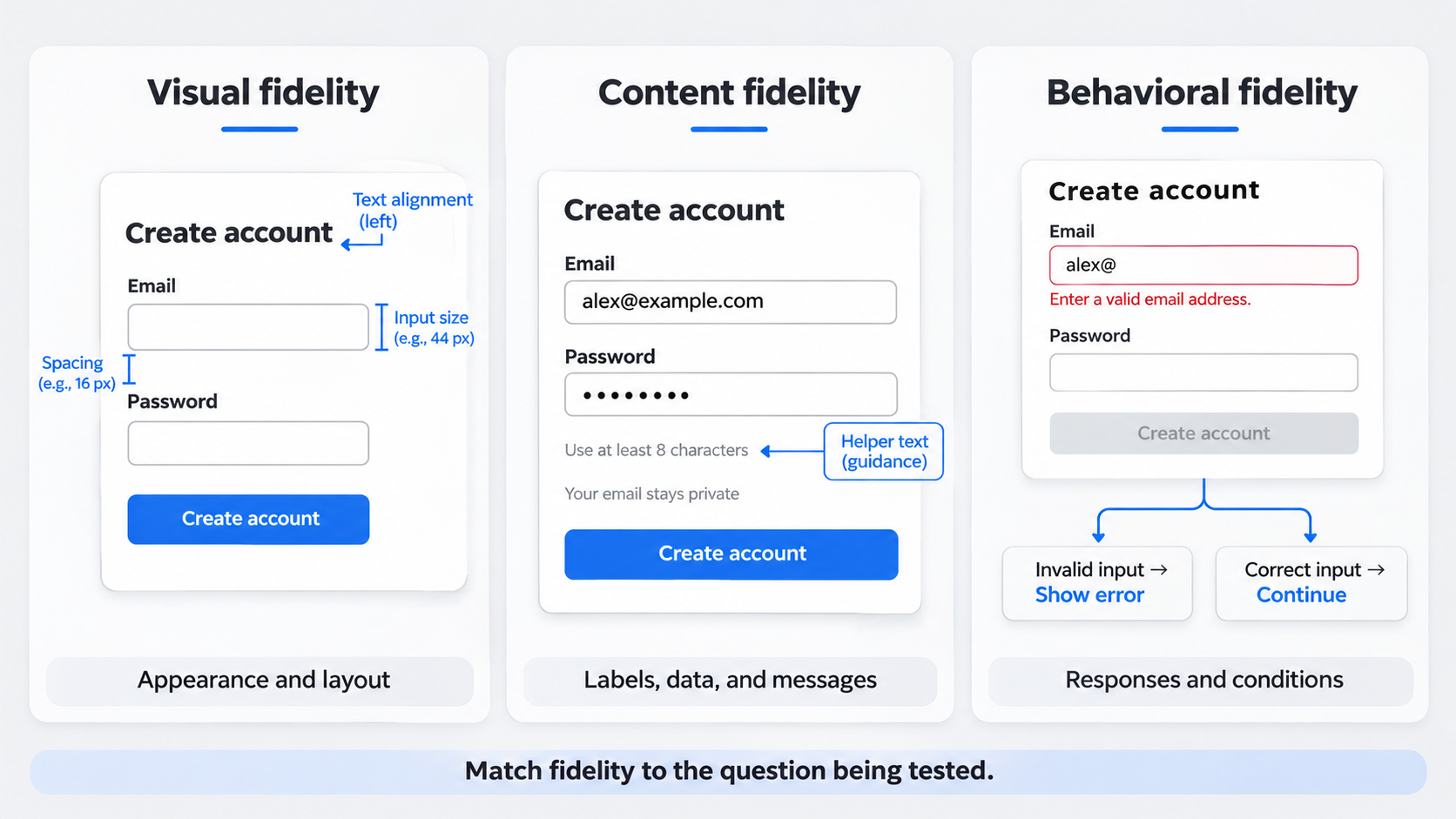 A wireframe represents interface structure. A mockup is a more polished but usually static representation. A prototype is an interactive model used to evaluate how an experience works.
Teams commonly use Figma prototypes to connect screens and component states with interactions, overlays, scrolling, transitions, and variables. That can be enough for navigation tests, stakeholder walkthroughs, and focused usability sessions.
Visual polish, however, does not guarantee realistic behavior. A checkout screen may look finished while its fields accept no input, errors never appear, and the order summary never changes.
We separate fidelity into three dimensions:
- Visual fidelity: How closely the interface resembles the intended product
- Content fidelity: How realistic the labels, data, imagery, and messages are
- Behavioral fidelity: How accurately the interface responds to actions and changing conditions
Each can change independently. A visually simple prototype can contain realistic logic, while a polished mockup may offer little beyond linked screens.
Clickable Versus Behavior-Rich Prototypes
Clickable prototypes help teams assess routes, hierarchy, comprehension, and broad task flow. They often suit landing pages, onboarding sequences, menus, and early concepts.
A clickable startup prototype should cover the decisive path rather than imitate an entire application. Tight scope speeds testing and keeps decorative interactions from distracting reviewers.
Behavior-rich prototypes address questions that basic screen linking cannot answer. They may represent:
- Typed input
- Validation and recovery
- Conditional outcomes
- Changing states
- Detailed transitions
- Gesture responses
- Product-like feedback
Set expectations before review. Explain what is interactive, which data is simulated, what persists, and which branches are intentionally excluded.
Choose the Minimum Useful Fidelity
Map each approval question to the least complex prototype that can answer it:
| Approval question | Minimum useful fidelity |
|---|---|
| Is the primary CTA clear? | Polished static screens or a short click-through |
| Can people find account settings? | Connected navigation flow |
| Is an empty state understandable? | Representative state and recovery action |
| Does validation help people recover? | Interactive input and triggerable errors |
| Does a filter sequence make sense? | Connected or conditional data states |
| Is motion essential to comprehension? | Realistic transition behavior |
Increase fidelity when a misleading result would create meaningful product risk. Simulating every hover, loading sequence, and edge case can slow review without improving the decision.
Proto.io vs Figma Comparison Matrix
A useful comparison goes beyond whether a capability appears on a feature list. We need to know whether the team can build, revise, govern, and explain the prototype efficiently.
| Category | Figma | Proto.io | Approval impact |
|---|---|---|---|
| UI creation | Keeps screen design and prototyping close to the source file | Offers drag-and-drop prototype creation, but duplicate work must be assessed | Proximity can shorten visual revision cycles |
| Interaction depth | Fits connected flows and configured component states | Worth evaluating as a dedicated prototyping environment | Added depth must produce better evidence |
| Reusable components | Connects to the team’s Figma libraries | Reuse must be assessed inside Proto.io | Duplicate systems can increase maintenance |
| Animation | Supports common transitions and interactive states | May merit evaluation for motion-heavy demonstrations | Motion matters when it affects comprehension |
| Collaboration | Design, comments, and prototyping can stay together | Introduces another review and ownership context | Separate feedback can slow corrections |
| Sharing | Uses Figma’s browser-based review workflow | Current sharing conditions depend on the plan and setup | Access friction can delay review |
| Handoff | Keeps developer context near the design source | Simulated behavior may need separate documentation | Teams must distinguish intent from simulation |
| Learning curve | Lower for existing Figma teams | Requires onboarding into another environment | Revision speed matters more than first-build speed |
| Governance | Can use existing libraries, permissions, and conventions | Requires additional workspace governance | Prototype ownership should not become unmanaged |
| Best fit | Teams with frequent revisions and shared systems | Teams with a defined need for richer simulation | Match the tool to the validation risk |
UI Creation and Interaction Depth
Figma’s main workflow advantage is proximity. Designers can update a screen, component, or label and adjust the prototype without rebuilding the interface elsewhere.
Proto.io must earn its place through behavior that is difficult or inefficient to represent in the existing workflow. The practical test is whether the designer responsible for the product can revise that behavior after feedback.
Consider a SaaS dashboard. A basic prototype might connect an overview to a detail screen. A richer version could demonstrate filters, empty states, loading states, validation, and conditional panels.
Not every state needs to work. We recommend making the risky sequence realistic while using representative screens for lower-risk branches.
Collaboration, Handoff, and Governance
Prototype approval involves more than its creator. Reviewers, researchers, developers, security teams, and external stakeholders may need different levels of access.
Evaluate:
- Whether reviewers can open the prototype easily
- Whether comments attach to the correct screen or state
- Whether developers can distinguish simulation from requirements
- Whether external sharing follows organizational policy
- Whether ownership survives employee or agency changes
- Whether the source design remains authoritative
A prototype owned by one specialist can become a queue. If every copy change and state adjustment waits for that person, deeper fidelity may slow approval rather than accelerate it.
Learning Curve and Best-Fit Team
Measure both the time to the first useful prototype and the time to the third revision. The second measure reveals the real workflow cost.
Figma often suits occasional prototypers, cross-functional teams, and organizations with established Figma libraries. Proto.io is worth piloting when the team repeatedly needs simulation-heavy demonstrations and can assign clear ownership.
Synchronization risk increases as more designs and contributors are involved. A source-library update may require a manual audit if related elements have been reconstructed in another tool.
Prototype Examples: When Continuity Wins and When Realism Matters
We recommend organizing examples around validation objectives, not visual inspiration. The same team may reasonably use Figma for one flow and a dedicated behavioral layer for another.
Landing Page and Marketing Flow
Risky assumption: Visitors will understand the offer and choose the intended CTA.
Minimum fidelity: A focused click-through covering hierarchy, navigation, CTA clarity, content sequence, and responsive intent.
Likely reviewers: Marketing, product, brand, sales, and leadership.
Revision pattern: Frequent changes to copy, layout, imagery, and calls to action.
Continuity usually wins. Elaborate input behavior rarely changes the central decision, while frequent visual and content revisions favor staying near the source design.
Teams can use the website prototype validation workflow to define the decisive journey. UXMagic can generate editable sections from a prompt, screenshot, or reference before the team applies brand styling and connects the required path.
Dashboard and Enterprise Workflow
Risky assumption: People can interpret changing data and complete an action across several states.
Minimum fidelity: Realistic behavior for decisive filters, permissions, loading, empty states, table actions, or conditional panels.
Likely reviewers: Product leads, operations teams, enterprise customers, developers, and executives.
Revision pattern: Repeated changes driven by requirements, permissions, and design-system updates.
Selective realism can improve approval here. Two static tables may not show what triggers a state, what persists, or why an action becomes available.
Avoid simulating every widget. Make the critical filter or approval sequence behave while keeping low-risk sections representative.
Mobile App and Multi-State Product Flow
Risky assumption: People can complete a task involving gestures, inputs, validation, or changing state.
Minimum fidelity: Basic links for broad onboarding comprehension; richer behavior for moments that determine task success.
Likely reviewers: Product managers, researchers, mobile engineers, compliance teams, and executives.
Revision pattern: Visual refinements followed by targeted changes to errors, permissions, and edge cases.
A mobile onboarding flow may start as hotspots between screens. If research depends on keyboard input, error handling, gestures, animated states, or persistent choices, greater behavioral fidelity becomes more useful.
Start with a coherent structure using a practical mobile wireframe system. Clearly state what the prototype does not simulate, such as device permissions, live data, network failure, or production persistence.
Can Teams Transfer Figma Designs Into Proto.io Without Workflow Debt?
Do not assume instructions for importing Figma into ProtoPie apply to Proto.io. Verify the current Proto.io workflow through first-party documentation before procurement or project planning.
“Transfer” can mean:
- A flattened image
- Editable visual layers
- Preserved text and vectors
- Reusable components
- Component variants
- Variables or design tokens
- Existing interactions
- An ongoing connection to the source file
A visually accurate transfer is not necessarily maintainable. If components and variables lose their relationships, the prototype may look correct initially but become expensive after a design-system update.
Run a Transfer Test Before Buying
Create a representative test screen containing:
- Custom typography
- Nested components
- Variants
- Images and vectors
- Responsive behavior
- Multiple states
- Existing interactions
- Shared styles or variables
Use the currently documented transfer process. Record what remains editable, what becomes flattened, what changes visually, and what must be recreated.
Next, update a source component in Figma. Measure how long it takes to align the prototype again, including visual QA and interaction repair.
Calculate the Synchronization Cost
Model a likely stakeholder revision loop. Count:
- Duplicate components
- Repeated visual changes
- Interaction rebuilding
- Manual QA
- Owner handoffs
- Version checks
- Review delays
- Documentation updates
Define the authoritative workspace before work begins. We recommend revising the source UI first and then updating the prototype, rather than letting the prototype become an unofficial design fork.
The same principle applies to generated files. Our guide to turning AI UI into editable Figma designs explains why editable structure matters more than a convincing export.
Sharing, Testing, and Revision Loops
A prototype is useful only if its audience can access it, understand its scope, provide feedback, and trust the updated version.
| Role | Primary requirement |
|---|---|
| Designer | Fast editing and reliable state management |
| Reviewer | Low-friction access and clear scope |
| Research participant | A stable flow without workspace distractions |
| Developer | Context about states and implementation intent |
| External stakeholder | Controlled access without unnecessary editing permissions |
| Enterprise administrator | Ownership, permissions, and sharing controls |
Check current sharing, authentication, permission, and plan conditions in official documentation. These details can change, making older comparisons unreliable.
The Stakeholder Approval Test
Ask four questions before sharing:
- Can the reviewer open it without unnecessary setup?
- Is the intended starting point obvious?
- Are simulated and unsupported behaviors identified?
- Can feedback attach to the correct screen, state, or source file?
For executive demos, build a narrow behavior-rich path around the decisive workflow. Simulating the entire application adds failure points without necessarily adding evidence.
For research, provide enough realism to avoid misleading results. If a task depends on data entry but the prototype accepts none, the setup may cause the failure.
The Revision-Speed Test
Measure the elapsed time from feedback to a corrected, trustworthy prototype. Include design changes, interaction repair, QA, access checks, and stakeholder communication.
A separate tool may add little time to the first update but create substantial work across repeated component changes. Conversely, realistic behavior may save an approval cycle by resolving a high-risk disagreement.
If only one person can edit the prototype safely, establish backup ownership or keep its scope narrow.
Proto.io vs Figma Pricing: Calculate Total Workflow Cost
Pricing status: reviewed November 3, 2026. Recheck current plans, prices, and limits on the vendors’ official pricing pages before purchasing.
The supplied third-party comparison listed Proto.io as starting at $24 per month. We would not treat that listing as authoritative current pricing because billing periods, packaging, and plan terms can change.
Do not choose a winner from an entry price. Calculate the full cost of creating, reviewing, governing, and maintaining the prototype.
Build a Realistic Seat Model
Separate users by role:
- Full-time creators
- Occasional editors
- Reviewers
- Researchers
- Developers
- External stakeholders
- Workspace administrators
Check whether essential interaction, sharing, security, or governance features require a higher plan. Compare the existing Figma stack with Figma plus Proto.io rather than treating each subscription in isolation.
Include Hidden Workflow Costs
Add:
- Onboarding and training
- Specialist time
- Duplicate component maintenance
- Re-import or reconstruction work
- Interaction repair
- Manual QA
- Version checks
- Slower revision cycles
- Delayed approval
Compare those costs with the value of resolving a risky interaction before development. A dedicated tool can make commercial sense if it prevents the team from implementing a misunderstood workflow. It is wasteful when a focused click-through would answer the same question.
Where Figma AI, Figma Make, and UXMagic Fit Before Prototyping
AI-assisted UI generation, design-system management, and behavior-rich prototyping are different jobs. Combining them into one purchasing decision hides the actual bottleneck.
Figma AI and Figma Make features, availability, and packaging should be checked before adoption because they can change. Generated output still requires review for editability, consistency, accessibility, and design-system alignment.
If generated work must move into a maintainable source file, follow a deliberate Figma Make-to-Figma Design workflow. A convincing preview is not the same as an editable, governed design.
Do Not Use a Prototype Tool to Solve Blank-Canvas Design
Ask why approval is slow.
If screens exist but cannot demonstrate critical behavior, increase prototype fidelity. If the team is waiting for the first credible interface, accelerate UI production first.
UXMagic supports that upstream stage by generating editable UI from prompts, screenshots, or references. Teams can begin with an AI UI generator for Figma-ready designs, refine the result against brand and system constraints, and then choose the required prototype fidelity.
Generated interfaces still need design judgment. Our guide to creating shippable AI UI covers the structure and refinement needed after the first result.
A Faster Prompt-to-Prototype Workflow
We recommend this sequence:
- Describe the interface or provide a visual reference.
- Generate and edit the initial UI in UXMagic.
- Align it with the product’s brand, content, components, and constraints.
- Identify the riskiest assumption.
- Prototype the smallest flow that can resolve it.
- Revise the source UI before updating downstream behavior.
This sequence keeps generation upstream, the design environment authoritative, and prototype complexity tied to a specific decision.
Final Proto.io vs Figma Decision
Our scorecard favors Figma when continuity, frequent revisions, design-system governance, shared ownership, and workflow cost matter most. Proto.io deserves a pilot when realistic behavior is necessary for approval and the team can manage the additional workspace.
Community discussions, including searches for “proto io vs figma reddit,” may reveal useful frustrations. They are not a procurement model. Translate opinions into measurable criteria: setup time, behavioral coverage, revision speed, synchronization effort, reviewer access, and ownership risk.
A second tool should earn its place by resolving a material validation risk.
Is Proto.io Better Than Figma for Prototyping?
Proto.io may be a better fit when a dedicated environment provides interaction realism that materially improves research or approval. Figma is usually stronger when components, comments, revisions, and prototype connections must remain near the source design.
We recommend piloting the decisive flow instead of choosing a universal winner.
Who Is Figma’s Biggest Competitor?
There is no single answer because Figma covers interface design, collaboration, prototyping, and developer handoff. The closest competitor depends on the job a buyer prioritizes.
Proto.io competes for part of the prototyping workflow, not Figma’s entire collaborative design role.
What Is ProtoPie Used For, and Is It the Same as Proto.io?
ProtoPie is a separate interaction-prototyping product. It is not the same as Proto.io.
ProtoPie plugin pages and import instructions apply to ProtoPie. Verify Proto.io integration claims independently before relying on them.
Should an Existing Figma Team Add Proto.io?
Add Proto.io when a defined validation requirement cannot be addressed efficiently in the current workflow.
Pilot one representative flow and compare its behavioral value with setup time, specialist dependence, update speed, reviewer access, and synchronization effort.
Generate the UI Before Adding Prototype Complexity
Use UXMagic to turn a prompt, screenshot, or reference into editable UI, align it with your design system, and prototype only the behavior needed to reach a confident decision.