• Libraries
  • Community
  • Pricing
  • Affiliate
  • Resources

Libraries

Community
Pricing
Affiliate

Resources

Follow us on:
Help center
  • 🚀Get started
    • What is UXMagic?
    • Create your first project
    • The canvas, projects and screens
    • Writing a prompt that gets what you want
    • Keyboard shortcuts
    • Your account and profile
  • ✨Generate designs
  • 🎨Design & edit
  • 📦Export & handoff
  • 🌐Publish a live site
  • 🤝Share & collaborate
  • 🔌Integrations & developers
  • 💳Plans, credits & billing
  • 🛠Troubleshooting

Still stuck?

Our team answers from inside the product.

Contact support →
  1. Help center/
  2. Share & collaborate/
  3. Share a preview for review

Share a preview for review

Send a read-only link so stakeholders can see the design without editing it.

Last updated 27 August 2026

On this page

  • When to use a preview
  • Steps
  • Preview vs published site
  • Preview vs PDF
uxmagic.ai/dashboard/project
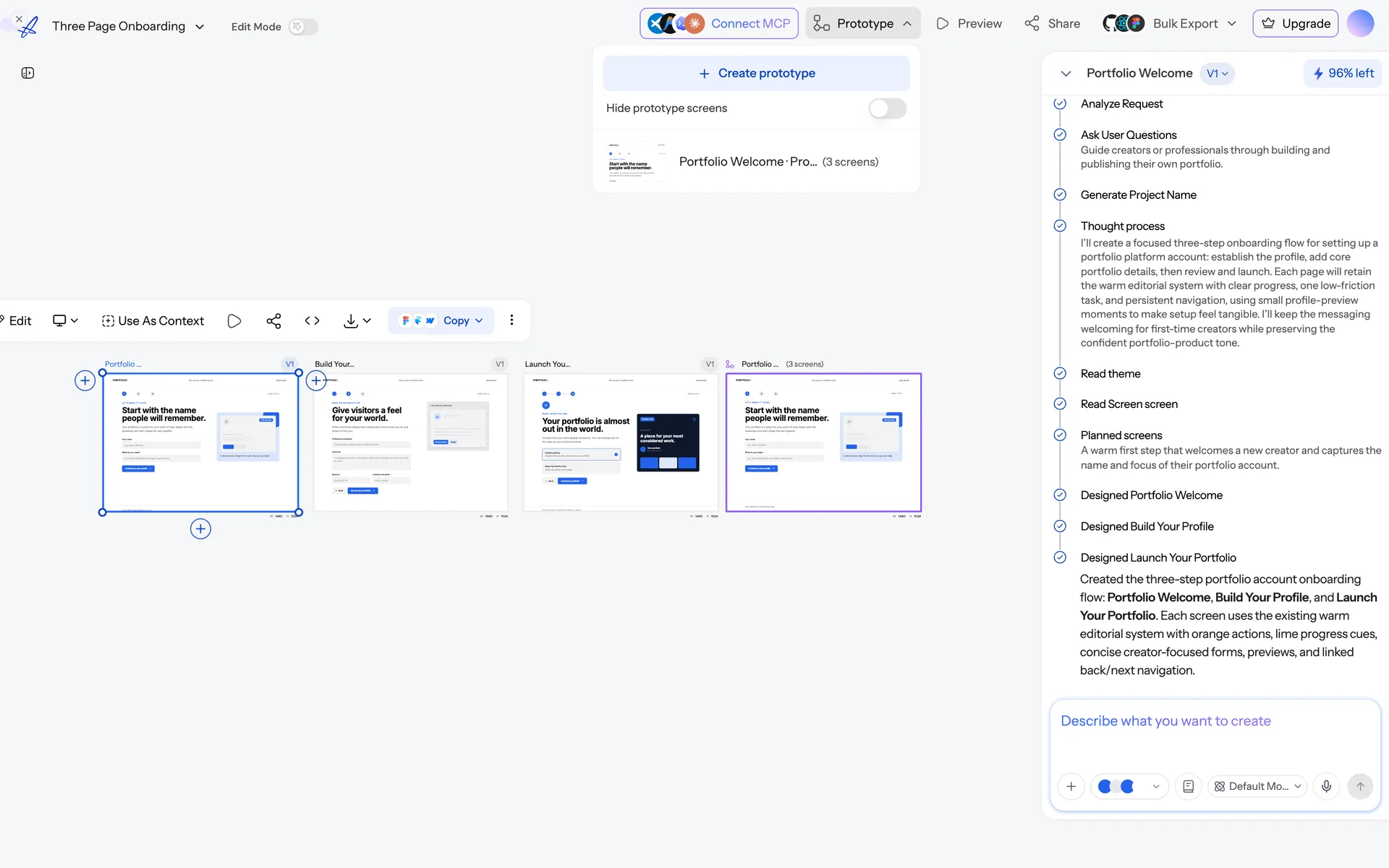
The Prototype menu open on the canvas, offering “Create prototype” and listing an existing three-screen prototype.
Prototype mode links screens together into a clickable flow.

When to use a preview#

Preview links are for people who need to look, not build: clients, execs, engineers scoping work. They see the screens as designed, without the canvas, the chat or the ability to change anything.

Steps#

  1. Open the project or the screen.
  2. Share → Preview link.
  3. Send the link.

Preview vs published site#

  • Preview — a review artifact. Fast, disposable, tied to the project.
  • Published site — a real website on its own address, with pages, hosting and deployment history.

For a client sign-off, preview. For something the client will show their customers, publish.

Preview vs PDF#

A preview stays current as you iterate; a PDF is frozen the moment you export it. Send previews for live review, PDFs for a record of what was approved. See Export as PDF or image.

Was this article helpful?

Related articles

Share a project

Invite specific people, or share a link that lets anyone who opens it join.

Comments and feedback

Leave comments on a design and resolve them as you work through them.

Publish your first site

Take a project live on a uxmagic.io subdomain in a couple of minutes.

← PreviousShare a projectNext →Teams, seats and shared credits

On this page

  • When to use a preview
  • Steps
  • Preview vs published site
  • Preview vs PDF

your next idea
deserves to exist

stop thinking about it. just type it out. Badly, half- formed, whatever. We'll turn it into something real.

Product

  • Community
  • Pricing Plans
  • Affiliate Program
  • UXMagic MCP
  • Claude MCP
  • AI info

Resources

  • Help Center
  • Figma Library
  • React Library
  • Mobile App Templates
  • Documentation
  • Tutorials

Features

  • Prompt to UI
  • Image to UI
  • Sketch to UI
  • Clone website
  • Import from Figma
  • All Features

Compare

  • vs UX Pilot
  • vs Relume
  • vs MagicPath
  • vs Magic Patterns
  • vs Banani
  • vs Galileo AI
  • All Competitors

Blogs

  • AI in UX Design Workflow: What Actually Works
  • Prompt Templates for SaaS Dashboards
  • Real Prompts We Use to Generate Product Flows
  • Prompt Engineering for UX Designers
  • Best Wireframing Tools in 2026: 10 Free & Pro Options Compared
  • All Blogs

Company & Support

  • Careers
  • Contact Us
  • Privacy Policy
  • Terms of Use
  • Cookie Settings

© 2026 UXMagic AI Technologies Inc.