
TL;DR: A PRD (product requirements document) is the short, shared document that says what a feature must do, who it is for, why it matters and how you will know it worked. A good one fits on two or three pages, names its non-goals, and ends with acceptance criteria and metrics. Copy the free PRD template below, or draft the requirements and matching screens together with UXMagic's AI PRD generator. Designers should follow up with our guide to PRDs for designers.
Every product team has lived through the same failure: a feature ships, and at the review someone says "that is not what I meant." Nobody was careless. The requirements lived in five Slack threads, two meetings and one person's head, and each person built from a different version of the truth.
A product requirements document exists to prevent that. It is not paperwork for its own sake; it is the cheapest place to find out that sales, design and engineering disagree about what "done" means.
This guide is our attempt at the complete answer: what a PRD is, how it differs from an MRD, a spec and a user story, the sections that belong in one, a free template you can copy, a short worked example, and how AI tools (including ours) change the job in 2026. We build UXMagic, an AI design tool that many product managers use to turn requirements into screens, so we will be clear about where that helps and where the thinking is still yours.
What is a PRD?
A PRD, or product requirements document, is a written description of what a product or feature must do, for whom, and why, along with how success will be measured. It is written before building starts and serves as the single reference that product, design, engineering, QA and stakeholders agree on.
A PRD answers five questions:
- Why are we building this? The problem and the evidence that it is worth solving.
- Who is it for? The users or personas affected.
- What must it do? Functional requirements, usually written as user stories.
- What is out of scope? The non-goals that keep the release small.
- How will we know it worked? Success metrics and acceptance criteria.
Notice what is missing: how it gets built. A PRD deliberately stops short of screen layouts and implementation. Design decides how it looks and behaves, engineering decides how it works under the hood, and the PRD keeps both pointed at the same goal.
PRDs came out of traditional waterfall development, where a document could run to dozens of pages and be signed off before any design began. That version deserved its bad reputation. The modern PRD is short, lives in a shared doc, changes as the team learns, and is paired with a prototype early rather than handed over and forgotten.
PRD vs MRD vs spec vs user story
These documents get mixed up constantly, and the confusion causes real handoff problems. Here is where each one starts and stops.
| Document | Answers | Typical owner | Scope | Lifespan |
|---|---|---|---|---|
| MRD (market requirements) | Is there a market, and what does it need? | Product marketing or PM | Market or product line | Quarters |
| BRD (business requirements) | What does the business need from this project? | Business analyst or sponsor | Project | Project length |
| PRD (product requirements) | What must the product do, for whom, and why? | Product manager | Feature, epic or release | One release cycle |
| Technical spec / design doc | How will engineering build it? | Engineering lead | System or component | Build and maintenance |
| Design brief | How should it look and feel? | Design lead | Screen or flow | One design task |
| User story | What does one user need to do? | PM with the team | Single capability | One sprint |
Two relationships matter most. An MRD feeds the PRD: once the market case is made, the PRD describes the product that answers it. And a PRD contains user stories: stories are the smallest units of a PRD, and they are what ends up on the backlog.
Other formats overlap with the PRD. Amazon's "working backwards" PR/FAQ, a mock press release plus FAQ, is written earlier to test whether an idea is worth pursuing. Basecamp's Shape Up "pitch" is a shaped, time-boxed version of the same thinking. If your team already uses one of these, treat the PRD as the more detailed document that follows once the idea is approved.
Why PRDs still matter in 2026
A common argument is that agile killed the PRD. What agile killed was the 40-page, signed-off requirements book. The need for one shared answer to "what are we building and why" never went away, and two changes have made it more important.
AI coding agents build exactly what you describe. When a developer reads a vague requirement, they ask questions. When an agent reads one, it guesses. Teams that hand features to Cursor, Claude Code or an AI app builder find the quality of the output tracks the quality of the spec. That is the core idea behind the spec-driven design workflow for product managers: the PRD becomes the prompt. The same logic applies to design context files such as DESIGN.md, which do for visual rules what a PRD does for product rules.
Scope creep is cheaper than ever. When a screen or an endpoint takes minutes to generate, the temptation to add "just one more thing" is constant. A PRD with explicit non-goals is the simplest defence against feature creep, because the conversation about what is out has already happened in writing.
A PRD also earns its keep in three quieter ways: new team members can read one document instead of reconstructing history, QA has criteria to test against, and six months later you can see why a decision was made.
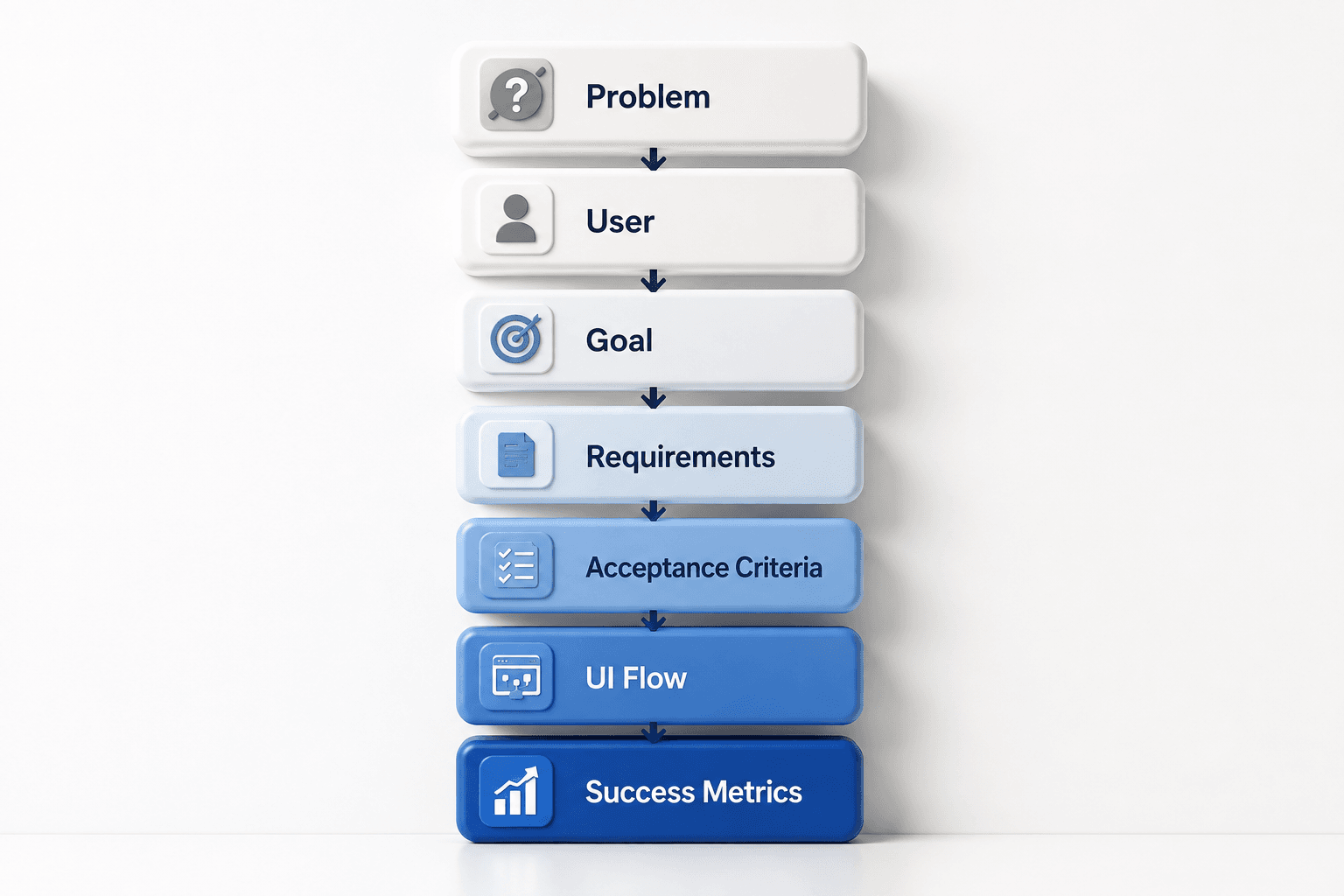
What goes in a PRD: the 10 sections
Structures vary by company, but most strong PRDs contain these ten sections. For a small feature, several can be a single line.
- Overview and context
Two or three sentences a stakeholder can read in 20 seconds: what this is, why now, and a link to the source material (research, the MRD, customer tickets). Add the owner, status and last-updated date at the top so readers know whether they are looking at a draft.
- Problem statement
The single most important section. Describe the user's problem, not your solution, and back it with evidence: interview quotes, support volume, funnel data or usage analytics. If you cannot state the problem in two sentences, the team is not ready to write requirements. Our guide on how to validate a product idea covers how to collect that evidence cheaply.
- Goals and success metrics
What changes if this works? Name one primary metric (for example, activation rate or time to first value) and a few guardrail metrics you must not harm. Set a target and a measurement window, so "success" is decided in advance rather than argued about after launch.
- Target users and personas
Who is affected, and which of them the release is primarily for. Link to existing personas rather than rewriting them; if you do not have any, a lightweight persona template takes an afternoon to fill in.
- User stories and functional requirements
The capabilities the product must provide, usually as user stories ("As a [user], I want to [action], so that [outcome]"). Number them so designers, engineers and QA can refer to "R3" without ambiguity, and mark each as must-have, should-have or nice-to-have. If you need a defensible order, score them with a framework such as the RICE score.
- Acceptance criteria
For each must-have requirement, the testable conditions that prove it is done, often in Given/When/Then form. Acceptance criteria are where hidden disagreements surface: "users can invite teammates" sounds settled until someone asks what happens when the invite email bounces.
- Non-goals and scope
What this release explicitly will not do. Non-goals are the section most PRDs skip and the one that saves the most time, because every item on the list is a conversation that will not happen in sprint three. Many teams also add a "future considerations" list so good ideas are parked rather than lost.
- UX and design notes
Links to the user flow, wireframes or prototype, plus any hard UX constraints (accessibility level, supported devices, key empty states). Keep it to links and constraints; the designer follow-up linked below covers how to turn this section into flows and screens.
- Technical considerations and dependencies
Known constraints the solution must respect: platforms, APIs, data sources, performance, security or compliance requirements, and dependencies on other teams. Leave the architecture itself to the engineering design doc.
- Risks, open questions and timeline
What could go wrong, what you do not know yet, and who is finding out. Close with milestones (not a Gantt chart) and a short changelog so readers can see what changed since they last looked.
PRD template
Copy this into Notion, Google Docs, Confluence or a Markdown file in your repo. Delete any section that does not apply; a short PRD that gets read beats a complete one that does not.
# PRD: [Feature or product name]

Owner: [Name]          Status: Draft | In review | Approved | Shipped
Last updated: [Date]   Reviewers: [Design lead], [Eng lead], [Stakeholder]

## 1. Overview
[2-3 sentences: what this is and why we are doing it now.]
Source material: [links to research, MRD, tickets, analytics]

## 2. Problem statement
[Who has the problem, what the problem is, and what it costs them today.]
Evidence:
- [Interview quote, support ticket count, funnel drop-off, etc.]

## 3. Goals and success metrics
Primary metric: [metric] from [baseline] to [target] within [time window]
Guardrail metrics: [metric that must not get worse]
Business goal: [revenue, retention, cost, strategic reason]

## 4. Target users
Primary: [persona or segment]
Secondary: [persona or segment]
Not for: [users this release deliberately ignores]

## 5. User stories and requirements
| ID | User story | Priority |
|----|-----------|----------|
| R1 | As a [user], I want to [action] so that [outcome]. | Must |
| R2 | As a [user], I want to [action] so that [outcome]. | Must |
| R3 | As a [user], I want to [action] so that [outcome]. | Should |

## 6. Acceptance criteria
R1:
- Given [context], when [action], then [result].
- Given [edge case], when [action], then [result].
R2:
- Given [context], when [action], then [result].

## 7. Non-goals (out of scope)
- [Thing we are explicitly not doing in this release]
- [Thing we are explicitly not doing in this release]
Future considerations:
- [Good idea parked for later]

## 8. UX and design
User flow: [link]
Prototype or screens: [link]
Constraints: [accessibility target, devices, empty/error/loading states]

## 9. Technical considerations
Dependencies: [APIs, services, other teams]
Constraints: [performance, security, compliance, data]

## 10. Risks and open questions
| Risk or question | Owner | Due |
|------------------|-------|-----|
| [What we do not know yet] | [Name] | [Date] |

## Timeline
- [Milestone]: [date]
- [Milestone]: [date]

## Changelog
- [Date]: [what changed and why]
How to write a PRD, step by step
Step 1: Start from the problem, not the feature
Collect the evidence before you write a word: customer interviews, support tickets, analytics, sales calls. If the idea is still unproven, validate it first; a PRD for an unvalidated idea is a detailed plan for a guess. For early products, pair this with the thinking in our guide to what an MVP is, because the first PRD for a new product is usually the MVP's scope.
Step 2: Write the one-paragraph version first
Draft the overview, problem and primary metric, then share just that with your design and engineering leads. Disagreement at this stage costs a conversation; at the review stage it costs a rewrite.
Step 3: List requirements, then cut
Write every user story you can think of, then prioritise ruthlessly. Move everything that is not essential to the core problem into non-goals or future considerations. If you are unsure what to cut, the ideas in our feature creep guide and a quick RICE prioritisation pass help.
Step 4: Add acceptance criteria and edge cases
For each must-have, write the conditions that prove it works, including failure paths: empty data, errors, permissions, slow networks. This is where engineers and QA add the most value, so write this section with them.
Step 5: Make it visible
Text is good at intent and bad at layout, branching logic and edge states. Before the review, attach a user flow diagram or a rough prototype so reviewers react to something they can see. An AI wireframe generator gets you greyscale screens in minutes; for anything a stakeholder must click through, use an AI prototype generator. Our rapid prototyping playbook covers how far to take it.
Step 6: Review with the whole team
Run one review with product, design, engineering and QA together, walking through the prototype alongside the requirements. Record decisions and open questions in the doc rather than in chat. If your team runs design sprints, the PRD is a natural output of the first day.
Step 7: Keep it alive after kickoff
Update the PRD when scope changes, note it in the changelog, and link the final version from the tickets. When the feature ships, add the actual results next to your target metrics. That habit turns a pile of PRDs into a record of what your team learned.
Turn your PRD into screens in minutes
Paste your requirements into UXMagic and get a planned, multi-screen flow your team can review before a sprint starts.

PRD example: "Save for later" in a shopping cart
Here is a condensed PRD for a common e-commerce feature, to show how short a useful one can be.
Overview. Let shoppers move an item from the cart to a saved list without losing it, so they can clear the cart for checkout and come back later.
Problem. Support logs show shoppers deleting items they still want because the cart is "cluttered", then failing to find them again. Cart-to-checkout conversion is lower for carts with many items.
Primary metric. Cart-to-checkout conversion for carts with 5+ items, measured over 30 days. Guardrail: average order value must not drop.
Requirements. R1 (Must): as a shopper, I can move an item from the cart to "Saved for later" in one tap. R2 (Must): as a shopper, I can move a saved item back to the cart. R3 (Should): signed-in shoppers see saved items on any device.
Acceptance criteria for R1. Given an item in the cart, when I tap "Save for later", it leaves the cart, the total updates, and it appears in the saved list. Given the cart is now empty, I see an empty state that links to the saved list rather than a blank page.
Non-goals. No price-drop alerts, no sharing saved lists, no saved lists for guest checkout in this release.
Open question. What happens to a saved item that goes out of stock? Owner: PM, due before design review.
That example fits on one page, and every line gives a designer or engineer something to act on. Notice the empty state in the acceptance criteria: this is exactly the detail that written specs tend to miss and a generated flow tends to catch, which we return to below. For richer onboarding-style examples, see our SaaS onboarding flow patterns.
Who writes the PRD, and who reads it
The product manager owns the PRD and is accountable for it being clear and current. In a startup without a PM, the founder owns it. Ownership does not mean solo authorship: the best PRDs are drafted with the design lead and an engineering lead from the first outline.
Each reader wants something different:
- Engineers read requirements, acceptance criteria and technical considerations, and push back on anything ambiguous.
- Designers read the problem, users and UX notes, then turn them into flows and screens.
- QA builds test cases from acceptance criteria.
- Executives and stakeholders read the overview, goals and non-goals, and rarely go further, which is why those sections come first.
- Support, sales and marketing read the overview and timeline to prepare for launch.
A clean design handoff is much easier when the PRD, the screens and the tickets link to each other.
Common PRD mistakes
- Writing the solution as the problem. "Users need a dashboard" is a solution. "Account managers spend two hours a week compiling usage reports" is a problem.
- No non-goals. Without them, every review adds scope.
- Metrics without targets. "Improve retention" cannot fail, so it cannot guide decisions.
- Describing layouts in paragraphs. Three paragraphs about where a button goes should be one wireframe link.
- Freezing it. A PRD that is not updated after kickoff becomes a second, wrong source of truth.
- Writing it alone. A PRD engineering has not seen is a wish list, not a plan.
- Skipping edge states. Empty, error, loading and permission states are where most review-stage surprises come from; our accessibility heuristics checklist is a good prompt for the ones teams forget.
Using AI to write a PRD
AI is good at the parts of a PRD that are structure and phrasing, and poor at the parts that are judgement. It can turn a messy meeting transcript into numbered user stories, suggest acceptance criteria and edge cases you missed, and critique a draft for vague language. It cannot decide which problem matters most, what to leave out, or what your target metric should be.
Three types of tool are common:
- General assistants (ChatGPT, Claude, Gemini). Flexible and already in most PMs' toolkits. Paste the template above, then your notes, and ask for a draft. Our guide to ChatGPT for UI/UX design covers where general assistants stop being useful.
- Dedicated PRD writers such as ChatPRD. Built for product documents, with coaching-style reviews and integrations into Notion, Linear and Slack. Pro was $15 a month billed yearly when we checked in September 2026. Read our full ChatPRD review.
- Tools that generate requirements and screens together. UXMagic's AI PRD generator takes a product description and produces a structured PRD alongside matching UI screens, so the team reviews the spec and the interface at the same time instead of in separate rounds.
For the wider toolkit, including research, analytics and roadmap tools, see our list of AI tools for product managers and our roundup of AI tools for UX research.
From PRD to screens in UXMagic
Most PRD guides stop at the document. The gap they leave is the one in the shopping-cart example: text describes intent well, but empty states, branching logic and permission rules only become obvious when someone sees the screens. Here is how teams close that gap in UXMagic.
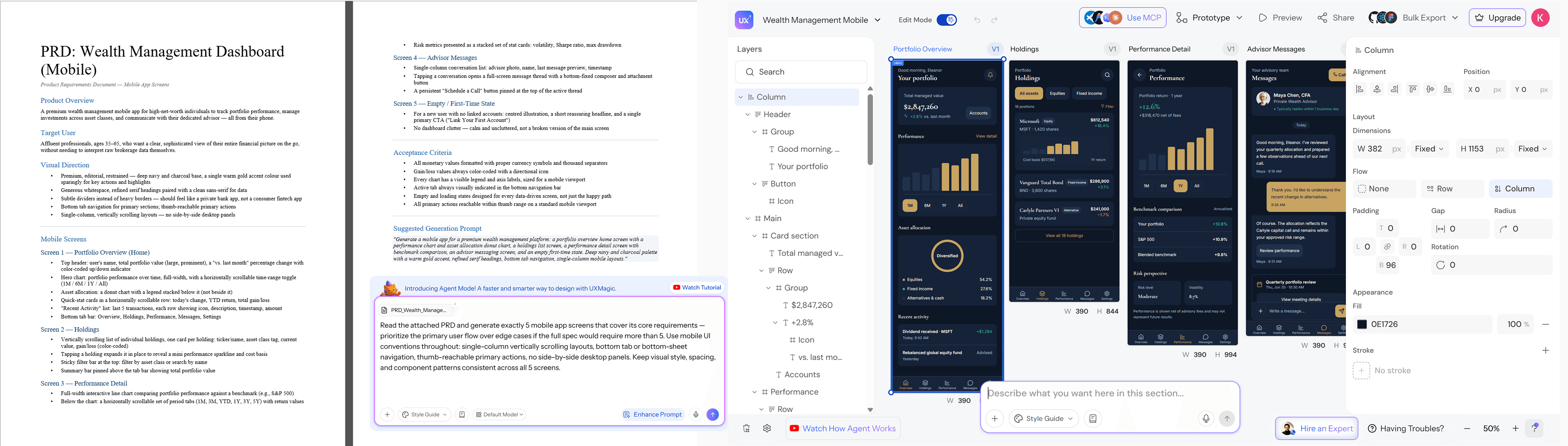
- Start from the document. With design from a document, you upload an existing PRD or brief and UXMagic uses it as the brief for the design. Reading a document costs no credits, per how credits work.
- Approve the screen plan. Before designing, UXMagic proposes a named list of screens with a one-line purpose each. You can edit, reorder or reject it, which makes it a quick check that the screens match the requirements. The flow mode and screen plans guide explains the details.
- Generate the flow. Flow mode designs the whole journey with one shared theme and navigation, and you can add a "forgot password" screen or an empty state later with a follow-up prompt. Prefer structure first? Switch to wireframe mode.
- Review together. Share a clickable preview with share a preview, and collect notes on the screens themselves with comments and feedback. Screens keep their versions and history, so a scope change is easy to trace.
- Hand off. Export code with the design-to-code generator, or connect a coding agent through the UXMagic MCP server, which can list and read a project's documents, including PRDs, alongside the screens. Setup is in the MCP server help article.
A note on honest scope: UXMagic generates the interface a PRD describes. It does not replace customer research, prioritisation or the engineering design doc, and generated screens still need a designer's eye before they ship. For new products, the AI MVP builder takes the same approach to a first release, and our MVP design guide covers which screens to build first. Plans and credit allowances are on the pricing page; if you want better first drafts, our tips on writing a good prompt apply to PRD uploads too.
Related guides
- PRD for Designers: How to Read a PRD and Turn It Into Screens
- Design Ops 101: How to Scale UI/UX Production Without Slowing Down
- Design Thinking Process: A Practical Guide for Product Teams
- User Persona Template for AI-Ready UX Workflows
- The Most Innovative AI Wireframe Platforms in 2026: A Technical Comparison
- The UX Case Study Template Hiring Managers Actually Read
- How to Run a Design Sprint in 2026: The 3-Day Accelerated Framework
- What Is a Prototype in UX Design (And Why Most Teams Build Them Wrong)
- What Is Rapid Prototyping? The Modern SaaS Playbook (2026)
- MVP Design: How to Design a SaaS MVP Users Actually Adopt (2026)
- The 12 Best AI Prototyping Tools in 2026
- Best Design Handoff Tools for Engineering Teams in 2026
- Customer Journey Map Complete Guide: From Emotions to Wireflows
Write the PRD, see the product
Generate a structured PRD and the matching screens together, then share a clickable flow with your team. Free to start.