

TL;DR: MVP stands for Minimum Viable Product: the smallest thing you can put in front of real customers to learn whether your core idea is right. The term dates to 2001 and was popularised by Eric Ries's The Lean Startup. Pick the cheapest MVP type that tests your riskiest assumption, measure behaviour rather than opinions, and use an AI MVP builder to get the screens done in hours instead of weeks. For the UI side, read our follow-up on how to design an MVP.
Most founders do not fail because they build badly. They fail because they build the wrong thing well, spending six months on a product nobody asked for. The minimum viable product exists to stop that from happening: you find out whether the idea holds up before you pay for the full build.
The term is also one of the most misused in tech. Some teams use "MVP" to mean "version one with fewer features", others to excuse a buggy release, and others for a clickable Figma file. This guide is our attempt at the canonical answer: what an MVP is, where the idea came from, how it differs from a prototype, MLP and POC, the five common types with real companies that used them, and how to build, measure and pay for one in 2026.
We build UXMagic, an AI design tool that a lot of founders use for the screens of their first version, so we will also be clear about which parts of an MVP AI actually speeds up and which it does not.
What does MVP stand for?
MVP stands for Minimum Viable Product. In product development it means the smallest version of a product that delivers the core value to real users, released so the team can learn whether its central assumption is correct.
Each word carries weight:
- Minimum: only what is needed to test the assumption. Everything else waits.
- Viable: it has to work well enough that a real customer can get real value from it. A broken product tells you nothing except that people dislike broken products.
- Product: it goes to real customers in a real setting, not to colleagues in a meeting room.
The point is learning, not launching. An MVP is an experiment dressed as a product, and its output is evidence: sign-ups, usage, retention, payments or a clear "no".
(Outside product teams, MVP more often means Most Valuable Player in sport. If you landed here looking for that, this is the wrong post.)
Where the term came from
Frank Robinson, co-founder of the consultancy SyncDev, introduced the term in 2001. His framing was commercial: the MVP is the version of a product that maximises return on risk for both the vendor and the customer, found by developing the product and the customer base at the same time.
Steve Blank and Eric Ries then brought it into startup culture. Ries, who studied under Blank, wrote about it on his blog from 2009 and made it a central idea of The Lean Startup (2011), where he defines an MVP as the version of a new product that lets a team collect the maximum amount of validated learning about customers with the least effort.
That shift, from maximising return to maximising learning, is why the modern MVP sits inside the build, measure, learn loop: build the smallest test, measure what people actually do, learn whether to persevere or pivot, and repeat. If you want the wider process that surrounds it, our design thinking process guide and design sprint playbook cover the discovery work that should come first.
MVP vs prototype vs MLP vs POC
These four terms get swapped constantly. The difference is what question each one answers and who sees it.
| Proof of concept (POC) | Prototype | MVP | MLP | |
|---|---|---|---|---|
| Question it answers | Can we build it? | Will people understand and use it? | Will people adopt it and pay? | Will people love it enough to choose it? |
| Audience | Internal team | Test users in sessions | Real early customers | Real customers in a crowded market |
| Does it work for real? | Only the risky technical part | Usually simulated | Yes, the core job works | Yes, with a polished core |
| Typical effort | Days | Hours to days | Days to a few months | Weeks to months |
| Output | Feasibility yes/no | Usability findings | Behaviour and revenue data | Retention and word of mouth |
Proof of concept. A POC tests technical feasibility: can this model classify these documents, can this API handle that load. It is usually never shown to customers.
Prototype. A prototype simulates the product so you can test flows and comprehension. It can be a paper sketch, a wireframe or a high-fidelity clickable file. See what a prototype is in UX design, our wireframe vs mockup vs prototype breakdown and the guide to low-fidelity vs high-fidelity for choosing the right level of detail.
MVP. The MVP goes to real users, and something real happens: they sign up, pay, come back or leave. It can still be manual behind the scenes, as several of the examples below show.
MLP (Minimum Lovable Product). Brian de Haaff, CEO of Aha!, argued in a 2013 essay that "viable" sets the bar too low, and that the first version should be something customers love. In 2026, when a competent-looking app can be generated in an afternoon, that argument is stronger than ever: a clunky MVP in a crowded category often fails for reasons that have nothing to do with the idea.
A related term, the MMP (Minimum Marketable Product), is the first version you are ready to sell and market broadly, usually after the MVP has proven demand.
5 types of MVP, with real examples
You do not always need to write code. Pick the cheapest type that can test your riskiest assumption.
- Landing page or explainer video MVP
You describe the product as if it exists and measure how many people take a costly action: joining a waitlist, clicking "buy", entering an email.
Dropbox is the best-known case. Drew Houston recorded a short screencast showing how file sync would work before the product was ready for the public, and posted it to Hacker News and Digg. The beta waiting list reportedly went from about 5,000 to 75,000 sign-ups overnight. Syncing files reliably across operating systems was hard to build, so proving demand first was worth a lot.
Buffer is the other classic. Founder Joel Gascoigne put up a two-page site explaining a tool for scheduling tweets, with a "plans and pricing" button that led to an email sign-up. When people signed up, he added a pricing page in between to see whether they would still click through with prices attached. Only then did he build the product, over about seven weeks of evenings and weekends.
A landing page MVP is the fastest to build. Our guide to SaaS landing page design covers what makes one convert, and the AI landing page generator will draft one from a prompt.
- Wizard of Oz MVP
The customer sees what looks like a finished, automated product. Behind the curtain, humans do the work by hand.
Zappos began this way in 1999. Nick Swinmurn wanted to know whether people would buy shoes online without trying them on. Instead of buying stock, he photographed shoes in local stores and posted them on a basic site. When an order came in, he bought the pair at full price and shipped it. He lost money on sales, but proved the behaviour he needed to prove.
Wizard of Oz MVPs suit anything where automation is expensive, including a lot of "AI-powered" products, where a person can play the model until you know the output is worth automating.
- Concierge MVP
Like Wizard of Oz, but the customer knows a human is doing the work. You deliver the service personally and learn exactly what each customer needs.
The Lean Startup describes Food on the Table, a meal-planning service whose founder started by personally serving a single customer, visiting her each week with a shopping list and recipes built around local grocery deals. The software came later, once the team understood the job well enough to automate it.
DoorDash blended both approaches. As Stanford students, Tony Xu, Evan Moore, Andy Fang and Stanley Tang launched a site called Palo Alto Delivery with eight restaurant menus as PDFs and a Google Voice number that rang their own phones. They delivered the first orders themselves.
- Piecemeal MVP
You stitch together existing tools instead of building your own, so the product works end to end with almost no custom code.
Groupon started as a WordPress blog with a new deal posted each day. Andrew Mason has described generating coupons as PDFs from FileMaker and emailing them through Apple Mail with a script. Today the piecemeal stack is usually Webflow or Framer, Stripe, Airtable, Zapier and an AI builder. Our round-up of AI app builders for non-developers covers the tools most founders assemble.
- Single-feature MVP
A real, coded product that does one thing well. This is what most people picture when they hear "MVP", and it is the right choice once cheaper tests have shown demand and the remaining risk is whether you can deliver the value in software.
Early Uber (book a black car from your phone in San Francisco) and Airbnb (rent an air mattress in the founders' apartment during a sold-out design conference) both fit this pattern: one core job, nothing else. The discipline is to resist a second feature until the first one is working.
Which type to choose comes down to the question:
| Your riskiest assumption | Cheapest MVP type |
|---|---|
| Do enough people want this? | Landing page or video |
| Will they pay this price? | Landing page with pricing, pre-orders |
| Will they use the outcome if we deliver it? | Wizard of Oz or concierge |
| Can we deliver it with existing tools? | Piecemeal |
| Can software deliver the value reliably? | Single-feature product |
How to build an MVP in 6 steps
- Write down the riskiest assumption
Every product idea rests on a stack of assumptions: that the problem exists, that people know they have it, that they will switch from their current workaround, that they will pay. List them and pick the one that would kill the business if wrong. That is what your MVP tests. A lightweight spec helps; our PRD guide has a template, and the AI PRD generator drafts one from a paragraph of notes.
- Define the user and the one job
Name the early adopter precisely ("freelance designers who invoice more than five clients a month", not "SMBs") and the single job they hire the product for. A user persona template and a customer journey map keep this honest.
- Cut the scope to one flow
Map the shortest path from "arrives" to "gets the value". Everything off that path goes on a later list: settings, teams, integrations, admin panels, dark mode. A simple user flow diagram makes cuts visible. A prioritisation score like RICE helps when the team disagrees about what stays.
- Design the screens before you build them
This is where teams used to lose weeks, and where AI has changed the maths the most. In UXMagic you describe the journey in one prompt, and Flow Mode proposes a screen plan (a named list of screens with a one-line purpose each) that you approve, edit or reject before anything is designed. Every screen then shares one theme and navigation.
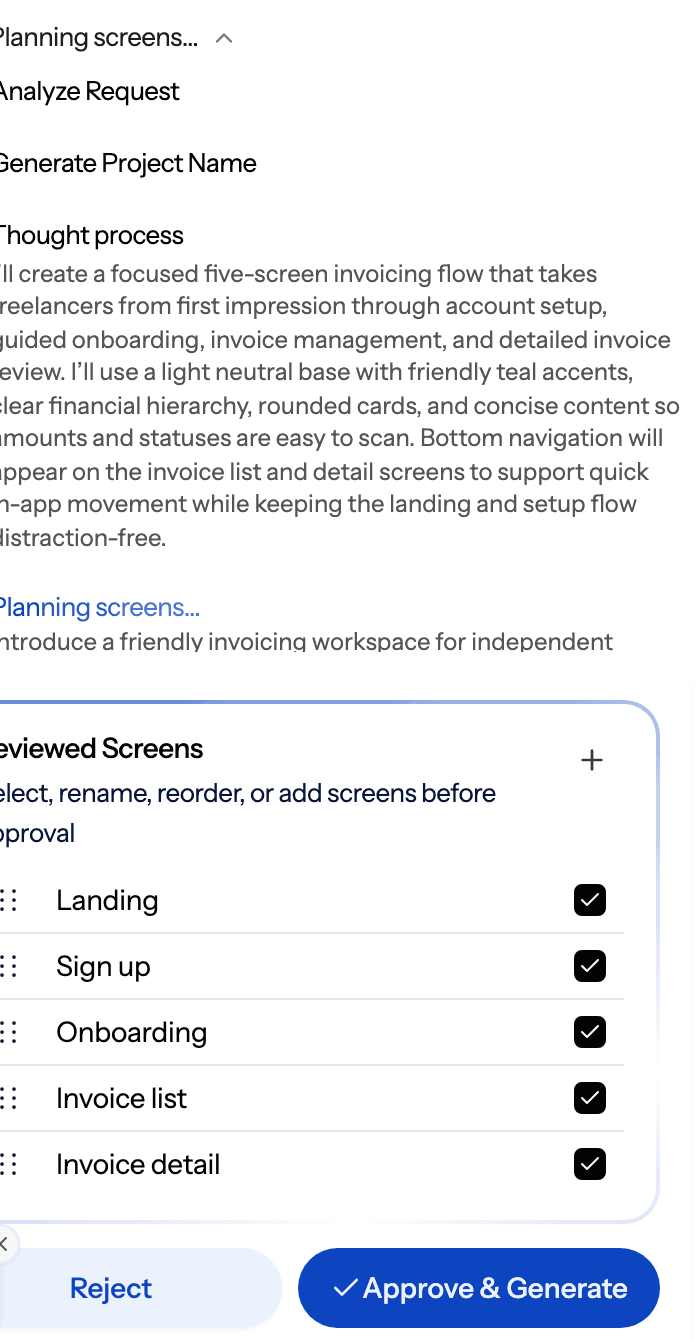
The help article on screen plans explains why fixing the plan is the cheap step. If you already have a spec, you can design from a document instead of writing a prompt. If you want to settle structure before visual polish, wireframe mode generates greyscale layouts first. How much design an MVP needs, which screens and at what fidelity, is the subject of our MVP design guide, so we won't repeat it here.
- Test the prototype, then build the smallest real thing
Put a clickable version in front of five to eight target users before writing production code. Usability problems you find here cost minutes to fix. In UXMagic you can link screens into a clickable prototype and share a preview link with testers.
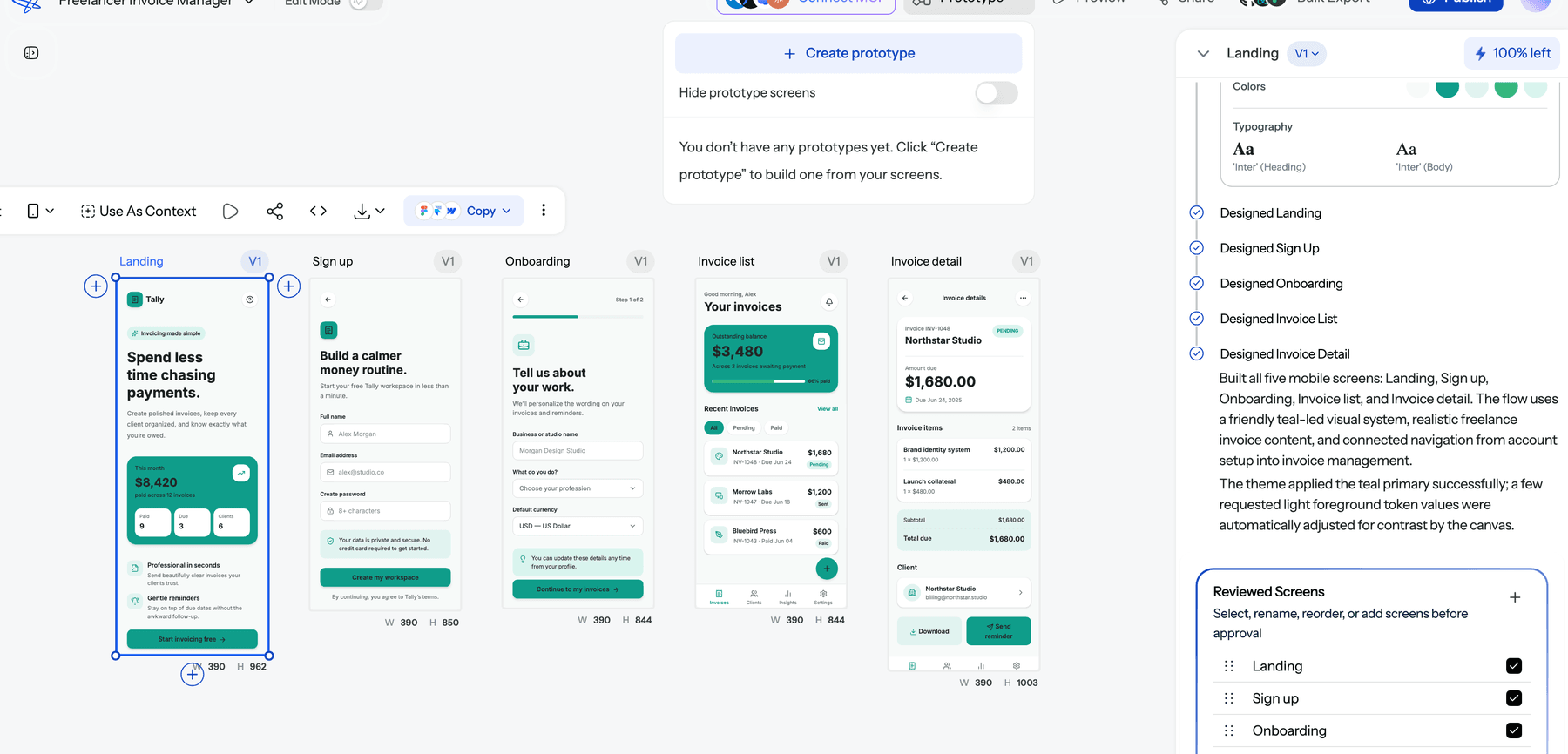
Then build. For a landing page or simple site, you can publish straight from UXMagic to a live URL. For a coded product, export the screens as HTML or React and hand them to a developer or an AI coding tool. Our reviews of Lovable, Bolt.new and Base44 cover the popular full-stack builders.
- Launch to a small group and talk to every user
Launch to a few dozen early adopters, not the whole internet. Watch what they do, talk to as many of them as you can, and decide what the evidence says. Reid Hoffman's line that if you are not embarrassed by your first version you launched too late is about timing, not permission to ship something broken.
How to measure an MVP
Decide what success looks like before you launch, or every result will look like a partial win. Write the hypothesis as a sentence with a number: "At least 20% of visitors who see the pricing page will join the waitlist" or "At least 40% of users who complete onboarding will create a second invoice within a week."
Metrics that tell you something:
- Conversion on a costly action: waitlist sign-up, pre-order, card entered, demo booked.
- Activation: the share of new users who reach the core value moment.
- Retention: the share who come back in week two and week four. Retention is the strongest early signal of real demand.
- Willingness to pay: paid conversions, or pre-orders, rather than "would you pay?" survey answers.
- Qualitative signal: what users say in interviews, and whether they would be disappointed if the product disappeared.
Metrics that mislead: page views, total sign-ups without activation, social likes and compliments from friends. Our guide to AI tools for UX research covers interview and analysis tools that make the qualitative side faster.
After each cycle, make an explicit call: persevere (the numbers hit the target, keep going), pivot (a different user, problem or model looks more promising) or stop.
Common MVP mistakes
- Testing too many things at once. If the MVP has six features and fails, you do not know which assumption was wrong.
- Minimum without viable. A buggy or confusing product measures tolerance for bad software, not demand for your idea. This is the MLP argument in practice.
- Viable without minimum. Adding "just one more" feature before launch is how three-month MVPs become nine-month ones. Scope creep deserves its own playbook.
- Mistaking a prototype for an MVP. Positive feedback in a usability session is not market validation. People are polite; wallets are not.
- No success criteria. Without a number set in advance, teams rationalise any result.
- Building for everyone. A vague audience gives vague data.
- Over-engineering the backend. Scalable infrastructure for users you do not have yet is a common and expensive delay.
- Waiting for the launch to be ready. Perfectionism is a form of scope creep.
How much does an MVP cost?
It depends almost entirely on the type:
| MVP type | Typical cost driver |
|---|---|
| Landing page or video | Your time, plus a domain and ad spend |
| Wizard of Oz or concierge | Your time doing the manual work |
| Piecemeal (no-code) | Tool subscriptions, often under a few hundred dollars a month |
| Single-feature coded product | Developer or agency time, the largest cost by far |
The coded route is where budgets vary most, and AI tools have moved the numbers a lot in the last two years. Our SaaS MVP development cost breakdown has the detailed ranges by approach and team type, and our piece on the cost of slow design in SaaS explains why design delays are an underrated line item.
On the design side, UXMagic's Free plan includes 20 credits a day with no card required, and Pro is $35 a month or $17.5 a month billed annually, per the pricing page. Designing a new screen costs 3 credits, as listed in how credits work, so a five-screen MVP flow fits comfortably inside a free week.
What AI changes about building an MVP
In 2026 the build step is the cheapest part of an MVP. AI UI generators produce multi-screen designs from a prompt, vibe-coding tools turn those into working front ends, and a solo founder can have a clickable, good-looking product the same day. Our guides to vibe designing, vibe coding in 2026 and how to design UI with AI cover the workflow.
That shifts the hard parts rather than removing them:
- Polish is no longer a differentiator. When anyone can generate a clean UI, "it looks professional" does not validate anything. The idea and the core job have to carry the test.
- Scope creep gets cheaper, and so more dangerous. Asking an AI for another feature takes one prompt, so it is easy to drift from one flow to twelve without noticing.
- Consistency matters more. Screens generated one at a time drift in colour, type and components, which confuses test users. Tools that plan the whole flow and share one theme avoid this; our explainer on why single-screen AI design is a dead end goes deeper.
- Judgement stays human. Choosing the riskiest assumption, recruiting the right users and reading the evidence are still your job. See why AI design fails without human direction.
For product managers who want the full spec-to-screens process, our spec-driven design workflow and round-up of AI tools for product managers are good next reads. If you are comparing prototyping options, see the best AI prototyping tools of 2026.
Design your MVP's screens in an afternoon
Describe the journey, approve the screen plan, and get a consistent, clickable flow you can test with real users today.

Where UXMagic fits, honestly
UXMagic is the design and prototype layer of an MVP. Use the AI MVP builder to go from a description of your idea to a full set of connected screens, turn them into a clickable AI prototype, publish a landing page or simple site, and export HTML, React or Figma files for the build. The AI product builder page shows the broader workflow, and ready-made templates give you a head start.
What it does not do: it is not a backend, database or payments platform, and it will not run your customer interviews. Pair it with a developer, a no-code stack or a full-stack AI builder for the working product, and keep the learning loop in your own hands.
If you are a founder working without a designer, our guide to shipping without a design team covers the rest of the workflow.
Related guides
- How to Validate a Product Idea: 7 Tests, With Templates
- Fast AI Design is Easy, Shipping Reliable Products isn’t
- UX Design Methodologies Explained (And Which Ones Still Matter in 2026)
- 15 Best UX/UI Design Tools for 2026, Plus a Startup Stack
- Emergent AI Review 2026: Is Full-Stack Vibe Coding Production-Ready?
- 10 SaaS Onboarding UX Examples Doing It Right (And How to Implement Them)
- What Is Design Thinking in 2026? (And Why Most Teams Get It Wrong)
- Base44 vs Lovable (2026): Which AI App Builder Fits Your Project?
- 12 Best Base44 Alternatives in 2026, Grouped by Use Case
- Lovable Pricing 2026: Plans, Credits, and What an App Really Costs
Test the idea before you build the company
Generate every screen of your MVP, share a clickable prototype, and learn what users actually want. Free to start, no card required.