
TL;DR: As of September 2026, the strongest AI models for UI design are Anthropic's Claude Fable 5.1 and Opus 5.5, OpenAI's GPT-6 Astra and GPT-5.6 Sol, and Google's Gemini 3.1 Pro. They are close enough at the top that the tool you run them in, and the workflow around it, decides the result. If you need consistent multi-screen product UI with Figma and React handoff, a design tool such as UXMagic's AI UI design generator matters more than the model name. Read on for strengths, pricing and where each model is available.
"Which model is best for UI?" is the question we hear most from product teams in 2026, and it has a frustrating answer: it changed three times this month. Anthropic shipped Claude Fable 5.1 on September 1 and Opus 5.5 on September 22. OpenAI released GPT-6 Astra in early September and GPT-6 Sol and Luna on September 22. Google shipped Gemini 3.8 Flash on September 2, while the Gemini 3.5 Pro it announced at I/O in May still had not arrived.
So instead of crowning a model that will be overtaken by November, this guide does three things. It lays out the current frontier models from each vendor with what the vendor itself says about design, what they cost and where you can use them. It groups them by the job you are doing: a single screen, a multi-screen product, frontend code, or quick exploration. And it explains why, once you are choosing between frontier models, the workflow around the model decides more than the model does.
We build UXMagic, an AI UI designer, so we have a view on that last part. We also do not publish which models run inside UXMagic, and this article does not rank our own product against the models. We describe what each model is for, based on vendor documentation, and where UXMagic fits.
The models at a glance
All prices are standard API list prices per million tokens (input / output) from each vendor's own pricing page, checked on September 25, 2026. Short-context rates only.
| Model | Vendor | Positioning (vendor's words, paraphrased) | API price per 1M tokens | Where designers use it |
|---|---|---|---|---|
| Claude Fable 5.1 | Anthropic | Most capable widely available Claude, demanding reasoning, long-horizon agents | $10 / $50 | Claude Design, Claude Code, claude.ai, API |
| Claude Opus 5.5 | Anthropic | Long-running agentic coding and knowledge work; comparable to Fable 5.1 on most tasks | $4 / $20 | Claude Design, Claude Code, claude.ai, API |
| Claude Sonnet 5 | Anthropic | Best balance of speed and intelligence | $2 / $10 | Claude apps, coding tools, API |
| GPT-6 Astra | OpenAI | Most capable GPT; stronger visual judgment for front-end design | $10 / $50 | ChatGPT, Codex, API |
| GPT-6 Sol | OpenAI | Mid tier for complex tasks such as coding | $2 / $10 | ChatGPT, Codex, API |
| GPT-5.6 Sol | OpenAI | Launched with an explicit design pitch | $4 / $20 | Figma Make, ChatGPT, API |
| Gemini 3.1 Pro (preview) | Advanced reasoning, agentic and vibe coding | $2 / $12 | Google Stitch, Gemini app, AI Studio | |
| Gemini 3.8 Flash | Google's best Flash for coding and agents | $0.75 / $3.75 (through 2026) | Gemini app, AI Studio, API |
Two notes before the details. First, public leaderboards for web design move weekly and we could not load a current, citable WebDev ranking while writing this, so we do not quote one. Second, the prices matter mainly if you call a model through the API or a bring-your-own-key tool. Most designers pay through a subscription (Claude Pro, ChatGPT Plus, Figma seats, a design tool) where the model cost is bundled.
Anthropic: Claude Fable 5.1 and Opus 5.5
Anthropic's current lineup, per its models overview, is Claude Fable 5.1, Claude Opus 5.5, Claude Sonnet 5 and Claude Haiku 4.5. Fable 5 and Opus 5 are now listed as legacy models. All four current models accept text and images, which is what lets them work from a screenshot or a mockup.
Claude Fable 5.1
What it is: Anthropic's most capable generally available model, released September 1, 2026. Anthropic recommends it for demanding reasoning and long-horizon agentic work, with a 1M-token context window and up to 128K output tokens. The same underlying model is offered as Mythos 5.1 through a restricted access programme.
Best for: long, complex design-to-code sessions where the model has to hold a whole product in its head: a multi-page app, a design system applied across many screens, or a large refactor of existing frontend code.
Where it falls short: it is the slowest and most expensive model in Anthropic's lineup ($10 input, $50 output per million tokens). Inside a subscription tool, that shows up as usage limits reached sooner.
Claude Opus 5.5
What it is: released September 22, 2026. Anthropic describes it as comparable to Fable 5.1 on most tasks at a much lower price ($4 / $20), and says typical workloads cost about 40% less than on Opus 5. In the launch notes, one tester who had several Claude models build a game from a single prompt said Opus 5.5 scored highest on graphics and polish. Its predecessor, Opus 5, was described at launch as checking its own pages in a browser at desktop and phone widths and fixing layout problems before handing work back.
Best for: most day-to-day UI and frontend work. It is Anthropic's own default recommendation ("start with Claude Opus 5.5 for most workloads"), and the price gap to Fable makes it the sensible starting point.
Where it falls short: it is newer than most published hands-on design tests, so community evidence is still thin. If your evals at higher effort still fall short, Anthropic points you to Fable.
For a head-to-head on these two, including when the extra cost of Fable is worth it, read our Claude Opus vs Fable for UI design comparison.
Where to use Claude models for design
- Claude Design, Anthropic's visual canvas for designs, prototypes and slides. It is included on Claude Pro, Max, Team and Enterprise, not Free. We cover its limits and the tools people switch to in Claude Design alternatives, and compare it with our product in Claude Design vs UXMagic.
- Claude Code, for frontend work inside a repository.
- Third-party tools such as Cursor and other coding agents that let you choose a Claude model.
OpenAI: GPT-6 Astra, GPT-6 Sol and GPT-5.6
OpenAI now splits each generation into named tiers. GPT-5.6 launched on July 9, 2026 as Sol (flagship), Terra (balanced) and Luna (fast and cheap). The GPT-6 generation started with Astra in early September, followed by GPT-6 Sol and Luna on September 22.
GPT-6 Astra
What it is: OpenAI's most capable model, announced on September 3, 2026 as "a new generation of intelligence". OpenAI's developer account says Astra "brings stronger visual judgment to front-end design", and suggests giving it a sketch, reference or existing UI to turn into working UI, refine layout, typography and spacing, or revise from screenshots.
Best for: reference-driven frontend work in ChatGPT or Codex, where you hand the model a screenshot or sketch and iterate on a working page.
Where it falls short: it is priced at the top of the market ($10 / $50 per million tokens), and it is new enough that its design behaviour in dedicated design tools is not yet widely documented.
GPT-6 Sol and GPT-5.6 Sol
What they are: GPT-6 Sol is the mid tier of the new generation, priced at $2 / $10, and OpenAI says it makes about half as many mistakes as its predecessor. GPT-5.6 Sol is the previous flagship, and its launch was the most design-forward of any model this year. OpenAI's GPT-5.6 announcement claimed that "with only high-level direction, GPT‑5.6 creates tasteful, ergonomic, and functional interfaces", and highlighted the model inspecting its own rendered output.
Best for: GPT-5.6 is the GPT you are most likely to meet inside a design tool today: Figma made it selectable in Figma Make on launch day. GPT-6 Sol is the value pick for frontend code in Codex or through the API.
Where they fall short: community reviews of GPT-5.6 have pointed to repetitive, card-heavy layouts and looser adherence to a supplied design system. Treat that as anecdotal, but plan to give any GPT model an explicit style guide.
For how ChatGPT itself fits a design workflow, from research to copy to first-draft screens, see ChatGPT for UI/UX design. If you are working inside Figma, our Figma Make tutorial walks through the model picker and credits.
Google: Gemini 3.1 Pro and Gemini 3.8 Flash
Google's model list is the most confusing of the three right now. According to the Gemini API models page, the newest Pro model you can call is Gemini 3.1 Pro, still labelled a preview. Gemini 3.5 Pro was announced at Google I/O on May 19 but had no model ID or price as of this writing. Meanwhile Flash has moved fast, with Gemini 3.8 Flash released on September 2.
Gemini 3.1 Pro
What it is: Google describes it as having advanced intelligence, complex problem-solving, and "powerful agentic and vibe coding capabilities". It is the highest-quality model inside Google Stitch, where Google pitches it as handling large design systems and strict design rules without losing detail, which suits dense dashboards, data tables and multi-step forms.
Best for: free or low-cost exploration through Stitch and the Gemini app, and teams already in Google's ecosystem (AI Studio, Antigravity).
Where it falls short: it is still a preview, so behaviour and pricing can change, and there is no free API tier for it. Some developers have also reported long "thinking" phases on complex tasks.
Gemini 3.8 Flash
What it is: Google called it its "best reasoning and coding model yet" at Flash speed and cost. It has a free tier in the Gemini API, and an introductory paid price of $0.75 / $3.75 per million tokens through December 31, 2026, doubling from January 2027.
Best for: high-volume, cheap iteration: generating many variations, quick component drafts, or powering your own internal tool.
Where it falls short: Flash models trade depth for speed, so for a polished, multi-screen product design you will usually want a Pro or frontier model.
For the tool built on these models, read our Google Stitch review and our round-up of Google Stitch alternatives. If you want images for your UI (hero shots, illustrations) rather than layouts, Google's image models are a different family, compared in Nano Banana Pro vs Nano Banana 2.
Best AI model by UI design job
Because the frontier models are close, a better question than "which is best?" is "which is best for what I am doing, where I am doing it?"
A single screen or landing page
Any of the frontier models will produce a credible single screen from a detailed prompt. The differences you notice are taste and defaults: colour choices, how much animation it adds, how it fills in copy. Use whichever model sits inside the tool you already pay for. If you want a quick page without writing code, an AI landing page generator or AI website generator gets you there with less setup than a chat window.
A multi-screen product flow
This is where model choice matters least and workflow matters most. Every model can drift between screen three and screen seven: a button colour changes, the nav moves, spacing tightens. Longer context (Opus 5.5, Fable 5.1 and Sonnet 5 all offer 1M tokens) helps, but it does not replace a shared theme and a plan. We explain the failure mode in why single-screen AI design is a dead end.
Frontend code in a real codebase
Pick the model your coding agent runs best: Opus 5.5 or Fable 5.1 in Claude Code, GPT-6 Astra or Sol in Codex, or any of them in Cursor. The agent's ability to run the page, look at it and fix it matters as much as raw model quality. Our AI coding assistants for frontend developers comparison and our list of AI design-to-code tools cover the options.
Following a design system
If your brand rules matter, give the model a written system rather than hoping it infers one. A DESIGN.md file is the most portable format in 2026: Stitch, Claude Design and coding agents all read it. Be realistic about what to expect, though; our honest answer to can AI follow design tokens? is "mostly, with checking".
Cheap exploration
For volume, GPT-6 Luna, Gemini 3.8 Flash and Claude Haiku 4.5 are an order of magnitude cheaper per token than the frontier tiers. Stitch remains free as a Labs experiment. This is the vibe designing stage: explore many directions fast, then commit.
Images and assets
None of these language models is the best choice for generating hero images or illustrations. Use a dedicated image model; our guide to the best AI image generators compares them for UI assets.
Why the workflow matters more than the model
Every model on this list can make a good-looking screen. The problems product teams actually hit are the same regardless of vendor:
- Nobody decided which screens the product needs. A model will happily design a dashboard you did not need and skip the empty state you did.
- Screens drift apart. Each new generation re-invents spacing, colour and components unless something holds them together.
- Output lands in the wrong place. A chat transcript or a single HTML file is not a Figma file your designer can edit, nor a React project your developer can merge.
- Iteration is expensive. Regenerating a whole screen to change a headline burns time and money on any model.
These are workflow problems. They are solved by structure around the model: a plan, a theme, a canvas, and export. That is the argument of our how to design UI with AI guide, and it is why our list of the best AI design tools of 2026 ranks tools on structure rather than on which model they run.
Stop picking models, start shipping flows
UXMagic plans your screens, designs them on one shared theme, and exports to Figma or React. The free plan refreshes every day.

Where UXMagic fits
UXMagic is an AI UI designer for product teams. You describe a product, or start from a screenshot, sketch, document or URL, and it produces editable, high-fidelity screens on an infinite canvas. We do not say which vendors' models run behind it. The model picker in the prompt box offers a Default Model and an alternative model, so you can switch if a result is not what you wanted, and otherwise you never have to think about it.
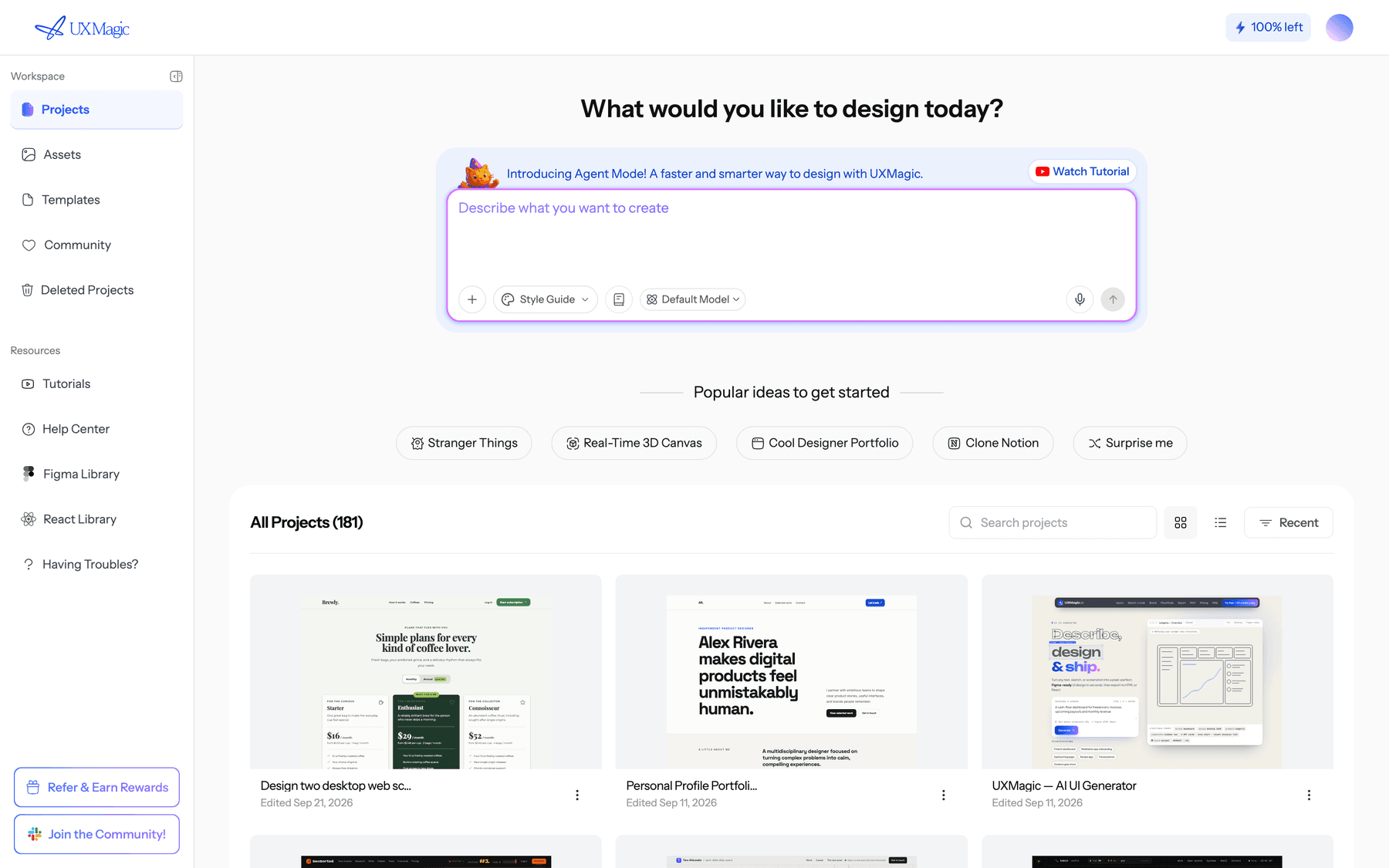
What UXMagic adds around the model is the structure the previous section described:
- A plan before pixels. For a new project, UXMagic proposes a named screen plan that you edit or approve before anything is drawn. Flow mode then designs the whole journey in one pass.
- One theme across every screen. Colours, type, radii and spacing live as project-level tokens. Changing the theme and style guide updates every screen, and theme changes cost no credits. You can generate the system first with the AI style guide generator.
- Many starting points. Prompts, image to UI, a greyscale AI wireframe generator mode, and a website cloner.
- Cheap edits. Chat editing changes a specific element instead of regenerating the screen. Designing a new screen costs 3 credits and rewriting one costs 2, per how credits work.
- Handoff. Export to Figma as auto-layout frames, or export code as HTML or React with Tailwind and your theme tokens. The design-to-code generator page shows that path end to end.
Bring your favourite model with you. If you prefer working in Claude, add UXMagic as a Claude connector and drive your designs from chat; setup is in Connect UXMagic to Claude. Cursor, VS Code, Windsurf, Codex and Antigravity connect through the UXMagic MCP server, so your coding agent, on whichever model you picked above, can read the real screens and theme before it builds.
Where UXMagic is not the answer: it is not a general chatbot for research, specs or strategy (use Claude or ChatGPT for that, and see our list of AI tools for product managers). Exported code is a front end without a data layer or routing, so for a full-stack app you would hand it on to a coding agent or an app builder. And if you only need one quick landing page, a frontier model in a chat window may be all you need.
Pricing: the free plan gives 20 credits a day. Pro is $35 a month, or $17.50 a month billed annually, with 2,400 credits a month. See the pricing page and plans and limits for details.
How to choose, in one list
- You want the most capable model and cost is secondary: Claude Fable 5.1 or GPT-6 Astra.
- You want frontier quality at a sensible price: Claude Opus 5.5 or GPT-6 Sol.
- You live in Figma: Figma Make, with GPT-5.6 or whichever model its picker offers.
- You want free exploration: Google Stitch on Gemini 3.1 Pro.
- You are writing frontend code: whichever model your coding agent runs best, in Claude Code, Codex or Cursor.
- You are designing a multi-screen product for a team: use a design tool with a plan, a theme and export, and let the model be a setting. The state of AI in UI/UX design report shows how teams are splitting this work.
Models will keep leapfrogging each other. A workflow that plans screens, holds a theme and exports to where your team works will still be useful after the next release, whichever lab ships it.
Related guides
- GPT Image 2 Review: Features, Pricing and Prompts for UI Assets
- Pencil.dev Review 2026: Now pen.dev, Features, Pricing, Alternatives
- Google Stitch Pricing 2026: Is It Free, and What Are the Limits?
- Midjourney Pricing 2026: Plans, GPU Hours, and What Images Really Cost
- Galileo AI Is Now Google Stitch: Here's the 2026 Review
- Paper.design Review 2026: HTML Canvas, MCP, Pricing and Limits
- Figma Agent Review 2026: What the Beta Does, Costs and Misses
- 10 Best a0.dev Alternatives for Building Mobile Apps with AI (2026)
- 10 Best Figma Make Alternatives in 2026, Grouped by Use Case
- 11 Best v0 Alternatives in 2026, Grouped by the Job You Need Done
Design the flow, not just the screen
Plan screens, keep one theme across all of them, and export to Figma or React. Or connect UXMagic to Claude and design from chat.