
TL;DR: For most UI design work, start with Claude Opus 5.5. Anthropic says it performs at Fable 5.1's level on most work, it is faster, and it costs $4/$20 per million tokens against Fable 5.1's $10/$50. Use Fable 5.1 for long, multi-hour agent runs, such as a large refactor or a full design-system build, where Opus 5.5 at high effort still falls short. Either model can drive UXMagic through the Claude connector, so your model choice and your design tool don't have to compete.
If you searched for "Opus vs Fable", you probably have a Claude subscription or an API key and one practical question: which model should design my screens? Anthropic now ships two top-tier models side by side, and both write a convincing landing page from a paragraph of prompt. The gap between them is less about visual taste and more about price, speed and how long a task has to run.
One thing to clear up first. Much of what is written online compares Opus 5 with Fable 5. Those are now legacy models. Anthropic released Fable 5.1 on September 1, 2026 and Opus 5.5 on September 22, 2026, and its model docs now recommend those two. This comparison uses the current versions and notes where the older ones differ.
Everything below comes from Anthropic's own model overview, pricing docs, and launch posts, checked in September 2026. We did not run a benchmark, and we don't quote scores we can't show you. Instead, we describe what each model is built for and which UI jobs that fits. If you want the wider field, including OpenAI and Google models, our hub on the best AI model for UI design compares them all.
Opus 5.5 vs Fable 5.1 at a glance
| Dimension | Claude Opus 5.5 | Claude Fable 5.1 |
|---|---|---|
| Released | September 22, 2026 | September 1, 2026 |
| Anthropic's description | Long-running agentic coding and knowledge work | Demanding reasoning and long-horizon agentic work |
| API price (input / output) | $4 / $20 per million tokens | $10 / $50 per million tokens |
| Cache reads | $0.20 per million tokens | $0.25 per million tokens |
| Batch API | $2 / $10 | $5 / $25 |
| Fast mode | Yes, $8 / $40 (research preview, API only) | No |
| Comparative latency | Moderate | Slower |
| Default effort | medium | high |
| Effort levels | low, medium, high, xhigh, max | low, medium, high, xhigh, max |
| Context window | 1M tokens | 1M tokens |
| Max output | 128K tokens | 128K tokens |
| Input / output | Text and images in, text out | Text and images in, text out |
| Knowledge cutoff | June 2026 | June 2026 |
| API model ID | claude-opus-5-5 | claude-fable-5-1 |
What is Claude Opus 5.5?
Opus 5.5 is Anthropic's newest model and the one its docs now name as the starting point for most workloads. The launch post positions it as performing at the level of Fable 5.1 on most work while costing 40% less to run than Opus 5, and it says Opus 5.5 generates output more than 30% faster than Opus 5. It is available in the Claude apps, Claude Code, the API, and on AWS, Google Cloud and Microsoft's cloud.
In Anthropic's model selection matrix, Opus 5.5 is the pick for multihour autonomous coding agents, large-scale refactoring, complex systems engineering, vision-heavy workflows and computer use. Two of those matter directly for design: vision-heavy work covers screenshot-to-code and "match this mockup" prompts, and refactoring covers the job of moving an existing UI onto a new component system.
What is Claude Fable 5.1?
Fable 5.1 is what Anthropic calls its most capable widely released model. It extends Fable 5 at the same input and output prices, with cache reads at a quarter of the previous cost, and Anthropic's Fable 5.1 announcement highlights stronger long-running agentic coding, multistep research, and document, spreadsheet and slide work. Its sibling, Claude Mythos 5.1, has the same capabilities but is limited to invited organisations, so for design teams Fable 5.1 is the one that matters.
Anthropic's matrix points Fable 5.1 at agent sessions that run for hours, deep research, and analysis carried through to a finished document, spreadsheet or deck. The docs are explicit about the order of operations: start on Opus 5.5, and move to Fable 5.1 if your evaluations at xhigh or max effort still fall short.
Where the old Opus 5 vs Fable 5 debate landed
The "Opus vs Fable" question first took off with Opus 5, which Anthropic launched on July 24, 2026 as bringing the frontier intelligence of Fable 5 at half the price. Opus 5 was $5/$25 per million tokens and Fable 5 was $10/$50, so the argument was simple: nearly the same results for half the bill.
The 5.5 and 5.1 releases widen that gap on price. Opus 5.5 dropped to $4/$20, while Fable 5.1 held at $10/$50, which makes Opus 5.5 60% cheaper per token than Fable 5.1. If you read an older review that concluded Opus 5 was the economical pick, the same logic now applies with more force.
Positioning: what each model is built for
Neither model is marketed as a "design model". Anthropic's launch posts talk about coding, knowledge work, research and documents, not visual taste. That is useful to know, because UI design with a language model is mostly a coding task: the model writes HTML, CSS and component code, and the quality you see depends on how well it follows a spec, keeps a layout coherent and checks its own work.
Read that way, the split is:
- Opus 5.5 is tuned for doing a lot of work efficiently: many screens, many edits, screenshot input, and refactors across a codebase.
- Fable 5.1 is tuned for going deeper on hard, long problems: tasks where a model has to plan, run for hours, and carry a large piece of work to a finished state.
Most day-to-day UI work, like a landing page, a settings screen or a dashboard, sits firmly in the first category. That is why Anthropic's own advice to start on Opus 5.5 holds for designers too.
Pricing: what the difference means per screen
Both models use the same tokenizer (the one introduced with Opus 4.7, which Anthropic says produces around 30% more tokens for the same text than older models), so their per-token prices compare directly.
To make the gap concrete, here is an illustrative calculation. The token counts are assumptions for a typical single-screen generation, not measurements: 30,000 input tokens (your prompt, a design.md file and a reference screenshot) and 20,000 output tokens (thinking plus the finished HTML).
| Scenario | Opus 5.5 | Fable 5.1 |
|---|---|---|
| One screen (30K in, 20K out) | $0.52 | $1.30 |
| Ten-screen flow at the same size | $5.20 | $13.00 |
| Same flow on the Batch API | $2.60 | $6.50 |
| Same flow in Opus fast mode | $10.40 | Not available |
Two details change the real numbers. First, default effort differs: Fable 5.1 runs at high by default and Opus 5.5 at medium, and higher effort generally means more thinking tokens per answer, so the same prompt can cost Fable 5.1 more than the per-token price alone suggests. Second, prompt caching nearly erases the difference on repeated context. If you send the same design system file with every request, cache reads cost $0.20 per million tokens on Opus 5.5 and $0.25 on Fable 5.1.
On a Claude subscription, you don't pay per token. According to Claude's pricing page, Pro is $20 a month (or $17 a month billed annually) and includes Opus 5.5, Fable 5.1 and Sonnet 5, while Max starts at $100 a month. The trade-off moves from dollars to usage limits: the heavier model uses up your allowance faster, and Claude Design shares the same limits as chat and Claude Code.
Speed and effort
Anthropic lists Opus 5.5's comparative latency as moderate and Fable 5.1's as slower. For design, speed shapes how you work more than you might expect. A model that answers in half the time lets you try three layouts before lunch; a slower one pushes you towards writing one careful prompt and waiting.
Opus 5.5 also supports fast mode on the API, a research preview that Anthropic says delivers up to 2.5 times the output speed at double the price. Fable 5.1 has no fast mode.
Both models expose the same effort levels (low, medium, high, xhigh, max), and Anthropic's docs make a point worth repeating: tuning effort is often a better lever than switching models. Before you upgrade a stubborn layout problem to Fable 5.1, try Opus 5.5 at high or xhigh.
Context window and output length
This one is a tie. Both have a 1 million token context window and a 128K token output limit, and both accept images as input. In practice, that means either model can hold a large design.md file, several reference screenshots and a sizeable chunk of your codebase in one conversation. Our design.md guide explains how to write the design-system file both models read best.
Neither model generates images. Both return text, which for UI work means markup, styles, SVG icons and code. Hero photos and illustrations have to come from an image model or your own library.
Where you can use each model
In the Claude apps. Both appear in the model picker on paid plans. Anthropic's pricing page lists the Free plan with Sonnet and Haiku only.
In Claude Design. Anthropic's Claude Design getting-started guide lists it in beta on Pro, Max, Team and Enterprise, with exports to ZIP, PDF, PPTX and standalone HTML and a handoff to Claude Code. Claude Design launched on Opus 4.7, and Anthropic's current pages don't name which model it runs by default, so check the picker in your workspace. We compare it with dedicated design tools in Claude Design vs UXMagic.
In Claude Code. Anthropic's docs say Claude Code defaults to Opus 5.5 on Pro, Max, Team, Enterprise and the API. The fable alias switches to Fable 5.1, and the best alias uses Fable where available. For how Claude Code stacks up against Cursor and other assistants on frontend work, see our AI coding assistants for frontend developers comparison.
On the API and cloud platforms. Both are on the Claude API, Amazon Bedrock, Google Cloud, Microsoft Foundry and Claude Platform on AWS. Fast mode is only on the first-party API.
Use your Claude model on a real design canvas
Connect UXMagic to Claude or Claude Code and let Opus 5.5 or Fable 5.1 read, edit and generate multi-screen designs that share one theme.

Which model for which UI job
This is the practical part. The guidance below follows from how Anthropic positions each model, their speed and price, and how UI work tends to break down. Treat it as a starting point and test on your own prompts.
A single screen or component
Pick Opus 5.5. A landing page, a pricing card or a settings screen is a short task. The deciding factors are iteration speed and cost, and Opus 5.5 wins both. The quality of the brief matters far more than the model; our guide to prompting for UI that ships covers what a good one includes. If you mainly want a quick visual draft, a dedicated AI UI design generator is cheaper again.
Screenshot to UI, or "match this mockup"
Pick Opus 5.5. Anthropic names vision-heavy workflows as an Opus 5.5 strength. Rebuilding a screen from an image is exactly that.
A multi-screen app or flow
Start with Opus 5.5; consider Fable 5.1 for planning. The hard part of a ten-screen flow is not any single screen. It is keeping navigation, spacing, type and colour consistent from screen one to screen ten. A model generating each screen in its own turn tends to drift, whichever model it is. We explain why in why single-screen AI design is a dead end.
Two things help more than a bigger model. First, plan the screens before generating any of them. Second, give every screen one shared set of design tokens. If you want the extra reasoning, one pattern Anthropic's docs describe is to use the stronger model as the planner and the cheaper one as the worker: have Fable 5.1 write the screen plan and component inventory, then let Opus 5.5 build the screens.
Refactoring an existing UI
Pick Opus 5.5 for most refactors; Fable 5.1 for the very long ones. Anthropic lists large-scale refactoring under Opus 5.5. If the job is a multi-hour agent run across a big codebase, such as migrating every screen to a new component library, that is the long-horizon case Fable 5.1 is built for.
Building a design system
Either, depending on scope. Generating tokens, a colour scale and a dozen components is well within Opus 5.5. Auditing a large product, reconciling inconsistent components and writing documentation for all of it is closer to Fable 5.1's long, finished-deliverable territory. Our playbook on how to build a design system from scratch covers the order of work, and can AI follow design tokens? is honest about where models still slip.
Interactive prototypes and animation
Start with Opus 5.5. Interactive work is code: state, event handlers, transitions. Opus 5.5's speed lets you test and fix interactions quickly. For patterns worth asking for, see our guide to UI micro-interactions.
Pitch decks and design documents
Consider Fable 5.1. Anthropic's Fable 5.1 launch leans on document and slide work, and quotes a customer calling its output the best decks of any model they had tested. If the output is a finished presentation of a design rather than the UI itself, this is where Fable 5.1's extra depth has the clearest case.
Who should pick which
Choose Opus 5.5 if:
- You design screens, components or landing pages and iterate often.
- You work from screenshots, mockups or references.
- You pay per token and want the most output for the budget.
- You use Claude Code for frontend work and want the default that Anthropic recommends.
- You want fast mode for quick, interactive sessions.
Choose Fable 5.1 if:
- You run long agent sessions that take a large UI job from start to finish.
- Opus 5.5 at xhigh or max effort still doesn't get a hard problem right.
- The deliverable is a finished document or deck, not the UI itself.
- Cost and waiting time matter less than getting the hardest step right.
Consider something else if you only need quick visual drafts, or your team works in Figma. A language model writing HTML in a chat is one way to design, not the only one. Our roundup of the best AI design tools in 2026 and our list of Google Stitch alternatives cover dedicated tools, and if you are weighing OpenAI instead, see ChatGPT for UI/UX design. Product managers choosing a wider toolkit can start with our list of AI tools for product managers.
Why the workflow matters more than the model
Here is the uncomfortable part of any model comparison: the gap between Opus 5.5 and Fable 5.1 on a single screen is small next to the gap between a vague prompt and a structured workflow. The failures teams actually hit with AI-generated UI are drift across screens, ignored design tokens, and a single screen that looks great but doesn't fit the product. A stronger model does not fix any of these on its own.
What fixes them is structure: a screen plan you approve before generation, one theme every screen reads from, and a canvas where you can see the whole flow at once. That is the approach behind vibe designing, and our step-by-step guide on how to design UI with AI walks through it.
Using Opus 5.5 or Fable 5.1 with UXMagic
UXMagic is a design tool, not a model, and you don't have to choose between it and Claude. You can use it two ways.
Inside Claude, through the connector
UXMagic is available as a custom connector in Claude. In Claude, open Settings, then Connectors, choose Add custom connector, enter the UXMagic MCP URL from our Claude connector guide, sign in and allow access. No API key is needed. From then on, whichever Claude model you have selected, Opus 5.5 or Fable 5.1, can list and read your projects and screens, edit markup, generate new screens, export to Figma and publish a project.
That gives your chosen model a real design surface. Instead of writing one long HTML file in a chat, Claude works on a UXMagic canvas where every screen shares one theme. The UXMagic for Claude page has an overview.
From Claude Code, Cursor or another IDE over MCP
If you build in Claude Code, connect the UXMagic MCP server. Your assistant can read a screen's real HTML and the project theme, then implement it in your codebase against your tokens instead of guessing from a screenshot. The same server works with Cursor, VS Code, Windsurf, Codex and Antigravity; the MCP setup page generates the config.
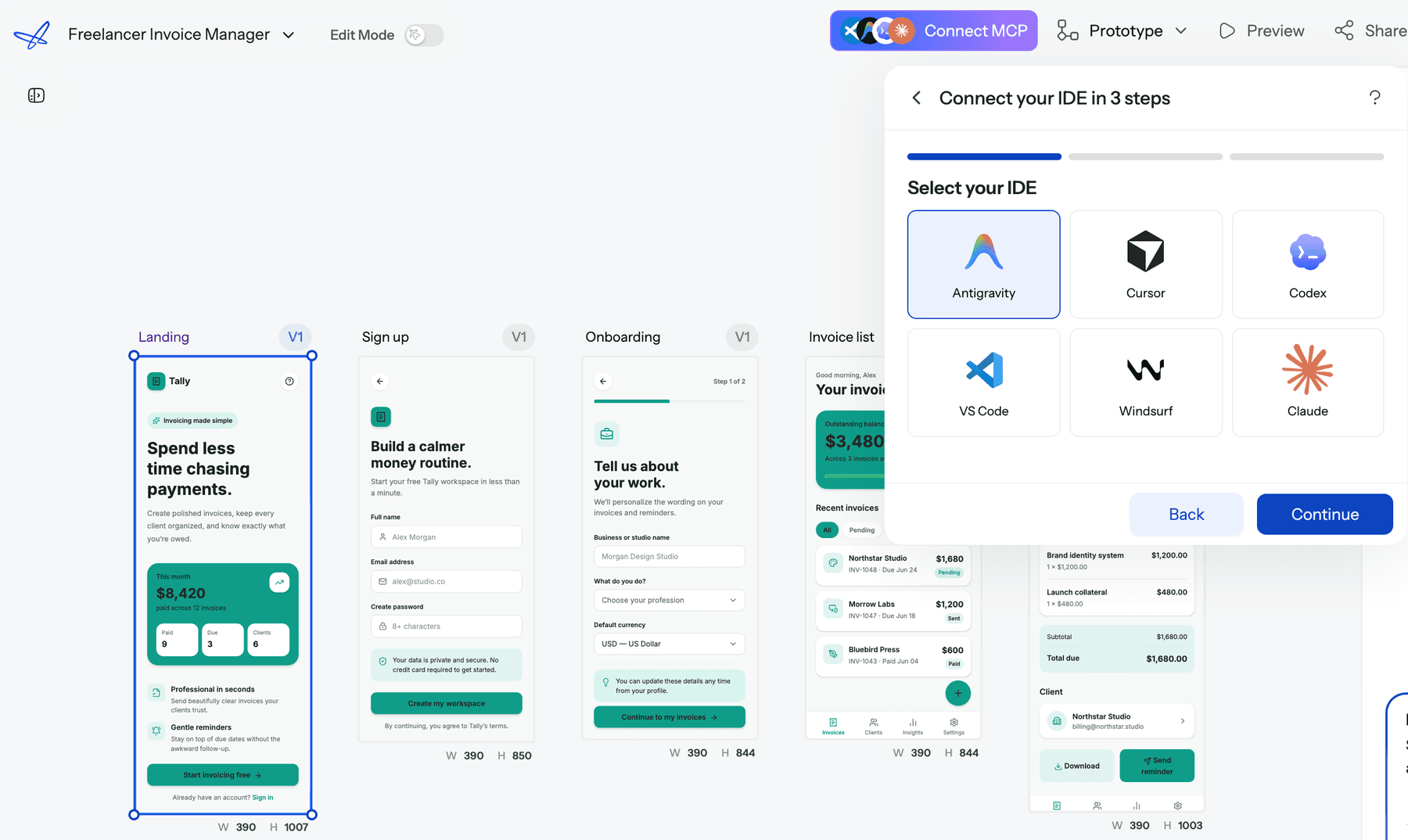
A sensible split: let Opus 5.5 in Claude Code handle implementation, and use UXMagic for the design decisions that are expensive to redo in code.
What UXMagic adds on its own
- Screen plans first. Flow Mode proposes the screens in a flow for you to edit and approve before anything is generated. The screen plans guide shows how.
- One theme across every screen. The AI style guide generator builds a theme from a prompt, and themes and style guides explains how one change updates the whole project.
- Rough before polished. The AI wireframe generator settles layout before visual detail, and the AI prototype generator links screens into a clickable flow.
- Handoff. Export HTML or React with Tailwind using the design to code generator (see the code export guide), export to Figma, or push to a repo with GitHub sync. Our explainer on what a design handoff should include has the checklist.
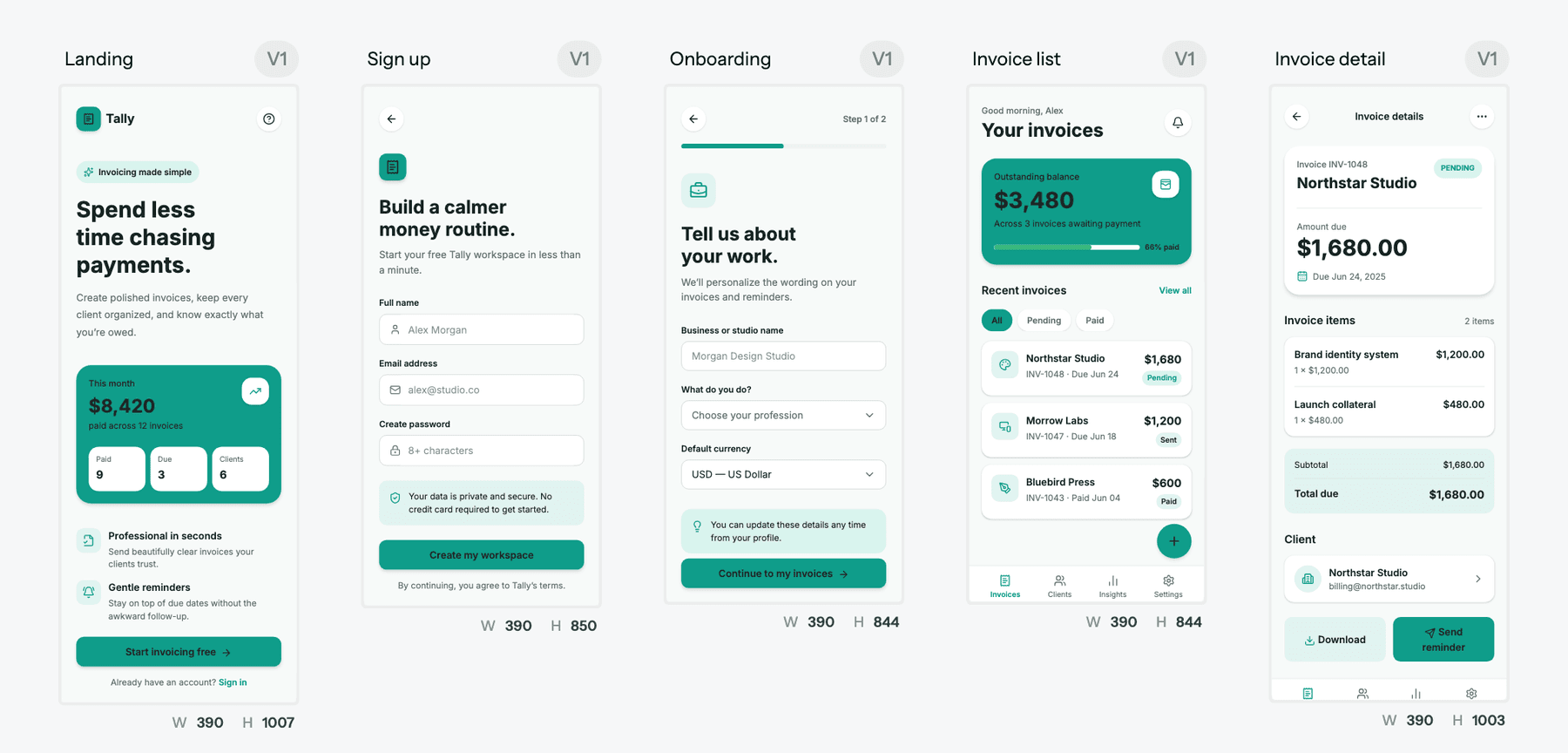
Inside the UXMagic app you can also switch between a default model and an alternative model from the prompt box, so you can compare outputs without leaving the canvas.
Cost. Generation through the connector or MCP costs the same credits as in the app, and reading and publishing are free. Per our credit cost table, a new screen is 3 credits, a targeted edit 0.2 and theme changes nothing. The free plan gives 20 credits a day with no card, and Pro is $35 a month or $17.50 a month billed annually for 2,400 credits. Full details are on our pricing page.
Honest scope. UXMagic won't replace Claude Code for building your app's logic, and if you want Claude's own canvas, Claude Design is a reasonable choice; our UXMagic vs Claude Design page lays out the differences. Where UXMagic helps is keeping a multi-screen product consistent and handing it off cleanly, whichever model does the thinking.
Final verdict
For UI design, Opus 5.5 is the right default. Anthropic positions it at Fable 5.1's level on most work, it is faster, and it costs 60% less per token. It is also the model Claude Code uses by default and the one Anthropic tells most teams to start with.
Fable 5.1 earns its price on long, hard jobs: multi-hour refactors, large design-system builds, and finished documents or decks. Use it as the planner or the fallback, not the everyday model.
Whichever you pick, the bigger win is structure. Plan the screens, fix the theme, then let the model generate. Connect UXMagic to Claude and Opus 5.5 or Fable 5.1 does that work on a canvas built for it.
Related guides
- 8 Claude Design Alternatives in 2026, Free and Open Source Included
- Pencil.dev Review 2026: Now pen.dev, Features, Pricing, Alternatives
- Paper.design Review 2026: HTML Canvas, MCP, Pricing and Limits
- Figma Agent Review 2026: What the Beta Does, Costs and Misses
- GPT Image 2 Review: Features, Pricing and Prompts for UI Assets
- 12 Replit Alternatives in 2026, Grouped by the Job You Need Done
- Figma Dev Mode Alternatives in 2026: Handoff, Code and MCP Tools
- 10 Best a0.dev Alternatives for Building Mobile Apps with AI (2026)
- Replit Pricing 2026: Plans, Credits, and What an App Really Costs
- AI Design to Code Tools: The Complete 2026 Guide by Input Type
Plan, design and hand off with Claude and UXMagic
Connect UXMagic to Claude in about a minute, then design connected multi-screen flows with one shared theme and export to Figma or React.