
TL;DR: Pencil.dev, the "design mode for Claude Code" that took off in early 2026, is now called pen.dev. It is an agentic canvas that saves designs as .pen files next to your code, lets you bring almost any model, and connects to Claude Code, Codex, Cursor and others over MCP. It is free today, but you pay for the model, and there is no multiplayer. If you want AI to plan and design a whole product flow without wiring up an agent, UXMagic's flow mode does that out of the box and hands off through the UXMagic MCP server. Our UXMagic vs Pencil comparison sums up the difference.
If you searched for "Pencil.dev" and landed on a site called pen.dev, you are in the right place. The tool that many developers first met as a Figma-like canvas bolted onto Claude Code has been renamed, and it has grown up in the process. It no longer depends on a single model, it runs on Windows, and it has a CLI for headless design work.
We build UXMagic, an AI UI design generator, so Pencil sits in our corner of the market. This review explains what changed with the rename, what the product does today, what it costs, where it falls short and which alternatives suit different jobs. Every Pencil fact below comes from pen.dev and docs.pen.dev as of September 2026. We describe how the tool works from its own documentation, not from staged tests.
Pencil.dev at a glance
| Pencil.dev (now pen.dev) | |
|---|---|
| What it is | Agentic design canvas that lives beside your code |
| Current name | pen.dev (pencil.dev redirects there) |
| Platforms | Desktop (macOS, Windows x64, Linux), IDE extensions, CLI |
| AI | On-canvas agent with your own model, plus MCP for external agents |
| File format | .pen, JSON-based, stored in your repo |
| Code output | React, Next.js, Vue, Svelte, HTML/CSS via the agent; HTML, CSS and Tailwind export |
| Collaboration | Share links to view and download snapshots, Git for the rest |
| Price | Free today; you pay your AI provider |
| Best for | Developers and design engineers who want design files in Git |
| Not for | Teams that need multiplayer or AI that plans whole flows |
Pencil.dev is now pen.dev: what the rename means
Visit pencil.dev today and you are redirected to pen.dev, where the homepage says plainly that "pencil.dev is now pen.dev." The tagline is "An agentic canvas for building bold software," the publisher is High Agency Inc., and the site notes backing from a16z speedrun. Some of the old name survives in the docs, where the interface page is still titled around Pencil, so expect to see both names for a while.
What stayed the same:
- The idea. A design canvas that sits inside your development environment, so the design file and the code live in one repository.
- The file format. Designs are still
.penfiles. - The Figma-like editing. Layers, properties, components, variables and direct manipulation.
What changed since the early "Pencil for Claude Code" days:
- Models. Early coverage, including Banani's review from January, described Pencil as a layer on top of a locally running Claude Code. pen.dev now lets you sign in with ChatGPT Plus or Pro, Claude Pro or Max, or GitHub Copilot, or add API keys for Gemini, xAI, OpenRouter, DeepSeek, Moonshot, Together AI, Fireworks and more. Claude can also run through AWS Bedrock, Google Vertex or Microsoft Foundry.
- Platforms. Early builds were Mac and Linux only. The downloads page now lists a Windows x64 installer, with Windows ARM64 marked as coming soon.
- Headless work. A CLI, installed with
npm install -g @pen.dev/cli(Node.js 22.19 or later), lets agents and scripts edit.penfiles without the app.
Keep "Pencil.dev" in your search if you are researching the tool, since most reviews, videos and threads still use that name. For the concept behind it, our explainers on vibe designing and what vibe coding is set the scene.
Pencil.dev features
The on-canvas agent
The desktop app has an Agent tab. You select layers, describe the change, and the agent edits the canvas, with your selection passed in as context. You pick a model from any connected provider in the model picker, though the docs warn that switching providers loses the conversation context.
Two features stand out:
- Parallel agents. Choose between one and six agents. In Split Work mode they divide a task; in Side by Side mode they tackle the same task so you get alternatives to compare.
- Let it cook. The agent generates two to six successive variants, exploring either layouts or visual styles.
Pencil also shows a context-usage panel with an estimated cost at API rates, which the docs describe as an estimate rather than an invoice. That is a useful habit to borrow, because the model is where the real cost of this workflow lives. Our guide to the best AI model for UI design and our Claude Opus vs Fable comparison can help you pick one.
MCP server for Claude Code, Codex, Cursor and others
Besides the built-in agent, pen.dev runs an MCP server. The homepage lists Claude Code, Codex, Hermes, Antigravity and Cursor as agents that can design through it. According to the AI integration docs, the external client talks to the MCP server over stdio, and the server connects to the running pen.dev app through a local socket (a named pipe on Windows). The documented tools are get_style, read_skill, get_app_state and execute, plus a browser tool in the desktop app and an optional spawn_agents tool behind a flag.
Setup is a toggle: install Claude Code, then enable Claude Code CLI under Settings, MCP, and restart. The same screen configures the Codex entry that ChatGPT desktop, Codex CLI and the Codex IDE extension share. If MCP is new to you, our round-up of AI coding assistants for frontend work explains how these agents reach design tools, and our DESIGN.md guide shows how to give them a written description of your system as well.
.pen files and design in Git
A .pen file is JSON, which the docs call "structured, readable data" that "works with Git like a code file." The recommendation is to keep design files in your project workspace alongside the code, save and close a file before switching branches, and keep asset paths relative. The docs also say not to edit the JSON by hand: use the app, the CLI or the MCP tools instead.
This is Pencil's most distinctive choice. Designs get branches, pull requests and history the same way code does, and an agent working in your repo can see both. It also means your design file is a proprietary format, even if a readable one, rather than HTML and CSS. That is the key difference from Paper, which we cover in our Paper.design review.
Design to code, and code to design
The design-to-code guide is short: design on the canvas, save the .pen file, open the AI chat and ask for code. The docs list React, Next.js, Vue, Svelte and HTML/CSS as frameworks; Tailwind, CSS Modules and Styled Components for styling; shadcn/ui, Radix, Chakra and Material UI as component libraries; and Lucide, Heroicons, Font Awesome and React Icons for icons.
It also works backwards. Ask the agent to read an existing component and recreate it on the canvas, change it visually, and ask the agent to apply the change back to code. The docs are honest that this is request-driven, not live sync: "Design and code update when you ask the agent to make a change. Review both files after each request." For context on shadcn-based output, see shadcn/ui explained and our list of the best React UI component libraries.
Manual editing, components and variables
Pencil still feels like a lightweight Figma. The homepage highlights a custom WebGL pipeline that handles thousands of layers, a pen tool for paths and SVG editing, flex layout with snapping and a pixel grid, and effects such as blur and drop shadows. Components support overrides and slots, and variables cover colour, spacing and typography.
Hand edits matter in an AI workflow. Changing a label or nudging spacing by hand costs nothing, while the same change by prompt burns tokens and time. If you are setting up variables for the first time, our playbook on building a design system from scratch and our honest look at whether AI can follow design tokens are good companions.
Import, export, shaders and presentations
- Import. Open Figma
.figfiles with layouts, styles and images, paste directly from Figma, or import web pages through a built-in browser or the "pen.dev web import" Chrome extension. UXMagic covers similar ground with import from Figma, HTML to design and clone any website. - Export. One-click HTML, CSS and Tailwind export, plus PDF, PNG, JPEG and WEBP at custom resolutions.
- Vibe Shaders. Real-time shader effects applied on the canvas.
- Presentations. A slides mode for walking stakeholders through a design.
Sharing
This is the thinnest part of the product. The sharing docs describe a share link that uploads the document and its assets so others can view and download it in a browser. When you change the design, you choose Update snapshot and reviewers reload the link. Editing a downloaded copy does not change the shared design. There is no mention of multiplayer, comments or permission levels. For a sense of what fuller review tooling looks like, our guide to what a design handoff is and our list of best design handoff tools cover the options.
Pencil.dev pricing
pen.dev's pricing page is one line: the product "is currently free." It adds that paid features or plans may come later and that terms and prices will be described before anyone is charged. The authentication docs already mention "pen.dev Pro" models that use your pen.dev account and an Upgrade button to view plans, so a paid tier looks likely. We could not find published prices for it.
The real cost today is the model:
| Way to power the agent | What you pay |
|---|---|
| ChatGPT Plus or Pro sign-in | Your OpenAI subscription |
| Claude Pro or Max sign-in | Your Anthropic subscription |
| GitHub Copilot sign-in | Your Copilot plan |
| API keys (Gemini, xAI, OpenRouter, DeepSeek and others) | Pay per token to that provider |
| External agent over MCP (Claude Code, Codex, Cursor) | That agent's own plan |
Compare that with UXMagic's pricing, where generation is included: the free plan refreshes 20 credits a day, Pro is $35 a month or $17.50 a month billed annually for 2,400 credits, and a new screen costs 3 credits according to how credits work. If you are weighing Pencil against Figma's seats instead, see our Figma pricing guide.
What Pencil does well
- Design lives in the repo.
.penfiles version with Git, so designs get branches and history like code. - Bring any model. Subscriptions, API keys, cloud providers or MCP agents, which suits teams with existing AI plans.
- Parallel exploration. Up to six agents at once and "Let it cook" variants make it fast to compare directions.
- Familiar editing. Anyone who has used Figma can find their way around within minutes.
- Two-way design and code. Recreate existing components on the canvas, change them, and push the change back.
- Free today. No seat fees while the product is in its current phase.
Where Pencil falls short
- You bring and pay for the intelligence. Output quality and cost depend on your model and prompts.
- No real-time collaboration. Snapshots and Git work for developers, less so for designers, PMs and stakeholders who want to comment in place.
- Single screens, not flows. Nothing in Pencil plans a multi-screen journey or keeps ten screens on one navigation pattern. You or your agent design each frame, which is why we argue single-screen AI design is a dead end for full products.
- Sync is manual. Design and code only line up when you ask the agent and review both sides.
- Proprietary file.
.penis readable JSON, but it is not HTML or CSS, so code still has to be generated from it. - Uncertain pricing. A paid tier is signalled in the docs but not published.
Who should use Pencil.dev?
Pencil is a good fit if you are:
- A developer or design engineer already living in Cursor, VS Code or Claude Code, who wants a visual canvas that sits in the same repo.
- A solo builder or small team where one person does both design and front-end work.
- A team with existing AI subscriptions that would rather reuse them than pay for another AI product.
It is a weaker fit if you are:
- A founder or PM without design experience who wants a whole product designed from a description. Start with how to design UI with AI and, if you are still testing the idea, our guide on how to validate a product idea.
- A team that needs clickable multi-screen prototypes for user testing. The AI prototype generator and our list of the best prototyping tools are better starting points.
- A mixed team that reviews in comments. A browser-based, shareable tool will fit your review loop better.
Pencil.dev alternatives
UXMagic: plan and design whole flows, then hand off to your agent
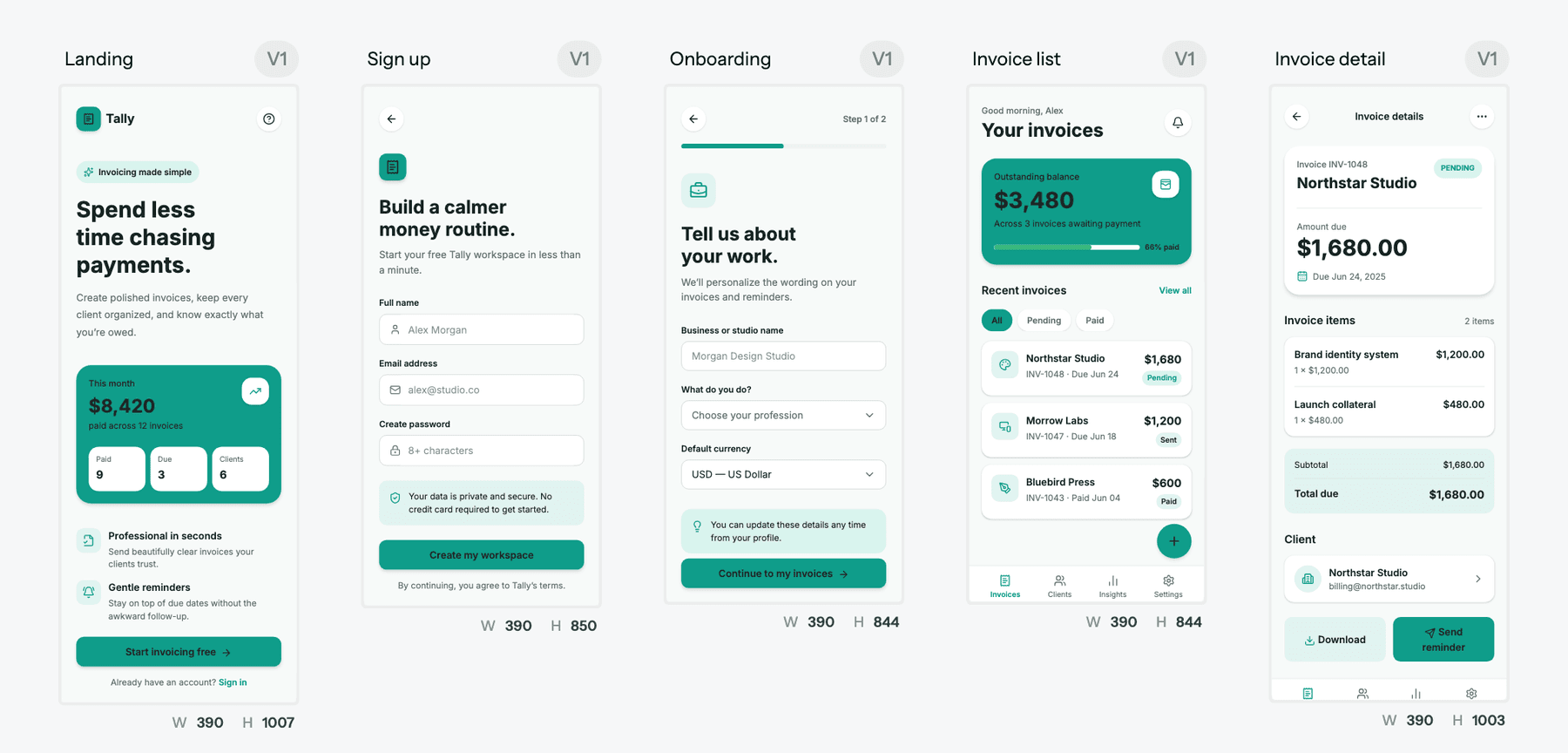
UXMagic starts from the other end. You describe the product, UXMagic proposes a screen plan, and once you approve it, flow mode and screen plans design every screen on one shared theme and navigation. It runs in the browser, and generation is included, so there is no model to connect.
Where it overlaps with Pencil:
- Code-first output. Screens are HTML with Tailwind and theme tokens. Export code as HTML or React, push it to a repository with GitHub sync, or see the output on our design to code generator and AI React generator pages.
- Themes as tokens. Colours, fonts, radii and spacing live on the project, and changing them updates every screen. See themes and style guides.
- MCP in the other direction. Pencil lets agents work on its canvas. The UXMagic MCP server lets Claude, Cursor, VS Code, Windsurf, Codex or Antigravity read your screens, HTML and theme, edit screens, start generations and publish. Reads are free, and Claude users can connect through the Claude connector without an API key.
- Figma both ways. Start from existing files and export to Figma as editable auto-layout frames.
- Sharing in the browser. Share a project by link and collect comments and feedback on screens.
Where it falls short compared with Pencil: UXMagic does not store design files in your Git repo, does not have a pen tool, shaders or vector editing, and does not let you plug in your own model subscription (you can switch between a default and an alternative model). It is built to generate and refine product screens fast, not to be a canvas inside your IDE.
Read the full UXMagic vs Pencil comparison.
Get the whole flow, not just a canvas
Approve a screen plan and UXMagic designs every screen on one theme, ready for React, Figma or your coding agent over MCP.

Paper.design
Paper is the closest rival in spirit. Its canvas is built on real HTML and CSS, it runs in the browser and as Paper Desktop, and its MCP server lets Claude Code, Cursor, Codex and others read and write files. Unlike Pencil, it has real-time multiplayer and a paid Pro plan.
- Best for: designers and design engineers who want a code-native canvas with free team collaboration.
- Falls short: relies mainly on external agents, and MCP needs the desktop app.
Read our Paper.design review or see UXMagic vs Paper.
MagicPath
MagicPath is a React-first infinite canvas where you generate components and screens, then tweak them by hand before exporting code. It suits people exploring many UI directions visually. Compare it on our UXMagic vs MagicPath page and read our MagicPath alternatives guide.
Magic Patterns
Magic Patterns targets product teams already building with AI, generating React UI and connecting to your components and codebase. Where Pencil gives you a design file, Magic Patterns aims for shippable code. Read our Magic Patterns review and Magic Patterns alternatives.
Google Stitch
Google's free Stitch generates UI screens from prompts and images and is quick for ideation, but it is thinner on editing and code handoff. See our Google Stitch review and Google Stitch alternatives.
Figma, Figma Make and the Figma MCP server
For teams already on Figma, Figma Make turns prompts into prototypes and code, and Figma's MCP server lets coding agents read design context. The file does not live in your repo, but the ecosystem is far ahead. Start with what Figma AI includes, our Figma agent review and our Figma Make alternatives.
Claude Design
If you already pay for Claude and mostly want quick visual output, Anthropic's Claude Design generates designs and prototypes inside Claude. See Claude Design alternatives and Claude Design vs UXMagic.
For the wider field, our rankings of the best AI design tools in 2026, Figma Dev Mode alternatives and v0 alternatives cover the rest of the design-to-code category. Building for phones? Our a0.dev alternatives guide covers AI mobile app builders.
Pencil vs UXMagic: how to choose
Ask what the first hour of the project looks like.
If it is you in your IDE, designing a component or a page on a canvas while an agent writes the code into the same repo, Pencil is built for that. If it is a whole product (onboarding, dashboard, settings, billing) that has to exist this week on one theme, then go to engineering or a coding agent, UXMagic is built for that.
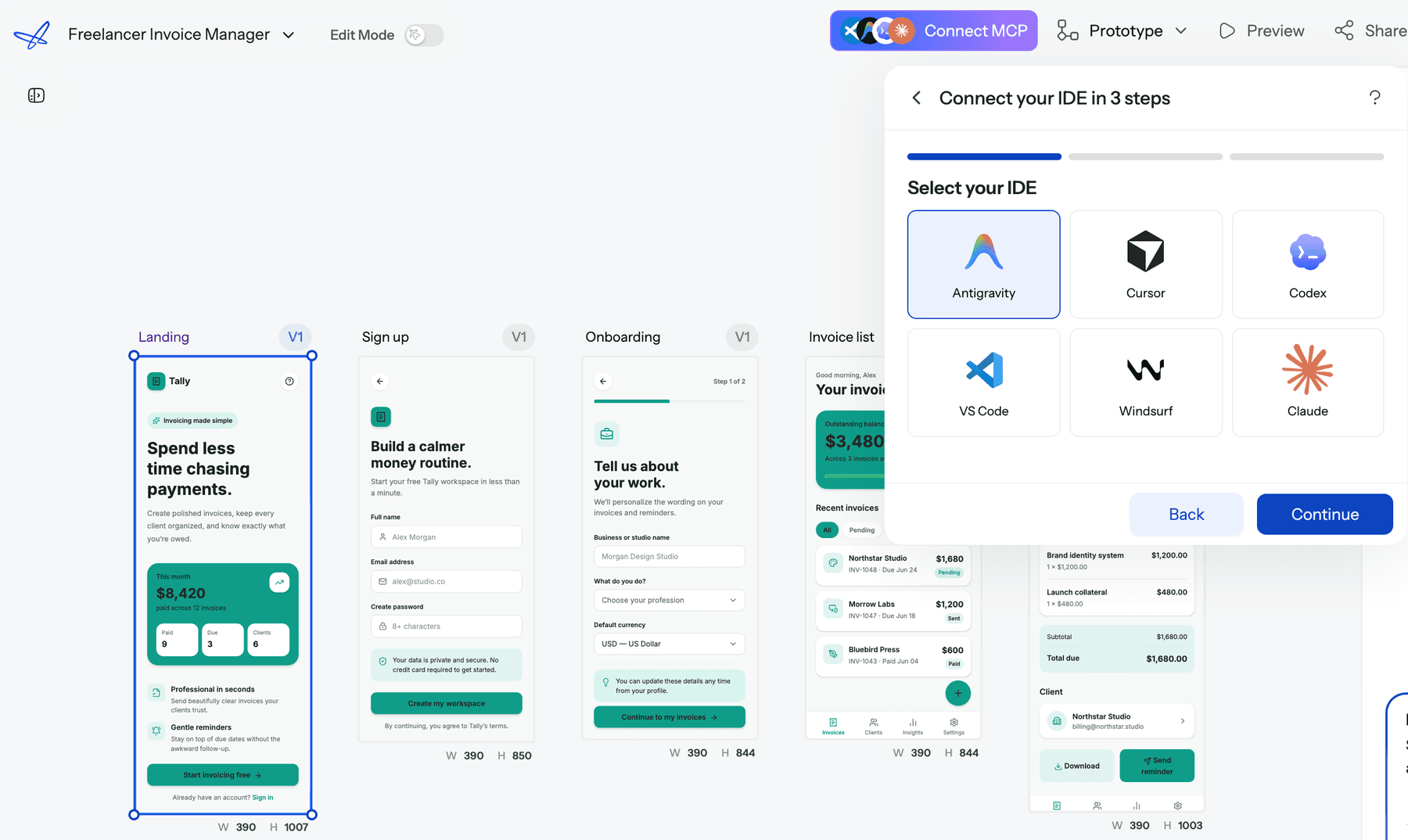
The two also combine well. Generate the flow in UXMagic, export HTML or React into your repo, and use Pencil or your coding agent for component-level polish. Connect Claude through UXMagic's Claude connector page so the same agent can read both. If you are still defining the product, our guide to designing an MVP explains which screens to design first.
Our verdict
Pencil.dev, now pen.dev, is one of the most developer-friendly design canvases of 2026. Keeping .pen files in Git, supporting almost any model, and running parallel agents on the canvas are real strengths, and it is free while the team works out pricing. The rename came with meaningful upgrades: Windows support, a CLI, and freedom from a single model vendor.
It is still a canvas, not a product designer. You bring the model, the screen list and the design judgement, and collaboration is limited to snapshots and Git. If you want a design file next to your code and already work in an IDE with an agent, try pen.dev. If you want AI to plan and design the whole flow and then hand it to Figma, React or your agent, start with UXMagic, or browse the template gallery for a head start.
Related reading
- Best UX and UI design tools for 2026
- Best AI design-to-code tools
- Vibe coding in 2026: the real workflow
- Using ChatGPT for UI and UX design
- Penpot vs Figma
- Best Figma alternatives
- UXMagic vs Banani compared
- Subframe review
Design the product, then hand it to your agent
Start free with 20 credits a day. Generate a consistent multi-screen flow and send it to React, Figma or Claude and Cursor through UXMagic MCP.