
TL;DR: Claude Design is Anthropic's AI design canvas, in beta on Claude Pro, Max, Team and Enterprise. It is excellent for fast, on-brand prototypes, decks and one-pagers, and its handoff to Claude Code is the best in its class. It has no free plan, shares your Claude usage limits, has no version history yet and does not list Figma export. For multi-screen product UI that has to stay consistent and land in Figma or React, UXMagic is the better fit, and it runs inside Claude through the UXMagic Claude connector, so you don't have to pick one.
Claude Design has been out for five months, and in that time it has moved from a standalone lab experiment at claude.ai/design into the main Claude app, Claude Code and the mobile apps. If you are trying to decide whether it deserves a place in your workflow, you need to know what it is good at, what it costs in practice, and where it stops.
We build UXMagic, an AI UI design tool, so we have a stake in this comparison. We wrote this review from Anthropic's own announcement, help center and pricing pages, checked in September 2026, and we say plainly where Claude Design is the better choice. If you already know you want something else, our Claude Design alternatives guide covers eight options by use case.
Claude Design review at a glance
| Claude Design | |
|---|---|
| Made by | Anthropic Labs |
| Launched | April 17, 2026 (beta) |
| Plans | Pro, Max, Team, Enterprise (off by default on Enterprise) |
| Entry price | Claude Pro, $20/month ($17/month billed annually) |
| Usage | Shared with the rest of Claude, including Claude Code |
| Outputs | Prototypes, web pages, slides, one-pagers, marketing assets |
| Exports | ZIP, PDF, PPTX, standalone HTML, partner tools, Claude Code |
| Figma export | Not listed |
| Version history | Not yet |
| Best for | Fast on-brand prototypes and decks inside a Claude plan |
| Weakest at | Long multi-screen products and Figma-based teams |
Our verdict: worth using if you already pay for Claude, particularly for early exploration and anything that ends in Claude Code. Not a replacement for a dedicated product design tool if your team ships from Figma or needs a system that holds across a large flow.
What is Claude Design?
Claude Design is a product from Anthropic Labs for making visual work with Claude: designs, interactive prototypes, slides, one-pagers and marketing assets. Anthropic announced it on April 17, 2026 as a research preview, running on Claude Opus 4.7, which Anthropic described as its most capable vision model at the time. Anthropic's current pages don't name a default model, so check your workspace's picker. Our Opus vs Fable comparison explains how the current Claude models differ for UI work, and the best AI model for UI design hub compares them with OpenAI and Google.
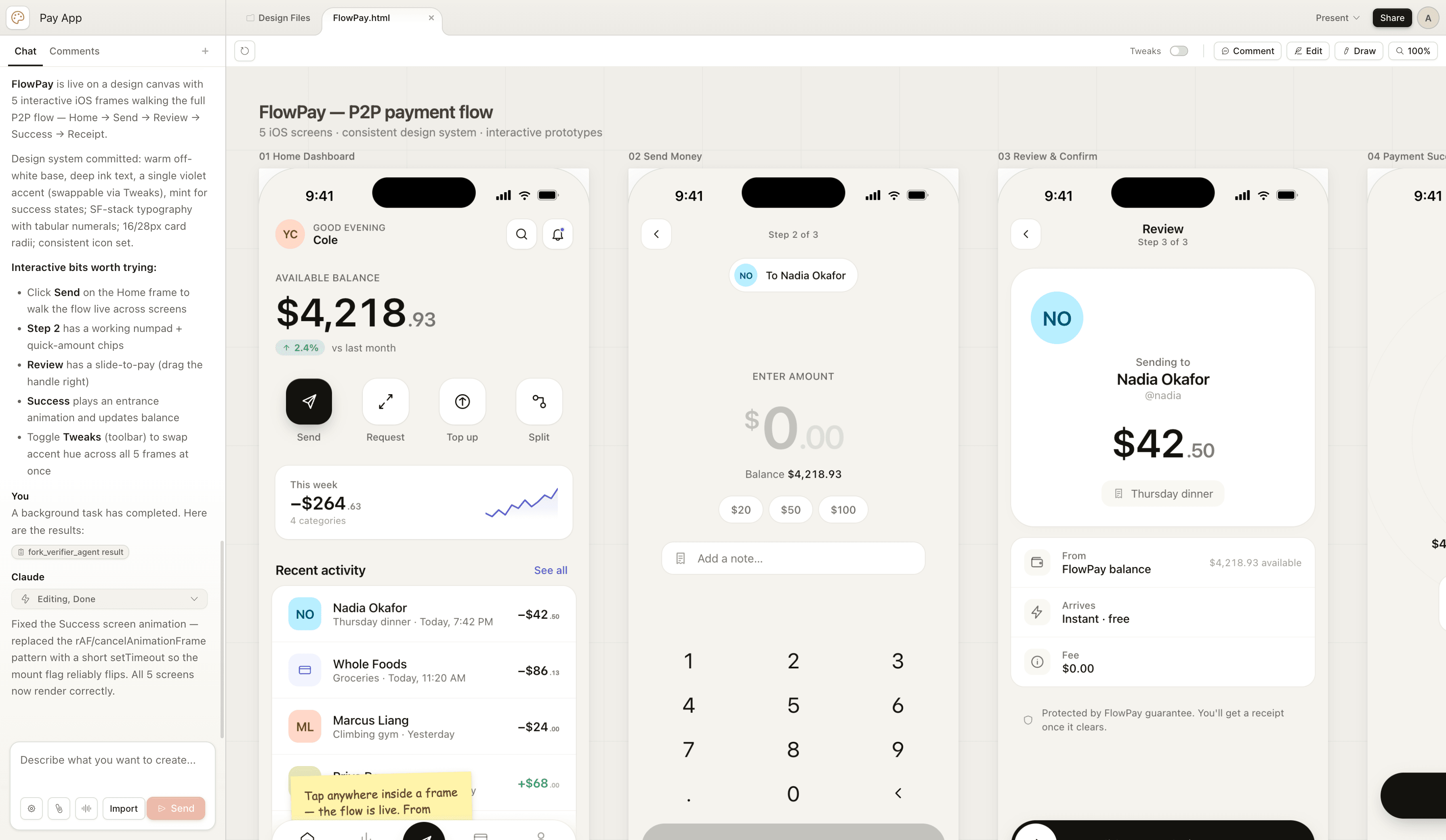
The core idea is a conversation paired with a canvas. You describe what you want, Claude builds a working design beside the chat, and you refine it until it is right. Where the first version lived only at claude.ai/design, Anthropic's getting-started guide now lists several ways in:
- In any Claude conversation. Ask for "a one-pager from this proposal" or choose Output, then Design, in the message box.
- In the Artifacts tab, starting from a Design template.
- In Claude Code, with the
/designcommand on desktop or in the terminal. - In the iOS and Android apps, where you can request and view a design, though canvas editing and sharing need web or desktop.
- At claude.ai/design, which still works as a standalone experience.
That breadth matters. Claude Design is not a separate app you have to remember to open; it is a mode of Claude. For teams already using Claude for specs, research and code, that is a real advantage. It also means Claude Design is a generalist, which is the thread running through most of its strengths and weaknesses.
Claude Design features
Many ways to give it context
You can start from a text prompt, or attach screenshots, images, existing slide decks and documents, design files and codebases. At launch Anthropic also described a web capture tool that grabs elements from a live site, so a prototype looks like your real product instead of a generic template. Claude asks clarifying questions when a brief is thin, which is useful for non-designers who don't know what they left out. Our prompts we use for product flows apply here too: goal, layout, content and audience beat adjectives.
Design system import
This is the feature that sets Claude Design apart from most chat-based generators. During setup, Claude reads your codebase and design files and builds a design system, so new projects inherit your colours, type and components. A June 2026 update added imports from GitHub repositories and design files, and Claude now checks its output against the imported system before showing it to you. On Enterprise, admins can reserve publishing and editing of design systems. It is the same idea as writing a DESIGN.md file, handled for you. Anthropic is honest that import is only as good as its source: a messy codebase shows up in the output, which is why building a design system from scratch properly still pays off.
Four ways to refine
Claude Design gives you more control than a chat box with a preview:
- Chat for broad or structural changes, new sections, or "show me three alternative layouts".
- Inline comments pinned to a specific element, for targeted fixes like button padding.
- Direct canvas editing to drag, resize and align elements.
- Tweaks, adjustment sliders Claude generates for a design so you can change spacing, colour or layout live without writing a prompt.
You can also ask Claude to review a design for accessibility, contrast and hierarchy. That is a helpful first pass, not a substitute for an accessibility heuristics checklist.
Sharing and collaboration
Designs start private. You can share them so colleagues can view, comment or edit, and chat with Claude together on the same project. Anthropic's own known-issues list notes that simultaneous multi-person editing is still basic and may not work reliably.
Export and handoff
Anthropic's help center lists these exports: download as ZIP, PDF, PPTX, Google Slides (from claude.ai/design only), standalone HTML, and sending work to partner tools including Canva, Gamma, Miro, Lovable, v0, Vercel, Netlify, Replit, Base44, Wix, HubSpot and several Adobe products.
The standout is the handoff to Claude Code. Claude packages the design into a bundle, and you can send it to a local coding agent or Claude Code on the web, which continues from the actual design rather than a screenshot. In the other direction, /design-sync in Claude Code pulls your local design system into Claude Design, and /design can turn existing code into a live prototype. If your build step is Claude Code, this loop is tighter than anything else we have seen. For how it compares with other routes from design to code, see our guide to AI design-to-code tools.
Claude Design pricing and usage limits
Claude Design has no separate price. It is included in paid Claude plans and counts against the same limits.
| Plan | Price | Claude Design |
|---|---|---|
| Free | $0 | Not included |
| Pro | $20/month, or $17/month billed annually | Included, beta |
| Max | From $100/month | Included, more usage than Pro |
| Team | Per seat | On by default |
| Enterprise | Custom | Off by default; an owner enables it |
Prices are from Claude's pricing page as of September 2026.
The part that matters more than the sticker price is how usage works. At launch, Claude Design had its own weekly allowance. Anthropic has since moved it onto your plan's shared limits: design activity draws from the same pool as chat, Cowork and Claude Code, and complex projects with large codebases or many iterations use more. When you hit the limit, Claude Design is unavailable until it resets, unless you have enabled paid usage credits.
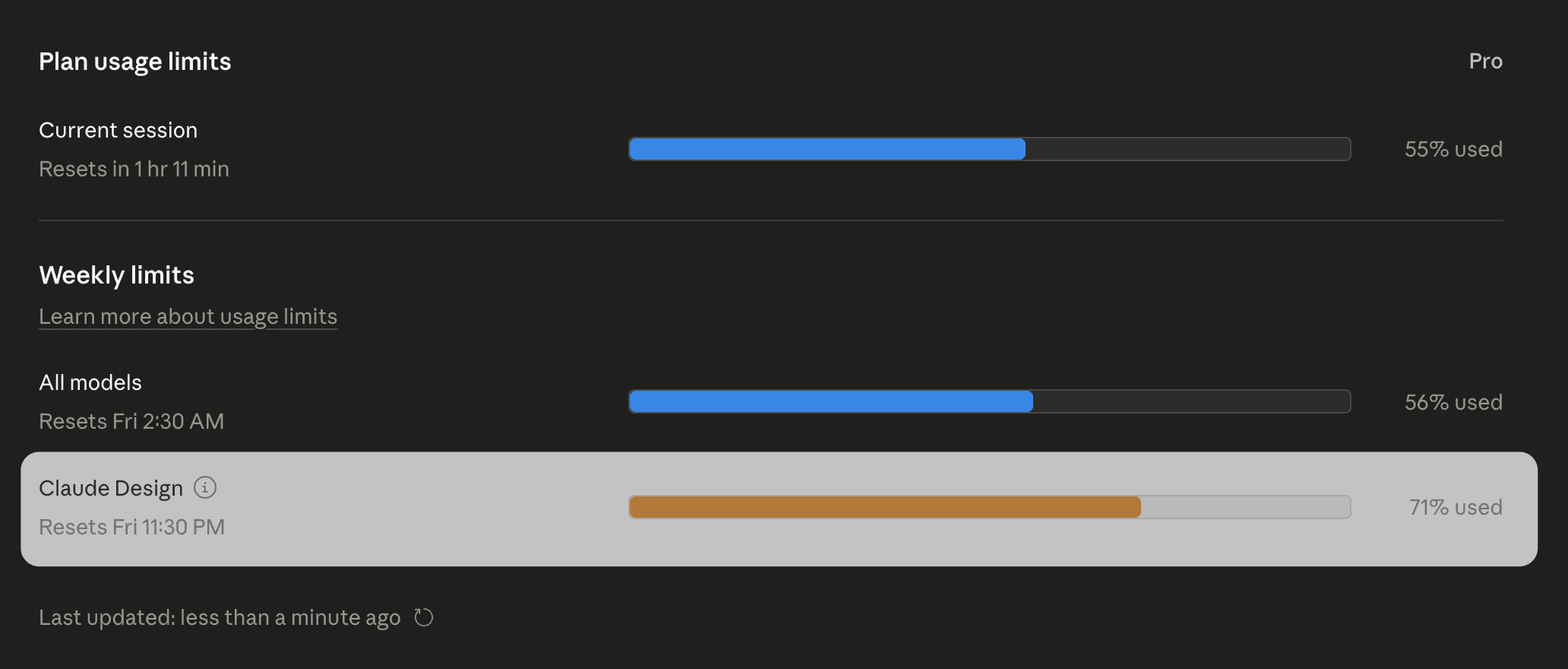
The screenshot above is from the launch period, when the separate meter existed. The shared pool removes one number to watch, but it also means an afternoon of design iteration now eats into the budget you had for coding. Anthropic says the June update reduced average usage per turn; heavy regeneration of large screens is still the expensive path. The practical habit is the same one we recommend in any AI design tool: ask for targeted changes instead of regenerating whole screens, and settle the theme early.
What Claude Design does well
- It is already in your Claude plan. No new vendor, no new login, and it works in the same conversation as your spec. Product managers who write PRDs in Claude (see what a PRD is) can mock up the flow they just described in the same thread.
- Range of outputs. Prototypes, pitch decks, one-pagers and campaign assets from one tool. Few AI design tools cover slides as well as screens.
- Design system awareness. Imported systems plus self-checking make it far more on-brand than a blank chat.
- Refinement controls. Comments, canvas edits and generated Tweaks sliders feel like a design environment, not a prompt box.
- Claude Code handoff. The best idea-to-code loop in the Anthropic ecosystem.
- Good for non-designers. Founders and PMs get credible visuals without learning Figma, which is the same shift we describe in vibe designing.
Where Claude Design falls short
- No free plan. Pro is the entry point. If design is the only reason you would pay for Claude, compare it with free tiers first.
- Shared usage limits. Long design sessions compete with your coding and chat. Teams that iterate heavily feel this first.
- No listed Figma export. If your source of truth is a Figma file, expect a rebuild step. Our list of best Figma AI plugins and what Figma AI can do cover the Figma-native routes.
- No version history yet. Anthropic's workaround is to ask Claude to save the project before you try something new. That works for a few screens; it is fragile across a large product.
- Beta rough edges. Anthropic lists comments that occasionally don't appear, lag with large codebases, occasional chat errors and basic multi-person editing.
- Consistency across long flows is on you. This was the core argument of the earlier version of this article, and it still holds in a softer form. Claude Design keeps a design system in view, but it generates each artifact from a conversation, and in any long, multi-screen session the model can drift from earlier decisions on spacing, accents or type. Checking and correcting that drift is time you spend after generation, and it grows with the number of screens. We wrote an honest piece on whether AI can follow design tokens that applies to every tool, ours included.
- Prototype, not production code. Exports are front-end prototypes and bundles for Claude Code. Engineers will still refactor into your components and add state, data and accessibility attributes. That is normal for AI-generated UI; just don't treat a polished preview as a finished pull request. Our explainer on what a design handoff should include is a useful checklist.
Who Claude Design is for
- Founders turning a rough outline into an on-brand pitch deck or a clickable MVP concept.
- Product managers sketching a feature flow before a design review. Our roundup of AI tools for product managers places it alongside the rest of a PM's stack.
- Designers exploring several directions quickly before committing in their main tool.
- Marketers making landing pages and campaign assets without waiting in the design queue.
- Engineers who want a prototype first and then build it with Claude Code.
It is a weaker fit for design teams maintaining a large product in Figma, and for anyone who needs dozens of connected screens with a guaranteed shared theme.
Claude Design vs UXMagic
The two tools overlap on "describe a product, get screens", but they are built around different jobs. Claude Design is a generalist canvas inside a general AI assistant. UXMagic is built for one thing: turning an idea into a consistent set of product screens you can hand to designers or developers.
| Claude Design | UXMagic | |
|---|---|---|
| Core job | Prototypes, decks, one-pagers, assets | Multi-screen product UI |
| Starts from | Prompt, files, codebase, web capture | Prompt, screenshot, sketch, URL, Figma file |
| Planning | Clarifying questions | Editable screen plan before any screen is drawn |
| Consistency | Imported design system, self-checks | Project-level theme tokens applied to every screen |
| Canvas | Canvas beside chat | Infinite canvas with every screen side by side |
| Figma export | Not listed | Yes, auto-layout frames |
| Code export | HTML, Claude Code bundle | HTML, React, multi-screen React with Tailwind |
| Publishing | Via partner tools | Publish a live site on a UXMagic URL or custom domain |
| Free plan | No | 20 credits a day |
| Paid entry | Claude Pro, $20/month | Pro, $35/month or $17.50/month billed annually |
| Works in the other | Not applicable | Runs inside Claude as a connector |
Planning before pixels. For a new project, UXMagic proposes a named screen plan that you edit or approve before anything is drawn. Flow mode then designs the whole journey with one theme and shared navigation. Fixing a plan costs 1 credit; fixing eight wrong screens costs far more. We explain the reasoning in why single-screen AI design is a dead end and flow-based design vs one-off screens.
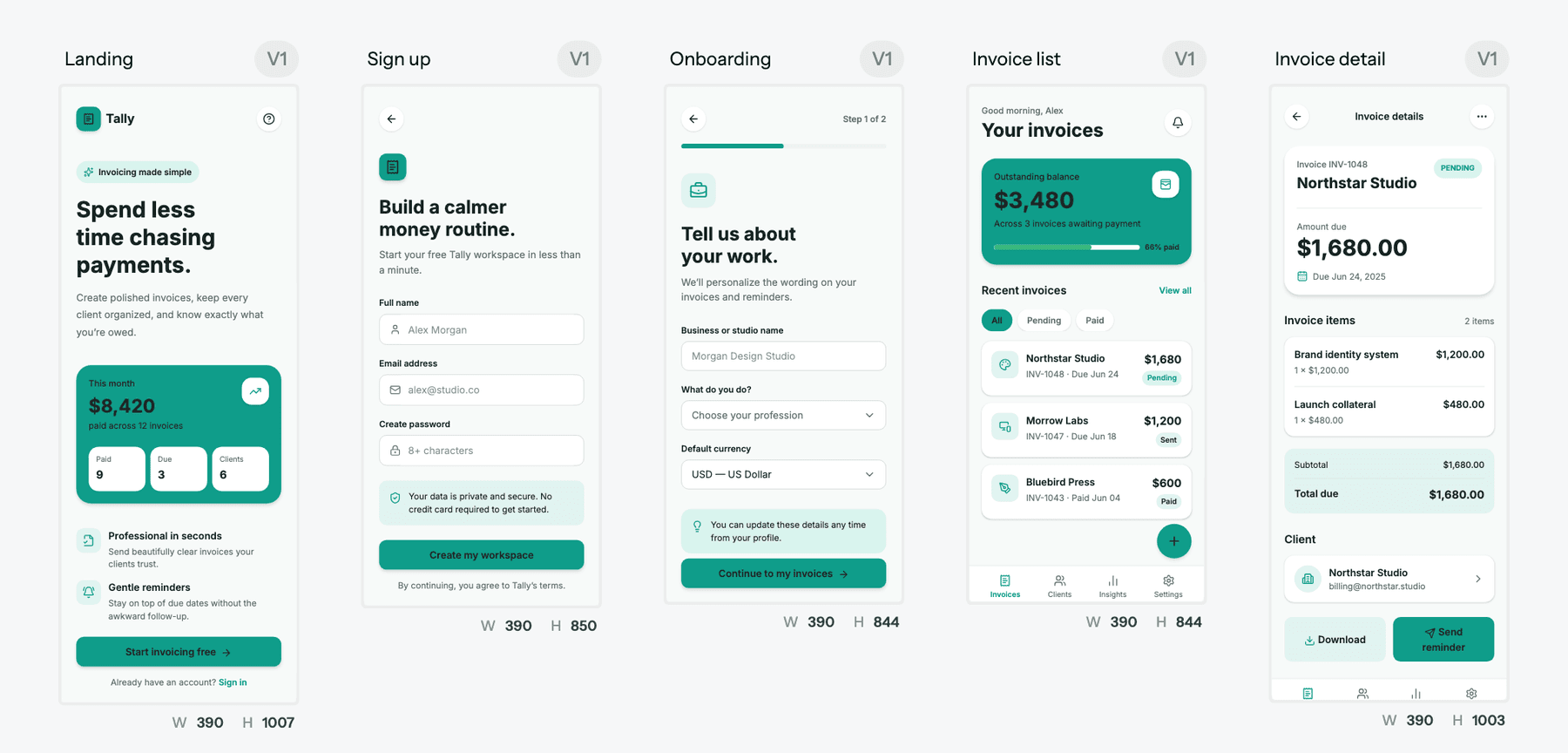
A theme that is data, not a prompt. In UXMagic, colours, type, radii and spacing are stored as design tokens on the project. Changing the theme and style guide updates every screen at once, and theme changes cost no credits. You can generate the system first with the AI style guide generator. Claude Design's imported design system is a strong answer to the same problem; the difference is that UXMagic applies the theme to every screen as stored values rather than asking the model to remember it.
Handoff to where your team works. UXMagic exports to Figma as auto-layout frames, which Claude Design does not list, and exports code as HTML, a React component or a multi-screen React project with Tailwind and your theme tokens. You can also publish a project as a live site. The design to code generator page and our Figma and React component libraries show the output.
Screens keep their history. Each UXMagic screen keeps earlier versions you can go back to, covered in versions and history, which answers one of Claude Design's current gaps.
More ways in. Beyond prompts, you can use image to UI, a lo-fi AI wireframe generator mode, the website cloner or a starting point from our templates.
Pricing you can predict. UXMagic's free plan gives 20 credits a day with no card. Pro is $35 a month, or $17.50 a month billed annually, for 2,400 credits (up to about 400 screens) and 250 Figma exports. Per our credit cost table, a new screen is 3 credits and a targeted edit 0.2, and the credits are separate from your Claude usage. Full details are in plans and limits and on the pricing page.
Where Claude Design wins. Slides, pitch decks, one-pagers, marketing assets and motion-heavy "frontier" experiments are Claude Design's territory; UXMagic doesn't make decks. If your only build path is Claude Code, the native handoff bundle is hard to beat. And if you already pay for Claude and design occasionally, Claude Design costs you nothing extra.
For a feature-by-feature grid, see our UXMagic vs Claude Design comparison page.
Design the whole flow on one theme
Approve a screen plan, generate every screen with shared tokens, and export to Figma or React. The free plan refreshes every day.

Use both: UXMagic inside Claude
You don't have to choose between Claude and a dedicated design tool. UXMagic is available as a Claude connector. In Claude on web, desktop or mobile, open Settings, then Connectors, add a custom connector with the UXMagic MCP URL, sign in and approve access. There is no API key and nothing to install. The step-by-step guide is in Connect UXMagic to Claude.
From then on you can ask Claude, in the same chat where you wrote the spec, to "design a three-screen onboarding flow in UXMagic", "rewrite the headline on the Pricing screen" or "export the Checkout screen to Figma". Whichever Claude model you have selected does the reasoning; UXMagic holds the canvas, the theme and the exports. Reading designs and publishing are free, and generation uses the same credits as in the app. Claude Code connects to the same server with one claude mcp add command, and Cursor, VS Code, Windsurf, Codex and Antigravity connect through the UXMagic MCP server. The UXMagic MCP page lists every client.
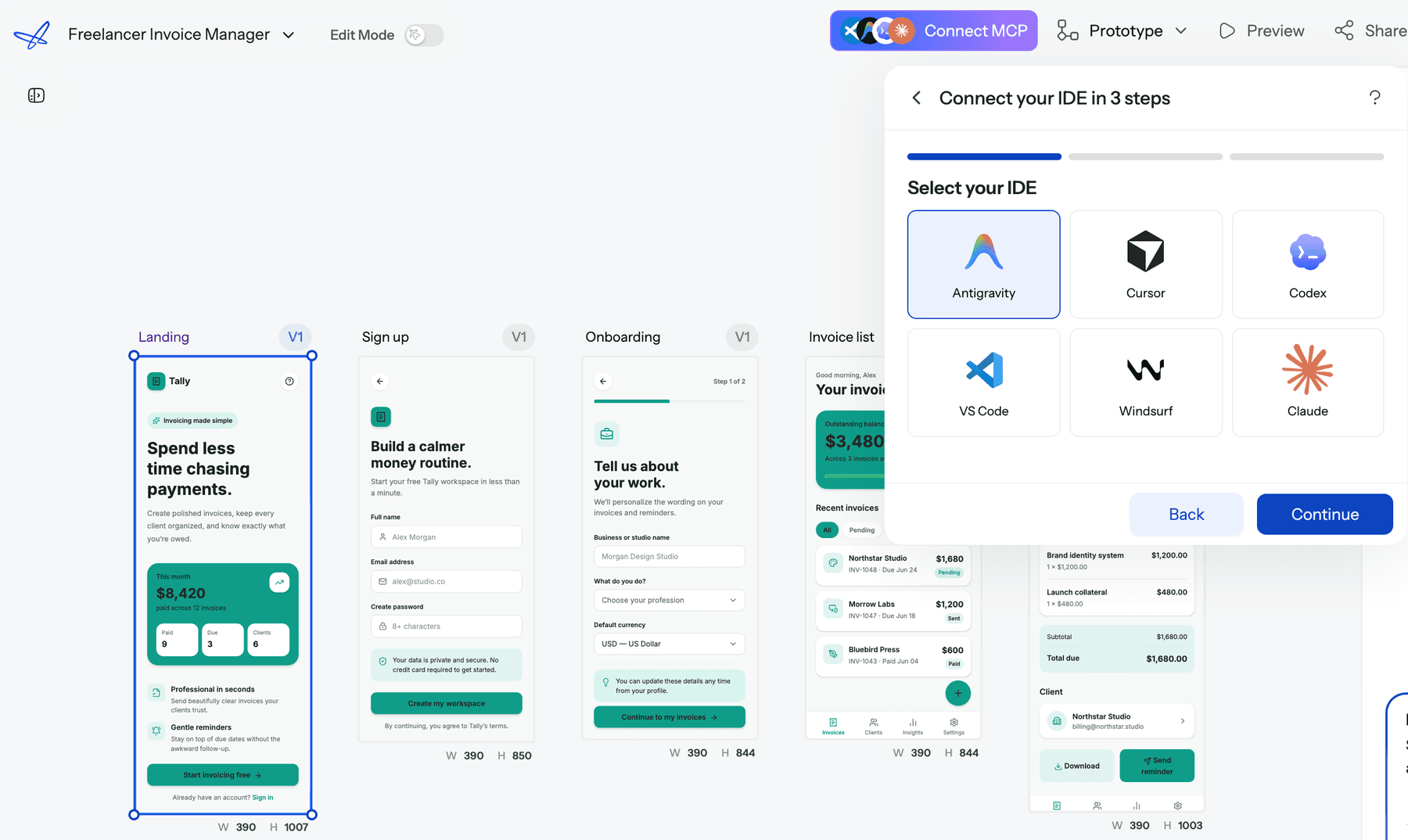
A practical split many teams land on: use Claude Design for the deck and the one-pager, and drive UXMagic from Claude for the product screens that need to survive handoff. It is the same human-in-the-loop idea we argue for in why AI design fails without human direction: let the model generate, and keep a person and a structure in charge of what gets built.
Claude Design alternatives
If Claude Design isn't the right fit, these are the tools people compare it with most. Our Claude Design alternatives guide covers each one in depth; here is the short version:
- Google Stitch for free, fast exploration. Read our Google Stitch review.
- Figma Make if your system lives in Figma. See our Figma Make alternatives and Figma pricing breakdown.
- v0 and Lovable if you want running code rather than a design; our Lovable review covers the app-builder route.
- Pencil.dev and Paper for canvases wired to coding agents. Read our Pencil.dev review and Paper.design review.
- ChatGPT if you already live in OpenAI's tools; see ChatGPT for UI/UX design.
- Canva for marketing layouts, covered in our Canva alternatives for UI design.
For the wider picture, our State of AI in UI/UX design report and best AI prototyping tools list show how teams are splitting this work in 2026.
Should you use Claude Design?
If you already pay for Claude Pro, Max or Team, yes, try it. Getting from a half-formed idea to something clickable you can show in tomorrow's meeting, or a spec into an on-brand one-pager, is worth the usage it costs, and the Claude Code handoff is a genuinely new way to go from idea to code.
Be clear about what it is, though. Claude Design is a fast, capable generalist in beta. It is not yet a system of record for a product's UI: there is no version history, no Figma export, and keeping a large flow consistent still takes checking. If you are designing a real product with many connected screens, that is the job UXMagic is built for, and with the connector you can do it without leaving Claude. If you are still working out the structure, start in our AI in the UX design workflow guide or with our blank canvas workflow, then generate.
Related guides
- Best Miro Alternatives for UX Teams in 2026
- Best Mockup Tools in 2026: Fast UI Mockups Without the Friction
- What Is a Product Requirements Document (PRD)? A Designer’s Take
- The Spec-Driven Design Workflow for Product Managers (2026 Blueprint)
- What Is UX Design in 2026? A Practical Guide for Shipping Faster
- What Is UI Design? A Beginner’s Complete Guide (2026 Edition)
- From AI Prompt to Design System
- User Interface Design Guide for Beginners (2026)
- When You Should Not Use AI for Design
- UI vs UX: What's the Actual Difference in 2026?
Use UXMagic on its own, or inside Claude
Plan a flow, keep one theme across every screen, and export to Figma or React. Or add the UXMagic connector and drive it from Claude.