
TL;DR: Paper.design is a professional design canvas built on real HTML and CSS, with a desktop app and an MCP server that let Claude Code, Cursor, Codex and other agents read and write your files. It is one of the most agent-ready canvases available, but it expects you to design by hand or bring your own coding agent. If you want the AI to produce whole product flows for you, UXMagic's flow mode does that out of the box and hands off through the UXMagic MCP server. Our UXMagic vs Paper comparison sums up the difference.
Paper has become one of the most talked-about design tools of 2026. The pitch is simple: a design file and a web page should be the same thing. Paper draws your work with real HTML and CSS, so there is no proprietary format to translate, and an AI agent working on the canvas reads and writes the same language it already knows from code.
That idea has landed. Paper raised a $34M Series A from Accel and ICONIQ in July 2026, and the company says thousands of teams now pay for it. It is also a specific kind of tool. Paper is a canvas for people who design, with agents as collaborators, rather than a generator that designs for you.
This review covers what Paper does, how the MCP workflow runs day to day, what it costs, where it falls short, and which alternatives fit better for different jobs. We build UXMagic, an AI UI design generator, so we are open about where our tool overlaps and where Paper is the better choice. Every Paper fact below comes from paper.design and its docs as of September 2026.
Paper.design at a glance
| Paper.design | |
|---|---|
| What it is | Design canvas built on real HTML and CSS |
| Platforms | Web app, Paper Desktop (Mac, Windows, Linux AppImage) |
| AI | MCP server for external agents, image generation, canvas-aware assistant |
| Code output | Tailwind classes, React with CSS, agent-built sites |
| Collaboration | Real-time multiplayer, free editor and viewer seats on Free |
| Free plan | Yes, 100 MCP tool calls a week |
| Paid | Pro, $20 per editor a month or $16 billed yearly |
| Best for | Designers and design engineers pairing with coding agents |
| Not for | Teams that want AI to generate whole flows with no setup |
What is Paper.design?
Paper is a design tool from a small, remote team that started with a $4.2M seed round led by Accel in February 2025. In February 2026 it launched Paper Desktop, a desktop app that turns the canvas into something any agent can connect to. In July 2026 it announced its $34M Series A, bringing total funding to $38.5M. The announcement says revenue grew 25 times in the month after the desktop launch and names Ramp, Lovable and Harvey among its customers.
Paper describes itself as "the connected canvas for teams shipping with agents." In practice that means three things:
- The canvas is web code. Frames, text and layouts are HTML elements with CSS properties, including real flexbox. Your design is closer to production code than a picture of it.
- Agents are first-class. Paper Desktop runs an MCP server so Claude Code, Cursor, Codex and others can build on the canvas, pull a selected frame into your repo, or bring in real content.
- It is meant to be a professional tool. Paper puts weight on craft features: wide-gamut colour, shaders, vector editing and typography controls.
If you are new to the "design with agents" idea, our guide to vibe designing explains where it came from, and vibe coding in 2026 covers the code side.
Paper.design features
The HTML/CSS canvas
Paper's core bet is its rendering engine. Figma stores designs in its own format drawn on a WebGL canvas, and developers or agents have to translate that into CSS. Paper skips the step: what you see is rendered by the browser engine from real markup. Paper's own comparison page lists the practical differences:
- Colour. You can mix sRGB and Display P3 per element and use OkLCH and Oklab colour models, the way production CSS does.
- Styling. Real CSS outlines, shadows, filters and backdrop filters instead of abstracted properties.
- Typography. System and web fonts, variable font settings and OpenType features.
This matters most at handoff. Our explainer on what a design handoff is shows where designs usually drift from code, and our list of Figma Dev Mode alternatives covers tools that try to close the gap from the other side. Paper's answer is to remove the gap at the source.
Paper Desktop and the Paper MCP server
The MCP server is what made Paper take off. The Model Context Protocol is an open standard that lets an AI assistant call tools in another app, and it is how most AI coding assistants for frontend work reach design tools. Paper's docs say agents can "read and write your Paper files" to generate a layout, pull in real content, or turn a selected frame into code.
How setup works, according to Paper's MCP docs:
- Install and open Paper Desktop. This starts the MCP server in the background and installs the Paper CLI. The server works on the file you have open, so Desktop has to be running for reads and writes.
- Connect your agent. Open the Connect your agent dialog and click Add to your agent. One-click installs exist for Cursor, Claude (the Chat tab), Claude Code, the GitHub Copilot app, VS Code, OpenCode, ChatGPT, Codex CLI and Antigravity. Any other agent can use a manual stdio config that runs the Paper CLI with the
mcpargument. - Run a test prompt. Paper suggests prompts like "Create a basic Hello World frame in Paper" or "Create 3 color tokens and make a swatch in Paper." The agent asks for permission, and the result appears in the open file.
Older setups connected over HTTP to a local endpoint on port 29979. That still works while a file is open, but Paper now recommends the CLI, because agents can see Paper's tools even when Desktop is closed.
The docs include three guides worth reading:
- Syncing tokens from Figma. Run the Figma MCP server and the Paper MCP server in the same agent, select an element in Figma that uses your variables or styles, and ask the agent to rebuild the design system in Paper. Paper lists the gotchas honestly: SVG fills often come back as images, spacer elements get ignored, inset borders do not translate, code-connected components are unreliable, and very large files can make Figma's tool calls fail.
- Real content from Notion. Connect the Notion MCP server, select a frame such as a testimonial section, and ask the agent to fill it with entries from a Notion database. You can then ask for a German or Spanish version to stress-test the layout.
- Building a website from a design. Open your agent in an empty folder, select a frame in Paper, and ask for a React and Tailwind site. Paper's advice is to use flex layouts and containers, and to start with a small section, because larger designs raise the chance the agent gets things wrong.
If you are wiring several design tools into one agent, our DESIGN.md guide shows how to give agents a written description of your system as well as tool access.
Tokens and themes
Paper's tokens are CSS variables. The docs list ten token types, including colour, spacing, typography properties, radius, containers and breakpoints. Change a token and everything that uses it updates. You create them in the Theme tab, or ask an agent to extract them from an existing design or from the CSS variables in your codebase.
Two limits apply today. Tokens are per file: copying them to another file brings them over, but they do not stay in sync. Multiple theme modes, such as a dark mode where a token takes a different value, are still listed as planned. If you are setting up tokens from scratch, our guide to building a design system from scratch and our honest answer to whether AI can follow design tokens are good companions.
Paste from Figma, HTML and live sites
Paper accepts images, SVG and text, and you can paste designs from Figma or paste HTML as editable layers. The Paper Snapshot browser extension copies sections of a live site onto the canvas, and Paper's docs explain how to allow cross-origin requests so Snapshot can capture images from a local dev server. It is similar in spirit to UXMagic's HTML to design and clone any website features.
Paper Shaders
Paper Shaders is an open-source library of fast, zero-dependency shader effects, published for React as @paper-design/shaders-react. The collection includes mesh gradients, grain gradients, liquid metal, fluted glass, halftone dots, CMYK halftone, dithering, god rays, metaballs and more. You can apply them on the canvas, and because the library is open source, developers can use the same effects in production. For background, our guide to glassmorphism in production CSS covers the performance side of effect-heavy UI.
Image generation and the agent assistant
Paper has built-in AI image tools: a create-image panel on the canvas, with limited generations on Free and "100x more" per week on Pro. Paper's roadmap marks a canvas-aware agent assistant as done, aimed at repetitive work rather than full-screen generation. We have not listed the image models here because Paper does not name them on its pricing or docs pages. For a wider view of image tools for UI work, see our roundup of the best AI image generators, our Nano Banana Pro vs Nano Banana 2 breakdown and our GPT Image 2 review.
Export and collaboration
From the canvas you can copy a selection as Tailwind classes or as React with CSS, export PNGs, build SVGs, and on Pro export video. Collaboration is real-time multiplayer in the browser. You share a URL, and on the Free plan editors and viewers cost nothing.
Paper.design pricing
Paper's pricing page lists three plans as of September 2026:
| Plan | Price | MCP tool calls | Image generation | Other |
|---|---|---|---|---|
| Free | $0 | 100 a week | Limited | Unlimited viewers and editors, 25 MB max image |
| Pro | $20 per editor a month, $16 billed yearly | 1M a week | 100x more per week | Video export, 100 MB max image, priority feedback |
| Organizations | Custom | As Pro | As Pro | SAML/SSO, admin controls, custom contracts, dedicated support |
Two things stand out. First, collaboration is free: a team can work together on the Free plan, and only editors become paid when you upgrade. Second, the MCP cap is the real difference between plans. One agent task can use many tool calls, since reading a frame, writing styles and taking screenshots each count, so 100 a week is enough to try the workflow, not to run it daily.
The hidden cost is the agent. Paper does not include the model that drives your layout work, so most people pay for Claude, ChatGPT, Cursor or a similar tool on top. Compare that with UXMagic's pricing, where generation is built in: the free plan refreshes 20 credits a day, Pro is $35 a month or $17.50 a month billed annually for 2,400 credits, and a new screen costs 3 credits per how credits work. For Figma's seat costs, see our Figma pricing guide.
What Paper does well
- No translation layer. Designs are HTML and CSS, so agents and developers work from the same thing you designed.
- A wide set of agent clients. Nine one-click installs plus a generic stdio config covers most setups in 2026.
- Candid docs. The MCP guides list real failure modes, from long agent sessions to Figma import quirks.
- Craft features. P3 colour, OkLCH, shaders and typography controls are unusual in a young tool.
- Free collaboration. Inviting a whole team, editors included, costs nothing on Free.
- Open source. Paper Shaders and Paper Mono are open-source projects the company has committed to keep supporting.
Where Paper falls short
- You bring the intelligence. Paper is the canvas, and your agent does the heavy lifting. Output quality depends on the model, your prompts and how well structured your file is. Our comparison of the best AI models for UI design shows how much that varies.
- Desktop is required for MCP. The web app is great for sharing, but agent work runs through Paper Desktop on the machine where the file is open.
- Agent sessions are fragile. Paper's troubleshooting notes that long sessions are the most common cause of problems, that agents sometimes hallucinate tools or pass bad parameters, and that the fix is often to restart.
- Single screens, not flows. Nothing in Paper plans a multi-screen journey or keeps ten screens on one navigation pattern. You or your agent design each frame. We explain why that matters in why single-screen AI design is a dead end.
- Still maturing. Code components, a native Tailwind integration, a theme system with modes, and full sharing settings are in progress. CSS Grid, components with slots and a script and prompt engine are planned.
- Ecosystem. Figma's plugins, community files and prototyping depth are not there yet.
A typical Paper workflow with an agent
Here is how a design-engineering team would use Paper, based on the docs:
- Import brand tokens from Figma through both MCP servers, or have the agent read CSS variables from the repo.
- Design a landing page hero by hand on the canvas, using flex layouts so the structure maps cleanly to code.
- Pull in real copy from Notion or another MCP source instead of lorem ipsum.
- Select the frame and ask Claude Code or Cursor to build it in React and Tailwind in your project folder.
- Iterate: change the design, ask the agent to sync, and check the result in your local dev server.
It is a strong loop for a single page or component. For a whole product (onboarding, dashboard, settings, billing), someone still has to decide which screens exist and design each one. That is the part UXMagic automates, and it is why the two tools can work together.
Paper.design alternatives
UXMagic: generate whole flows, then hand off to your agent
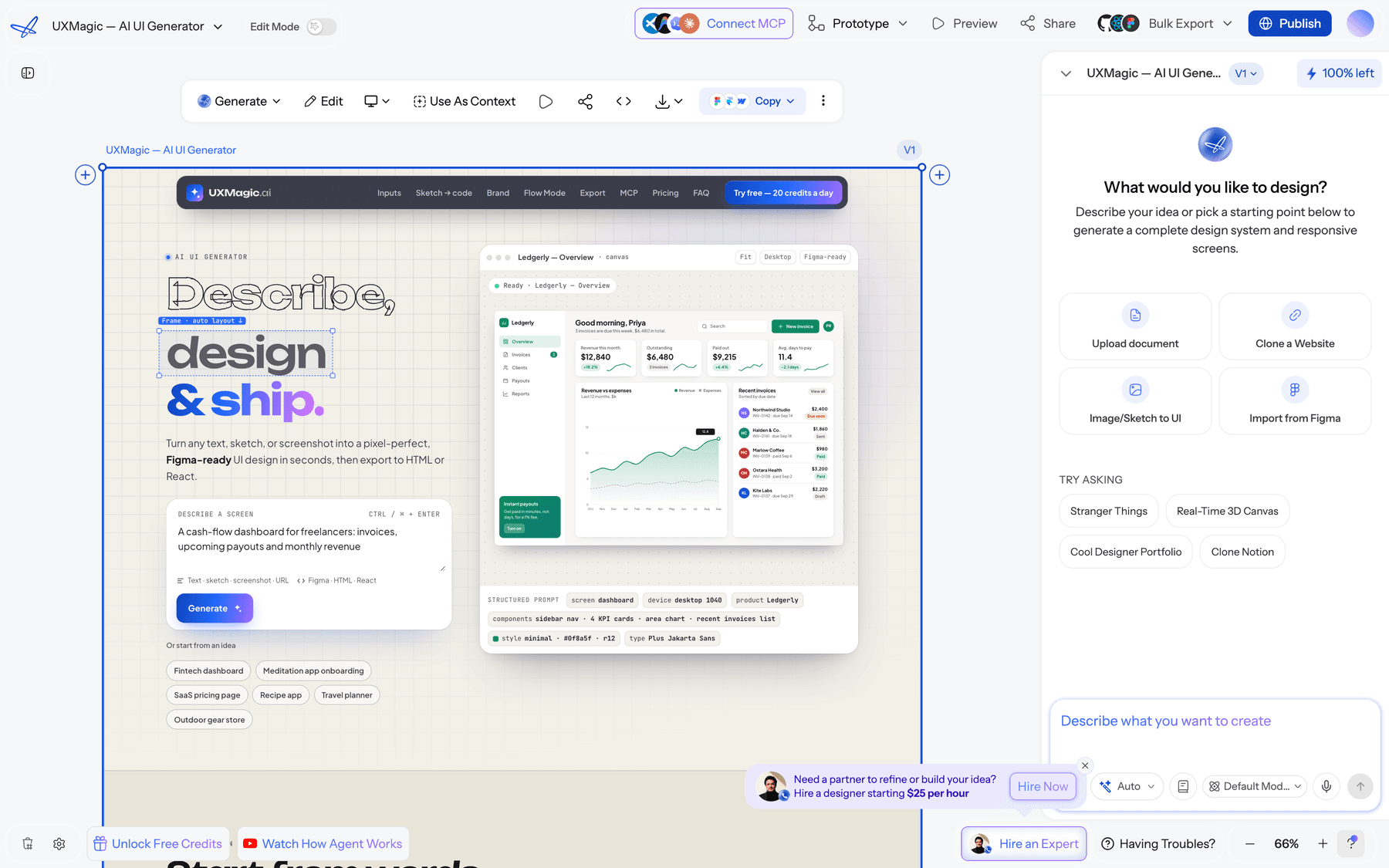
UXMagic approaches the same problem from the other end. You describe the product and UXMagic proposes a screen plan. Once you approve it, flow mode and screen plans design every screen with one shared theme and navigation. No agent subscription or local setup is needed.
Where it lines up with Paper:
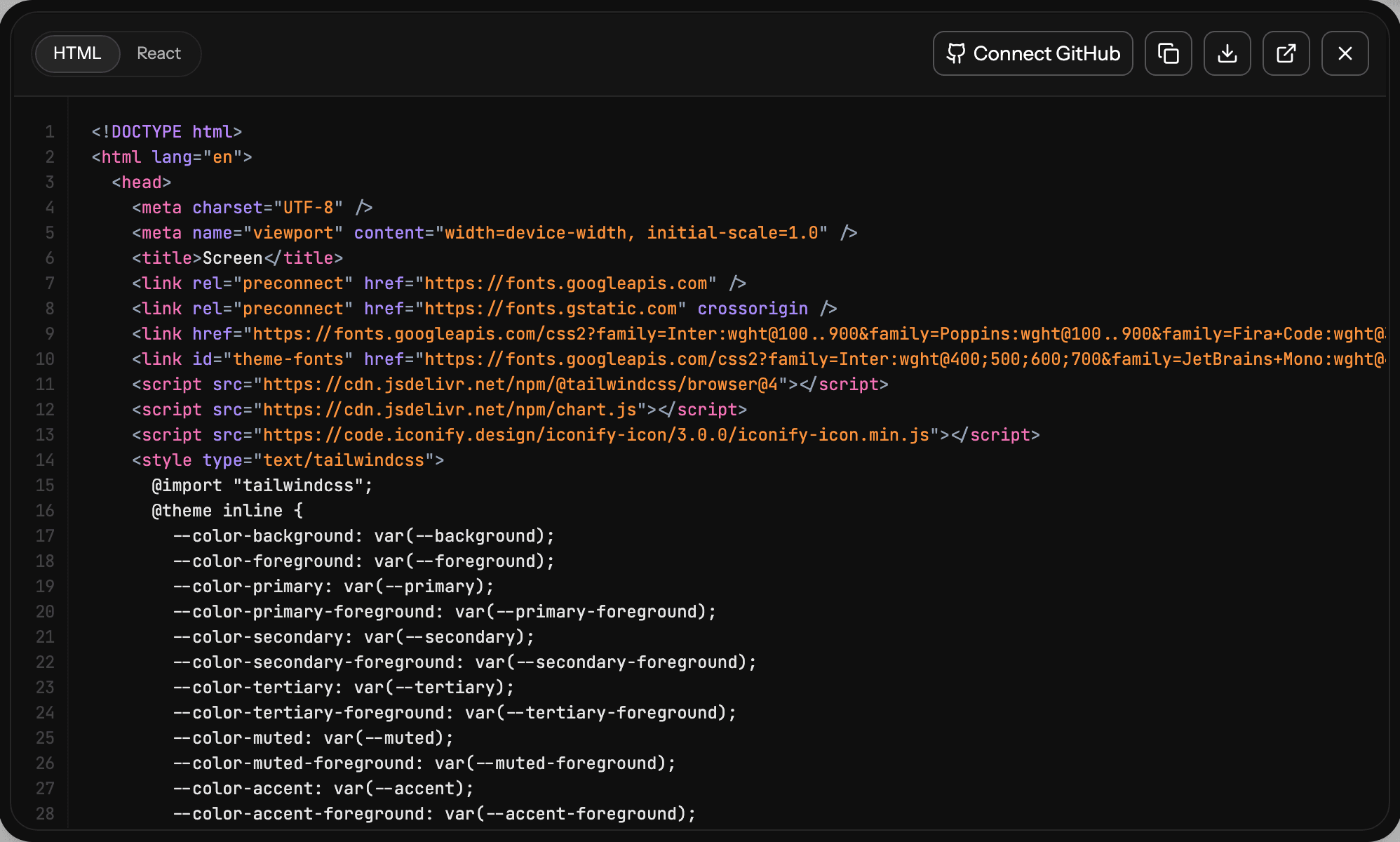
- Code-first output. Screens are HTML with Tailwind and theme tokens. Export code as HTML or React, or push to a repository with GitHub sync. Our design to code generator page shows the output.
- Themes as tokens. Colours, fonts, radii and spacing live on the project, and changing them updates every screen at no credit cost. See themes and style guides or draft one with the AI style guide generator.
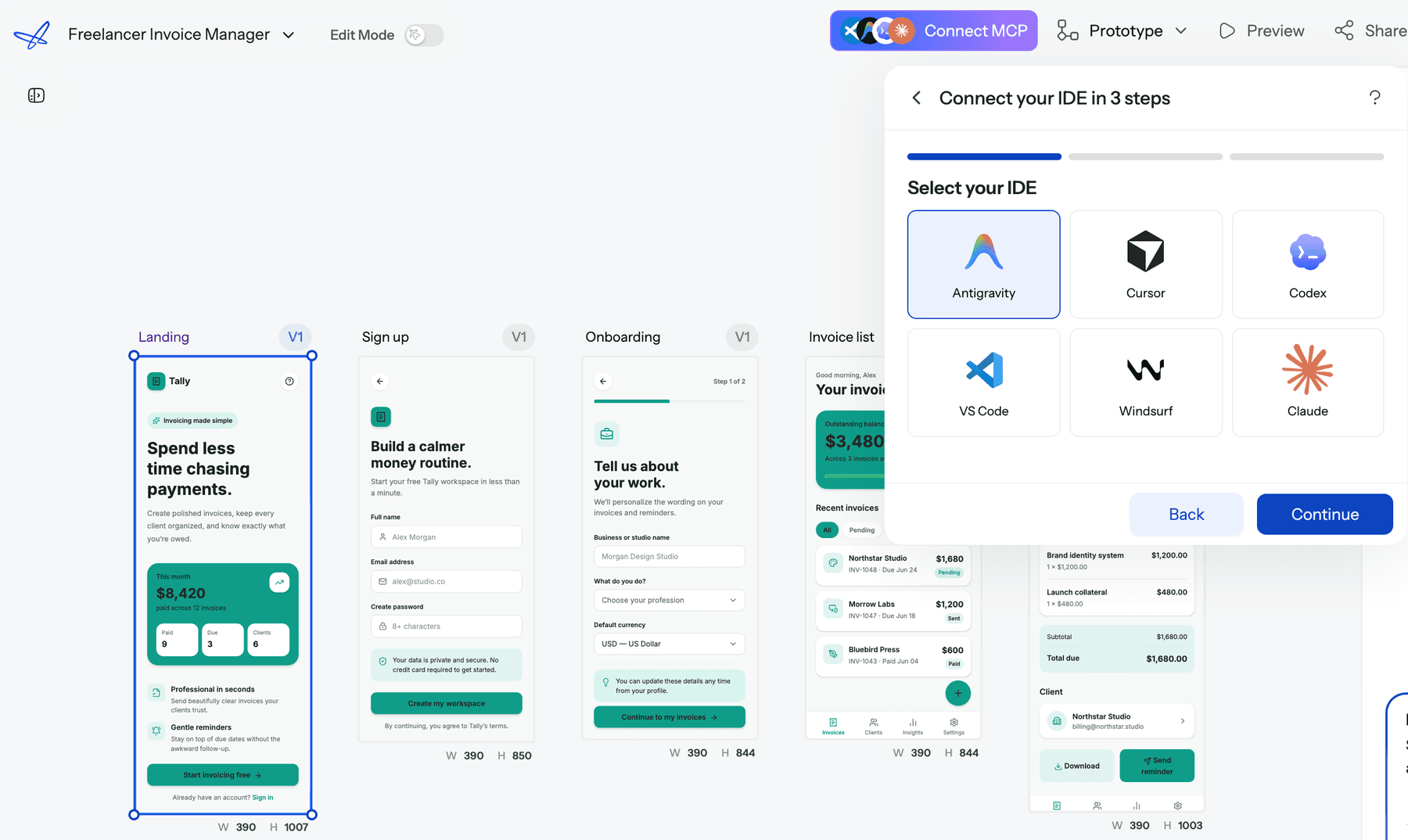
- MCP in the other direction. Paper lets agents work on its canvas. The UXMagic MCP server lets Claude, Cursor, VS Code, Windsurf, Codex or Antigravity read your screens, HTML and theme, edit screens, start generations and publish. Claude users can connect through the Claude connector without an API key. Reads are free.
- Figma both ways. Import from Figma to start from existing work, and export to Figma as editable auto-layout frames.
Where it falls short compared with Paper: UXMagic is not a pixel-level professional canvas with shaders, P3 colour tools or vector editing, and it does not have live multiplayer editing. It is built to generate and refine product screens quickly, not to replace a craft tool.
Because UXMagic exports HTML and Paper pastes HTML as editable layers, one workable split is to generate the flow in UXMagic and bring key screens into Paper for detailed visual polish. Read the full UXMagic vs Paper comparison.
Get the whole flow, not a blank canvas
Approve a screen plan and UXMagic designs every screen on one theme, ready for React, Figma or your coding agent over MCP.

Pencil (now pen.dev)
Pencil, which now goes by pen.dev, calls itself "an agentic canvas for building bold software." It lets you bring any model (Claude, OpenAI, Gemini, Grok and others) through a ChatGPT or Claude subscription, API keys, MCP or a CLI, and it has an on-canvas agent, shaders, Figma and HTML import, and a custom WebGL renderer. Paper's own comparison describes Pencil as a desktop app plus IDE extension that saves designs as a JSON format in your Git repository.
- Best for: developers who want designs to live next to the code in the repo, with a built-in agent.
- Falls short: the canvas is not HTML/CSS, so output still needs translating to code.
Read UXMagic vs Pencil.
Subframe
Subframe is a design-and-build tool that works with real React components, so designers compose with the same components engineers ship. It suits product teams with a React codebase who want designers working in code-backed components. Read our Subframe review or see UXMagic vs Subframe.
Figma, Figma Make and the Figma MCP server
Figma is still the default for most teams. Figma Make turns prompts into interactive prototypes and code, and the Figma MCP server lets coding agents read design context from a file. Figma's canvas is not web code, but its ecosystem, prototyping and team features are far ahead. Start with what Figma AI includes, our Figma agent review, the Figma Make tutorial and our list of Figma Make alternatives.
Claude Design
Anthropic's Claude Design generates designs and prototypes inside Claude. It suits people already working in Claude who want quick visual output without another canvas. See our Claude Design alternatives and Claude Design vs UXMagic.
For more options, our rankings of the best AI design tools in 2026, AI design-to-code tools and MagicPath alternatives cover the rest of the agent-canvas category.
Who should use Paper.design?
Paper is a good fit if you are:
- A design engineer or designer who codes, already using Claude Code or Cursor, and wants a visual layer that speaks the same language as the codebase.
- A brand or marketing designer who wants shaders, wide-gamut colour and CSS effects that survive into production.
- A team moving off Figma for web work and willing to trade ecosystem maturity for a code-native file. Our Penpot vs Figma comparison covers another route.
Paper is a weaker fit if you are:
- A founder or PM without a design background who wants AI to produce a whole product flow. Start with how to design UI with AI and a generator instead.
- A team that needs clickable multi-screen prototypes for user testing. The AI prototype generator and our list of the best prototyping tools are a better starting point.
- Anyone who does not want to set up and pay for an agent to get AI layout work done.
How to choose between Paper and UXMagic
Ask what the first hour of the project should look like.
If it is you on a canvas, crafting one page to a high visual standard while an agent turns it into code, Paper is built for that. If it is ten screens that must exist by Friday, share a theme and navigation, and go to engineering or a coding agent, UXMagic is built for that.
Many teams will want both. Generate the structure and every screen in UXMagic, bring the hero moments into Paper for polish, and let the coding agent read both through MCP. Our best design handoff tools guide and Figma to HTML walkthrough cover the rest of the handoff.
Our verdict
Paper.design is one of the most interesting design tools of 2026. The HTML/CSS canvas is a real idea, not a gimmick, and the MCP server plus Paper Desktop make it one of the easiest canvases for coding agents to work with. The Free plan is generous for collaboration, and Pro at $16 to $20 per editor is fair for what it includes.
It does not generate your product for you. The design thinking, the screen list and the agent subscription are still yours to bring, and some pro features are on the roadmap rather than in the product. If you want a crafted, code-native canvas and already live in Claude Code or Cursor, try Paper. If you want AI to plan and design the whole flow, then hand it off to Figma, React or your agent, start with UXMagic, or browse the template gallery for a head start.
Related reading
- UXMagic vs Banani: another AI design tool compared
- Figma Dev Mode alternatives for handoff, code and MCP
- DESIGN.md guide: give coding agents your design system
- Figma Weave review
- Best UX/UI design tools for 2026
- Claude Opus vs Fable for UI design
- shadcn/ui explained for design-to-code teams
- Connect UXMagic to Claude with the MCP connector
Design the product, then hand it to your agent
Start free with 20 credits a day. Generate a consistent multi-screen flow and send it to React, Figma or Claude and Cursor through UXMagic MCP.