TL;DR: The best AI image generator depends on the asset. Use GPT Image 2 for complex scenes and in-image text, Nano Banana 2 for fast, cheap iterations, Midjourney V8 for art direction, Ideogram 4.0 for typography, and Recraft for SVG icons. None of them produce editable screens; for that, drop the assets into an AI UI generator like UXMagic, which also generates and edits images inside your designs.
A product team rarely needs "an image". It needs a hero shot for the landing page, a set of onboarding illustrations that match, twelve category icons, a product photo on three backgrounds, and a banner with a headline that is spelled correctly. Each of those is a different job, and in 2026 each has a different best tool.
The model landscape also moved fast this year. OpenAI shipped GPT Image 2 in April and followed it with GPT Image 2.5 (Sunburst and Flare) on September 8 at the same per-token price (our GPT Image 2 review covers both), Google made Nano Banana 2 the default in Gemini, Midjourney moved to its V8 series, and Ideogram released an open-weight 4.0 model. Older roundups that still recommend DALL-E 3 are out of date.
This guide, updated September 2026, groups the best AI image generators by the asset you are making. We build UXMagic, a design tool rather than an image model, so we are upfront about where image generators stop being the right tool and a UI generator takes over. Every price here comes from the vendor's own site or docs.
Quick picks: best AI image generator by use case
| Use case | Best pick | Runner-up | Free option |
|---|---|---|---|
| Complex scenes, prompt fidelity | GPT Image 2 | Nano Banana Pro | Yes, ChatGPT free tier |
| Fast, cheap iteration | Nano Banana 2 | Reve | Yes, Gemini app |
| Art direction and moodboards | Midjourney V8 | Krea | No |
| Text and typography in images | Ideogram 4.0 | GPT Image 2 | Yes, capped |
| SVG icons and illustrations | Recraft V4.1 | Ideogram 4.0 (transparency) | Yes, capped |
| Commercially safe stock imagery | Adobe Firefly | Nano Banana via Firefly | Yes, daily limits |
| Many models in one place | Krea | Adobe Firefly | Yes, 100 units/day |
| Self-hosted or API at scale | FLUX.2 | Ideogram 4.0 open weights | Open weights |
| Cinematic, consistent characters | Kling Image 3.0 | Midjourney V8 | Limited |
| Images placed into real screens | UXMagic | Figma plugins | Yes, 20 credits/day |
Image generators vs UI generators: know which one you need
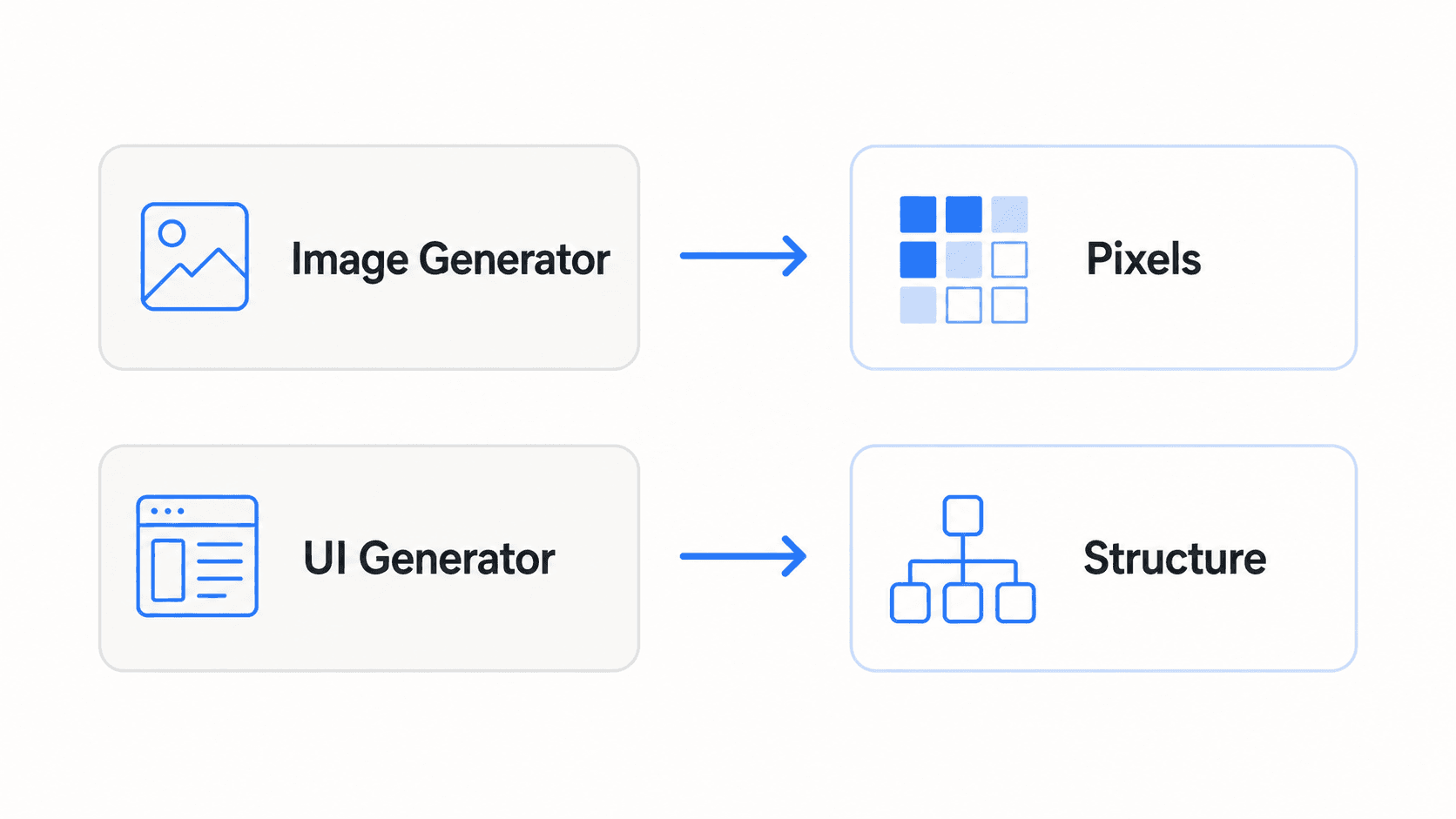
An image generator returns pixels. Even when it draws a convincing dashboard, the buttons are not buttons, the text cannot be edited, and there is no padding, token or component behind anything. That is fine for a hero photo. It is a dead end for an interface.
A UI generator returns structure: frames, text layers, components and code. If what you actually want is screens, skip the image tools and read our guide to the best AI design tools for UI or the walkthrough on how to design UI with AI. If you already have a picture of a UI and want it editable, image to UI converts it, and our roundup of image to Figma converter tools compares the options.
The rest of this list is for the assets that sit inside those screens.
Best AI image generators for hero images and complex scenes
- GPT Image 2 (ChatGPT Images 2.0)
GPT Image 2 is OpenAI's current image model, released in the API on April 21, 2026 and powering image generation in ChatGPT as ChatGPT Images 2.0. Its headline change is that it reasons about the request before rendering, which shows in dense prompts: several characters, specific objects in specific places, and readable signage or labels.
Best for: landing-page heroes, product marketing scenes, infographics and anything where the image has to contain correct text.
Where it falls short: generation is slower than Flash-class models, and multi-turn editing inside ChatGPT is less direct than in a dedicated canvas. Characters can drift across a long series of edits.
Access and pricing: free users get limited access in ChatGPT; paid ChatGPT plans raise the limits. In the OpenAI API, gpt-image-2 costs $5 per million text input tokens, $8 per million image input tokens and $30 per million image output tokens, with batch at half price.
If you are also using ChatGPT for layout ideas, our guide to ChatGPT for UI/UX design shows where it helps and where it does not. For how OpenAI's text models compare for interface work, see our breakdown of the best AI model for UI design.
- Nano Banana Pro and Nano Banana 2 (Google Gemini)
"Nano Banana" is Google's name for its Gemini image models. Nano Banana 2 is Gemini 3.1 Flash Image, and Nano Banana Pro is Gemini 3 Pro Image. Nano Banana 2 brought much of Pro's quality to Flash speed and is now the default image model across the Gemini app, with Google AI Pro and Ultra subscribers able to regenerate with Pro. Both can ground images in Google Search results, which helps with real landmarks, products and diagrams.
Best for: fast iteration on hero concepts, editing an existing image with plain-language instructions, and keeping one subject consistent across several shots.
Where it falls short: free-tier limits in the Gemini app change often, and Pro-level quality costs noticeably more through the API.
Access and pricing: free with daily limits in the Gemini app. Through the Gemini API, Nano Banana 2 works out to roughly $0.045 to $0.151 per image depending on resolution, and Nano Banana Pro to about $0.134 per 1K or 2K image and $0.24 per 4K image. A cheaper Nano Banana 2 Lite also exists.
Read our full Nano Banana Pro vs Nano Banana 2 comparison for which one to use for which asset.
- Kling Image 3.0
Kuaishou's Kling is better known for video, but its February 2026 3.0 release included Image 3.0 and Image 3.0 Omni, with 2K and 4K output. It leans cinematic: lighting, texture and a consistent character across a sequence of frames.
Best for: storyboard-style marketing sequences, product scenes that will later become video, and campaign art where a character must stay recognisable.
Where it falls short: prompt adherence on detailed layouts is less reliable than GPT Image 2, and it is overkill for simple spot images. If video is the real goal, our list of AI video tools for SaaS product demos is a better starting point.
Best AI image generators for art direction and moodboards
- Midjourney V8
Midjourney is still the tool designers reach for when the brief is "make it feel like something". The V8 series brought better prompt adherence and much better text rendering than V7; per Midjourney's own update, V8.1 generates in about 4 seconds in standard mode and 12 seconds in HD. V8.2 followed in July with a new edit model that replaces the older reference and retexture tools.
Best for: moodboards, brand exploration, editorial illustration and art direction before a design system exists.
Where it falls short: there is no free plan, and it is the least literal tool here, which is a strength for exploration and a weakness when a stakeholder wants exactly what they described.
Pricing: paid only, starting with the Basic plan at $10/month, with 20% off annual billing. Unlimited Relax-mode images start on Standard, and private Stealth Mode needs Pro or Mega.
- Krea
Krea is a creative suite rather than a single model. It hosts its own Krea models alongside third-party ones, adds real-time generation, upscaling and node workflows, and since September 2026 offers an agent on every plan that plans and runs multi-step generations.
Best for: teams that want to compare several models on the same prompt without juggling subscriptions.
Where it falls short: compute units go quickly on video and premium models, and the free plan does not include a commercial license.
Pricing: Free gives 100 compute units a day. Basic is $9/month ($5/month billed yearly) for 5,000 units; Pro is $35/month ($21 billed yearly) for 20,000.
Best AI image generators for text, typography and banners
- Ideogram 4.0
Ideogram 4.0 is an open-weight model built for design work: multilingual text, bounding-box layout control over where elements land, native transparent backgrounds, and editable text layers on the roadmap for 4.0. Weights are downloadable for non-commercial use, with commercial licensing available.
Best for: banners, social tiles, posters and any asset where the words matter as much as the picture.
Where it falls short: photorealism is good rather than best-in-class, and baked-in text is still pixels once exported. If the copy will change, keep it as live text in your design and generate the background only.
Pricing: free and paid plans on ideogram.ai; the API charges $0.03 (Turbo), $0.06 (Default) or $0.10 (Quality) per image.
- Reve
Reve is a smaller lab whose image model focuses on following layout instructions and on precise edits to an existing image. It is fast and cheap, which makes it good for rapid variations.
Best for: quick edit passes and layout-faithful compositions on a tight budget.
Where it falls short: a smaller ecosystem and fewer integrations than the big three.
Pricing: Free, Lite and Pro plans in the app; the API is sold at 750 credits per dollar, which Reve prices at about $24 per 1,000 text-to-image generations.
Best AI image generators for icons, vectors and illustrations
- Recraft V4.1
Most image generators output PNG. Recraft outputs real SVG, and its canvas lets you generate and arrange a whole icon set together so stroke weight and palette stay aligned. For a product team, that removes the tracing and clean-up step that makes raster icons unusable at small sizes.
Best for: icon sets, empty-state illustrations, spot graphics and brand marks that must scale.
Where it falls short: photorealistic scenes are not its strength, and images made on the free plan are owned by Recraft and shown publicly in its community gallery.
Pricing: Basic is $12/month ($10/month annually) for 1,000 credits; Pro starts at $20/month for 2,000 credits.
Illustrations still need to sit on a consistent palette. Our list of UI color palette generators and the AI style guide generator help you lock the colours before you generate.
Best for commercially safe imagery
- Adobe Firefly
Adobe Firefly is the default for teams whose legal review asks where the training data came from. Adobe's own Firefly models sit alongside partner models from Google, Black Forest Labs and others, so one subscription covers Nano Banana 2 and FLUX.2 Pro as well.
Best for: stock-style photography, backgrounds, generative fill on existing product photos, and brand teams already in Creative Cloud.
Where it falls short: the Firefly models' look is more conservative than Midjourney's, and partner models use premium credits.
Pricing: a free tier with daily generations; Firefly Standard is $9.99/month and Pro $19.99/month, and paid plans include unlimited standard image generations.
Canva users get similar AI image features inside Canva itself; our Figma vs Canva comparison and list of Canva alternatives for UI design cover where Canva fits in a product workflow.
Best for developers and self-hosting
- FLUX.2 (Black Forest Labs)
FLUX.2 is a family: [pro], [max] and [flex] through the API, plus open-weight [dev] and smaller [klein] models you can run yourself. It is also one of the most widely hosted models, so you will find it inside Krea, Firefly and most image APIs.
Best for: engineering teams generating images at volume inside their own product, and anyone who needs multi-reference control for consistent product shots.
Where it falls short: self-hosting means you own the GPUs and the safety filtering.
Pricing: billed per megapixel; FLUX.2 [pro] costs $0.03 for the first output megapixel and $0.015 for each additional one.
Midjourney alternatives: free and paid options
Midjourney has had no free trial for years, so "Midjourney alternatives" usually means one of two things: a free way to get comparable quality, or a tool that is better at a specific asset.
Free Midjourney alternatives:
- Nano Banana 2 in Gemini: the most capable free option for most people, with strong prompt adherence and editing.
- GPT Image 2 in ChatGPT: free with limits, and better than Midjourney at text inside images.
- Krea Free: 100 compute units a day across several models, without commercial rights.
- Adobe Firefly Free: daily generations, including access to some partner models.
- Recraft Free: the free route to SVG icons, with the ownership caveat above.
- FLUX.2 [dev] or Stable Diffusion: free if you run them on your own hardware.
Paid Midjourney alternatives by strength: Ideogram for typography, Recraft for vectors, Firefly for licensing, Kling for cinematic consistency, and Krea for model variety. Leonardo AI and Freepik's AI suite are also popular for game art and upscaling respectively.
If your real reason for looking beyond Midjourney is that you need a logo, icons and a hero that all match a product, you may not need an image tool at all. The next section explains why.
Put your images into real screens
Generate, edit or upload images inside editable UI, then export to Figma, HTML or React. Free plan includes 20 credits a day.

Where image generators stop: turning assets into a UI
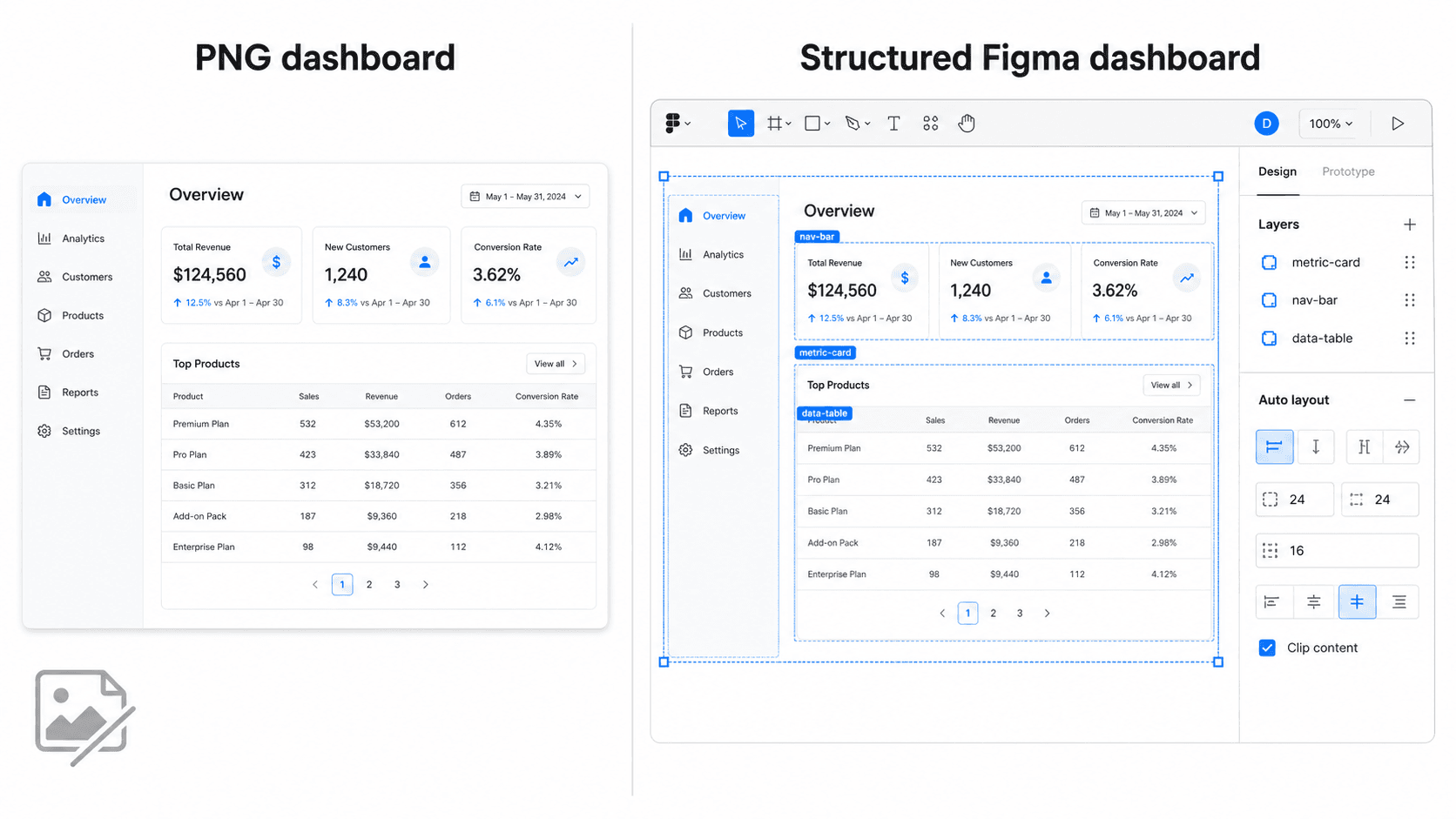
Ask any model on this list for "a fintech dashboard" and you will get something that looks right in a slide. Try to use it and the problems stack up: you cannot select a card, change a number, swap the font, or hand it to an engineer. Generate the next screen and the navigation, colours and radii change, because nothing ties the two images together. We covered this failure in why single-screen AI design is a dead end.
The fix is to keep image models for images and use a UI generator for the interface, with a shared theme holding the screens together. Our explainer on whether AI can follow design tokens goes deeper on why that shared system matters.
- UXMagic: images inside editable designs
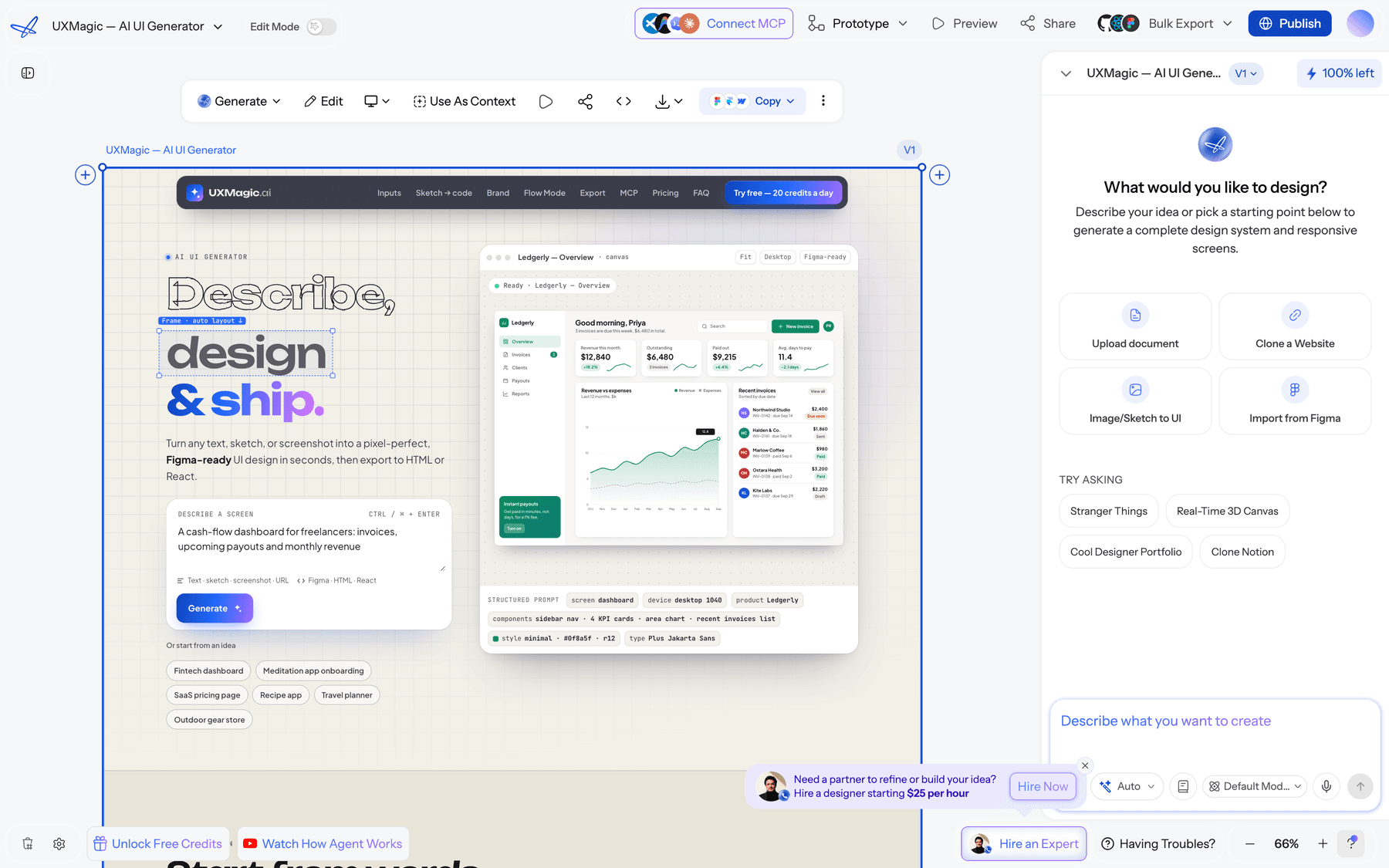
UXMagic is not an image model, and we will not pretend it replaces Midjourney for art direction. What it does is handle images where they end up: inside screens. According to the images in your designs guide, it works four ways:
- Generated images. When the AI designs a screen, it generates the imagery for it. Describe subject, setting, composition, lighting and mood rather than a bare noun, and state the aspect ratio if it matters ("16:9 hero", "square avatar").
- Edits in place. Change embedded text, recolour, restyle, or add and remove an element in an existing image while everything else stays pixel-identical, instead of regenerating it.
- Your own assets. Upload a logo, product photo or an image from GPT Image 2, Midjourney or Recraft through the prompt box or the project's asset library, then reference it in your request.
- Global replacement. Swap a logo or product shot across every screen as one operation rather than editing each screen.
Generating or editing an image costs 0.5 credits, a fraction of a new screen, and text and image swaps in edit mode are free; the full table is in how credits work. Around those images, Flow Mode designs a whole multi-screen journey on one theme, and themes and style guides keep colour and type consistent as you add screens.
When you are done, export to Figma with auto-layout, export HTML or React, or download screens as PDF and images for a deck. If images do not load, see images are broken or missing.
Best for: landing pages, app screens and mockups that need real imagery and have to stay editable, especially multi-screen flows.
Where it falls short: it is not a standalone art tool. For a highly stylised illustration series or a full SVG icon family, a specialist like Midjourney or Recraft will give you more control, and you can upload the results.
Pricing: Free gives 20 credits a day with no card; Pro is $35/month, or $17.50/month billed annually, for 2,400 credits a month. See plans and limits or the pricing page.
AI image generator pricing compared
Prices below come from each vendor's site or docs in September 2026. Subscriptions change often; check before buying.
| Tool | Free option | Entry paid plan | API pricing |
|---|---|---|---|
| GPT Image 2 | ChatGPT free tier, limited | Included in paid ChatGPT plans | $30 per 1M image output tokens |
| Nano Banana 2 | Gemini app, daily limits | Google AI plans | ~$0.045 to $0.151 per image |
| Nano Banana Pro | Limited | Google AI Pro and Ultra | ~$0.134 (1K/2K) to $0.24 (4K) |
| Midjourney V8 | None | Basic $10/mo | No public API |
| Krea | 100 units/day | Basic $9/mo ($5 yearly) | Per model |
| Ideogram 4.0 | Yes, capped | Paid plans | $0.03 to $0.10 per image |
| Reve | Daily refresh | Lite and Pro | ~$0.024 per image |
| Recraft V4.1 | Yes, public images | Basic $12/mo ($10 yearly) | Per image |
| Adobe Firefly | Daily generations | Standard $9.99/mo | Enterprise API |
| FLUX.2 | Open weights | Via hosts | From $0.03 per megapixel |
| UXMagic | 20 credits/day | Pro $35/mo ($17.50 yearly) | Not an image API |
Per-image API prices look small, but iteration is where cost hides. A hero image that takes eight attempts costs eight times the sticker price, so a model that follows the prompt on the first or second try is often the cheaper one.
How to choose the best AI image generator for your team
Start from the asset and where it will live, not from the model leaderboard.
- Hero and marketing images: GPT Image 2 for complex compositions, Nano Banana 2 when you need many variations fast. Our SaaS landing page design guide explains what the hero actually has to do.
- Brand exploration: Midjourney or Krea, early, before the design system is fixed.
- Anything with words: Ideogram 4.0 or GPT Image 2, but keep changeable copy as live text in the design.
- Icons and illustrations: Recraft, so you get SVG rather than a PNG you have to trace.
- Legal-sensitive work: Firefly.
- Product features that generate images for users: an API model such as FLUX.2, Nano Banana 2 or gpt-image-2.
- Screens, mockups and flows: a UI generator. Our AI mockup generator and AI landing page generator start from a prompt, and the best mockup tools roundup compares the alternatives.
Two habits save the most time whichever tool you choose. First, write prompts like a shot list: subject, setting, composition, lighting, mood and aspect ratio. Second, edit instead of regenerating once an image is 80% right; every tool on this list now supports some form of targeted edit.
A workflow that gets assets into production
Here is the loop we see working for product teams shipping a landing page or app flow:
- Fix the system first. Choose colours and type so every generated image has a palette to match. Our design.md guide shows how to write that down so AI tools follow it.
- Design the screens. Generate the flow in UXMagic from a prompt, a screenshot or a sketch, and let it place first-pass images.
- Upgrade the key images. Replace the hero or product shots with ones from GPT Image 2, Nano Banana or Midjourney, and generate icons in Recraft. Upload them and reference them by name.
- Edit, don't rebuild. Use chat editing for targeted changes and in-place image edits for small fixes.
- Review like a designer. Check contrast of text over images, alt text and cropping at each breakpoint. Our accessibility heuristics checklist is a quick pass.
- Ship. Export to Figma or code, or publish directly. Designers who stay in Figma can also use UXMagic's Figma AI generator.
For more on picking a model for the interface itself rather than the images, see our Google Stitch alternatives and Claude Design alternatives roundups, or the broader take on vibe designing.
Our recommendation
For most product teams, two image tools cover almost everything: GPT Image 2 or Nano Banana 2 for photographic and illustrative assets, and Recraft for icons. Add Midjourney if brand exploration is a big part of your work, Ideogram if you produce a lot of text-heavy graphics, and Firefly if licensing is a hard requirement.
Then stop treating the image tool as the design tool. Put the assets into UXMagic, generate or edit the remaining images in place, and keep the whole flow editable through to Figma or React. Browse the templates for a head start, or connect your coding agent through the UXMagic MCP server to pull the finished designs into your repo.
Related guides
- Midjourney Pricing 2026: Plans, GPU Hours, and What Images Really Cost
- Figma Weave Review: Node-Based AI for UI Assets, Not UI Layouts
- Best Figma AI Plugins in 2026: 12 Picks for UI, Assets and Code
- 9 Best UX Pilot Alternatives in 2026, Grouped by Use Case
- 9 Best Uizard Alternatives in 2026, Grouped by Use Case
- Figma Agent Review 2026: What the Beta Does, Costs and Misses
- Paper.design Review 2026: HTML Canvas, MCP, Pricing and Limits
- 15 Best UX/UI Design Tools for 2026, Plus a Startup Stack
- AI Wireframe Generator for Mobile Apps: Best Tools & Workflows (2026)
- 10 Best Figma Make Alternatives in 2026, Grouped by Use Case
From assets to editable screens
Generate multi-screen flows with images built in, edit any image in place, and export to Figma or code. Start free with 20 credits a day.