
TL;DR: ChatPRD is a focused AI writer and coach for product documents. It turns a rough idea into a structured PRD, critiques drafts you paste in, and pushes the result to Notion, Linear, Slack or an AI coding tool. Pro costs $15 a month billed yearly. Its limit is that it stops at text: if your team needs to see the screens a spec describes, pair it with, or replace it by, a tool like UXMagic's AI PRD generator, which produces the requirements and the matching UI together. Scoping a first release? Keep the spec as small as a true MVP.
Most product managers do not struggle to know what a PRD should contain. They struggle to find the three quiet hours it takes to write a good one, and then to get anyone to read it. ChatPRD is built for exactly that gap. It is one of the best-known AI tools made specifically for PMs rather than adapted from a general chatbot, and it has grown from a PRD writer into a small platform with coaching, team workspaces, integrations and an MCP server.
This ChatPRD review covers what the product does today, what each plan includes, where it works well, where it falls short, and which alternatives make sense for which teams. We are the UXMagic team, and we build a competing AI PRD generator that takes a different approach, so we say plainly where ChatPRD is the better choice. Every ChatPRD fact below comes from chatprd.ai and its documentation, checked in September 2026. We have not run a formal benchmark, so we describe how the tool works rather than quoting test scores.
If you are building your whole PM stack rather than choosing one tool, our roundup of AI tools for product managers groups twelve of them by job.
ChatPRD at a glance
| ChatPRD | |
|---|---|
| What it is | AI writer, reviewer and coach for product documents |
| Best for | PMs and founders who write many specs and want structure fast |
| Outputs | PRDs, one-pagers, user stories, technical specs, go-to-market briefs |
| Integrations | Notion, Google Drive, Confluence, Slack, Linear, GitHub, Granola, v0, Lovable, Bolt, Replit, Cursor |
| MCP | Yes, authenticated server for Cursor, Claude Desktop, Claude Code, VS Code, Windsurf |
| Free plan | 3 chats of limited length |
| Paid plans | Pro $15/mo and Teams $29/seat/mo (billed yearly); Enterprise custom |
| Main gap | No UI output; screens and prototypes need another tool |
What is ChatPRD?
ChatPRD describes itself as an AI product-management platform for PMs, engineers, designers and founders. In practice it is a chat interface paired with a document editor. You describe a feature, paste meeting notes or research, or upload a half-written spec, and it produces or improves a structured document. The company says more than 100,000 product managers use it, and its customer stories include teams at LaunchDarkly and Autodesk.
The key word is specialised. A general assistant can write a PRD if you tell it how. ChatPRD arrives already knowing the shape of a good PRD (problem, goals and success metrics, scope, user stories, rollout plan, open questions) and it is tuned to push back like a senior product leader would. That makes it faster to get a usable first draft, especially for PMs who are early in their career or working without a senior reviewer.
If you want to understand the document itself before choosing a tool, our explainer on what a product requirements document is covers each section, and our designer-focused piece on how designers read and write PRDs explains what the design team needs from one.
ChatPRD features
AI document writing and templates
The core job is drafting. ChatPRD can turn a prompt, rough notes or meeting transcripts into PRDs, one-pagers, user stories, technical specs and go-to-market briefs. It runs a gap analysis as it writes, flagging edge cases and open questions, and on paid plans you can build custom templates that match your team's house style.
There is also a free public library of more than 24 templates covering PRDs, MVP feature lists, feature requests, roadmaps, backlogs, product strategy and competitive analysis. Those templates are a good sanity check even if you never pay; compare them with the structure in the PRD guide linked above and take whichever structure your team will actually fill in. An MVP feature list works best alongside a clear definition of what an MVP is, so the list does not quietly grow into a full product.
AI coaching and document review
This is the feature that sets ChatPRD apart from a blank chat window. Paste in a draft and it reviews it the way a CPO might: questioning assumptions, pointing out missing success metrics, noting where the user problem is vague, and suggesting what to cut. ChatPRD pitches it as gap analysis across competitive, technical and UX angles.
For solo PMs and founders, that review loop is arguably worth more than the drafting. Our experience is that most weak specs fail on scope, not wording, and a reviewer that keeps asking "is this needed for launch?" is a useful guard against feature creep. Pair the feedback with a simple prioritisation method such as a RICE score so the cuts are argued with numbers.
Projects and saved knowledge
On Pro and above, Projects let you store product context (your strategy, personas, past specs, research) once so every new chat starts informed. On Teams, those projects and templates are shared across the workspace. This matters more than it sounds: most bad AI output comes from missing context, not from a weak model. A well-maintained user persona template and a few past PRDs in a project will noticeably improve what comes back.
Integrations
ChatPRD connects to the tools PMs already use. Its site lists one-click export to Linear, Notion, Confluence and Google Docs, Slack sharing and notifications, GitHub and Granola as context sources, and hand-offs to AI coding tools including v0, Lovable, Bolt, Replit and Cursor for turning a PRD into a prototype. Note the plan split: Google Drive, Notion and Slack arrive on Pro, while the Linear integration is listed on Teams.
The prototype hand-off is worth a closer look. Sending a PRD to an app builder gets you running code, but the builder still has to invent the interface from prose. Our reviews of v0 by Vercel, Lovable and Bolt.new cover what each does with a vague brief, and our Replit review covers the Replit Agent.
MCP server
ChatPRD runs an authenticated MCP server that works with Cursor, Claude Desktop, Claude Code, Windsurf and VS Code. From inside those tools you can list, search (vector search), read, create and update ChatPRD documents, browse team documents and templates, and search past chats. Authorization happens through a sign-in when your client asks for it, so there is no API key to paste.
For engineering-heavy teams this is the most practical feature in the product: the developer building a feature can pull the current spec into the IDE instead of copying it from a browser tab. It is the same idea behind the UXMagic MCP server, applied to documents rather than designs. If you are new to this pattern, our guide to DESIGN.md files explains how agents use structured project context.
Team collaboration and enterprise controls
Teams adds a shared workspace, real-time document collaboration, comments, shared templates, centralised billing and admin controls. Enterprise adds SSO (Okta, Azure AD, Google Workspace), granular data controls, usage analytics, custom integrations and the option to bring your own model. ChatPRD states it is SOC 2 Type II audited and does not train or fine-tune on customer data; security teams should confirm the details in its trust center.
ChatPRD pricing
| Plan | Price | Key inclusions |
|---|---|---|
| Free | $0 | 3 chats (limited length), basic model, document generation, basic templates |
| Pro | $15/mo billed yearly ($179/yr) | Unlimited chats and documents, premium models, custom templates, projects, file and image uploads, Google Drive, Notion export, Slack |
| Teams | $29/seat/mo billed yearly ($349/seat/yr) | Everything in Pro plus team workspace, shared projects and templates, real-time collaboration, comments, Linear, admin controls |
| Enterprise | Custom | SSO, granular data controls, dedicated support |
Prices come from the ChatPRD pricing page in September 2026. The listed monthly figures are the yearly-billing rate; ChatPRD advertises savings of up to 25% for paying yearly, so month-to-month billing costs more.
Two things stand out. First, the free plan is a trial, not a working tier: three short chats are enough to judge the output, not to run a quarter of specs. Second, Pro is cheaper than a general assistant subscription such as ChatGPT Plus or Claude Pro, both $20 a month, but it only does one job. If you already pay for one of those, the real question is whether PM-specific structure, coaching and integrations are worth another $15.
For comparison, UXMagic's pricing is credit-based: the free plan refreshes 20 credits every day, and Pro is $17.50 a month billed yearly or $35 monthly with 2,400 credits a month. The full breakdown is in plans and limits.
See your PRD as screens, not just text
Describe a feature once and get the requirements and matching UI together, kept in sync as the spec changes.

What ChatPRD does well
- Fast, well-structured first drafts. It removes the blank page and produces a spec with the sections reviewers expect, including open questions most people forget.
- Coaching that improves the PM, not just the doc. The review mode teaches good habits: clearer problem statements, measurable goals, tighter scope.
- Real integrations. Linear, Notion, Confluence, Slack and Google Drive cover where most PM documents end up, and the MCP server brings specs into the IDE.
- Low price for a specialist tool. $15 a month (billed yearly) is modest for something a PM may open every day.
- Enterprise readiness. SOC 2 Type II, SSO and bring-your-own-model options make it easier to approve at larger companies than many newer AI tools.
Where ChatPRD falls short
- It stops at the document. ChatPRD writes about screens; it does not show them. Stakeholders still react far more reliably to a clickable prototype than to a paragraph describing one, and engineers still ask "what happens on this screen?" after reading a perfect spec.
- Hand-off to code skips design. Sending a PRD straight to an app builder means the builder invents layout, hierarchy and states. That is fast, but it is also how teams end up with a working app that nobody designed, a problem we cover in why single-screen AI design is a dead end.
- Output quality depends on your context. Without a populated project, it writes a plausible, generic spec. The coaching is only as sharp as the product knowledge you give it.
- Another subscription. For PMs who already live in Claude, ChatGPT or Notion AI, a lot of the drafting overlaps.
- Free plan is very limited. Three short chats will not tell you how it performs over a real planning cycle.
- AI confidence is not validation. A polished PRD can still describe the wrong product. It does not replace validating the product idea with users, and it cannot tell you whether the flow it describes is usable.
Who ChatPRD is for
Good fit: solo PMs and founders without a senior reviewer, product teams that write a high volume of specs, organisations that want shared templates and a consistent document standard, and engineering-heavy teams that will use the MCP server to keep specs next to the code.
Weaker fit: teams whose main bottleneck is getting from spec to design, PMs who already have a strong template and a general assistant they like, and early-stage founders who would learn more from a quick MVP prototype tested with five users than from a longer document.
ChatPRD vs UXMagic AI PRD generator
The two tools start from the same place, a plain-language description of a product or feature, and then diverge.
| ChatPRD | UXMagic AI PRD generator | |
|---|---|---|
| Main output | Structured document | Structured requirements plus matching UI screens |
| Review and coaching | Strong, CPO-style feedback | Refine by follow-up prompt |
| Screens and flows | No (hand-off to coding tools) | Yes, generated with the spec and kept in sync |
| Export | Notion, Google Docs, Confluence, Linear | Figma layers, HTML and React code |
| MCP | Documents | Designs and screens |
| Pricing model | Per user subscription | Credits, free daily allowance |
UXMagic's AI PRD generator outputs a requirements document with user stories and acceptance criteria and the interface that satisfies it, side by side. When you change a requirement through a follow-up prompt, the related screens update with it, so the spec and the design do not drift apart over review rounds.
If you already wrote the PRD in ChatPRD, Notion or Google Docs, you do not have to start again. Design from a document lets you upload the PRD to a project; UXMagic reads it (reading documents costs no credits) and uses it as the source of truth for screens, content and terminology. It then proposes a screen plan, a named list of screens with a purpose each, which you approve, edit or reject before anything is designed.
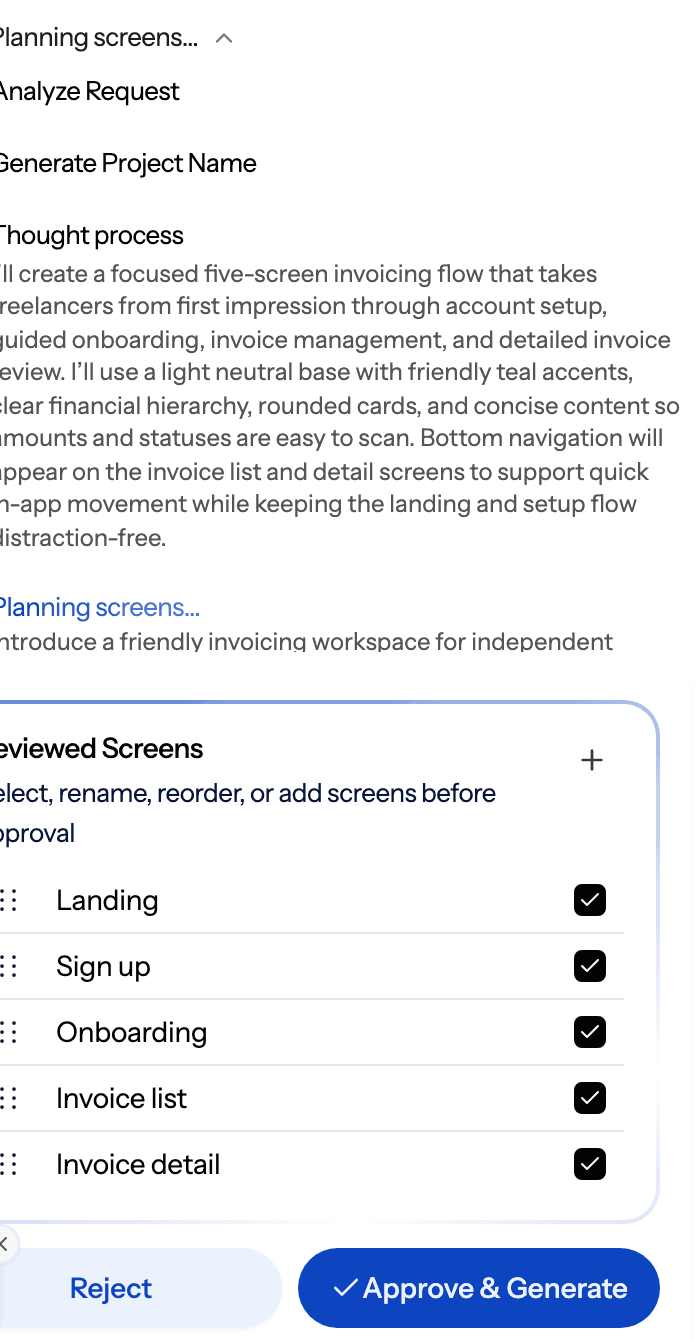
Once the plan is approved, flow mode designs every screen on one shared theme, so the last screen matches the first. From there you can export to Figma for the design team or export HTML or React code for engineering. Each designed screen costs credits; the exact rates are in how credits work.
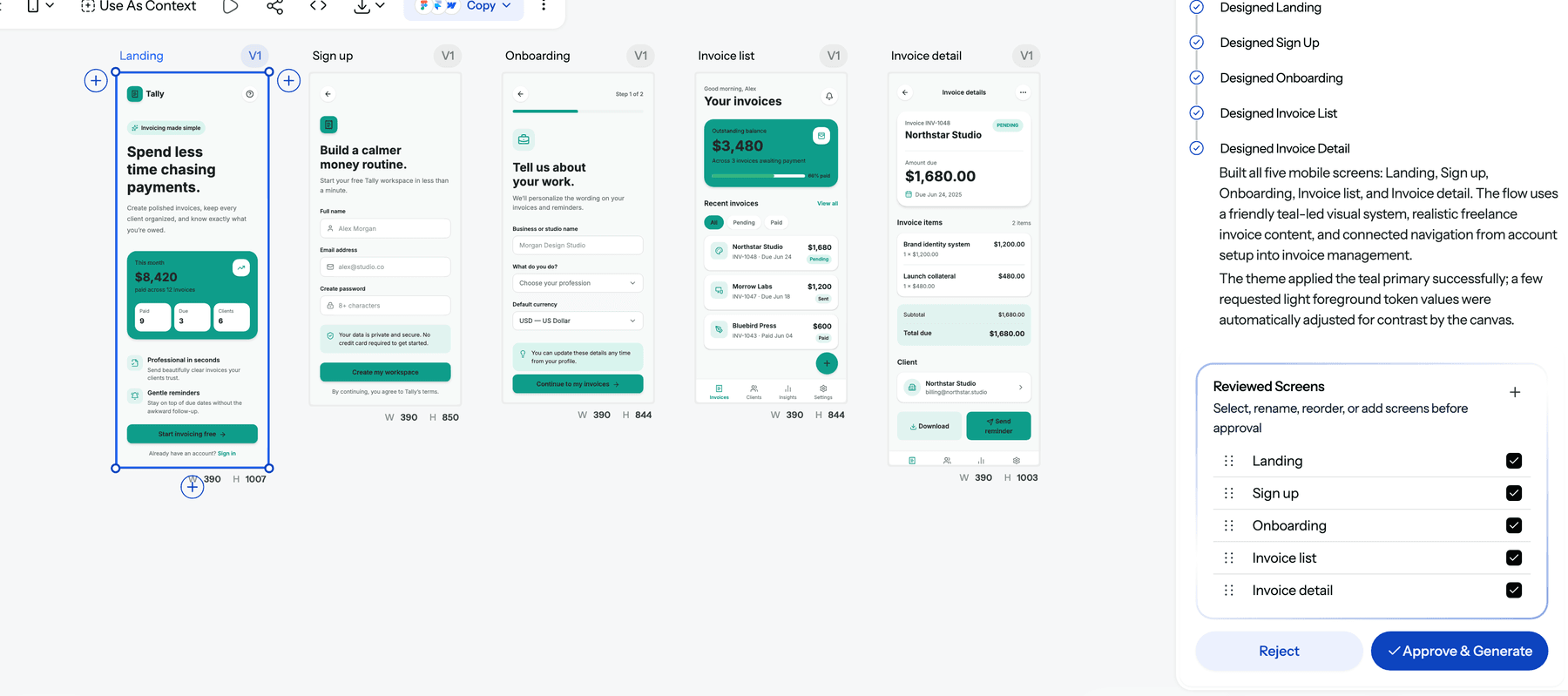
Choose ChatPRD when the document is the deliverable: strategy-heavy specs, backend features with little UI, or teams that need coaching and a shared document standard. Choose UXMagic when the next question after the spec is "what does it look like?", which for most customer-facing features it is. Plenty of teams use both: ChatPRD to write and sharpen the spec, UXMagic to turn it into a reviewable flow. Our spec-driven design workflow for product managers walks through that hand-off step by step.
ChatPRD vs ChatGPT and Claude
A fair question is whether ChatPRD does anything a $20 general assistant cannot. Technically, not much: with a good template, your product context loaded into a Project and a prompt asking for open questions, ChatGPT or Claude will write a comparable PRD.
What ChatPRD sells is the setup you would otherwise do yourself: PM-tuned structure, a reviewer persona that pushes back, document editing, templates, and integrations built around PM tools. For a PM writing two specs a quarter, a general assistant is enough. For one writing two a week, the saved setup time adds up.
If you go the general-assistant route, our guides to ChatGPT for UI/UX design and Claude Design alternatives cover their design output, and our comparison of the best AI model for UI design explains which models handle interface work best. You can also connect UXMagic to your AI assistant, or use the Claude connector, and ask Claude or ChatGPT to design screens from the PRD without leaving the chat.
ChatPRD alternatives
UXMagic
Best for: PMs and founders who want the spec and the screens together.
Covered above: the AI PRD generator produces requirements and UI in one step, and design from a document turns an existing spec into a planned multi-screen flow. For lower fidelity first, the AI wireframe generator gives greyscale layouts to argue structure before visuals, and the prototype generator makes the flow clickable for a stakeholder review. Teammates can leave comments and feedback directly on screens, and the UXMagic MCP server lets coding agents read the designs.
Where it falls short: it is a design tool first. It will not coach you on strategy memos or long stakeholder narratives the way ChatPRD does.
Claude or ChatGPT
Best for: PMs who already pay for one and are willing to build their own template.
Both offer Projects for saved context, file uploads and connectors, and both cost $20 a month on their main individual plan. They are generalists, so they will not push back on scope unless you ask them to. Our Claude Design vs UXMagic comparison covers where Claude's own design output stops.
Notion AI
Best for: teams whose specs, research and meeting notes already live in Notion.
Notion AI drafts inside the workspace and can reference pages your team wrote, which removes the copy-paste step. Full AI use sits on the Business plan at $20 per member a month. It is a writing assistant, not a PM coach, and like ChatPRD it produces no screens.
Prototype-first tools
If what you really need is to see the product rather than describe it, skip the long PRD and start with a flow. Our list of the best AI prototyping tools compares the field, and our reviews of Miro AI prototyping, MagicPath and Variant look at newer options. For code-first builders, see our Lovable alternatives and Replit alternatives.
A practical PRD-to-product workflow
Whichever tool writes the spec, the chain that works is the same:
- Frame the problem with evidence. Pull interview themes and data first; our roundup of AI tools for UX research covers the options.
- Write a short PRD. Problem, goals, success metric, scope, non-goals, open questions. ChatPRD, the UXMagic generator or a general assistant all handle this.
- Turn requirements into a flow. Map the journey before designing screens; our user flow diagram guide and flow-first prompting guide show how.
- Generate and review the screens. Approve the screen plan, then design. Keep a human decision at every step, which is the point of our piece on why AI design fails without human direction.
- Test with users. A clickable flow with five users beats another review round. See wireframe vs mockup vs prototype for the right fidelity at each step.
- Hand off. Export to Figma or code with the requirements attached; our guide to what a design handoff is lists what engineers need.
Our verdict
ChatPRD is a well-built, reasonably priced tool that does one job, writing and reviewing product documents, better than a blank chatbot. The coaching is its strongest feature, the integrations and MCP server make its output useful beyond the browser tab, and the enterprise controls make it easy to approve. If your bottleneck is the document, it is worth a Pro trial.
Its limit is structural rather than a bug: a PRD is a description of a product, and ChatPRD never shows you the product. For customer-facing features, the fastest way to find the problems in a spec is to see it as screens. That is where UXMagic fits, either as the tool that writes the PRD and designs it together, or as the next step after ChatPRD.
Related reading
- What is a PRD? Complete guide and template
- How designers read and write PRDs
- Best AI tools for product managers
- The spec-driven design workflow for PMs
- RICE score explained
- What is feature creep and how to prevent it
- How to validate a product idea
- MVP design: which screens to build first
Write the spec and design it in one place
Upload your PRD or describe a feature, approve the screen plan, and get a consistent multi-screen flow you can export to Figma or code.