TL;DR: Miro pricing has four tiers: Free, Starter at $8 per member a month, Business at $20 per member a month (both billed yearly) and custom Enterprise. The seat fee is the easy part. The real limits are the 3 editable boards on Free, the pooled AI credits on every plan, and the fact that AI prototypes now sit only in Business. If your team uses Miro to map flows and then needs real screens, pair it with an AI wireframe generator like UXMagic instead of paying Business seats for prototyping. For other whiteboards, see our Miro alternatives for UX teams.
Miro used to be priced like a whiteboard: pay per seat, get unlimited boards. In 2026 it is priced like an AI platform. Each plan now comes with a pool of AI credits, a daily cap on MCP calls, and a list of AI features (Sidekicks, Flows, Prototypes) that unlock at different tiers.
This guide covers each Miro plan as listed in September 2026, how AI credits are counted, what the Free plan really lets you do, what AI prototyping and wireframing cost, and where a design tool fits alongside Miro. It ends with a pricing table against FigJam, Mural and UXMagic.
A note on sources: plan prices and the feature matrix come from Miro's pricing page. Credit costs, Free plan limits and the Prototypes change come from Miro's help center, mainly the Miro AI credits and Free Plan articles. Miro changed its Business plan in mid-2026, so treat every figure as "as listed in September 2026".
Miro pricing at a glance
| Plan | Billed yearly | Billed monthly | AI credits | Editable boards | Who it suits |
|---|---|---|---|---|---|
| Free | $0 | $0 | Trial allowance, pooled | 3 | Trying Miro, one small project |
| Starter | $8/member/mo | $10/member/mo | 25 per member a month | Unlimited | Freelancers, small teams |
| Business | $20/member/mo | $25/member/mo | 50 per member a month | Unlimited | Product teams, agencies, consultants |
| Enterprise | Custom, from 30 members | Custom | From 2,500 a month, org-wide | Unlimited | Large orgs needing SCIM, audit logs, data residency |
Annual billing saves 20% on Starter and Business. Every member on a paid plan is a paid seat, and seats added mid-cycle are prorated. Guests (Business and up) and visitors via public link don't use a seat.
Miro plans in detail
Is Miro free? The Free plan
Yes, and it has no time limit. You get unlimited team members, templates, Docs, Tables, Slides, Diagrams, Timelines and Kanban, 250+ integrations, 5 Talktracks, and 100 MCP calls a day so tools like Claude or Cursor can read your boards.
The catch is structure, not features. The Free plan is built for one small team working in the open, and a few rules shape everything else:
- 3 editable boards per team. Once the team has 3, you can't create a fourth until you delete one or upgrade. Boards beyond your 3 most recent (for example after a downgrade) become view-only.
- Everything is shared. There are no private boards. Every board on a Free team is visible to every member, and anyone you invite to a board by email is added to your team.
- No guests, limited visitors. Visitors with a public link can view but not comment or edit.
- A trial AI allowance you can't see. The balance isn't shown on Free plans, so you find out you are out of credits when AI actions pause.
- Limited AI workflows. Free includes limited Sidekicks access and 5 Flow runs per team member.
What Miro Free can't do
| On Miro Free you can | On Miro Free you can't |
|---|---|
| Create up to 3 editable boards | Create a fourth board without deleting one |
| Use Docs, Tables, Slides, Diagrams | Make a board private |
| Build static screens with the Prototyping library | Add clickable connectors or interactive preview |
| Try Miro AI and Sidekicks | See your remaining AI credit balance |
| Share view-only public links | Let visitors comment or edit, or invite guests |
| Export boards | Export in high resolution, or restore board versions |
| Use 250+ integrations | Use voting, timer, private mode or video calls |
For a solo designer mapping one product, 3 boards is workable. For a team running discovery, a design sprint and a retro in parallel, it runs out in the first week.
Miro Starter
Starter costs $8 per member a month billed yearly, or $10 monthly. It removes the Free plan's walls: unlimited and private boards, visitors who can edit public boards without signing in, board history, manual backups, high-res exports, Spaces and Blueprints, custom templates, Brand Center, facilitation tools (voting, timer, private mode) and video calls. You also get 25 AI credits per member a month and 500 MCP calls a day.
What Starter doesn't include is most of the new AI: interactive prototypes, full AI workflows and agents, data tables and guests are all Business features. Starter is the right plan if you want Miro as a whiteboard and only dip into AI occasionally.
Miro Business
Business costs $20 per member a month billed yearly, or $25 monthly, with a 14-day free trial. Over Starter it adds:
- Interactive prototypes, generated from screenshots, HTML, code, prompts or board content.
- AI workflows and agents: Sidekicks and Flows, without the trial limits.
- 50 AI credits per member a month and 2,000 MCP calls a day.
- Unlimited workspaces and unlimited guests, which matters for agencies working with clients.
- Two-way integrations with Jira, Asana, Linear, ClickUp and Azure DevOps, plus data tables, Planner and dependencies.
- Engage activities (polls, 2x2 matrices) for up to 50 participants, and SAML SSO.
If you bought Business before mid-2026, check the plan name in your dashboard. Miro's help center calls the current plan "Business + AI Workflows"; legacy Business customers have to upgrade to keep Prototypes and Engage.
Miro Enterprise
Enterprise is custom-priced with a 30-member minimum. It adds SCIM provisioning, audit logs, domain control, granular AI controls and AI usage dashboards, data residency in the EU, US, Australia or Japan, a Customer Success program, and 10,000 MCP calls a day. AI credits start at 2,500 a month and scale with seat count. Several governance features (Enterprise Guard, eDiscovery, premium support, prompt blocking) are paid add-ons on top, and Prototypes is only included with the Accelerate license.
Education, startup and nonprofit discounts
- Education: free for students and staff at accredited schools and universities. It includes unlimited and private boards, voting, timer, custom templates, watermark-free high-res export and 100 AI credits a month. Educator teams last as long as they qualify (up to 100 members); student teams last two years (up to 10 members). See Miro's Education plan article.
- Startups: $500 in Miro credit for independent startups, $1,000 through a partner accelerator or VC, and a 25% Enterprise discount for VC-backed companies.
- Nonprofits: a discount on application.
How Miro AI credits work
One pooled balance per team
AI credits pay for everything Miro AI generates: diagrams, docs, slides, images, tables, prototypes and Sidekick replies. Included credits are allocated per paid seat but pooled, so one heavy user can spend the whole team's month. Guests and visitors can't run AI actions.
Credits don't roll over. Free and Enterprise balances reset on the first day of each calendar month; Starter and Business reset on your renewal date, even on annual plans. When the pool runs out, AI actions pause until the reset.
What each Miro AI action costs
Miro publishes a per-feature cost table. As of September 2026:
| AI action | Credits |
|---|---|
| AI search | 0 |
| Sticky note, text, catch-up, remove background | 1 |
| Doc, Sidekick reply, space summary | 2 |
| Image | 3 |
| Diagram, table, board layout | 5 |
| Slides | 5 per slide |
| Prototypes | 5 per screen |
Three rules matter for your budget:
- You pay on generation, not on keeping. Regenerating costs again, and discarding or undoing a result doesn't refund credits.
- Sidekicks and prompt-based flows vary. Their cost depends on the request, the context you attach and the model used, and Miro can't show the cost before you run them.
- Per-item features scale fast. Miro's own example: a 10-slide deck is 50 credits, and rewriting one slide and adding another brings it to 60.
To put that in seat terms: a Starter member's 25 credits buy five diagrams or five prototype screens a month. A Business member's 50 buy ten screens.
Buying more Miro AI credits
Billing or company admins on Starter and Business can add credit bundles (Miro's examples are 100 or 200 credits) from Admin Console, Billing. Bundles are shared across the organization, follow your plan's billing period, reset monthly like included credits, and disappear if you downgrade to Free. Free and Education plans have to upgrade first, and you can't buy credits during a Business trial. Enterprise buys through sales.
Map the flow in Miro, design the screens in UXMagic
Turn a user flow into connected, editable screens with a free UXMagic account. 20 credits every day, no card needed.

Miro AI prototyping and wireframes: what they cost
What Miro Prototypes does
Miro Prototypes generates single or multi-screen UI flows on the canvas from a prompt, a screenshot or selected board content (a Doc, sticky notes), lets you iterate in a panel, and then previews the result as a clickable simulation. A prototype takes one to three minutes to generate, and Miro's own advice is to generate fewer screens at a time for better results.
Until June 2026 this was a paid add-on. Miro then moved Prototypes into the Business plan, so today:
- Free and Starter: the Prototyping library only. You can drag screens, UI components and icons onto the board to build static layouts. Connector lines, advanced components and interactive preview are Business features. The old Wireframe library is still there, marked legacy.
- Business: AI-generated prototypes and interactive preview included, paid from the 50 credits per member.
- Enterprise: included with the Accelerate license only.
What a Miro prototype costs in credits
At 5 credits a screen, a six-screen onboarding flow costs 30 credits, which is most of a single Business seat's month. Iterating on it the way design work really goes (regenerate two screens, try a second direction) can double that. For a five-person Business team with a 250-credit pool that also pays for diagrams, docs and Sidekicks, a few prototype rounds a month is the realistic ceiling.
That is fine for what Miro Prototypes is for: aligning a team on an early concept in the same board as the sticky notes. It is an expensive way to produce the screens you'll hand to engineering. For the difference between those artifacts, see our guide to wireframe vs mockup vs prototype.
The same flow in a design tool
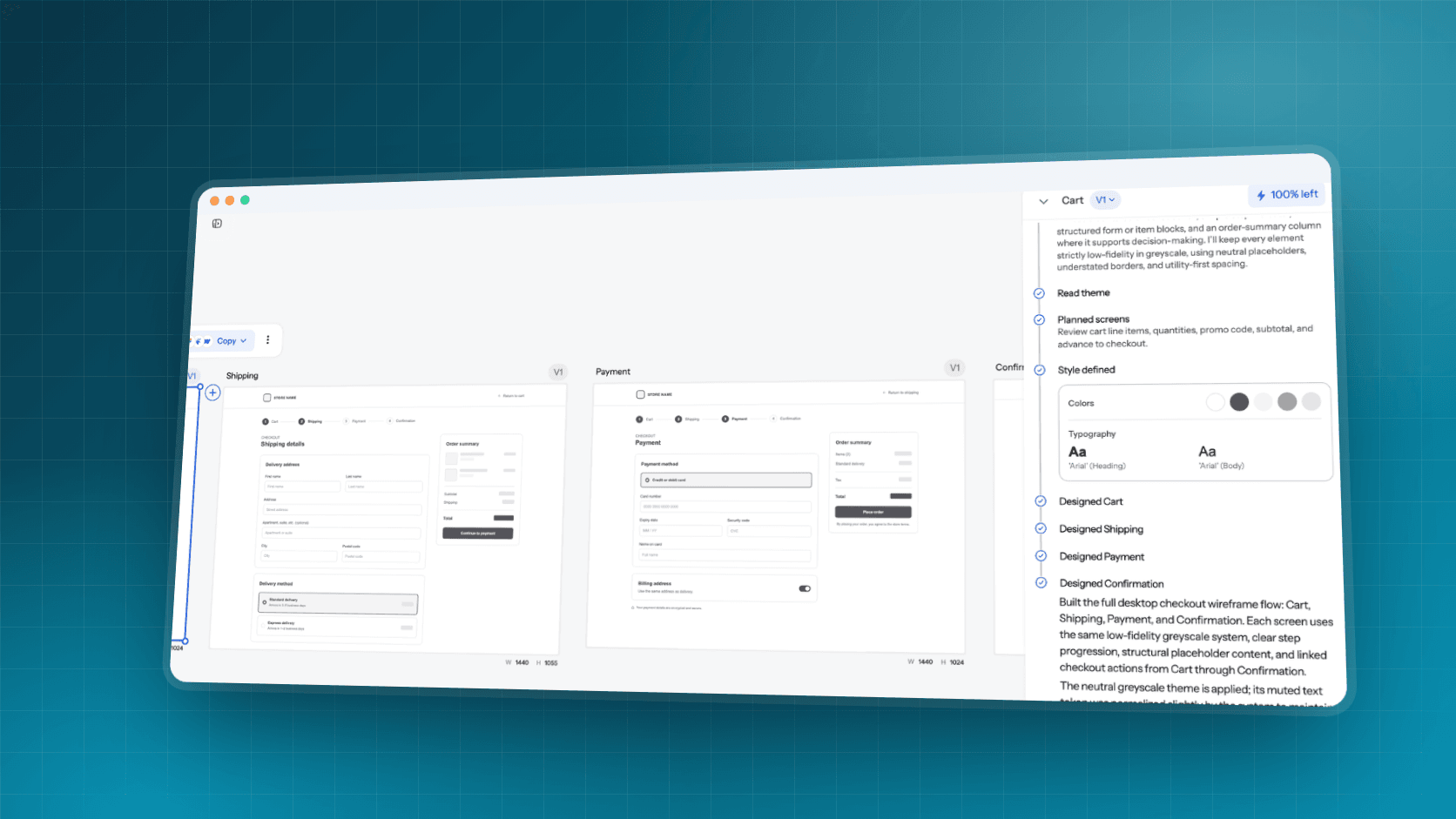
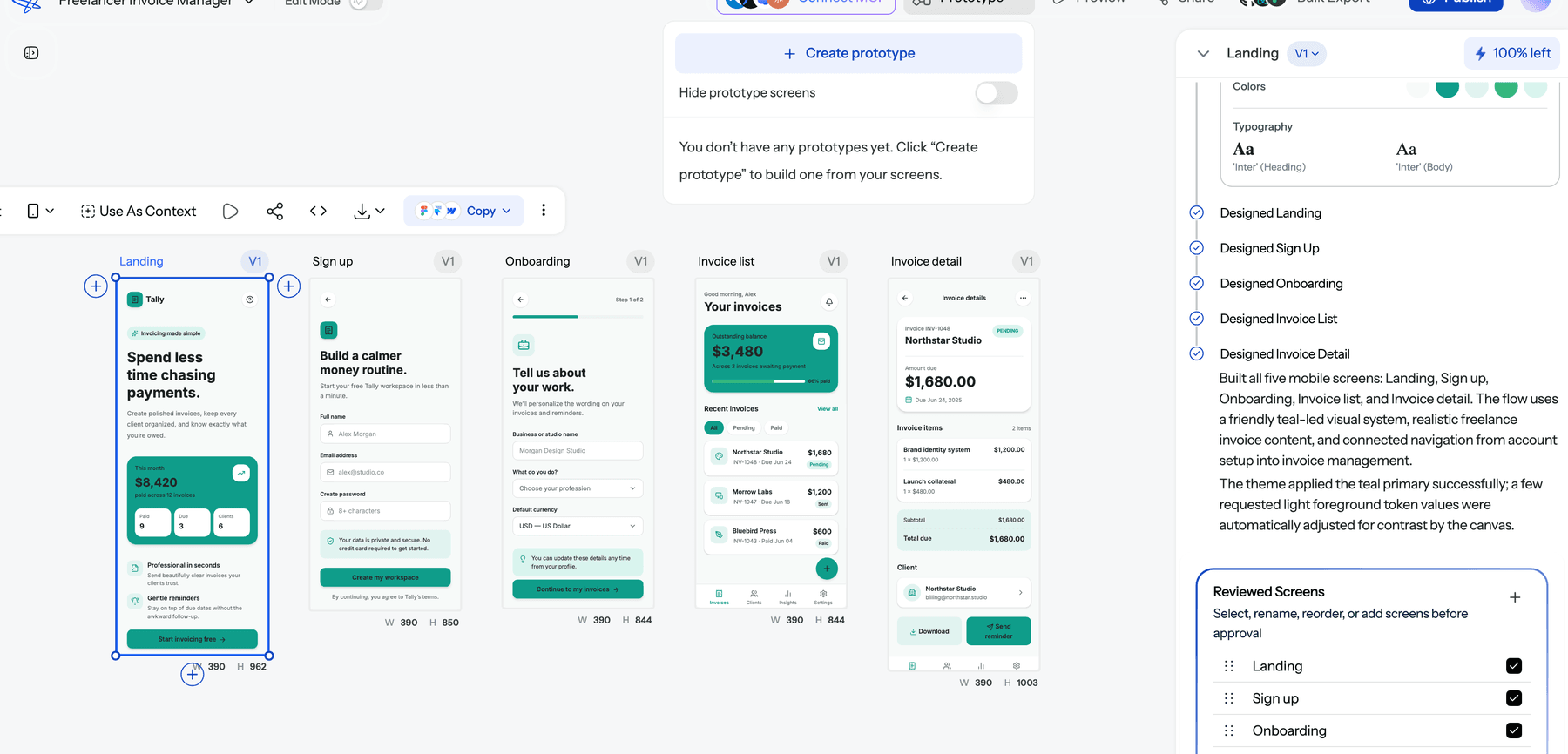
UXMagic is built for the screens themselves. Describe the journey and Flow Mode proposes a screen plan you approve before anything is designed, then generates every screen on one canvas with a shared theme. From our credit cost table: the plan costs 1 credit, each new screen 3, a targeted edit 0.2 and theme changes 0. A six-screen onboarding flow is about 19 credits, which the free plan (20 credits and up to 3 screens a day) covers over two days, and the output is editable, high-fidelity UI with React and HTML export.
If you want to stay low-fidelity first, wireframe mode generates greyscale layouts to settle structure before visual design.
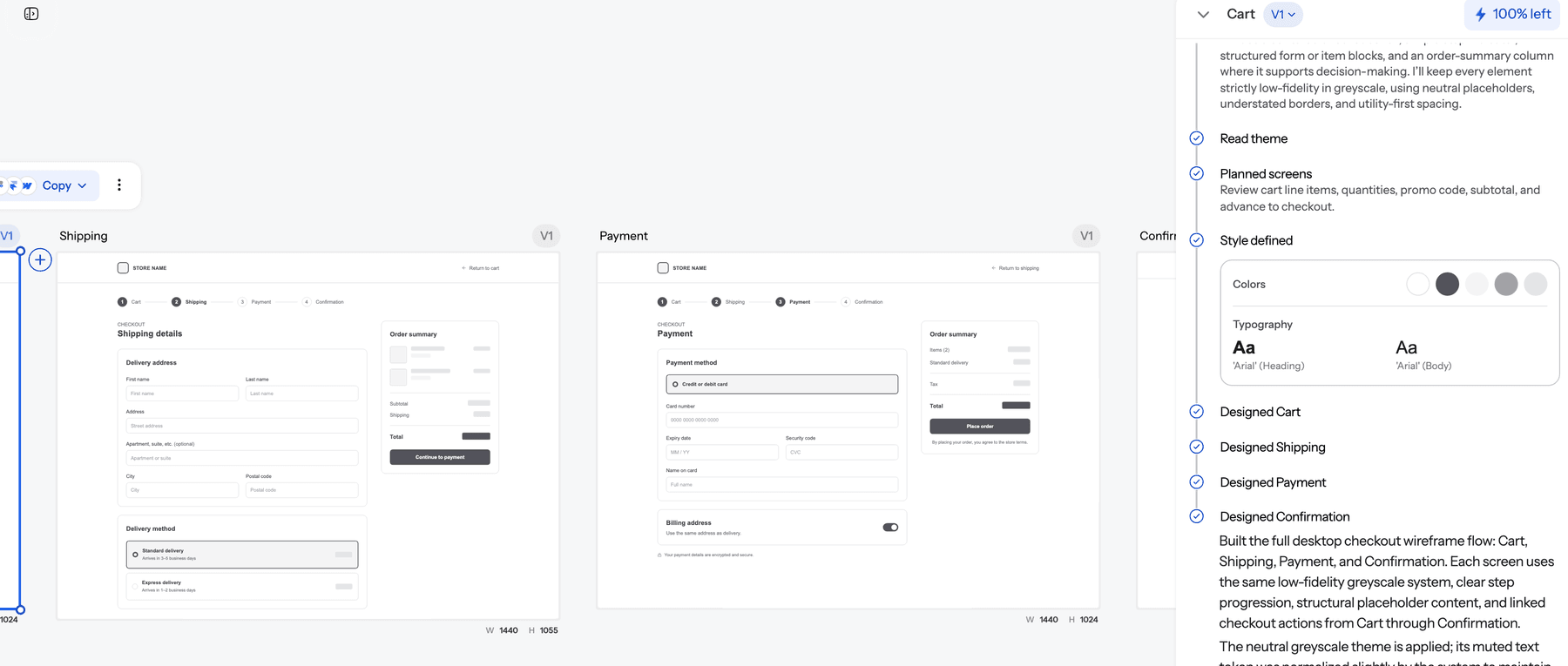
When the screens are ready, UXMagic's prototype mode links them into a clickable flow, and the AI prototype generator page shows how that works. Our list of the best AI prototyping tools compares the wider field.
Real Miro cost scenarios
Scenario 1: a solo designer or founder
You are mapping one product: a journey map, a user flow diagram and a feature backlog. That is three boards, which Free covers. The trial AI allowance handles a couple of diagrams a month. The first reason to pay is usually privacy (client work you can't leave visible to your whole team) or a fourth project, and that is $8 a month on Starter billed yearly.
What Free and Starter won't give you is AI prototypes. Rather than upgrade a single seat to Business for $20 to $25 a month, design the screens in a tool that includes them on its free plan and keep Miro for the thinking.
Scenario 2: a five-person product team
A PM, two designers and two engineers want Jira sync, AI workflows and prototypes, so Business fits: 5 x $20 = $100 a month billed yearly, or $125 monthly, with a 250-credit pool. Every member is a seat, so inviting a sixth teammate adds another $20 to $25; clients should be invited as guests, which are free on Business.
Watch the pool. A sprint's worth of diagrams (5 credits each), a 10-slide stakeholder deck (50) and one prototype round (30 or more) can use half of it in a single week.
Scenario 3: a workshop-heavy team or agency
If you mostly run workshops, discovery sessions and customer journey mapping with clients, Starter's voting, timer, private mode and editable visitor links do the job. Move to Business when you need client workspaces, guests with sign-in, or Engage polls. Either way, budget for credit bundles before a big workshop week, because the pool doesn't grow with a busy month.
Hidden costs in Miro pricing
- Every collaborator is a seat. On Free, invited users join your team; on paid plans, members are billed. Use guests (Business) and visitors (Starter and up) to keep seat counts down.
- Pooled credits hide who spent what. One person generating slide decks can pause AI for everyone. Admins see the balance; members don't.
- No preview of Sidekick costs. Prompt-based actions vary with context and model, and Miro can't quote them in advance.
- Regenerations cost full price. Iteration, which is most of design work, spends credits every time.
- Prototypes are a Business feature. Upgrading a whole team from Starter to Business to get AI prototypes costs $12 more per member a month on annual billing.
- Governance is extra on Enterprise. Enterprise Guard, eDiscovery, prompt blocking and premium support are paid add-ons.
How to spend less on Miro
- Pick the plan by collaboration, not by AI
Miro's value is shared thinking: workshops, maps, retros, sprint boards. Choose the plan that fits how your team collaborates (boards, privacy, guests, integrations), then treat AI credits as a bonus. If AI prototypes are the only reason to move to Business, look at a design tool first.
- Make each AI request count
- Write one detailed prompt instead of several vague ones, and attach only the context the task needs.
- Check the cost table before per-item actions. Slides and Prototypes scale per slide and per screen.
- Start from Miroverse templates for structure, and use AI for the part a template can't do.
- Top up with a bundle before a big workshop rather than letting AI pause mid-session.
Good prompts are a skill that transfers across tools; our guide to flow-first prompting shows how to describe a journey rather than a list of screens.
- Keep Miro for the map, move screens to a design tool
The expensive pattern is using the whiteboard as a UI tool. A cheaper split: run discovery, flows and alignment in Miro, then take the flow into UXMagic to generate the actual screens.
- Paste the flow or brief into UXMagic, or design from a document such as a PRD. The AI PRD generator drafts one if you only have sticky notes.
- Photograph a whiteboard sketch and convert it with sketch to UI; the sketch to UI guide walks through it.
- Review the screen plan before generating, since fixing the plan costs 1 credit.
- Hand off with export to Figma, React and HTML export, or the UXMagic MCP server, which lets Claude, Cursor or VS Code read the real screens. Our guide to what a design handoff is covers what developers need from it.
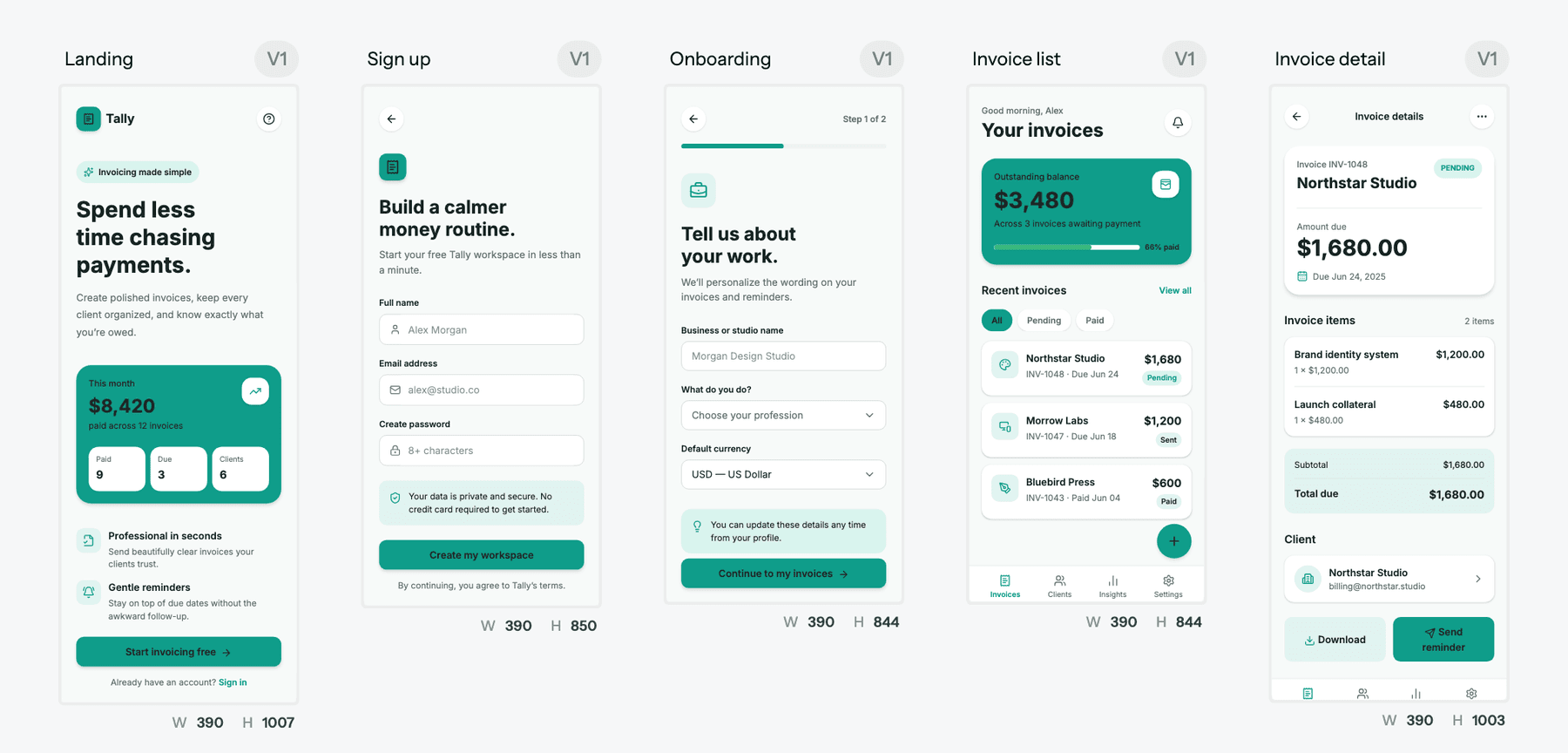
We walk through this end to end in how to design UI with AI, and the sketch to prototype workflow covers the whiteboard-to-screen step in detail.
Miro vs competitors: pricing comparison
Prices come from each vendor's pricing page as listed in September 2026. The tools do different jobs (whiteboards vs UI design), so compare what you would actually use them for.
| Tool | Free plan | Entry paid plan | Higher tiers | AI allowance |
|---|---|---|---|---|
| Miro | 3 editable boards, trial AI credits | Starter, $8/member/mo yearly ($10 monthly) | Business $20/member/mo yearly; Enterprise custom | 25 or 50 credits per member a month, pooled |
| FigJam (Figma) | Included in Figma Starter with limits | Professional Collab seat, $3/mo | Organization and Enterprise Collab seats $5/mo, billed annually | 500 AI credits a month per Collab seat |
| Mural | 3 editable murals, unlimited members | Team+, $9.99/member/mo yearly ($12 monthly) | Business $17.99/member/mo yearly; Enterprise custom | Mural AI on paid plans, no published credit numbers |
| UXMagic | 20 credits a day, up to 3 screens a day | Pro, $35/mo or $17.50/mo billed annually | Enterprise custom | 2,400 credits a month on Pro (up to 400 screens) |
Miro vs FigJam pricing
If your team already pays for Figma, FigJam is the cheapest whiteboard to add: a Collab seat costs a fraction of a Miro Starter seat and comes with its own AI credits. Miro is stronger for large workshops, facilitation and cross-team planning with Jira sync. Our Figma pricing guide breaks down the seat types, and what Figma AI is covers the AI features FigJam shares.
Miro vs Mural pricing
Mural's free plan has the same three-board shape as Miro's, and Team+ costs about the same as Starter. Mural leans toward facilitation and consulting; Miro toward product development, with prototypes, MCP and dev-tool integrations. Both suit the workshop stages of the design thinking process better than the UI stage.
Where UXMagic fits
UXMagic is not a whiteboard and won't replace Miro for workshops, retros or sticky-note clustering. It replaces the part of Miro that is trying to be a UI tool. The free plan gives 20 credits every day with no card; Pro is $35 a month, or $17.50 a month billed annually, for 2,400 credits, unlimited projects and 250 Figma exports. Team credits come from a shared pool that owners can cap per member, as our teams and seats guide explains. Full details are on the UXMagic pricing page, and our Figma alternatives guide places it among the other design tools.
If you're comparing AI tools by price more broadly, we have the same breakdown for Lovable, Replit, Base44 and Bolt.new.
Is Miro worth the cost?
For collaboration, yes. Starter at $8 a member is fair for unlimited private boards, facilitation tools and board history, and the Free plan is honest about being a trial for small teams. Business earns its price when you use what it bundles: Jira and Linear sync, client workspaces with guests, AI workflows and interactive prototypes.
The part to be careful with is AI. Credits are pooled, reset monthly, and cost full price on every regeneration, and a single prototype flow can use a seat's whole month. Miro's AI is good at turning board content into first drafts. It is not priced for iterating on UI.
Our recommendation is a split. Keep Miro, or a cheaper whiteboard, for discovery and flows. Design the screens in UXMagic, where a new screen costs 3 credits, an edit costs 0.2 and themes are free, then export to Figma or code. If you're choosing a wireframing tool as well, our best wireframing tools list and wireframe tool cost-benefit breakdown compare prices across the category.
Related guides
- 15 Best UX/UI Design Tools for 2026, Plus a Startup Stack
- 9 Best Uizard Alternatives in 2026, Grouped by Use Case
- 15 Best AI UX Research Tools in 2026, by Research Phase
- 9 Best UX Pilot Alternatives in 2026, Grouped by Use Case
- Penpot vs Figma in 2026: Open Source or the Industry Standard?
- Figma Make Tutorial 2026: Prompt, Edit, Publish and Export Code
- Figma Dev Mode Alternatives in 2026: Handoff, Code and MCP Tools
- Google Stitch Pricing 2026: Is It Free, and What Are the Limits?
- 12 Best AI Tools for Product Managers in 2026, by PM Job
- Base44 vs Lovable (2026): Which AI App Builder Fits Your Project?
Turn your Miro flow into real screens
Generate a connected, editable multi-screen flow from a brief or a sketch, then export to Figma or code. Free every day.