TL;DR: MockFlow is a whiteboard and wireframing platform with a capable AI agent, Mida, that turns prompts, screenshots and URLs into editable low-fidelity wireframes, flowcharts and sitemaps. It is cheap, the free plan is usable, and its two MCP servers are more developer-friendly than most wireframe tools. It stops at structure: Figma export and code live on the top plan, and there is no hi-fi design. If you want wireframes that become styled screens, an AI wireframe generator with flow mode like UXMagic goes further.
Wireframes are supposed to be quick. The job is to agree on structure (what goes on each screen, in what order, and how people move between them) before anyone argues about colour. MockFlow has served that job for more than a decade, and in 2026 it has rebuilt itself around AI: an on-board agent called Mida, prompt-to-wireframe, screenshot-to-wireframe, and MCP servers that let Claude Code or Cursor draw on your canvas.
This review covers what MockFlow does now, what changed in its pricing, where it falls short, and which MockFlow alternatives suit different jobs. We build UXMagic, an AI UI design tool that also generates wireframes, so we are clear about where the two overlap. MockFlow facts come from mockflow.com and its checkout as of September 2026. We have not reproduced third-party ratings because they change often and sample sizes are small.
MockFlow at a glance
| MockFlow | |
|---|---|
| What it is | Visual brainstorming platform with a built-in wireframing tool (WireframePro) |
| AI | Mida agent: prompt, screenshot or URL to wireframe, flowcharts, sitemaps, UI copy, images |
| Fidelity | Low to mid (sketchy or clean wireframes, light prototyping) |
| Code | Build mode (Max only): Tailwind, Bootstrap, iOS, Android and more |
| Figma export | Max only |
| MCP | IdeaBoard MCP and open-source WireframePro MCP |
| Free plan | 1 editor + 5 reviewers, 4 projects, 100 AI credits a month |
| Paid | Plus $12, Max $19 per editor per month (25% off yearly) |
| Best for | PMs, founders and teams planning structure and flows |
| Not for | Hi-fi UI, design systems, production handoff on a budget |
What is MockFlow?
MockFlow started as a wireframing app and has grown into what it now calls a brainstorming platform. The board, previously sold as IdeaBoard, is pitched as a "whiteboard reimagined for AI" and holds diagrams, mind maps, flowcharts, storyboards, Kanban boards and more. WireframePro, described as a "super-easy wireframing tool", sits inside the same account with its own UI kits, templates and editor.
The most important change for anyone reading older reviews: wireframing is no longer a separate purchase. MockFlow's pricing FAQ says WireframePro "is never a separate purchase" and is included on every plan. The old split between a WireframePro plan, an IdeaBoard plan and a bundle has been replaced by Basic, Plus and Max.
If you are still deciding whether you need a wireframe at all, our guide to low fidelity vs high fidelity explains when each is worth it, and wireframe vs mockup vs prototype sorts out the vocabulary.
MockFlow AI features
Mida, the AI agent on the board
Mida is MockFlow's AI assistant. It lives in the board and in WireframePro, and you ask it for things in plain language: a wireframe for a SaaS dashboard, a flowchart of a payment process, a sitemap for a marketing site. MockFlow's AI page lists a long menu of generators, including wireframes, flow diagrams, visual sitemaps, cloud architecture diagrams, mind maps, customer journey maps, storyboards, timelines and spreadsheets.
Paid plans get "Mida advanced with ongoing chat and memory", plus AI skills and expert roles you can run on the board. For product teams, the most useful generators are the sitemap and flow tools, because they produce the information architecture you need before screens. If you map journeys first, our customer journey map guide shows how journeys become wireflows.
Prompt, screenshot and URL to wireframe
WireframePro can generate a wireframe from a text prompt, convert a screenshot into editable wireframe components, or turn a live URL into a wireframe. MockFlow Clippy, a Chrome extension, clips any webpage into MockFlow and can convert it to a wireframe in one step. That is handy for redesigns, where the starting point is an existing site.
The output is genuinely editable: buttons, fields, navigation bars and images become WireframePro components rather than a flat picture. UXMagic covers the same ground with image to wireframe for screenshots, sketch to UI for hand-drawn layouts, and clone any website to rebuild a live page as a styled, editable design.
AI content and design review
WireframePro can fill a wireframe with AI-generated UI copy, images, colour palettes and placeholder data, and it can review your design and suggest improvements for clarity and visual quality. Placeholder content matters more than it sounds: a wireframe with real-looking labels gets better feedback than one full of lorem ipsum. Our guide to UX microcopy explains why.
The WireframePro editor
Outside AI, WireframePro is a mature editor. MockFlow cites 1,000+ UI components, sketchy and clean UI kits, symbols (reusable components that stay in sync), master pages for shared headers and sidebars, chart and data grid components, and a template store for web, mobile and dashboards. Collaboration covers real-time editing, suggested changes in comments and a presentation mode.
Prototyping is deliberately light. You can link pages and build tabs, hover effects and dropdowns so stakeholders can click through a journey, but there are no advanced transitions or variants. If you need more than that, see our list of the best prototyping tools and our explainer on what a prototype is in UX design.
MCP servers and Bridge
This is where MockFlow is ahead of most wireframing tools. It offers two MCP servers:
- MockFlow (IdeaBoard) MCP lets Claude, Cursor or another MCP client draw flowcharts, mind maps, architecture diagrams and other visuals. A loginless web version works as a connector in Claude.ai.
- WireframePro MCP is open source under the MIT licence. Your AI assistant generates HTML with inline CSS, and the server converts it into editable wireframe components. A
read_wireframetool sends a wireframe back to the AI for code generation in React, Vue or Tailwind, but only through the MockFlow desktop app.
Rate limits are tight on Basic (10 tool calls per 30 minutes) and relaxed on paid plans (30 per minute). MockFlow Bridge goes the other way: it puts your own coding agent (Claude Code, Codex, opencode or BridgeAI) behind Mida, so board AI runs on your own AI plan and costs no MockFlow credits. Basic gets 20 Bridge generations a day on one board; Plus and Max remove the limit.
If this kind of agent workflow is new to you, our DESIGN.md guide and AI design-to-code tools roundup explain how design context reaches coding agents. UXMagic's MCP server does the same job with styled screens and theme tokens rather than wireframes.
Build mode and Figma export
Build mode turns wireframes into front-end code for Tailwind, Bootstrap, iOS, Android and other targets, and Max also exports wireframes to Figma, adds interactive PDF export and CSS output, and generates "AI visual prompts for Claude, Lovable & Replit". All of that sits on the Max plan. A wireframe is also a thin spec for code: you get layout, not a colour system, type scale or real component states. Our design handoff guide covers what a developer actually needs.
MockFlow pricing
MockFlow's pricing page loads prices at checkout. These are the US prices it returned in September 2026:
| Plan | Monthly | Yearly | AI credits | Key limits and features |
|---|---|---|---|---|
| Basic | $0 | $0 | 100 a month | 1 editor + 5 reviewers, 4 projects, 500 components, 7-day history, personal and nonprofit use only |
| Plus | $12 per editor | $108 per editor ($9 a month) | 800 per editor a month | Unlimited projects and viewers, team chat and audio meetings, Mida advanced, Concept Builders, Bridge Pro, 60-day history |
| Max | $19 per editor | $168 per editor ($14 a month) | 2,000 per editor a month | Everything in Plus, Build mode, Figma export, video meetings, connectors, SSO/SAML/SCIM, offline desktop app |
| 10-day pass | $9 to $12 one-off | n/a | n/a | Full premium access for 10 days, no renewal |
Three things to know before you buy:
- Basic is not for client work. The free plan is licensed for personal and nonprofit use; commercial projects need Plus or Max.
- Code and Figma export are Max-only. If handoff is the reason you are buying, budget for $19 a month per editor, not $12.
- Credits scale with the task. MockFlow says a quick text generation uses a few credits and heavier outputs use more, and anything run through Bridge or MCP costs zero credits because it uses your own AI.
For comparison, UXMagic pricing gives Free users 20 credits every day. Pro is $35 a month, or $17.50 a month billed annually, for 2,400 credits a month. According to how credits work, designing a new screen costs 3 credits, a targeted edit costs 0.2, theme changes are free, and flow generation costs 6 credits per screen. Our wireframe tool cost-benefit breakdown looks at what is worth paying for in this category.
Wireframe it, then make it real
Generate a greyscale wireframe flow in UXMagic, then switch the same screens to a styled theme without redrawing anything.

What MockFlow does well
- Fast structure. Prompt, screenshot and URL to wireframe, plus AI sitemaps and flowcharts, get a team from idea to structure quickly.
- Everything on one board. Wireframes sit next to flows, mind maps and journey maps, so planning and layout live together.
- Mature editor. Symbols, master pages, data grids and 1,000+ components are rare in AI-first tools.
- Low price. Plus at $9 a month billed yearly is one of the cheapest paid plans in the category.
- Agent-friendly. Two MCP servers, an open-source WireframePro MCP and Bridge make it easy to drive from Claude Code or Cursor.
- Easy for non-designers. The learning curve is gentle, which suits PMs and founders.
Where MockFlow falls short
- Low fidelity by design. WireframePro is for structure. You will redraw the screens in another tool to get a real visual design. Our look at low-fidelity wireframes in the AI era asks how much of that step still makes sense.
- Handoff costs extra. Build mode and Figma export are Max-only, and the MCP code path needs the desktop app.
- No theme or design system. There is no project-level style guide that carries into styled screens. See can AI follow design tokens for why that matters later.
- Light prototyping. Links, tabs, hovers and dropdowns, not realistic flows. Our rapid prototyping guide covers what testing needs.
- Breadth can feel busy. Brainstorming formats, Concept Builders, Artifacts, connectors and Bridge are a lot of surface if all you want is a wireframe.
- Free plan limits. Four projects and commercial-use restrictions mean most working teams upgrade quickly.
A realistic MockFlow workflow
Here is where MockFlow earns its place:
- Map it. Use Mida to generate a sitemap and a user flow on the board. Agree on the screens with your team.
- Wireframe it. Generate or clip wireframes for the key screens in WireframePro. Run a quick review with stakeholders in presentation mode.
- Make it real. Move to a tool that produces styled, consistent screens and hands them to engineering.
Step 3 is where most teams stall. A greyscale layout does not tell you how the product looks, and rebuilding every screen in Figma is exactly the work AI was supposed to remove. Our wireframe builder guide and website wireframe in SaaS explain how to carry structure into production instead of starting again.
MockFlow alternatives
UXMagic: wireframes that become the design
UXMagic is an AI UI and UX design tool on an infinite canvas. You describe the product, upload a document or reference image, and UXMagic proposes a screen plan. Once you approve it, flow mode and screen plans design every screen with one theme and consistent navigation.
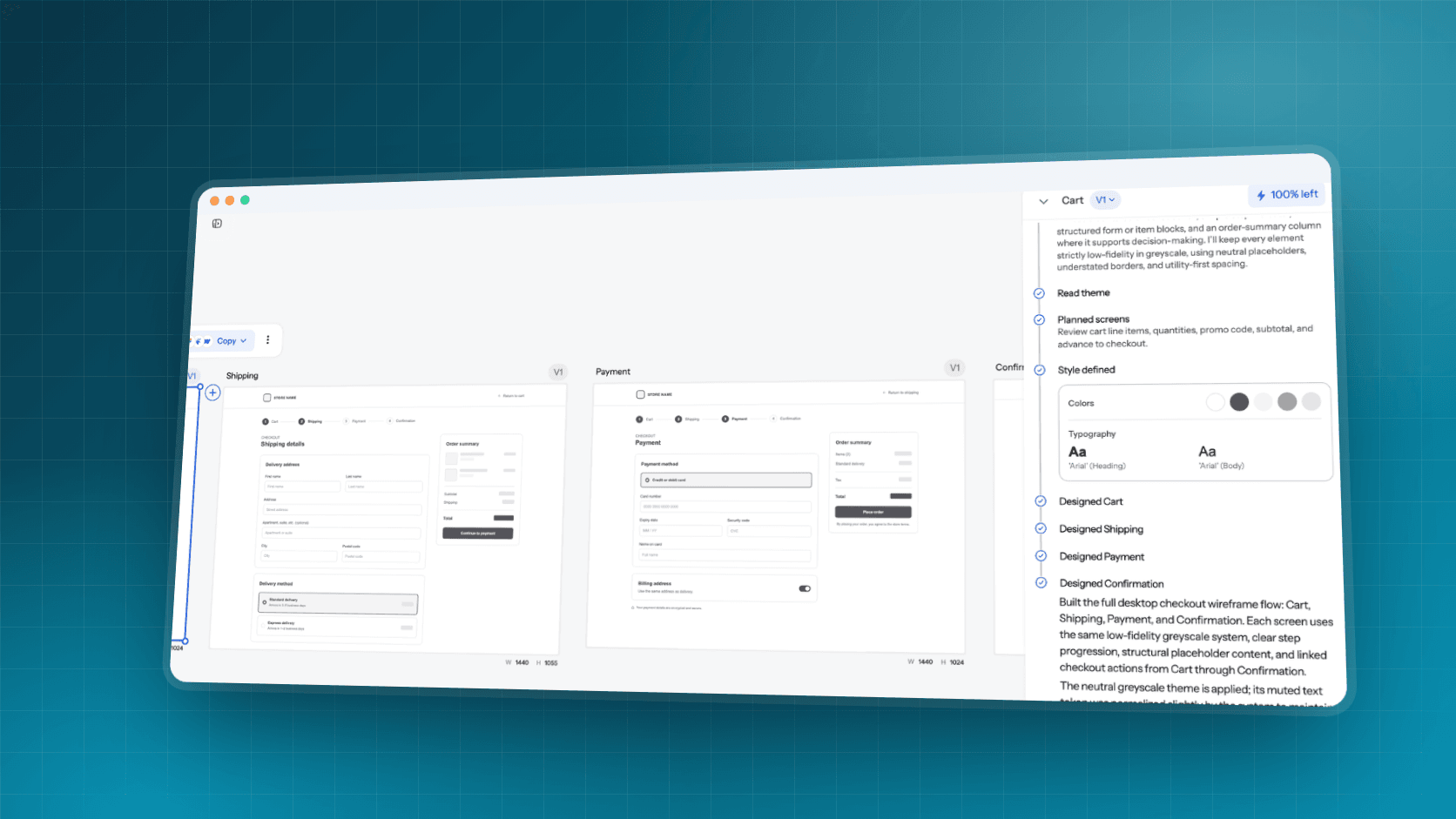
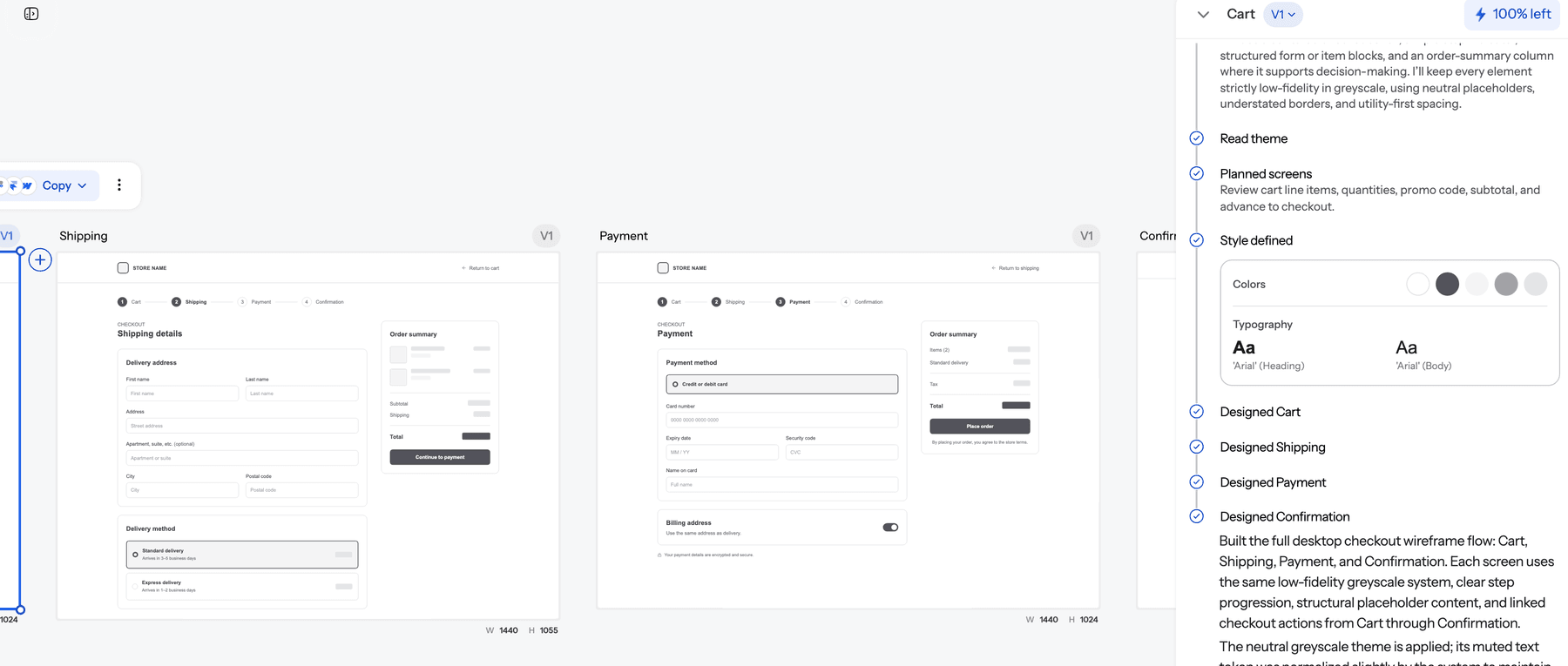
For wireframing, ask for wireframe mode explicitly ("Wireframe the checkout flow: cart, shipping, payment, confirmation") and you get plain greyscale screens with boxes, labels and hierarchy. When the structure is agreed, apply a theme and the same screens become styled UI.
Where it goes further than MockFlow:
- One project, every fidelity. Wireframe, styled screens and a clickable prototype from the AI prototype generator, with no redraw between them.
- A theme every screen follows. Set colours, fonts and spacing once in themes and style guides, or draft one with the AI style guide generator.
- Precise edits. Fix one element with chat editing instead of regenerating.
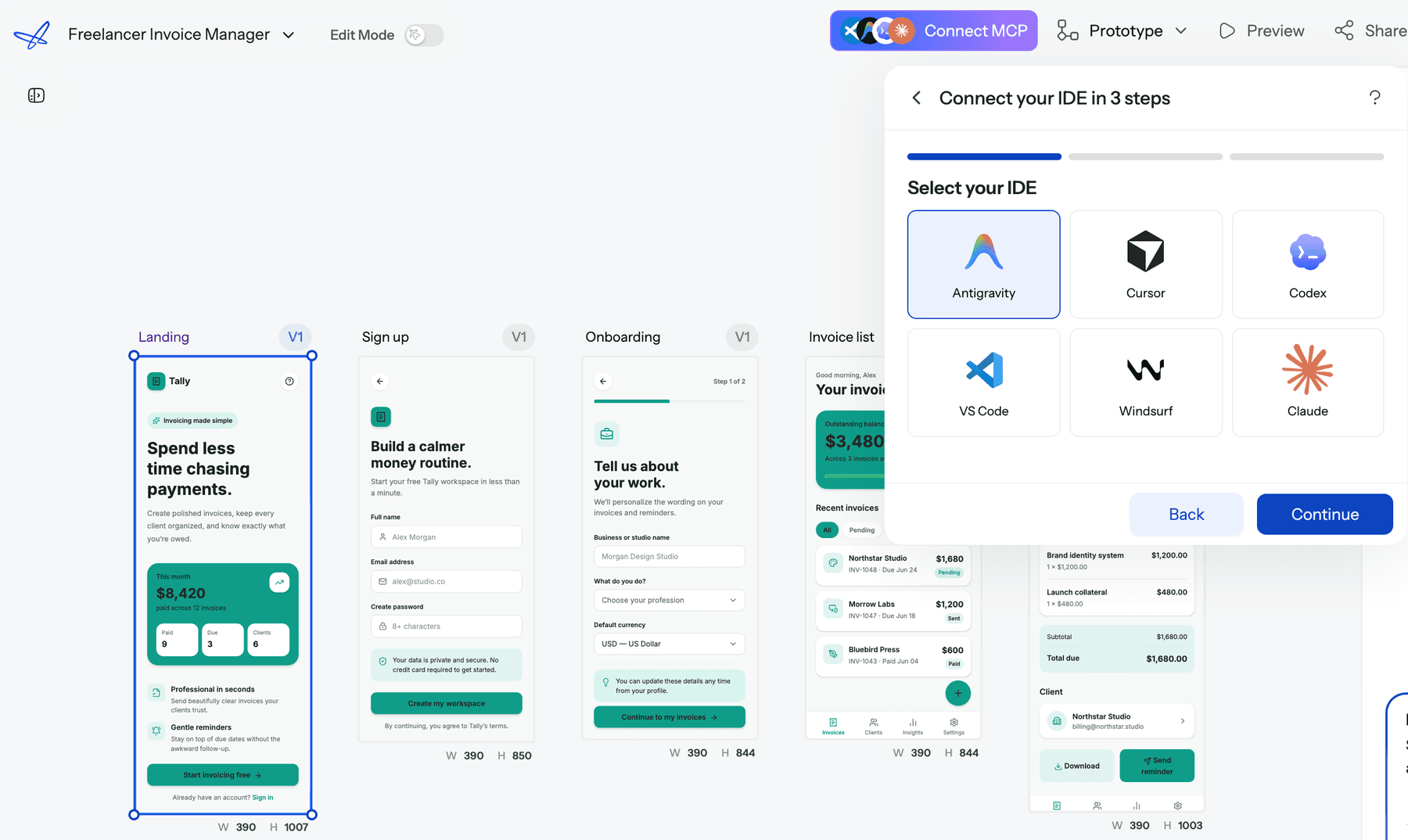
- Handoff on every plan. Export code as HTML or React, export to Figma, or connect Claude, Cursor and other agents through the UXMagic MCP server.
Where UXMagic falls short compared with MockFlow: it is not a whiteboard. There are no sticky notes, mind maps or cloud architecture diagrams, and wireframe mode is clean greyscale, not hand-drawn. If your team plans on a board first, MockFlow or Miro fits that step better.
Balsamiq
Balsamiq is the classic sketch-style wireframing tool. Its hand-drawn look keeps stakeholders focused on structure, and it now has AI features for generating wireframes from text. Choose it if you want the simplest possible lo-fi tool. It is one of the ten tools in our wireframing roundup linked below.
Figma
Figma is the standard for hi-fi UI, design systems and prototyping, and it has its own AI features. It is more tool than most people need for wireframes, but it is where many teams end up. Read what is Figma AI, our Figma pricing breakdown and our Figma alternatives.
Miro and Whimsical
If the board matters more than the wireframe, Miro and Whimsical are the obvious comparisons. Miro's AI can now draft prototypes on the board. Read our Miro AI prototyping review, Miro pricing and Miro alternatives for UX teams.
Visily and Uizard
Both target non-designers who want AI wireframes and mockups from prompts or screenshots. Read our Visily AI review, Uizard review and Uizard alternatives.
UX Pilot and FlowMapp
UX Pilot generates wireframes and hi-fi screens as a web app and Figma plugin; see our UX Pilot review. FlowMapp focuses on sitemaps and user flows, much like MockFlow's planning side; see UXMagic vs FlowMapp.
Who should use MockFlow?
MockFlow is a good fit if you are:
- A PM or founder who needs sitemaps, flows and wireframes to align stakeholders before design. Pair it with our guides to validating a product idea and AI tools for product managers.
- A team that brainstorms on a board and wants wireframes next to the diagrams.
- A developer using Claude Code or Cursor who wants quick wireframes and diagrams from the terminal through MCP.
- Budget-conscious freelancers who need a proper lo-fi editor for little money.
It is a weaker fit if you are:
- Shipping a styled product soon. You will redo every screen elsewhere. Our how to design UI with AI guide covers faster paths.
- A team with a design system that every screen must follow.
- Testing realistic flows with users, where light prototyping is not enough.
How to choose between MockFlow and UXMagic
Ask what you need at the end of the week. If the answer is "an agreed structure", meaning a sitemap, a flow and a set of wireframes the team has signed off, MockFlow is cheap and quick. If the answer is "screens we can build", meaning styled, consistent UI that goes to Figma, React or a coding agent, UXMagic gets there without a redraw.
Many teams use both: map the flow on a MockFlow board, then describe it to UXMagic or upload a wireframe with screenshot to UI and let flow mode build the styled screens. Our AI wireframe generators for mobile apps and AI wireframe platforms comparison go deeper on the options.
Our verdict
MockFlow is a sensible, affordable choice for low-fidelity planning in 2026. Mida makes wireframes, sitemaps and flows fast, the WireframePro editor is more mature than most AI-first tools, and its MCP servers and Bridge are ahead of the category. The simplified Basic, Plus and Max plans are also clearer than the old per-app pricing.
It is not a UI design tool. Output stays low fidelity, code and Figma export sit on the top plan, and there is no theme that carries into real screens. Use MockFlow to agree on structure. Use a flow-first tool like UXMagic when you want that structure to become the product.
Related reading
- Best wireframing tools in 2026
- Low fidelity vs high fidelity: when to use each
- Best AI design tools for 2026
- Variant AI review
- MagicPath review
- Pencil.dev review for design in the IDE
- Best mockup tools for fast UI workflows
- Ideogram review for AI images and typography
From wireframe to shipped screens
Start free with 20 credits a day. Wireframe a flow, apply a theme, and send it to Figma, React or your coding agent over MCP.